Recommended resources
The freely available resources this lesson will direct you to.
Welcome back. In our last lesson, we explored the theory behind speculative decoding, understanding how a fast "draft" model and a large "target" model can work together to generate multiple tokens per step without sacrificing quality.
Today, we'll move from theory to practice. You will configure and enable speculative decoding in a real-world serving framework, vLLM, and then benchmark its performance. This hands-on experience will give you a concrete understanding of how this optimization impacts generation speed and where its trade-offs lie—a critical perspective for an LLM Ops Engineer responsible for production performance.
1. Speculative Decoding in vLLM: From Concept to Implementation
As we discussed, the core idea of speculative decoding is to use a faster, cheaper method to propose tokens, which the main model then verifies in a single, parallel step. Let's quickly review this concept in the context of vLLM's implementation.
vLLM Office Hours - Speculative Decoding in vLLM - October 3, 2024
This clip from the "vLLM Office Hours" provides a concise recap of the speculative decoding process.
Watch the first couple of minutes, from the introduction, to refresh your memory on the core mechanism: a small model proposes, and a large model verifies multiple tokens at once, resulting in a lossless speedup.
Within vLLM, this is implemented through a specialized worker architecture. Your experience with distributed systems and service-oriented architectures will help you appreciate how vLLM modularizes this process.
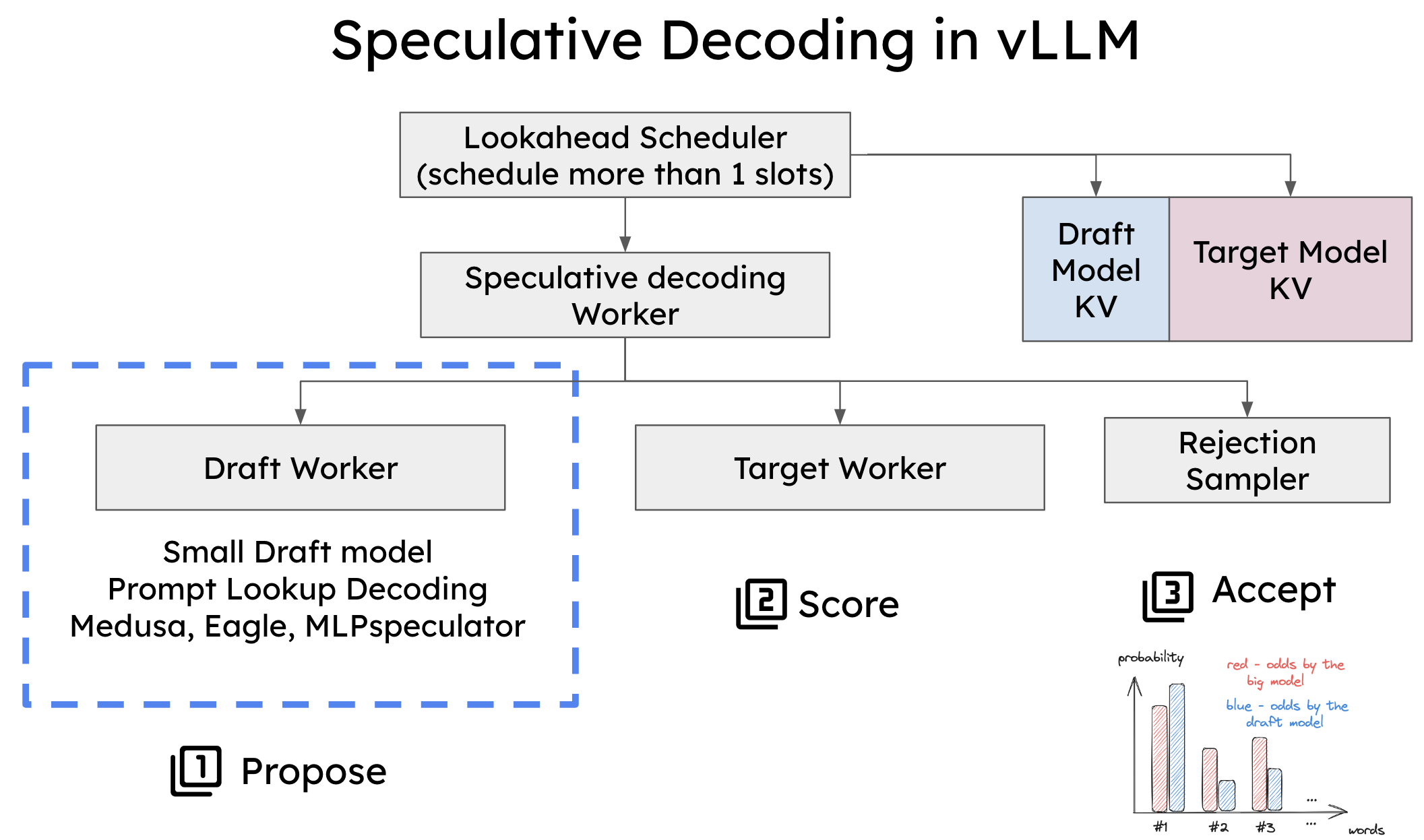
As the diagram shows, vLLM abstracts the token proposal mechanism. This allows for several different strategies, not just using a smaller draft model.
vLLM Office Hours - Speculative Decoding in vLLM - October 3, 2024
The same "vLLM Office Hours" video explains the different proposal methods that vLLM supports.
Watch the section from draft methods. Pay attention to the three main types discussed: Draft Model-Based: The classic approach using a smaller LLM. Prompt Lookup Decoding: A clever, model-free method that uses n-grams from the prompt itself to speculate. This is very efficient as it requires no separate model. Medusa/Ego: Advanced methods that modify the large model to predict multiple tokens, avoiding a separate draft model.
For our practical exercise, we'll focus on Prompt Lookup Decoding (referred to as ngram in vLLM) because it's simple to configure and doesn't require us to find and load a separate, compatible draft model.
2. Configuring and Benchmarking with vLLM
Now for the hands-on part. vLLM provides a command-line interface not only for serving models but also for benchmarking them, which makes evaluating performance straightforward.
Enabling Speculative Decoding
You enable speculative decoding in vLLM by passing a JSON configuration to the --speculative-config argument when starting the server.
The resource below shows practical examples. We will focus on the vllm bench throughput command, as it performs an offline benchmark which is ideal for measuring raw generation speed.
This documentation provides the exact command-line syntax for running benchmarks with speculative decoding.
Focus on the section "InstructCoder Benchmark with Speculative Decoding" under the vllm bench throughput examples. Notice the --speculative-config argument. It's a JSON string that specifies the method (in this case, "ngram") and other parameters like num_speculative_tokens.
A typical command to launch a throughput benchmark with ngram speculative decoding looks like this:
vllm bench throughput \
    --model="meta-llama/Meta-Llama-3-8B-Instruct" \
    --dataset-name="hf" \
    --dataset-path="likaixin/InstructCoder" \
    --num-prompts=1024 \
    --speculative-config '{"method": "ngram", "num_speculative_tokens": 5}'
--speculative-config: This is the key argument. We specify thengrammethod and tell it to speculate 5 tokens ahead.
Key Performance Metrics
Before running the benchmark, it's important to know what to measure. While throughput (tokens/second) is a primary metric, a deeper look reveals more.
Lecture 22: Hacker's Guide to Speculative Decoding in VLLM
This video, "Hacker's Guide to Speculative Decoding in VLLM," explains how to evaluate the performance of speculative decoding.
Watch the section on evaluating speed-up. The key concepts to grasp are: Inter-token latency (ITL): The time it takes to generate one token. Speculative decoding aims to reduce this by generating multiple tokens per step. Draft acceptance rate: A practical metric indicating how "good" the speculations are. A higher acceptance rate leads to a better speedup. vLLM reports this metric during execution.
When you run the benchmark, you'll get summary statistics for throughput and latency. The goal is to see a significant increase in output tokens per second and a decrease in end-to-end latency compared to a baseline run without speculative decoding.
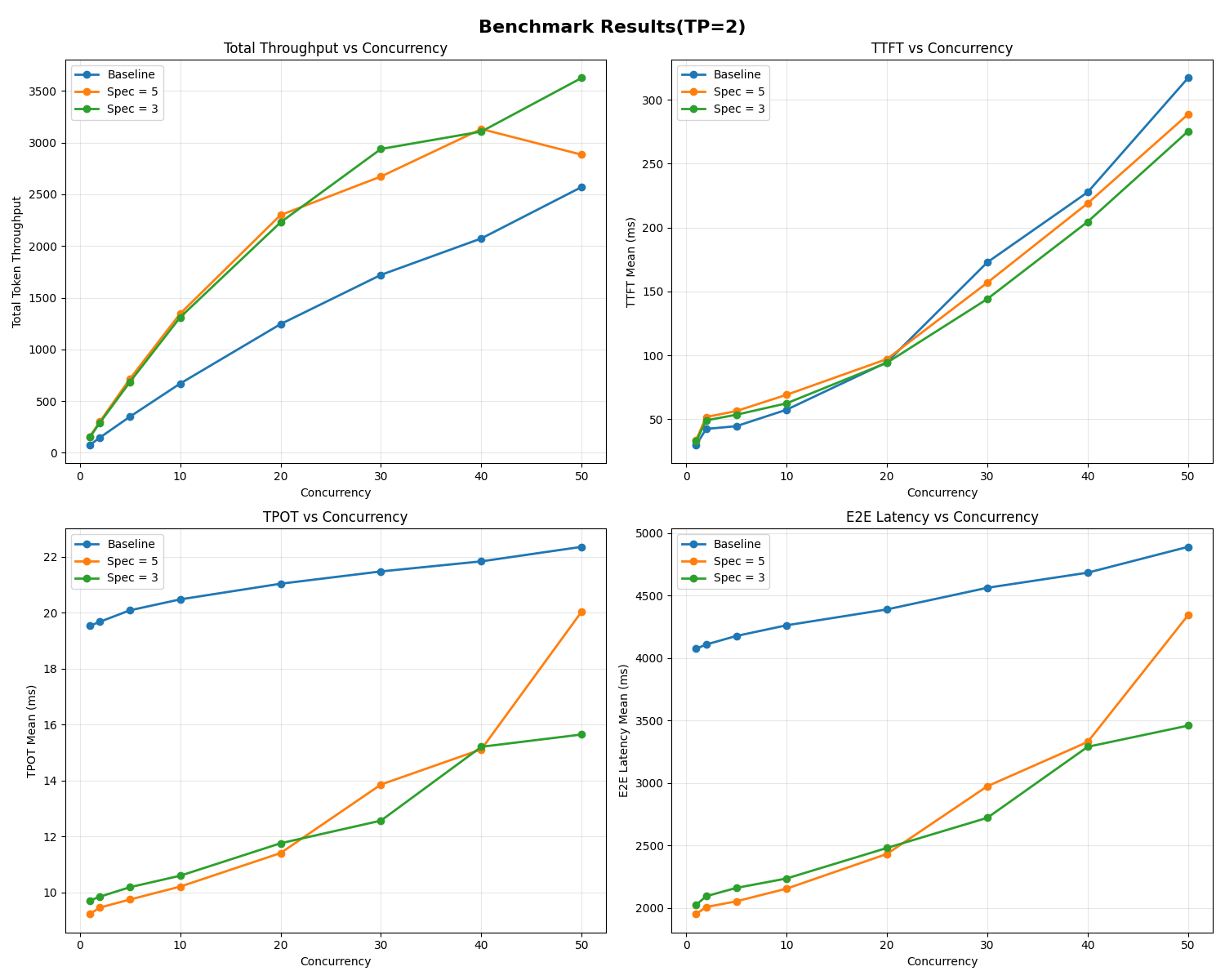
3. The Performance Trade-off: An SRE's Perspective
Speculative decoding seems like a universal improvement, but your SRE background will tell you there's rarely a free lunch in systems performance. This is no exception.
The technique trades extra computation (running the draft proposer and verification logic) for lower latency. This trade-off is highly dependent on system load.
- Low Concurrency (Memory-Bound): When the GPU has spare compute capacity, the extra flops used for speculation are "free." This is where you see the biggest speedups. The system is waiting on memory, and speculation helps generate more tokens for each memory-intensive pass.
- High Concurrency (Compute-Bound): When the GPU is already saturated with requests, the extra compute for speculation is no longer free. It competes for resources with the core task of generation, and can actually increase overall latency and reduce throughput.
This is a critical operational insight. Naively enabling speculative decoding in a high-traffic environment could degrade performance.
vLLM Office Hours - Speculative Decoding in vLLM - October 3, 2024
The "vLLM Office Hours" video demonstrates this exact trade-off with benchmark results.
Watch the segment from performance analysis. The speaker shows that while speculative decoding gives a great speedup at low QPS (Queries Per Second), it slows down the system at high QPS. This highlights the risk of using it in a compute-bound scenario.
To address this, more advanced implementations use dynamic speculative decoding, where the system monitors its own load and automatically adjusts or disables speculation to ensure it never performs worse than standard decoding. This is an active area of research and development.
Lecture 22: Hacker's Guide to Speculative Decoding in VLLM
The "Hacker's Guide" video touches upon this advanced solution.
Watch the clip on dynamic speculative decoding. The core idea is to create a policy that adapts the level of speculation based on system load, preventing the performance degradation seen at high request rates. This is precisely the kind of intelligent, adaptive system an LLM Ops engineer would aim to build.
4. Practical Exercise: Benchmark and Analyze
It's time to see the impact for yourself. You will run two benchmarks: one as a baseline and one with speculative decoding enabled.
Prerequisites:
- You have
vllminstalled (pip install vllm). - You have access to a GPU that can run an 8B parameter model.
Step 1: Run the Baseline Benchmark
First, let's measure the performance of standard autoregressive decoding.
# Run this command in your terminal
vllm bench throughput \
    --model="meta-llama/Meta-Llama-3-8B-Instruct" \
    --dataset-path="hf-internal-testing/prompts-for-benchmarking" \
    --num-prompts=500 \
    --output-len=1024
Note the "Throughput" for output tokens/s. This is your baseline.
Step 2: Run the Benchmark with Speculative Decoding
Now, enable ngram speculative decoding and run the benchmark again.
# Run this command in your terminal
vllm bench throughput \
    --model="meta-llama/Meta-Llama-3-8B-Instruct" \
    --dataset-path="hf-internal-testing/prompts-for-benchmarking" \
    --num-prompts=500 \
    --output-len=1024 \
    --speculative-config '{"method": "ngram", "num_speculative_tokens": 5}'
Step 3: Analyze the Results
Compare the output tokens/s from both runs.
- How much did the throughput increase?
- Did you observe a speedup of 1.5x, 2x, or more?
This exercise provides direct, empirical evidence of speculative decoding's impact on generation speed, fulfilling this lesson's goal.
Conclusion
In this lesson, you've bridged the gap between the theory of speculative decoding and its practical application. You've learned how to configure it in a leading serving framework and, crucially, how to benchmark and analyze its performance implications.
Here are your key takeaways:
- Configuration: Speculative decoding can be enabled in vLLM using the
--speculative-configargument, with methods likengramoffering an easy starting point. - Benchmarking: vLLM's built-in
benchcommands provide a straightforward way to measure the impact on throughput and latency. - Performance Trade-off: The benefits of speculative decoding are greatest in memory-bound, low-concurrency scenarios. In compute-bound, high-concurrency systems, it can add overhead and reduce performance.
- Operational Insight: For production systems, you must consider the system load. Advanced techniques like dynamic speculative decoding aim to automate this trade-off, ensuring optimal performance under varying conditions.
You've now added another powerful optimization technique to your LLM Ops toolkit. In the next module, "Advanced Orchestration and Scaling for LLMs," we'll take a step up in the infrastructure stack. Our first lesson will focus on configuring the NVIDIA Container Toolkit and Kubernetes device plugin to expose GPUs to pods, setting the stage for deploying these high-performance models at scale.