Recommended resources
The freely available resources this lesson will direct you to.
- How To Deploy Machine Learning Models Using FastAPI-Deployment Of ML Models As API’swww.youtube.com
- Build a Machine Learning API Using FastAPI & Scikit-Learn (Step-by-Step Python Tutorial)www.youtube.com
- The Machine Learning Practitioner's Guide to Model ...machinelearningmastery.com
- FastAPI Machine Learning Deployment: A Step-by- ...www.analyticsvidhya.com
Hello! Welcome back to our module on MLOps and Model Deployment.
In the last lesson, you learned what a REST API is and built your first basic endpoints using FastAPI. We created a simple "Hello, World" application and saw how FastAPI automatically generates interactive documentation. This was a crucial first step in understanding how applications communicate over the web.
Now, we'll bridge the gap between our trained models and the real world. A static message is one thing, but the true power comes from making a model's intelligence available to other services. This lesson will guide you through exactly that. By the end, you will be able to serve a trained machine learning model as a REST API using FastAPI.
The Workflow: From Model to API
Serving a model isn't just about writing an API endpoint. It involves a clear, multi-step process:
- Train a Model: First, we need a model to serve. We'll train a simple one.
- Save the Model: A trained model is an object that needs to be saved to a file so it can be loaded later without retraining. We'll use a library called
joblibfor this. - Build the API: We'll create a FastAPI application that:
- Loads the saved model into memory when the server starts.
- Defines the exact input data structure our model expects using Pydantic.
- Creates a prediction endpoint that accepts input data, passes it to the model, and returns the prediction.
- Test the API: We'll run our API locally and use the interactive documentation to send requests and verify that our model is generating predictions correctly.
Let's walk through this process together.
Step 1: Train and Save a Model
Before we can deploy a model, we need one. Since you're familiar with classic ML models, we'll quickly train a simple LinearRegression model using Scikit-learn. The crucial part of this step is persisting the trained model to a file.
The Machine Learning Practitioner's Guide to Model Deployment with FastAPI
The article "The Machine Learning Practitioner's Guide to Model Deployment with FastAPI" from Machine Learning Mastery provides a clear, step-by-step guide. Let's start by looking at how to train and save a model.
Please read the section titled "Step 1: Training & Saving the Model". This section shows how to train a Scikit-learn pipeline and save the entire object (preprocessor and model) to a file named house_price_model.joblib using the joblib library.
To summarize the code from the article, create a file named train_model.py and run it:
# train_model.py
import pandas as pd
from sklearn.linear_model import LinearRegression
from sklearn.pipeline import Pipeline
from sklearn.preprocessing import StandardScaler
import joblib


# Sample training data
data = pd.DataFrame({
    "rooms": [2, 3, 4, 5, 3, 4],
    "age": [20, 15, 10, 5, 12, 7],
    "distance": [10, 8, 5, 3, 6, 4],
    "price": [100, 150, 200, 280, 180, 250]
})

X = data[["rooms", "age", "distance"]]
y = data["price"]


# We use a pipeline to bundle the scaler and the model
pipeline = Pipeline([
    ("scaler", StandardScaler()),
    ("model", LinearRegression())
])

pipeline.fit(X, y)


# Save the entire pipeline to a file
joblib.dump(pipeline, "house_price_model.joblib")

print("Model trained and saved to house_price_model.joblib")
After running python train_model.py in your terminal, you will have a file named house_price_model.joblib in your project directory. This file contains your entire trained pipeline, ready to be used for inference.
Step 2: Create the FastAPI Application
Now we'll create our API file, which we'll call main.py. This is where the magic happens. A key best practice is to load the model only once when the application starts, not every time a prediction is requested.
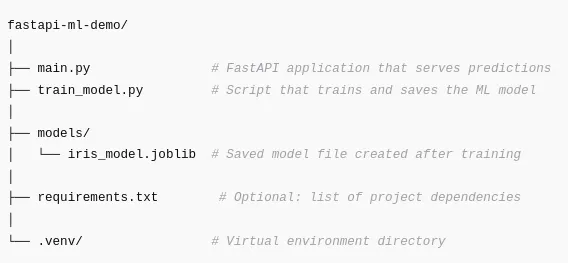
Let's begin setting up our main.py.
The Machine Learning Practitioner's Guide to Model Deployment with FastAPI
Let's return to the Machine Learning Mastery article to see how to initialize the FastAPI app and load our saved model.
Read "Step 2: Creating a FastAPI App". This short section shows you how to import the necessary libraries, create the FastAPI instance, and use joblib.load() to load your saved model into a global variable.
Your main.py should now look like this:
# main.py
from fastapi import FastAPI
from pydantic import BaseModel
import joblib


# Create a FastAPI instance
app = FastAPI(title="House Price Prediction API")


# Load the trained model pipeline when the app starts
model = joblib.load("house_price_model.joblib")
Step 3: Define the Input Data Schema
One of the most powerful features of FastAPI is its use of Pydantic for data validation. Our model expects specific inputs: rooms, age, and distance. We must define a Pydantic BaseModel to enforce this structure for any incoming requests. This prevents errors from bad or malformed data reaching our model.
The Machine Learning Practitioner's Guide to Model Deployment with FastAPI
The next step is to tell our API exactly what kind of data to expect. The same article explains this clearly.
Read "Step 3: Defining What Input Your Model Expects". It shows how to create a Pydantic class HouseInput that specifies the names and data types of the features your model needs.
Add the Pydantic model to your main.py:
# main.py (continued)


# ... (FastAPI instance and model loading code) ...


# Define the input data model using Pydantic
class HouseInput(BaseModel):
    rooms: int
    age: float
    distance: float
Now, our API will automatically validate that any data sent to it has an integer rooms, a float age, and a float distance. If not, it will automatically return a helpful error message to the client.
Step 4: Create the Prediction Endpoint
This is the core of our application. We need an endpoint that can:
- Receive a
POSTrequest containing the house features in the request body. - Use the loaded
modelto make a prediction. - Return the prediction as a JSON response.
The video below gives a great visual walkthrough of creating the app, defining the schema, and building the prediction endpoint.
Build a Machine Learning API Using FastAPI & Scikit-Learn (Step-by-Step Python Tutorial)
Let's watch a demonstration of these steps. The video "Build a Machine Learning API Using FastAPI & Scikit-Learn" by Data Science with Onur mirrors our process exactly.
Please watch from 05:19 to 07:11 and from 10:00 to 11:12. These segments cover: (05:19 - 07:11): Initializing the FastAPI app, loading the pickled model, and defining the input data HouseData using Pydantic's BaseModel. (10:00 - 11:12): Creating the @app.post("/predict") endpoint, taking the data, converting it to the right format for the model, making a prediction, and returning the result.
Based on the video and the corresponding textual guide, let's add the final piece to our main.py.
# main.py (final version)
from fastapi import FastAPI
from pydantic import BaseModel
import joblib
import pandas as pd


# Create a FastAPI instance
app = FastAPI(title="House Price Prediction API")


# Load the trained model pipeline when the app starts
model = joblib.load("house_price_model.joblib")


# Define the input data model using Pydantic
class HouseInput(BaseModel):
    rooms: int
    age: float
    distance: float


# Define the prediction endpoint
@app.post("/predict")
def predict_price(data: HouseInput):


    # Convert the input data to a pandas DataFrame
    # because our pipeline expects it
    input_df = pd.DataFrame([data.dict()])


    # Make a prediction
    prediction = model.predict(input_df)


    # Return the prediction
    return {
        "predicted_price": round(prediction[0], 2)
    }


# Optional: Add a root endpoint for simple health check
@app.get("/")
def read_root():
    return {"status": "ok", "message": "Welcome to the House Price Prediction API!"}
Notice a few key details:
- We use the
@app.post("/predict")decorator. We usePOSTbecause the client is sending data in the request body to be processed. - The
predict_pricefunction takes an argumentdata: HouseInput. FastAPI uses this type hint to validate the incoming JSON body against ourHouseInputmodel. - We must transform the input
datainto the format our Scikit-learn pipeline expects. In our case, it was trained on a pandas DataFrame, so we create one from the input. model.predict()returns a NumPy array. We access the first elementprediction[0]and return it in a dictionary.
Step 5: Run and Test Your API
Everything is now in place. Let's start the server. In your terminal, run the same command as in the previous lesson:
uvicorn main:app --reload
Your API is now running locally. The best way to test it is with the interactive Swagger UI.
The Machine Learning Practitioner's Guide to Model Deployment with FastAPI
Let's see how to test our new prediction endpoint using the built-in documentation.
Read through "Step 5: Running Your API Locally" and "Step 6: Testing with Real Input". These sections show you how to start the Uvicorn server, open the /docs URL in your browser, and use the interactive form to send a POST request to your /predict endpoint.
To test your API:
- Open your browser and go to
http://127.0.0.1:8000/docs. - You will see your
/predictendpoint listed. Click to expand it. - Click the "Try it out" button.
- Modify the example request body with some values, for example:
{ "rooms": 3, "age": 10, "distance": 7 } - Click the "Execute" button.
You should see a successful 200 response from the server with the predicted price!

Conclusion
Congratulations! You have successfully built and tested a complete machine learning API. You took a trained model, wrapped it in a robust web service with FastAPI, and exposed its predictive power through a simple, well-defined endpoint.
Key Takeaways:
- Serving an ML model involves training, saving (
joblib.dump), and loading (joblib.load) the model artifact. - The model should be loaded once at startup to ensure efficient performance.
- Pydantic models are essential for defining a strict input schema, which validates incoming data and prevents errors.
- A
POSTendpoint is used for predictions, as the client sends a data payload (the features) in the request body. - The data received by the API must be converted into the exact format the model expects for prediction (e.g., a pandas DataFrame or NumPy array).
- FastAPI's interactive documentation (
/docs) is an invaluable tool for testing your prediction endpoint without writing any client-side code.
Preview of the Next Lesson
Your API works perfectly on your local machine, but how do you share it with others or deploy it to a server? The next step is to package your application and all its dependencies into a standardized, portable unit. In the next lesson, we will learn to do just that by exploring the topic: "Explain the purpose of containerization and write a basic Dockerfile for a Python application."