Recommended resources
The freely available resources this lesson will direct you to.
- What Is REST API? Examples And How To Use It: Crash Course System Design #3www.youtube.com
- Python FastAPI Tutorial: Build a REST API in 15 Minuteswww.youtube.com
- From Zero to API: The Data Scientist's Guide to FastAPI |saketgarodia.medium.com
- FastAPI Tutorial: An Introduction to Using FastAPIwww.datacamp.com
Hello! Welcome to the twelfth module of our course: MLOps and Model Deployment Essentials.
In our previous modules, we journeyed from the foundations of deep learning all the way to building, training, and fine-tuning sophisticated models like LLMs. You've learned how to create models that can classify images, understand text, and even generate new content. However, a trained model sitting in a Jupyter notebook is of little use in the real world. The crucial next step is to make it accessible to users and other applications. This is where MLOps and deployment come in.
This lesson kicks off our exploration of model deployment. We will focus on the most common method for exposing an ML model to the outside world: a web API. By the end of this lesson, you will be able to explain the concept of a REST API and build a basic endpoint using FastAPI.
What is an API?
Let's start with a simple analogy. When you go to a restaurant, you don't go into the kitchen to cook your meal. Instead, you interact with a waiter. You give the waiter your order (a request), the waiter communicates it to the kitchen (the system that does the work), and then brings the food back to you (the response).
An API (Application Programming Interface) is like that waiter. It's a messenger that takes requests from a client (like a mobile app or a website), passes them to a server for processing, and then returns the server's response back to the client.
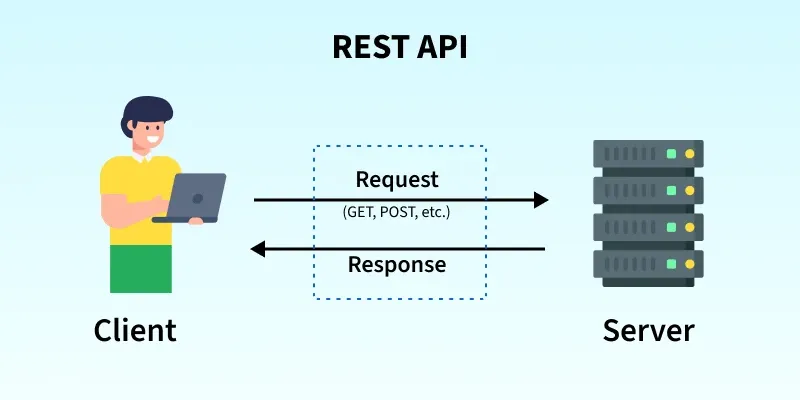
Understanding REST APIs
Most modern web APIs follow a set of architectural principles known as REST (Representational State Transfer). An API that adheres to these principles is called a RESTful API. REST provides a standardized way for computers to communicate over the internet.
To understand the core principles of REST, let's watch a few short segments from the following video.
What Is REST API? Examples And How To Use It: Crash Course System Design #3
The video "What Is REST API?" from the ByteByteGo channel provides a clear and concise explanation of the fundamental concepts behind REST.
Please watch the video from the beginning until 03:34. This will cover: The definition of REST (0:07 - 0:56) How resources are organized with URIs (0:56 - 1:27) The standard HTTP verbs (GET, POST, PUT, DELETE) and their link to CRUD operations (1:27 - 2:10) The structure of requests and the importance of HTTP status codes in responses (2:10 - 3:34)
To summarize the key ideas from the video:
- Resource: The core concept in REST. A resource is any piece of information that can be named, such as a user, a product, or a model's prediction. Each resource is identified by a unique URL (or URI), like
/users/123. - HTTP Methods (Verbs): The client specifies what it wants to do with a resource using standard HTTP methods. The most common are:
- GET: Retrieve a resource (e.g., get user information).
- POST: Create a new resource (e.g., add a new user).
- PUT: Update an existing resource.
- DELETE: Remove a resource.
These map directly to the CRUD operations: Create, Read, Update, Delete.
- Statelessness: Each request from a client to the server must contain all the information needed to understand and process the request. The server does not store any state about the client between requests.
- Representation: Clients and servers exchange representations of resources, most commonly in JSON (JavaScript Object Notation) format, which is lightweight and easy for both humans and machines to read.
Introducing FastAPI: The API Framework for AI/ML
Now that you understand what a REST API is, how do we build one in Python? While there are many frameworks, FastAPI has become the go-to choice for the AI and machine learning community.

Let's explore why FastAPI is so well-suited for this task.
From Zero to API: The Data Scientist's Guide to FastAPI
The article "From Zero to API: The Data Scientist's Guide to FastAPI" provides an excellent overview of why this framework is so powerful for our field.
Please read the sections titled "What Makes FastAPI So Special?" and "Why FastAPI is the Top Choice for AI & ML". These sections explain its three main advantages: speed (asynchronous performance), automatic data validation with Pydantic, and auto-generated documentation.
As the article highlights, FastAPI's key strengths for serving ML models are:
- High Performance: Its asynchronous nature allows it to handle many concurrent requests efficiently, which is critical when a model is being used by thousands of users.
- Data Validation: ML models are strict about their input formats. FastAPI uses Python type hints and Pydantic to automatically validate incoming data, rejecting bad requests before they can crash your model.
- Automatic Documentation: FastAPI automatically generates interactive API documentation (a Swagger UI). This is incredibly useful for testing your API and for other developers who need to use it.
Building Your First API with FastAPI
Theory is great, but let's get our hands dirty. We are going to build a simple "Hello World" API and then extend it slightly. This will solidify your understanding of the core components of a FastAPI application.
The following video provides a complete, concise walkthrough. We will follow its steps.
Python FastAPI Tutorial: Build a REST API in 15 Minutes
The "Python FastAPI Tutorial" by pixegami is a fast-paced guide to getting your first API running in minutes. We will use it to build our first few endpoints.
Watch the video, paying attention to these key segments: 00:00 - 02:04: Installing FastAPI and Uvicorn, creating a basic 'Hello World' app, and running the server. 02:04 - 04:51: Adding new routes, including one that uses a path parameter to retrieve a specific item. 11:41 - 13:30: Exploring the automatic interactive documentation at the /docs endpoint.
Step-by-Step Guide
Let's recap the process shown in the video and write the code ourselves.
1. Setup your Environment
First, open your terminal and install FastAPI and Uvicorn, which is the server that will run our application.
pip install fastapi "uvicorn[standard]"
2. Create Your First Endpoint
Create a new file named main.py and add the following code.
# main.py
from fastapi import FastAPI


# Create an instance of the FastAPI class
app = FastAPI()


# Define an endpoint for the root URL "/"
@app.get("/")
def read_root():
    return {"message": "Hello, World"}
Let's break this down:
- We import the
FastAPIclass. - We create an instance named
app. This will be the main point of interaction for our API. @app.get("/")is a decorator. It tells FastAPI that the function directly below it,read_root, is responsible for handlingGETrequests to the URL path/.- The function returns a Python dictionary, which FastAPI will automatically convert into a JSON response.
3. Run the Server
Go back to your terminal and run the following command from the same directory where you saved main.py:
uvicorn main:app --reload
main: refers to themain.pyfile.app: refers to theapp = FastAPI()object inside the file.--reload: tells the server to automatically restart whenever you save changes to your code.
You should see output indicating the server is running, typically on http://127.0.0.1:8000.
4. Test Your API
Now, you can test your API in two ways:
- In the browser: Open your web browser and navigate to
http://127.0.0.1:8000. You should see the JSON response:{"message":"Hello, World"}. - Interactive Docs (Swagger UI): Navigate to
http://127.0.0.1:8000/docs. This is the powerful, auto-generated documentation page. You can see your/endpoint, and you can even click "Try it out" to test it directly from the browser.
This interactive documentation is one of FastAPI's most beloved features, as it makes testing and sharing your API incredibly simple.
Conclusion
Excellent work! You have successfully taken your first step into the world of MLOps and model deployment. You now understand the fundamental concepts of REST APIs and have built and tested your very first one using FastAPI.
Key Takeaways:
- A REST API is a standard way for applications to communicate over the web, built around the concepts of resources (URIs) and HTTP methods (GET, POST, etc.).
- FastAPI is a modern, high-performance Python framework that is ideal for serving machine learning models due to its speed, automatic data validation, and built-in interactive documentation.
- Creating a basic API endpoint in FastAPI is straightforward: you use a decorator like
@app.get()to associate a URL path with a Python function. - The
uvicornserver is used to run the FastAPI application, and the interactive docs at the/docspath are an invaluable tool for development and testing.
Preview of the Next Lesson
In this lesson, we built a simple, static API. In our next lesson, we will take the logical next step: "Serve a trained model as a REST API using FastAPI." We will load a pre-trained machine learning model (like one from Scikit-learn) and create an endpoint that accepts input data, passes it to the model for a prediction, and returns the result.