Recommended resources
The freely available resources this lesson will direct you to.
Hello! Welcome to your next lesson on adapting Large Language Models.
In our last session, we established the theory behind Parameter-Efficient Fine-Tuning (PEFT) and specifically LoRA (Low-Rank Adaptation). You learned how LoRA avoids the massive costs of full fine-tuning by freezing the base model and training only a small, low-rank update, which can be merged back for efficient inference.
Today, we transition from theory to practice. This lesson is dedicated to the hands-on application of these concepts. You will learn how to apply LoRA to adapt a large language model to a specific task using the Hugging Face ecosystem. We'll walk through the entire workflow, from setting up the environment and loading a model to configuring LoRA, training, and generating text with your newly specialized model.
From LoRA to QLoRA: Fine-Tuning with Maximum Efficiency
As we discussed, LoRA dramatically reduces the number of trainable parameters. However, you still need to load the full, high-precision base model into GPU memory, which can be a bottleneck. For example, a 7-billion-parameter model in 16-bit precision requires about 14 GB of VRAM just to load.
To solve this, the community developed QLoRA (Quantized LoRA). QLoRA combines two powerful techniques:
- Quantization: The pre-trained model is loaded into memory using a lower-precision format, typically 4-bit instead of 16-bit. This drastically reduces the memory footprint of the base model (e.g., from 14 GB to ~3.5 GB for a 7B model). The original high-precision weights are discarded after quantization.
- LoRA: The standard LoRA method is then applied on top of this quantized base model. The small LoRA adapters are still trained in higher precision (e.g., 16-bit).
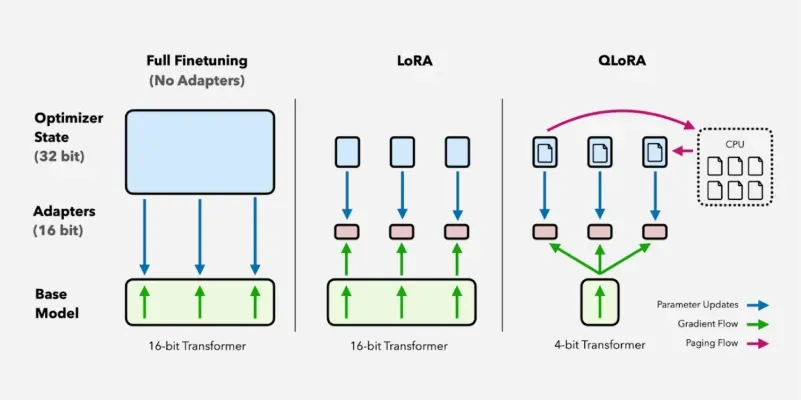
QLoRA is the de-facto standard for efficiently fine-tuning LLMs on accessible hardware. Let's watch a video that explains the key components of QLoRA in more detail.
LLM Fine Tuning Crash Course | LLM Fine Tuning Tutorial
The video "LLM Fine Tuning Crash Course" by codebasics provides an excellent explanation of quantization and QLoRA. It breaks down how numbers are quantized and how QLoRA integrates this with the LoRA technique we learned about.
Please watch the segment from 13:03 to 36:01. The first part (until 28:16) explains quantization, including the clever NF4 (Normal Float 4) format designed for model weights. The second part (from 28:16 onwards) explains how QLoRA combines NF4 quantization, LoRA, and other tricks like paged optimizers for extreme efficiency.
The Fine-Tuning Workflow with Hugging Face
Now that we understand QLoRA, let's outline the practical steps for fine-tuning a model using the popular Hugging Face libraries. We'll be using transformers for model loading, peft for LoRA configuration, trl for training, and bitsandbytes for quantization. High-level libraries like unsloth streamline this process, which you will see in action shortly.
Step 1: Load a Quantized Model and Tokenizer
First, we select a pre-trained model from the Hugging Face Hub (e.g., Llama-3.1-8B-Instruct). We then load it with a configuration that tells the transformers library to use bitsandbytes to quantize the model to 4-bit on the fly. We also load its corresponding tokenizer.
Step 2: Prepare the Dataset
The model needs to be trained on examples that follow a specific structure. We take a raw dataset (e.g., a list of questions and answers) and format each entry into a consistent prompt template. This template guides the model on how it should behave. For example:
### INSTRUCTION:
Solve the math problem.


### INPUT:
What is 2+2?


### RESPONSE:
The answer is 4.
Step 3: Define the LoRA Configuration
This is where we apply the theory from our last lesson. We create a LoraConfig object from the peft library, specifying key hyperparameters:
r: The rank of the decomposition. A smallerrmeans fewer trainable parameters. Common values are 8, 16, 32, 64.lora_alpha: A scaling factor for the LoRA update. A common practice is to setlora_alphato be equal to or double the rankr.target_modules: A list of the specific layers in the model architecture where we want to apply the LoRA adapters. We can target just the attention matrices (q_proj,v_proj) or all linear layers for potentially better performance.lora_dropout: A dropout probability applied to the LoRA layers for regularization.
Step 4: Set Up and Run the Trainer
The SFTTrainer (Supervised Fine-tuning Trainer) from the trl library is a high-level utility that handles the entire training process. We provide it with:
- The model (with its LoRA adapters).
- The tokenizer.
- The prepared dataset.
- Training arguments (learning rate, number of epochs, batch size, etc.).
Then, we simply call trainer.train(), and trl takes care of the training loop, gradient updates, and logging.
Step 5: Perform Inference
After training, the LoRA adapters are saved. To generate text, we can load the base model and apply the trained adapters to it. We then use the model's generate() method, just as we would with any pre-trained model.
Practical Implementation: Fine-Tuning Llama 3 with Unsloth
Let's see this entire workflow in action. The following video provides a complete, step-by-step code walkthrough of fine-tuning a Llama 3 model using Unsloth, a library that significantly accelerates Hugging Face fine-tuning with optimized kernels.
LLM Fine Tuning Crash Course | LLM Fine Tuning Tutorial
We will now return to the "LLM Fine Tuning Crash Course" video for a full, practical demonstration. The presenter uses Google Colab to fine-tune a Llama 3 model on a math reasoning dataset.
Watch the code walkthrough from 36:01 to 53:35. Pay close attention to how each part of the code corresponds to the steps we just outlined: loading the model with 4-bit quantization, configuring LoRA parameters (r, lora_alpha), preparing the dataset with a prompt template, and using the SFTTrainer.
The code in the video is a powerful template for your own fine-tuning projects. Don't worry about memorizing every line of code; focus on understanding the purpose of each block and how the key parameters are configured.
The Impact of LoRA Hyperparameters
As you saw, setting up a LoRA fine-tune involves choosing several hyperparameters. Two of the most important are the rank (r) and the target_modules. Their values can significantly impact model performance and training time.
A study documented in the Databricks blog post "Efficient Fine-Tuning with LoRA for LLMs" provides excellent insights into this.
Efficient Fine-Tuning with LoRA for LLMs | Databricks Blog
This blog post from Databricks explores how different LoRA configurations affect the quality of a fine-tuned model. It provides clear, empirical evidence of what works best.
Please read the following sections: "The Turnable Knobs": This introduces the r and target_modules hyperparameters. "Hyperparameter Combination #3": This section shows the significant quality improvement when targeting all linear layers instead of just attention blocks. "Key Observations" and "Conclusion": These sections summarize the findings and provide a helpful comparison table. You can skim the other "Hyperparameter Combination" sections.
The key takeaway from this analysis is that targeting all linear layers often provides a significant boost in performance compared to only targeting the attention layers, sometimes being more impactful than simply increasing the rank r. This is a crucial piece of practical knowledge for getting the best results from your fine-tuning efforts.
Conclusion
Congratulations on completing this hands-on lesson! You have now bridged the gap between the theory of LoRA and its practical application. You have a complete roadmap for adapting powerful large language models to your specific needs efficiently.
Key Takeaways:
- QLoRA is the standard for efficient fine-tuning, combining 4-bit quantization of the base model with LoRA adapters.
- The fine-tuning workflow involves loading a quantized model, preparing a formatted dataset, defining a
LoraConfig(r,lora_alpha,target_modules), and using theSFTTrainerto manage training. - Libraries like Unsloth and Hugging Face's
trlandpeftprovide the tools to implement this workflow with just a few dozen lines of Python code. - Choosing the right hyperparameters is crucial. Experimentation shows that targeting all linear layers with LoRA is often a highly effective strategy.
Preview of the Next Lesson
We have now fine-tuned an "encoder-decoder" style model for a reasoning task. Next, we will turn our attention to the world of generative models. Our next module, "Foundations of Generative Models," will begin with a lesson explaining the architecture and purpose of a standard autoencoder and its more powerful generative cousin, the Variational Autoencoder (VAE).