Recommended resources
The freely available resources this lesson will direct you to.
Hello again. Last time, you mapped the journey from an idea to a released film. Now we’ll look inside that journey: what does each kind of AI system actually contribute? A writing assistant, an image generator, a video generator, a synthetic voice, a music generator, and an editor can all appear in one project, but they solve different problems.
We’ll keep using the paper-crane micro-short from the previous lesson: a person enters an empty room, discovers a paper crane with a drawing inside, and pulls up a second chair. By the end of this lesson, you should be able to tell which system could help with each part of that film—and which decisions still belong to you.
Text systems: define what needs to be made
A generative text system produces language. In filmmaking, its useful outputs include possible premises, outlines, screenplay drafts, dialogue alternatives, shot descriptions, and prompts for other tools. For the paper-crane story, you might ask it to propose ways of showing the discovery without dialogue, then choose the version in which the drawing is revealed before the second chair moves.
Notice what the text system has not done: it has not made a picture or established whether the sequence will be moving. Its draft is a plan you can test. If it proposes five beautiful shots but none makes the drawing legible, the plan needs revision before generation.
Read the short “Story and Shot Design: The Starting Point” subsection of VP Land’s Step-by-Step: The State of AI Filmmaking Workflows. It shows how language models can help turn a story intention into shot ideas and visual prompts.
Step-by-Step: The State of AI Filmmaking Workflows — VP Land
VP Land connects story planning to the prompts used later for image generation. Read it to identify the text system’s handoff to the visual tools.
In “Story and Shot Design: The Starting Point,” begin with the paragraph opening “Every film begins with a solid story.” Read the shot-design example through the paragraph about the mine-cart sequence. Focus on the difference between proposing a shot and producing its image.
You do not have to accept a text model’s suggestion because it sounds confident. The filmmaker’s question is: Will this choice help the audience understand the story and feel its change?
Image and video systems: establish a look, then create a shot
An image generator makes still pictures. Those pictures can serve several distinct jobs: a character reference, a view of a location, a storyboard frame, a prop design, or the starting frame for a moving shot. In our example, you could establish what the person, room, chairs, and paper crane look like before making any video. This gives later shots visual targets. A still image, however, cannot show the timing of the person noticing the crane.
A video generator makes moving clips. It might generate a shot from a text description or animate an existing image. Its contribution is motion over time: the person crosses the room, turns, or pulls out the chair. A strong starting image can guide the look, but it does not guarantee that the generated movement will follow your intention. The crane might change shape, a hand might behave strangely, or the action might happen too quickly to read. You select a usable take—or change how you show the moment.
Watch two parts of ElevenLabs’ How to Make Your First AI Short Film (Full Tutorial). The tutorial demonstrates a particular product, but here the important distinction is between preparing a still and making a moving shot; you need not adopt its tool choices.
How to Make Your First AI Short Film (Full Tutorial)
ElevenLabs demonstrates image creation and later turns stills into video. Watch for the different production job performed by each system.
Watch image generation for the creation of visual assets, then video generation for the conversion of planned images into clips. As you watch, ask what becomes possible only when the picture has duration and movement.
A useful distinction is reference versus take. A still of the room may be a reference for several shots. A clip of the person entering is one candidate take for a particular place in the film. Keeping those jobs separate helps you avoid treating every attractive generation as footage the film must use.
Voice and music systems: make different kinds of sound
A voice system produces spoken performance from text, often called text-to-speech. It can give a character dialogue or deliver narration. Its choices concern more than which words are spoken: pace, pronunciation, pauses, and emotional delivery affect how a line lands. A voice saying “You kept it” softly might suggest recognition; delivered sharply, the same words could suggest accusation. If the paper-crane film communicates clearly without speech, you can leave voice out altogether.
A music system generates a musical track or cue. Music can support tension, tenderness, or release, and its changing energy can help you judge the pace of a scene. But music is not a substitute for a readable action. If viewers cannot see what was inside the crane, a moving score will not supply that missing information.
There is also sound that fits neither category: effects and ambience. The paper unfolding, a chair scraping the floor, and the quiet presence of the room could be made with generated effects, suitable recordings, or other sound tools. A film may use music without dialogue, dialogue without music, or neither; the soundtrack should follow the story’s needs.
Continue the ElevenLabs tutorial at its demonstrations of synthetic voice, music, and sound effects. The aim is to hear and see their separate jobs, not to memorize the interface.
How to Make Your First AI Short Film (Full Tutorial)
These excerpts show three different audio contributions to a short film: spoken lines, musical backing, and effects.
Watch voice creation for decisions about spoken performance, music creation for the film’s musical tone, and sound effects for sounds tied to the depicted world. Note which sounds would still be needed if the film had no narrator.
Generated sound also needs judgment. A voice should be understandable and appropriate to the character; a music track should leave space for important sounds. Before using any generated voice or track in a released film, you will also need to check consent and usage rights—topics we will address in detail later.
Editing systems: decide what the audience experiences
An editing system is where the pieces become a sequence. You place and trim shots, decide when to cut, synchronize sound, adjust levels, add titles or captions, and export the film. Some editors include AI features, such as generating a clip or helping with repetitive tasks. That does not change editing’s central job: deciding what the viewer receives, in what order, and for how long.
Consider two cuts of the paper-crane film. In one, the drawing appears only briefly before the chair moves. In the other, you hold the drawing long enough for viewers to recognize two people, pause on the character’s response, and then show the second chair. The image and video assets could be identical; the edit changes whether the ending is clear. Sound timing matters too: a chair scrape after a quiet pause may draw attention to the final choice, while loud music could obscure it.
Watch the editing portion of the ElevenLabs tutorial for the practical distinction between generating assets and arranging them on a timeline.
How to Make Your First AI Short Film (Full Tutorial)
The editing demonstration brings separate video and audio assets into one film. Focus on what must be decided after generation is complete.
Watch timeline assembly. Notice the trimming, synchronization, and audio-level decisions. Ask which of those choices determine whether the story is understandable, rather than merely whether all the files are present.
The image below shows why tool labels can sometimes be confusing. A video editor’s interface contains a panel for generating media from a description, while the surrounding timeline holds clips and audio tracks. Generating a new clip and editing that clip into a film are distinct tasks, even when one application offers both.
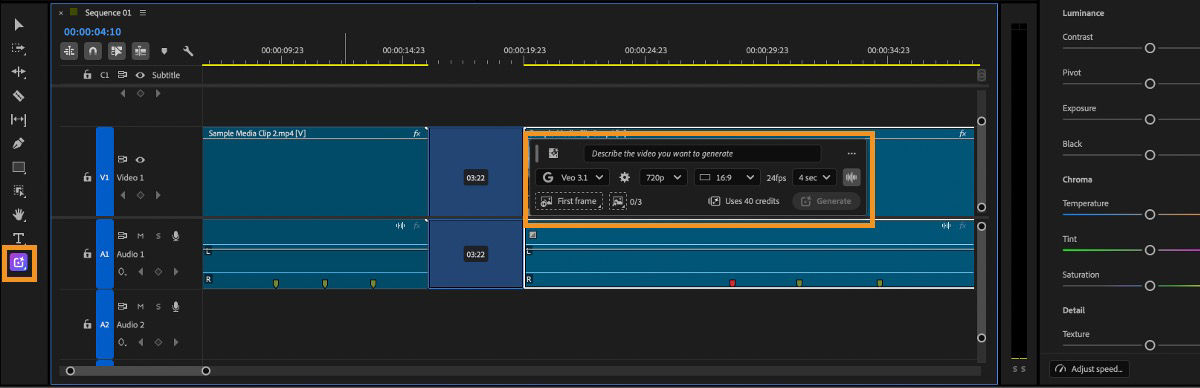
You do not need a sophisticated editor to grasp this distinction. Whatever software you eventually use, the first test of a rough cut is not “Does every shot look polished?” It is “Can someone follow what happened, and does the ending have the effect I intended?”
The roles at a glance
| System | Main contribution | Typical output for the paper-crane film |
|---|---|---|
| Text | Develops and describes story choices | Short script or shot descriptions |
| Image | Establishes still visual material | Character, room, prop, or storyboard images |
| Video | Creates moving shots | Candidate clips of entering or moving the chair |
| Voice | Performs spoken words | Dialogue or narration, if needed |
| Music | Supplies musical mood and progression | A cue that supports the emotional turn |
| Editing | Shapes picture and sound into a timed film | A cut with synchronized, balanced audio |
These are roles, not necessarily six separate apps or a mandatory order. One service may offer several kinds of generation; an editor may contain generative features; you may create temporary audio before the final shots. The distinction to remember is what each output is for. Making more assets cannot, by itself, decide which ones tell the story best.
Conclusion
Generative text helps you articulate the film; images establish its still visual world; video adds movement; voice performs speech; music shapes musical feeling; and editing makes all those contributions function as one experience. Effects and ambience fill another essential part of the soundtrack. Each system can offer options, but you decide which options serve the film.
Next, we’ll step back from the tools and examine how story, image, performance, sound, and editing work together to create meaning—including why changing just one element can change what an audience understands or feels.