Recommended resources
The freely available resources this lesson will direct you to.
- The Complete AI Filmmaking Course — Script to Finished Movie (Free Masterclass)www.youtube.com
- From Idea to Finished Film – AI Filmmaking Blueprintwww.youtube.com
- How to create longer videos and filmshelp.runwayml.com
- Runway Customers | Generating a film in 48 hours with director/producer Gabe Michaelrunwayml.com
Hello, and welcome. This course begins with the whole production journey before examining any one tool or craft in depth. Your first goal is to see how an idea becomes a film that someone can actually watch—not just a collection of impressive AI clips.
In this lesson, you’ll map the stages from idea to release, identify what each stage hands to the next, and see why a filmmaker often revisits earlier decisions. The examples use a short film, but the same map applies to longer projects.
What “fully AI-generated” still requires of you
A fully AI-generated film can use AI to create its writing, images, moving shots, voices, sound, and music, without photographing live-action footage. It does not mean the film makes itself. Someone must decide what the audience should understand and feel, choose among generated results, and assemble them into a coherent experience.
The image below offers a useful first map. Its eight boxes run from idea and script through characters, storyboard, video, voice, editing, and final film.
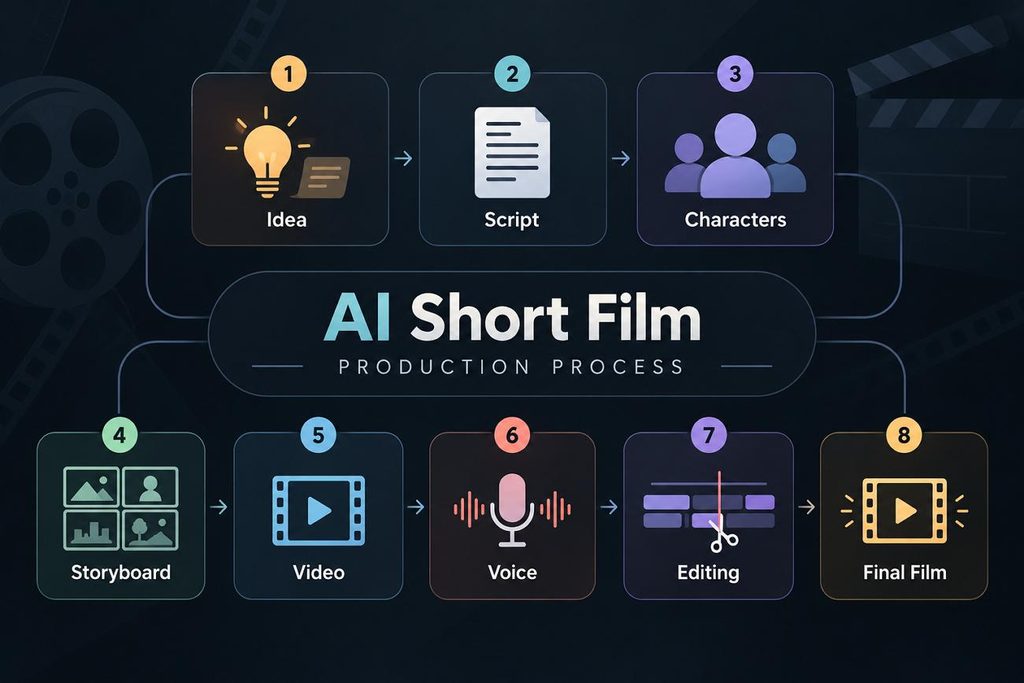
Treat those boxes as stages of work, not an inflexible order. You might generate a temporary voiceover before making video so you know how long the shots need to be. You might begin editing with still images, then replace them with moving clips. And a “final film” file is not yet a release: it still needs checking and delivery.
A helpful way to group the work is:
| Phase | Main question | Typical result |
|---|---|---|
| Development | What happens, and why should we care? | Premise, story outline, script |
| Pre-production | What must we create to tell it clearly? | Visual plan, storyboard, shot list, references |
| Production | Can we make the needed picture and sound? | Generated shots, voices, effects, music |
| Post-production | Do those pieces work as one film? | Edited, mixed, checked film file |
| Release | Can the intended audience find and watch it? | Published film and its presentation |
Some filmmakers group editing under “production”; others give post-production its own phase. The labels matter less than remembering the work.
For a brief orientation, watch the opening of The Complete AI Filmmaking Course — Script to Finished Movie from Helyz Space. The presenter names broad phases; use our five-phase map to make editing and release explicit.
The Complete AI Filmmaking Course — Script to Finished Movie (Free Masterclass)
Watch the opening of The Complete AI Filmmaking Course — Script to Finished Movie from Helyz Space for its broad view of the workflow.
Watch the phase overview. Listen for development, pre-production, production, and distribution. The presenter concentrates on making the film; in this lesson, we also name post-production as the distinct work of assembling and finishing it.
Development: decide what film you are making
Generation is easiest to direct when you know what each result is for. In development, a vague idea becomes a story with a beginning, a change, and an ending. A short screenplay or treatment states what the audience will see and hear; it does not need to specify every camera angle yet.
Imagine a micro-short: a person returns to an empty room, finds a paper crane on a chair, unfolds it to discover a drawing of two people, and pulls up a second chair. The premise is small, but it gives the production a destination. The final gesture matters because of what came before it. If you generated a beautiful shot of the room that concealed the crane, it would be a poor shot for this film.
Read Runway’s How to create longer videos and films for its account of how a concept becomes a plan. Although its title concerns longer work, the planning questions apply just as well to a micro-short.
How to create longer videos and films
Read Runway’s How to create longer videos and films to see how narrative planning connects to individual generated shots.
In “Planning the story,” read the planning guidance, beginning with the narrative foundation and ending with descriptions for planned shots, just before “Generating the story with Runway.” Notice the handoff: the treatment identifies characters, locations, and emotional change; the storyboard and shot descriptions turn those decisions into material you can generate.
Development’s practical test is simple: could you explain the film without describing its AI tools? If not, generating more material may only give you more material to sort through. Later modules will develop premise, structure, and screenplay craft in detail; for now, recognize their place at the start of the workflow.
Pre-production: make the story producible
Pre-production translates the script into decisions that guide consistent generation. For the paper-crane film, you would decide what the person looks like, how the room is laid out, where the crane sits, and which moments need their own shots. A storyboard shows the intended frames; a shot list records the shots you expect to make. Reference images or descriptions help the character, room, and crane remain recognizable across those shots.
A possible five-shot plan might include an empty-room view, the person entering, a closer view of the crane, the drawing being revealed, and the second chair being pulled up. That is not a required formula. It demonstrates the key handoff: each planned shot has a story job, so you have a reason to generate it and a standard for choosing a take.
Watch how the Helyz Space tutorial moves from a shared visual language to a shot list. Focus on the planning decisions rather than the software shown.
The Complete AI Filmmaking Course — Script to Finished Movie (Free Masterclass)
Return to The Complete AI Filmmaking Course — Script to Finished Movie to see two pre-production outputs: visual direction and a shot list.
In the pre-production portion, watch visual language for decisions about the film’s look. Then watch shot planning for the division of scenes into shots that can guide video prompts. Notice that a consistent plan does not guarantee consistent results; generated shots still need review.
Pre-production can be modest. For a very short film, a few reference images and a five-line shot list may suffice. What matters is recording decisions before you spend time generating many incompatible versions.
Production: generate picture and sound, then select
In production, you make the assets called for by the plan. Depending on the film, these might include character and location images, still frames to animate, video shots, spoken lines, room ambience, sound effects, and music. Not every film needs every asset: the paper-crane story could work without dialogue.
The unit of visual production is usually the shot, not the entire finished film. AI video tools often produce short clips, so you generate candidates for a planned moment and judge which one communicates that moment. A take of the person entering might be visually polished but unusable if the crane changes position or the person appears to notice it too soon. Selection is part of production, not an afterthought.
Runway’s guide describes character plates: relatively neutral images used as references when creating the same character in different shots. Read its generation sections for the basic continuity problem they address.
How to create longer videos and films
Return to Runway’s guide to connect planned shots with consistent visual assets.
Under “Generating the story with Runway,” read character and scene generation, covering “Generating the characters” and the opening of “Generating the scenes.” Focus on why a single character image may not provide enough information for a new angle, and why references help when placing a character in a location. The following paragraph mentions environment plates; read to the next heading, “Assembling and editing the story.”
Production and planning also influence one another. If a crucial action repeatedly generates badly, you can try another take or change the way the moment is shown—perhaps show the person’s reaction rather than insisting on a difficult close-up of hands unfolding paper. The aim is to preserve the story beat, not to defend the first shot plan at any cost.
Sound may be created before, during, or after the visuals. An early voice track can establish timing; effects and ambience may become clearer once shots exist. The important distinction is between creating assets and deciding how they work together, which becomes central in the edit.
Post-production: turn assets into a film
A folder of generated shots is not a film. Editing establishes what the viewer sees first, what they understand next, and how long each moment lasts. A rough cut places available material in story order to test whether the film makes sense. It can use unfinished clips or still frames; there is little value in polishing a shot that the story does not need.
Next, you refine timing and sound. For the paper-crane film, the reveal might need a moment of quiet before the second chair moves. You would check that the person and crane remain consistent, that dialogue—if any—is intelligible, that music does not overwhelm the action, and that titles or captions are readable. Finally, you export a playable film file and watch that exported file, rather than assuming it matches what you saw in the editor.
Read Runway’s account of assembly, keeping its emphasis on story flow during the first cut.
How to create longer videos and films
Finish Runway’s guide with the transition from generated scenes to a cohesive film.
Under “Assembling and editing the story,” read the editing guidance through the end of “Editing the Shots.” Include the subsections “Choosing the Editing Software” and “Assembling the Shots.” Focus especially on the distinction between a rough cut that tests narrative order and later work on trimming, color, music, and effects.
An early edit can also guide production. In a filmmaker’s account of making an AI short under a deadline, an animatic—a roughly timed version using available images and sound—helped determine which final animated shots were needed. You do not need to copy that intensive workflow; notice the principle that a provisional film can expose missing shots before you finish generating everything.
Runway Customers | Generating a film in 48 hours with director/producer Gabe Michael
Read this Runway filmmaker account for a concrete example of editing and generation informing each other.
Find “38:30:04 — Starting the Animatic” and continue into “35:22:05 — Animation.” Read the animatic account, stopping before “32:27:45 — Upscaling.” Notice why the filmmaker starts timing a rough version before all the finished moving shots exist.
Release: complete the journey to an audience
Export creates a file. Release makes a checked film available to its intended audience. The distinction is easy to miss when a workflow diagram ends at “Final Film.”
Before publishing, watch the exported file from beginning to end on the sort of device your audience will use. Check for missing or frozen shots, abrupt sound changes, unreadable text, and captions that arrive at the wrong time. Confirm that you have the necessary rights and permissions for the assets you use. Then prepare the film’s presentation—such as its title, description, cover image, captions, and any relevant AI disclosure—and publish it in the intended format.
Release is also a useful feedback point. If viewers cannot tell why the person pulls up the second chair, that is a story-clarity observation. If they understand it but prefer a different ending, that is a different kind of response. You will learn how to assess feedback and distribution choices later in the course; at this stage, put them on the map rather than treating upload as a button pressed after all creative work ends.
The complete workflow is therefore a set of handoffs with room to loop back. A script gives pre-production something to plan; the plan gives generation specific targets; generated takes give editing material; the edit reveals what is missing; and the exported film must pass a final check before release. The next lesson will look more closely at the distinct roles of text, image, video, voice, music, and editing systems within that map.