Recommended resources
The freely available resources this lesson will direct you to.
Hello. Last time, you saw how namespaces change a process’s view of the host and capabilities constrain privileged operations. A systemd service is also a group of Linux processes, so you can use those mechanisms without putting the application in a container.
In this lesson, you’ll harden a hypothetical network-facing service in layers: give it a dedicated identity, limit the files it can read and write, remove unneeded capabilities, and apply systemd sandboxing. The operational aim is not the highest possible restriction score. It is a service that still works while possessing only the access its work requires. Allow about 45–50 minutes, including the short video segments and targeted reading.
Start with the service’s actual needs
Suppose relay-api.service runs /usr/local/bin/relay-api. It listens on TCP port 8080, reads /etc/relay-api/config.yaml, retains data under /var/lib/relay-api, and may need a Unix socket under /run/relay-api. It also makes outbound network requests. These are assumptions for the example, not a configuration to copy onto an unfamiliar service.
Before changing a real unit, inspect it and its process:
systemctl cat relay-api.service
systemctl status relay-api.service
systemctl show -p MainPID --value relay-api.service
Record its startup command, service user, ports, configuration, writable paths, and any helper processes. Check what happens on restart, not just during steady-state operation: an application may create a socket or migrate data only at startup. Inspect existing drop-ins too; a new restriction can conflict with an earlier setting.
The access plan for our example is deliberately small. The service must read one configuration file, write its state and runtime directories, and use ordinary network sockets. It does not need to modify its executable, administer the host’s network, load kernel modules, or read users’ home directories. Every control below implements part of that plan.
Identity and file permissions: make ordinary access narrow
A system service that does not specify User= normally starts as root. A dedicated, non-login account makes ordinary file ownership meaningful: if the application is compromised, it cannot simply write every root-owned file. On an authorized test host, you could provision a static account like this, adapting the nologin path to the distribution:
sudo groupadd --system relay-api
sudo useradd --system --gid relay-api --no-create-home \
  --shell /usr/sbin/nologin relay-api
Provision the account once; do not run those commands on every service start. The executable should remain owned by root and not writable by the service. For the assumed configuration file, a useful arrangement is a root-owned directory and file that the service’s group can traverse and read:
sudo install -d -o root -g relay-api -m 0750 /etc/relay-api
sudo chown root:relay-api /etc/relay-api/config.yaml
sudo chmod 0640 /etc/relay-api/config.yaml
Here, the directory’s execute bit permits traversal, while the file grants group read, not write. This assumes the file already exists and has been provisioned securely. Check permissions on every parent directory and any relevant ACLs as well; a correctly protected file is of little use if another account can replace it through a writable parent.
Watch the selected parts of Stop Service Breakouts with Systemd Sandboxing from SecureRandom. Treat its Nginx changes as a demonstration of finding the permissions an application needs—not as instructions to change a packaged Nginx service wholesale.
Stop Service Breakouts with Systemd Sandboxing
Stop Service Breakouts with Systemd Sandboxing shows how a change of service identity reveals two concrete dependencies: a writable runtime location and, for a low-numbered port, a possible capability requirement.
Watch the process identity to see why the account running each process matters. In the PID-file failure, focus on the need to change both the unit’s writable directory and the application’s configured path. Then watch the port failure; we will distinguish that exceptional need from our port-8080 example.
For the authoritative details, read the “USER/GROUP IDENTITY” section of Debian’s systemd.exec(5). Its DynamicUser= discussion is also worth noticing, but a static account keeps ownership straightforward for this example.
systemd.exec(5) — systemd — Debian bookworm — Debian Manpages
Debian’s systemd.exec(5) specifies what User= and Group= change, and the ownership trade-off involved in using a transient identity.
In “USER/GROUP IDENTITY,” read the User=, Group= entry from service identity. Then, in DynamicUser=, read from the description of a dynamically allocated pair through UID reuse. Focus on why unmanaged files left by a transient UID are risky.
systemd can create appropriately owned writable directories when the unit starts. StateDirectory=relay-api supplies persistent /var/lib/relay-api; RuntimeDirectory=relay-api supplies /run/relay-api, normally removed when the service stops. The application must actually be configured to use those paths. For existing data, review ownership and migration effects before enabling directory management; do not assume changing a unit leaves a populated directory untouched.
DynamicUser=yes can be useful when a service fits its lifecycle rules, but its UID may be reused after the unit stops. If you choose it, use systemd-managed state and runtime directories rather than leaving arbitrary files owned by that UID. We will use the static account in the configuration below.
Capabilities: remove them by default, grant an exception deliberately
Running as a non-root user and limiting capabilities solve related but different problems. User=relay-api changes the process’s Unix identity; CapabilityBoundingSet= limits which privileged capabilities can be available to it or its descendants. For a daemon listening on port 8080 with no privileged host operations, start with no capabilities.
If the service instead must bind a port the host treats as privileged, CAP_NET_BIND_SERVICE may be sufficient without making it root. systemd’s AmbientCapabilities= can carry that capability into a process run as a non-root user. It is not a permission for only port 80: it grants the capability’s full scope, so use it only when needed. First verify the host’s privileged-port setting and whether socket activation or a front-end proxy already supplies the listener.
Read “CAPABILITIES” and “SECURITY” in systemd.exec(5) before interpreting the example unit. Pay particular attention to the difference between a bounding set, which removes capabilities from the available ceiling, and an ambient set, which can provide a specified capability to the unprivileged executable.
systemd.exec(5) — systemd — Debian bookworm — Debian Manpages
The systemd.exec(5) entries define the three controls used here: CapabilityBoundingSet=, AmbientCapabilities=, and NoNewPrivileges=.
In “CAPABILITIES,” read CapabilityBoundingSet= from the bounding set, noting what an empty assignment does. Continue in AmbientCapabilities= from the ambient set. In “SECURITY,” read NoNewPrivileges= from privilege gain. Interpret that last control specifically as preventing gains through execution mechanisms such as setuid files or file capabilities—not as removing privileges already assigned to the process.
For our service, empty CapabilityBoundingSet= and AmbientCapabilities= assignments are intentional. If testing establishes a genuine low-port requirement, replace those two lines with:
CapabilityBoundingSet=CAP_NET_BIND_SERVICE
AmbientCapabilities=CAP_NET_BIND_SERVICE
Keep NoNewPrivileges=yes: systemd can arrange an explicitly assigned ambient capability for the service, while the process and its children are prevented from acquiring additional privilege through later execution. Check the resulting process rather than relying on the unit text alone; wrappers and child execution can affect what remains available.
Sandboxing: restrict the view without severing required paths
Identity and file modes apply across the host. systemd sandbox options add restrictions to the unit’s execution environment. ProtectSystem=strict presents most of the filesystem as read-only to the service; it does not make readable files secret. ProtectHome=yes makes common home-directory locations inaccessible. PrivateTmp=yes gives the unit private temporary directories, and PrivateDevices=yes removes ordinary physical devices from its /dev view.
These are not interchangeable with file permissions. A managed state directory can be writable within a read-only system view, but the service still needs ordinary Unix permission to write there. Conversely, making a path writable in a mount namespace does not grant a user permission it lacks.
Watch the filesystem segment of the SecureRandom demonstration, then compare it with the man page: the video illustrates the change, while the manual gives the precise scope and caveats.
Stop Service Breakouts with Systemd Sandboxing
Return to Stop Service Breakouts with Systemd Sandboxing for its progression from shared temporary space to filesystem restrictions.
Watch filesystem isolation. Focus on what the process sees and can write. The presenter chooses ProtectSystem=full; our example uses strict and explicitly provides its necessary writable directories.
systemd.exec(5) — systemd — Debian bookworm — Debian Manpages
The “SANDBOXING” section of systemd.exec(5) explains both the protection and the places where a service legitimately needs an exception.
Under “SANDBOXING,” read ProtectSystem= from strict protection. In RuntimeDirectory=, StateDirectory=, and the related directory entries, read from managed directories, including the location and lifetime table. Also inspect the ProtectHome=, PrivateTmp=, and PrivateDevices= entries in this same section: identify what each hides or replaces, and whether your service uses it. The introductory paragraphs of “SANDBOXING” explain why availability of these mechanisms must be checked on the target host.
Because this API needs external connectivity, do not set PrivateNetwork=yes: that option would leave it with only loopback networking. A restriction is useful only if it matches the workload. Similarly, a daemon that genuinely uses a hardware device or serves files from home directories needs a different access plan.
For our assumptions, a hardening drop-in could contain:
[Service]
User=relay-api
Group=relay-api
UMask=0077

StateDirectory=relay-api
StateDirectoryMode=0700
RuntimeDirectory=relay-api
RuntimeDirectoryMode=0700

CapabilityBoundingSet=
AmbientCapabilities=
NoNewPrivileges=yes

ProtectSystem=strict
ProtectHome=yes
PrivateTmp=yes
PrivateDevices=yes
ProtectKernelTunables=yes
ProtectKernelModules=yes
ProtectControlGroups=yes
The application must read /etc/relay-api/config.yaml, write its state under /var/lib/relay-api, and place its runtime socket—if it needs one—under /run/relay-api. Do not add broad ReadWritePaths= exceptions because something failed to start; identify the precise path and why it needs writing first. The configuration file can remain readable under ProtectSystem=strict, subject to its normal ownership and mode.
Some sandbox settings depend on kernel and systemd support and can be ineffective in constrained environments. Mount-based read-only controls also have limitations; they are not a complete substitute for a non-root identity and a narrow capability set. A service that can reach a powerful local socket may still be able to ask another process to perform consequential actions. Check such dependencies alongside its file paths.
Roll out and verify the effective service, not just the file
On a test host, place this configuration in a new, identifiable drop-in such as /etc/systemd/system/relay-api.service.d/50-hardening.conf. Preserve any pre-existing configuration. After editing, validate the unit, reload systemd, and restart during a suitable test window:
sudo systemd-analyze verify relay-api.service
sudo systemctl daemon-reload
sudo systemctl restart relay-api.service

systemctl cat relay-api.service
systemctl status relay-api.service
journalctl -u relay-api.service -b --no-pager -n 80
systemd-analyze verify catches some configuration problems; it does not prove that the application can serve traffic. Check the expected listener, a representative request, outbound dependencies, state persistence across restart, and any startup-only operations. If startup fails, use the journal and the failed operation to decide whether the unit denied an access the service truly requires or the application is using the wrong path. Avoid disabling every restriction at once merely to make the status green.
The Red Hat article Mastering systemd: Securing and sandboxing applications demonstrates drop-ins and systemd-analyze security. Its example is useful for the workflow, not as a universal template for service privileges; check directive behavior against the target host’s man systemd.exec.
Mastering systemd: Securing and sandboxing applications ...
Read the article’s practical example to see how an operator applies a drop-in and interprets a security report without treating it as a verdict on the application.
In “An example,” read from the introduction of systemd-analyze security through the score caveat. Then, in “Turn on the security options,” examine the drop-in procedure and the first service template, from creating the drop-in. Stop before the second, older-version template. Compare its choices with this service’s read, write, and network needs rather than copying its settings.
The accompanying screenshot is a report for an example httpd.service. It lists individual systemd hardening checks and a weighted exposure result—not observed attacks or a proof that the application is vulnerable.
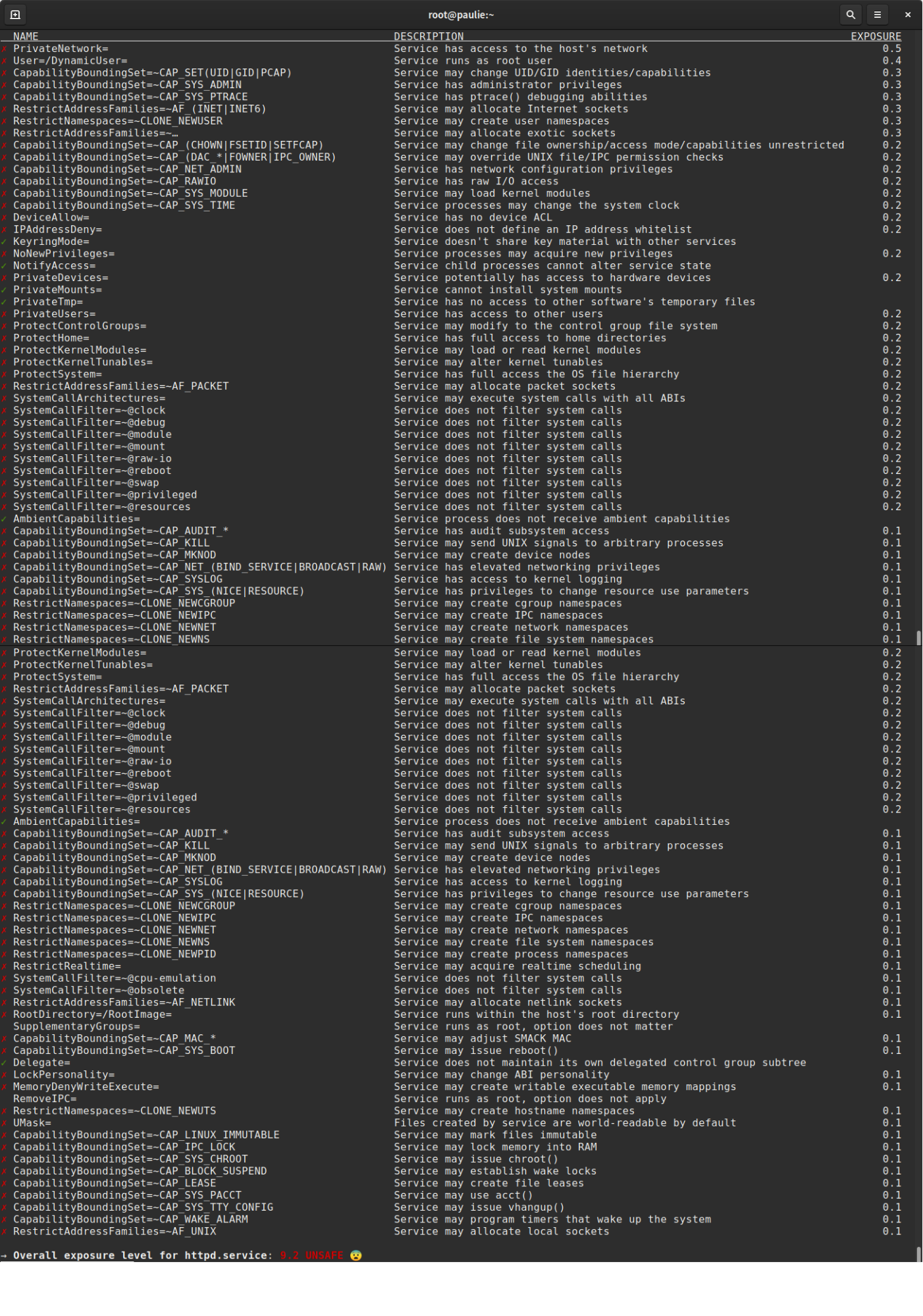
On a host that provides the command, systemd-analyze security relay-api.service is useful for spotting review candidates. For example, a network-facing service may receive a penalty for having network access, yet turning off its network would break its purpose. Investigate a flagged setting against the access plan rather than optimizing the score.
Finally, inspect the running process. Substitute the actual unit name and check that it has a nonzero main PID:
PID=$(systemctl show -p MainPID --value relay-api.service)
ps -o pid,user,group,args -p "$PID"
grep -E '^(Uid|Gid|CapEff|CapBnd|CapAmb|NoNewPrivs):' \
  "/proc/$PID/status"
For this port-8080 example, expect the dedicated identity, no capabilities in the effective, bounding, or ambient masks, and NoNewPrivs set. These process fields provide stronger evidence than a setting written in a file, though neither they nor a security score replace functional tests. Also review any SELinux or other mandatory-access-control denials on hosts that use those policies; Unix modes and systemd sandboxing are not the only access checks.
If a change breaks the service, restore only the drop-in you changed, reload systemd, restart, and confirm recovery. Do not remove unrelated drop-ins. Record the needed exception and its evidence before attempting a narrower revision.
Key takeaways
Least privilege for a Linux service starts with an access inventory. A dedicated user and restrictive file modes limit ordinary access; a capability bounding set removes privileged powers, with ambient capabilities reserved for justified exceptions. systemd’s managed directories and sandbox settings then narrow the service’s writable paths and view of the host. The configuration is complete only when you verify both the running process’s privileges and the service’s real behavior.
Next, you’ll combine this kind of host evidence with the earlier CPU, memory, storage, service, and network lessons to build a reusable runbook for an unhealthy production host.