Recommended resources
The freely available resources this lesson will direct you to.
Hello. In the previous lesson, you used ip, ss, and packet captures to distinguish what a host could see from what was happening elsewhere on the network. Containers make that distinction even more important: a process inside a container may see a different set of interfaces, process IDs, and mounts from a process on the host, while both still use the same Linux kernel.
This lesson explains three mechanisms behind that arrangement. Namespaces determine which resources a process can see; cgroups account for and constrain what a group of processes can consume; capabilities limit which privileged operations a process can perform. In about 40–45 minutes, you’ll connect those mechanisms to familiar container behavior and learn what each one does not guarantee.
A container is a set of host processes with a configured environment
A container is not a small virtual machine with its own kernel. Its processes run on the host’s Linux kernel. A container runtime arranges their filesystem and applies kernel mechanisms so that they experience a useful degree of separation from other processes.
Watch the opening of Linux Container Primitives: cgroups, namespaces, and more! from linuxfestnorthwest for this starting point. The important claim is not that any one primitive is a container, but that the runtime combines several of them.
Linux Container Primitives: cgroups, namespaces, and more!
Watch the brief introduction to understand why containers are described as a combination of Linux primitives rather than a separate kind of machine.
Watch the overview, beginning with “containers serve as a way to execute linux processes.” Focus on the distinction between an ordinary Linux process and the environment constructed around it.
The supplied diagram is a useful inventory of mechanisms, but not a literal stack of layers that every request passes through. For example, a cgroup does not sit “under” a namespace: the same process can belong to both. SELinux and seccomp are additional controls, and their configuration varies by host and runtime.
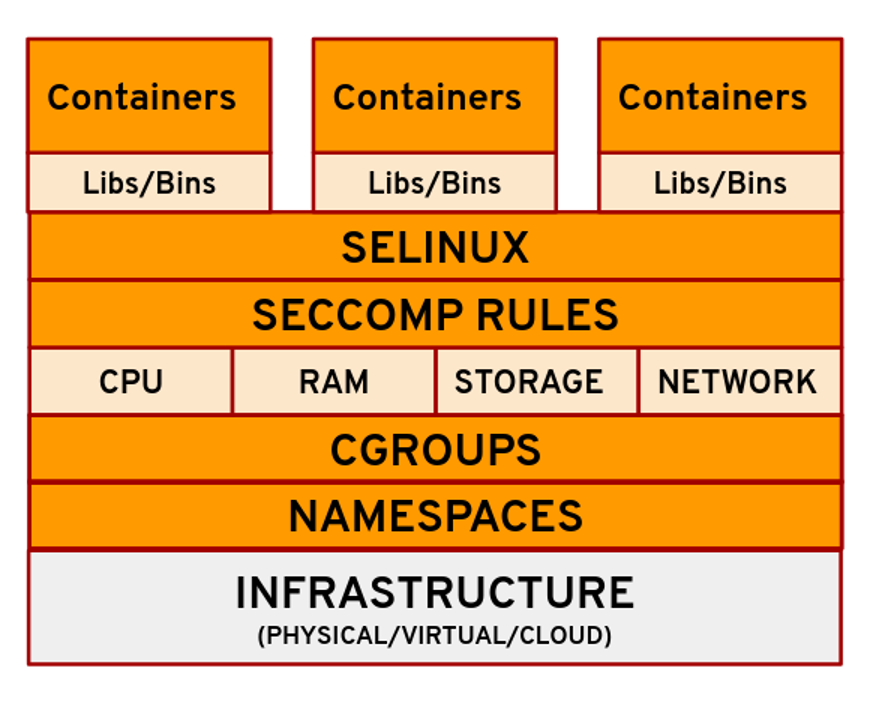
Keep three questions in mind as you read: What can this process see? How much can its group use? What is it allowed to do? They correspond broadly to namespaces, cgroups, and capabilities.
Namespaces: separate views of kernel-managed resources
A Linux namespace changes the view of a particular kind of resource for processes that belong to it. A process belongs to one namespace of each type, and two processes can share some namespaces while differing in others. Isolation is therefore configurable, not an all-or-nothing property attached to a “container” label.
Watch the namespace explanation in Linux Container Primitives. The examples of network and mount namespaces are especially relevant to the routing and socket tools you used previously.
Linux Container Primitives: cgroups, namespaces, and more!
Return to the linuxfestnorthwest presentation for the explanation of resource visibility, container networking, and filesystem views.
Watch namespace views, from the introduction to namespaces through the discussion of mount namespaces and volumes. Then watch process evidence for how /proc identifies a process’s namespaces. Finally, watch network contrast to see how the same ip inspection differs between the host and a newly created network namespace. Focus on which viewpoint each command observes.
Several namespace types explain common container behavior:
| Namespace | What is separated | Operational consequence |
|---|---|---|
| PID | Process-ID view | A process may be PID 1 inside a container but have a different PID visible on the host. |
| Network | Interfaces, addresses, routes, and port space | ip route or ss inside a container can show different results from the same commands on the host. |
| Mount | Filesystem mount view | The runtime can present a container root filesystem and selected mounts without presenting the host’s entire mount layout. |
| UTS | Hostname and related system identity | Containers can report different hostnames. |
| IPC | Certain interprocess-communication resources | Processes can be prevented from discovering or using another group’s IPC objects through that namespace. |
| User | User and group ID mappings | UID 0 inside a user namespace can map to an unprivileged UID outside it. |
A mount namespace separates mount arrangements, not the underlying bytes by magic. A runtime must also prepare the container’s root filesystem. A bind mount can deliberately expose a host path inside that view; granting a writable mount of a sensitive host directory substantially weakens the intended separation.
Likewise, a network namespace separates network configuration, not communication itself. The runtime can connect namespaces with virtual interfaces and configure routing so processes can exchange packets. In Kubernetes, containers in the same Pod normally share a network namespace and therefore an IP address and port space. Assuming every container has its own independent localhost would lead to a faulty diagnosis.
The PID namespace illustrates why viewpoint matters. A container’s first process can be PID 1 inside that namespace without being the host’s PID 1. The host can still observe that process under a host PID. Namespace isolation does not make a process cease to exist from the host’s perspective.
Cgroups: account for use and constrain contention
A namespace can hide other processes’ PIDs, but hiding them does not stop a faulty application from consuming CPU or memory. Control groups, or cgroups, address a different problem: they group processes for resource accounting and control. The controls are hierarchical, so a limit on a parent group constrains its descendants.
Read the “Cgroups (control groups)” part of Michael Kerrisk’s Containers as an Illusion, concentrating on its cgroups v2 examples. Its CPU and PID examples make the difference between a resource view and a resource limit concrete.
[PDF] Containers as an illusion - NDC Security 2022 - man7.org
Michael Kerrisk’s presentation shows how cgroups measure and constrain groups of processes. Read it to see why namespaces alone cannot protect a host from resource exhaustion.
In “Cgroups (control groups),” read slides 26–32 of 56, from resource controls. On slides 29–30, follow how two CPU-consuming processes share one group’s ceiling. On slides 31–32, notice what the PID limit prevents. Treat the shell commands as demonstrations, not changes to make on a production host.
The examples support several distinctions that matter in operations:
- A CPU quota caps a group’s CPU time over a period. If two busy processes share that group, they compete within its quota. A quota is not a reservation guaranteeing that CPU will be available when the host is busy.
- A memory limit bounds a group’s allowed memory use. Reaching it can cause reclamation or a cgroup out-of-memory kill; it does not mean memory pressure has vanished or that the application will remain healthy.
- A PID limit constrains the number of tasks the group can create, helping contain a runaway process-creation failure.
- Cgroup accounting gives you evidence about consumption even when no restrictive limit has been configured.
On a cgroups v2 host, the hierarchy is commonly exposed under /sys/fs/cgroup. Files such as cpu.max, memory.max, and pids.max describe limits for a particular group; memory.events and cpu.stat can provide evidence about what happened. The applicable files depend on which controllers are available and configured. Cgroups v1 uses a different layout, so do not assume an older tutorial’s paths and files will match a v2 host.
Most importantly, cgroups do not make another container’s files or processes inaccessible. They limit and measure resource use. A well-sized memory limit may reduce the blast radius of a leak, but it is not a permission boundary.
Capabilities: narrow the power of privileged processes
So far, we have separated views and bounded resource use. Neither answers whether a process may perform a privileged operation. Traditional Unix permissions distinguish a highly privileged root user from ordinary users. Linux capabilities split many root-level powers into individually grantable privileges.
For a concise introduction, watch Container Security Fundamentals - Linux Capabilities (Part 1) from Datadog. Its container example shows that the process running inside a container has inspectable privileges just like another Linux process.
Container Security Fundamentals - Linux Capabilities (Part 1)
Watch Datadog’s explanation to connect capabilities to the root/non-root distinction and to a container runtime’s default privilege set.
Watch privilege granularity, beginning with the historical root/non-root model. Then watch container defaults, where the presenter inspects a container process’s capabilities. Focus on why “running as root” does not, by itself, tell you every operation that process can perform.
For example, CAP_NET_BIND_SERVICE permits binding a port that the system treats as privileged without granting every root power. CAP_NET_ADMIN, by contrast, permits substantial network administration in the network namespace where it applies and should not be granted merely because an application uses the network. Namespaces answer which network configuration is in view; capabilities help answer whether the process may administer it.
The relationship between a user namespace and capabilities needs particular care. A runtime can map UID 0 inside a user namespace to an unprivileged UID outside it. Capabilities granted inside that user namespace then do not automatically confer equivalent power over resources owned by the host’s initial user namespace. Read Kerrisk’s “User namespaces and capabilities” treatment to see this boundary, including an example where a process can change its isolated hostname but cannot administer the host’s network namespace.
[PDF] Containers as an illusion - NDC Security 2022 - man7.org
Return to Kerrisk’s presentation for the distinction between being root inside a user namespace and having privilege over host-owned resources.
In “User namespaces and capabilities,” read slides 42–49 of 56, from scoped privilege. Pay particular attention to slides 44–46 on UID mapping and namespace ownership, then compare the successful hostname change with the failed network-device operation on slides 48–49. On slide 44, use the mapping line itself to identify the outside UID; its explanatory line uses a different number.
Do not assume every container uses a separate user namespace or an unprivileged host UID: that depends on runtime and host configuration. Nor does a reduced capability set make a process harmless. A writable host mount, access to a powerful runtime socket, an overly broad capability, or a kernel vulnerability can undermine isolation. Least privilege is a configuration decision, not an automatic property of packaging an application as a container.
Read a container from the host’s viewpoint
These mechanisms become more useful when you can identify evidence for each one. If you have an authorized test host and know the host PID of a container process, the following commands are read-only:
PID=12345  # Replace with the process's actual host PID

readlink /proc/$PID/ns/pid
readlink /proc/$PID/ns/net
readlink /proc/$PID/ns/mnt
readlink /proc/$PID/ns/user

cat /proc/$PID/cgroup
grep -E '^Cap(Eff|Bnd):' /proc/$PID/status
The namespace links identify namespace instances. Two processes whose net links identify the same instance share a network namespace; different links indicate different network views. /proc/$PID/cgroup reports group membership, although paths can appear different when observed through a cgroup namespace or a different cgroup mount. CapEff records currently effective capability bits, while CapBnd records a capability ceiling. Those masks are evidence of privileges, not an explanation of why an individual operation succeeded or failed.
This gives you a way to frame cross-layer incidents. If ss shows a listener inside a container but not in the host network view, first establish which network namespace each command observed. If a process is killed after its group reaches a memory limit, inspect cgroup evidence, not just the host’s free-memory figure. If a process sees the expected interface but receives Operation not permitted when changing it, investigate privilege and namespace ownership, not routing alone.
Other controls complement these three mechanisms. Seccomp can restrict system calls, while security modules such as SELinux can enforce additional access rules. They are valuable defenses, but they do not replace the basic questions of view, resource control, and privilege—and the diagram should not be read as a promise that every such defense is active.
Key takeaways
Namespaces give processes separate views of resources; cgroups measure and constrain resource use by groups of processes; capabilities narrow privileged operations. A container runtime combines these with a prepared filesystem and other controls. All container processes still share the host kernel, and the strength of their isolation depends on the namespaces shared, limits set, privileges granted, and host resources exposed.
Next, you’ll apply least privilege directly to a Linux service using users, permissions, capabilities, and systemd sandboxing. The same question will carry forward: what does this process actually need to see, use, and do?