Recommended resources
The freely available resources this lesson will direct you to.
- SQL Window Functions | Clearly Explained | PARTITION BY, ORDER BY, ROW_NUMBER, RANK, DENSE_RANKwww.youtube.com
- SQL Window Function | How to write SQL Query using RANK, DENSE RANK, LEAD/LAG | SQL Queries Tutorialwww.youtube.com
- How to Restrict Results to Top N Rows per Group in SQL Baeldung on SQLwww.baeldung.com
- ROW_NUMBER, RANK, and DENSE_RANK: Three Ways to Order Rows · The Art of PostgreSQLtheartofpostgresql.com
Welcome back. Last lesson, you used OVER (PARTITION BY region) to put a regional metric beside each order without collapsing the order rows. This time, you’ll add ORDER BY inside the window to put rows in order within each group. The practical question is one analysts often face: Which are the top two products in each category?
The answer depends on what “top two” means when products tie. You’ll use ROW_NUMBER, RANK, and DENSE_RANK to make that choice explicit, then filter the results in PostgreSQL.
Order rows within each group
Suppose a table has one row per product, with its category and units sold. All three ranking functions use this basic shape:
ranking_function() OVER (
    PARTITION BY category
    ORDER BY units_sold DESC
)
PARTITION BY category restarts the numbering for each category. ORDER BY units_sold DESC puts higher-selling products first within the window. Unlike the ORDER BY at the end of a query, it determines the ranking calculation; it does not guarantee how the final results are displayed.
Watch the relevant parts of Maven Analytics’ SQL Window Functions | Clearly Explained. You already know what a partition is, so focus on how ordering and ties change the numbers assigned to rows.
SQL Window Functions | Clearly Explained | PARTITION BY, ORDER BY, ROW_NUMBER, RANK, DENSE_RANK
Maven Analytics compares the three ranking functions, then uses a partition and an outer query to retrieve top rows within each group.
Watch ranking ties for the side-by-side comparison. Continue with group rankings to see numbering restart by group, and top rows for the inner-query-and-filter pattern. The video uses name popularity; here, the groups will be product categories.
The key difference is what counts as a position:
| Function | What it numbers | After two rows tie for first |
|---|---|---|
ROW_NUMBER() |
Individual rows | The rows receive 1 and 2; the next receives 3 |
RANK() |
Positions, allowing ties | Both receive 1; the next receives 3 |
DENSE_RANK() |
Distinct ordered values | Both receive 1; the next receives 2 |
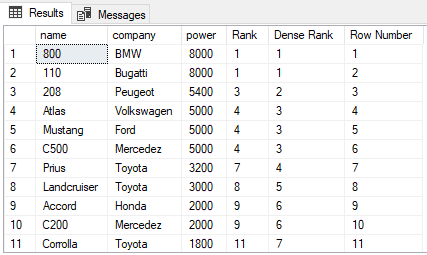
The car results below make the gap visible. Two cars with power 8000 share RANK 1 and DENSE_RANK 1, but get different row numbers. The car with power 5400 then has RANK 3 and DENSE_RANK 2. This image ranks all its cars together; our SQL will restart the calculation by category.
For a concise PostgreSQL explanation, read the two indicated passages from ROW_NUMBER, RANK, and DENSE_RANK: Three Ways to Order Rows by The Art of PostgreSQL.
ROW_NUMBER, RANK, and DENSE_RANK: Three Ways to Order Rows · The Art of PostgreSQL
Read these passages for the tie rule that matters most when choosing a top-N function.
In the “ROW_NUMBER” subsection, read the tie warning immediately before the race-results SQL example. Then find the “RANK and DENSE_RANK” subsection and read the comparison before its SQL example. Notice that a row number cannot preserve a tie by itself.
Compare the functions on product sales
If you have a PostgreSQL session available, create this small table and run the queries as you read. Its grain is one row per product, and units_sold is already the metric to rank.
CREATE TEMP TABLE product_sales (
    product_id integer PRIMARY KEY,
    category text NOT NULL,
    product_name text NOT NULL,
    units_sold integer NOT NULL
);

INSERT INTO product_sales
    (product_id, category, product_name, units_sold)
VALUES
    (101, 'Drinks', 'Iced tea',        120),
    (102, 'Drinks', 'Cold brew',       120),
    (103, 'Drinks', 'Sparkling water',  90),
    (104, 'Drinks', 'Lemonade',         70),
    (201, 'Snacks', 'Granola bar',     150),
    (202, 'Snacks', 'Pretzels',        100),
    (203, 'Snacks', 'Trail mix',       100),
    (204, 'Snacks', 'Popcorn',          80);
Now calculate all three positions side by side:
SELECT
    product_id,
    category,
    product_name,
    units_sold,
    ROW_NUMBER() OVER (
        PARTITION BY category
        ORDER BY units_sold DESC, product_id
    ) AS row_num,
    RANK() OVER (
        PARTITION BY category
        ORDER BY units_sold DESC
    ) AS sales_rank,
    DENSE_RANK() OVER (
        PARTITION BY category
        ORDER BY units_sold DESC
    ) AS dense_sales_rank
FROM product_sales
ORDER BY category, units_sold DESC, product_id;
| category | product_name | units_sold | row_num | sales_rank | dense_sales_rank |
|---|---|---|---|---|---|
| Drinks | Iced tea | 120 | 1 | 1 | 1 |
| Drinks | Cold brew | 120 | 2 | 1 | 1 |
| Drinks | Sparkling water | 90 | 3 | 3 | 2 |
| Drinks | Lemonade | 70 | 4 | 4 | 3 |
| Snacks | Granola bar | 150 | 1 | 1 | 1 |
| Snacks | Pretzels | 100 | 2 | 2 | 2 |
| Snacks | Trail mix | 100 | 3 | 2 | 2 |
| Snacks | Popcorn | 80 | 4 | 4 | 3 |
Look at Drinks first. The two products selling 120 units occupy two rows, so their row numbers are 1 and 2. They share rank 1, so the next product’s rank is 3. But 90 is the second distinct sales value, so its dense rank is 2. In Snacks, the tie occurs at the second sales value instead.
There is a deliberate difference between the ORDER BY clauses. ROW_NUMBER uses product_id as a final tie-breaker: among products with equal sales, the smaller ID reliably receives the smaller row number. RANK and DENSE_RANK order by sales alone, so equal sales remain tied. If you added the unique product_id to their window ordering, those products would no longer tie under those functions.
Turn positions into top-N results
A ranking function assigns a value to every eligible row. To keep only the top rows, calculate the value in an inner query and filter it in an outer query—just as you did when filtering orders above their window-calculated regional average.
Here is exactly two product rows per category, with a reproducible choice if sales tie:
WITH ranked_products AS (
    SELECT
        product_id,
        category,
        product_name,
        units_sold,
        ROW_NUMBER() OVER (
            PARTITION BY category
            ORDER BY units_sold DESC, product_id
        ) AS row_num,
        RANK() OVER (
            PARTITION BY category
            ORDER BY units_sold DESC
        ) AS sales_rank,
        DENSE_RANK() OVER (
            PARTITION BY category
            ORDER BY units_sold DESC
        ) AS dense_sales_rank
    FROM product_sales
)
SELECT
    category,
    product_name,
    units_sold,
    row_num
FROM ranked_products
WHERE row_num <= 2
ORDER BY category, row_num;
This returns Iced tea and Cold brew for Drinks, and Granola bar and Pretzels for Snacks. The WITH clause names the intermediate ranked result a common table expression (CTE). The important point is the query boundary: PostgreSQL cannot use WHERE row_num <= 2 in the same query level that calculates row_num, because WHERE is applied before window functions there.
What if the request instead says “include products tied at a top-two position”? Keep the same CTE, but filter on sales_rank <= 2. Drinks returns its two products at rank 1; Sparkling water is rank 3 and is excluded. Snacks returns three products: Granola bar at rank 1, plus Pretzels and Trail mix tied at rank 2.
A third request might be “show products at the two highest distinct sales amounts in each category.” Filter on dense_sales_rank <= 2. That includes Sparkling water in Drinks because 90 is its second distinct sales amount. It also includes both 100-unit products in Snacks. Either rank-based filter can therefore return more than two rows, while ROW_NUMBER() <= 2 returns at most two per category.
A final-query LIMIT 2 cannot replace this pattern: it limits the entire output, not each category. Nor should you filter out lower-selling products before calculating their positions; the ranking must see the full population you intend to compare.
Make the business rule explicit
When interpreting or writing a top-N query, settle three decisions before choosing the function:
- What is being ranked? Here it is products by
units_soldwithin each category. If your source has many transaction rows per product, you would first need a product-level sales metric rather than rank individual transactions. - What happens at a tie? Use
ROW_NUMBERfor a fixed number of rows,RANKfor positions that include ties, orDENSE_RANKfor the top distinct metric values. - Can the result be reproduced? For a fixed-row result, finish
ROW_NUMBER’s window ordering with a stable unique key. Do not quietly add that key to a tie-preserving rank.
The sample table requires units_sold, so missing sales are not an issue here. In a real table where sales may be NULL, decide whether those products should be excluded from the ranking population or placed last explicitly—for example, with ORDER BY units_sold DESC NULLS LAST. Leaving the treatment of missing values implicit can change which rows a “top” result contains.
Key takeaways
PARTITION BY defines each group; ORDER BY inside OVER defines the comparison within it. ROW_NUMBER gives every row a unique position, RANK shares positions and leaves gaps, and DENSE_RANK shares positions without gaps. Calculate the chosen position first, then filter it in an outer query to obtain top N per group.
Next lesson, you’ll use ordering inside a window for a different purpose: LAG and LEAD compare a row with a preceding or following row, enabling period-over-period analysis.