Recommended resources
The freely available resources this lesson will direct you to.
- How to Deploy LLMs | LLMOps Stack with vLLM, Docker, Grafana & MLflowwww.youtube.com
- 10 min Walkthrough of Langfuse – Open Source LLM Observability, Evaluation, and Prompt Managementwww.youtube.com
- Prometheus and Grafana - vLLMdocs.vllm.ai
- Prometheus & Grafana for vLLM, TGI, llama.cpp - Rost Glukhovwww.glukhov.org
Welcome back! In the previous lesson, we successfully constructed a full CI/CD pipeline using GitOps principles to automate canary deployments. A key part of that pipeline was the AnalysisTemplate, which relied on Prometheus metrics to automatically validate a new model's performance. Now, it's time to give ourselves and our teams the visibility needed to understand that performance in real-time.
Today, your goal is to learn how to configure a comprehensive monitoring dashboard that integrates latency, cost, GPU, and quality panels. A well-designed dashboard is the central nervous system for any LLM Ops team, providing at-a-glance insights into service health, user experience, resource saturation, and financial cost. Building on your SRE background, we will focus on the unique metrics and design patterns specific to LLM inference systems.
1. The Four Pillars of LLM Monitoring
While traditional services are monitored using metrics like requests per second and CPU utilization, LLM inference introduces new dimensions of performance and cost. A comprehensive dashboard must account for what we'll call the four pillars of LLM observability.
I recommend starting with this excellent article from Rost Glukhov, which explains why monitoring LLM inference requires a specialized approach.
Prometheus & Grafana for vLLM, TGI, llama.cpp - Rost Glukhov
This article provides a concise and practical overview of the unique monitoring challenges posed by LLM serving.
Read the sections "Why you should monitor LLM inference differently" and "Metrics checklist for LLM inference monitoring." As you read, focus on how LLM-specific behaviors translate into new metrics, such as: The distinction between Time To First Token (TTFT) and end-to-end latency. The importance of measuring throughput in tokens/second instead of requests/second. The role of queue depth and KV cache usage as leading indicators of system saturation.
Based on this, we can categorize the essential metrics for our dashboard into four key areas:
-
Performance & Latency: These metrics directly reflect the user experience.
- End-to-End Request Latency (percentiles): The total time from request to final response.
- Time To First Token (TTFT) (percentiles): Crucial for streaming use cases, measures perceived responsiveness.
- Inter-Token Latency (percentiles): The time between subsequent generated tokens, indicates decoding speed.
- Error Rate: The percentage of requests failing.
-
Throughput & GPU Resources: These metrics measure the system's capacity and workload.
- Tokens/Second: The true measure of system throughput. Often broken down by prompt vs. generation tokens.
- GPU Utilization (%): The percentage of time CUDA cores are active.
- GPU Memory Usage (GB): Tracks VRAM consumption by the model, KV cache, and other processes.
- KV Cache Usage (%): The percentage of the allocated KV cache that is in use. High usage is a precursor to performance degradation.
-
Cost: These metrics track the financial impact of the service.
- Token Counts per Request: The raw data for cost calculation (prompt and completion tokens).
- Cost per Request/User: Aggregated cost metrics, often tagged by model version or user ID.
- Total Cost over Time: The overall operational expenditure.
-
Quality: These metrics measure how well the model is performing its task.
- User Feedback Scores: Explicit ratings from users (e.g., thumbs up/down).
- Automated Evaluation Scores: Metrics from LLM-as-a-judge or other automated checks (e.g., factuality, context relevance).
2. Building the Core Dashboard: Performance & Resources
For the first two pillars—performance and resources—the standard stack of Prometheus and Grafana is a perfect fit. Your experience with these tools in traditional SRE roles is directly applicable here. The main difference lies in the specific metrics we collect and the PromQL queries we write.
Most high-performance serving frameworks, like vLLM and TGI, expose a Prometheus-compatible /metrics endpoint out of the box. This makes data collection straightforward.
The following video demonstrates a complete stack using vLLM, Prometheus, and Grafana, all orchestrated with Docker Compose.
How to Deploy LLMs | LLMOps Stack with vLLM, Docker, Grafana & MLflow
This video, "How to Deploy LLMs | LLMOps Stack with vLLM, Docker, Grafana & MLflow," provides a practical look at the monitoring architecture.
Watch these segments to see the components in action: Monitoring Architecture: Understand how Prometheus scrapes metrics from the vLLM server for visualization in Grafana. Configuration: See how the prometheus.yaml and docker-compose.yml files are configured to link the services together. Notice the reference to a pre-built Grafana dashboard JSON. Live Dashboard: Observe the final dashboard displaying key metrics like TTFT and token throughput.
Deconstructing a Grafana Dashboard for vLLM
To get hands-on, let's examine how such a dashboard is actually built. The vLLM documentation provides a complete grafana.json file that we can dissect.
This official guide from vLLM provides the code and configuration for a monitoring stack.
Skim the "Launch" and "Grafana Dashboard" sections to understand the setup process. Then, focus on the grafana.json content provided at the end. You don't need to read the entire JSON file, but use it to understand the structure of a few key panels.
Let's look at the PromQL queries for two essential panels defined in that grafana.json:
1. E2E Request Latency Panel:
This panel visualizes latency percentiles. The query for P99 latency is:
histogram_quantile(0.99, sum by(le) (rate(vllm:e2e_request_latency_seconds_bucket{model_name="$model_name"}[$__rate_interval])))
This is a classic PromQL pattern for histograms. It calculates the rate of change across the latency buckets (_bucket suffix) and then uses histogram_quantile to compute the 99th percentile value. This is far more meaningful than a simple average.
2. Token Throughput Panel:
This panel shows the rate of prompt and generation tokens being processed. The query for generation tokens per second is:
rate(vllm:generation_tokens_total{model_name="$model_name"}[$__rate_interval])
Here, rate() is used on a counter metric (vllm:generation_tokens_total) to calculate the per-second average rate of increase over the specified interval.
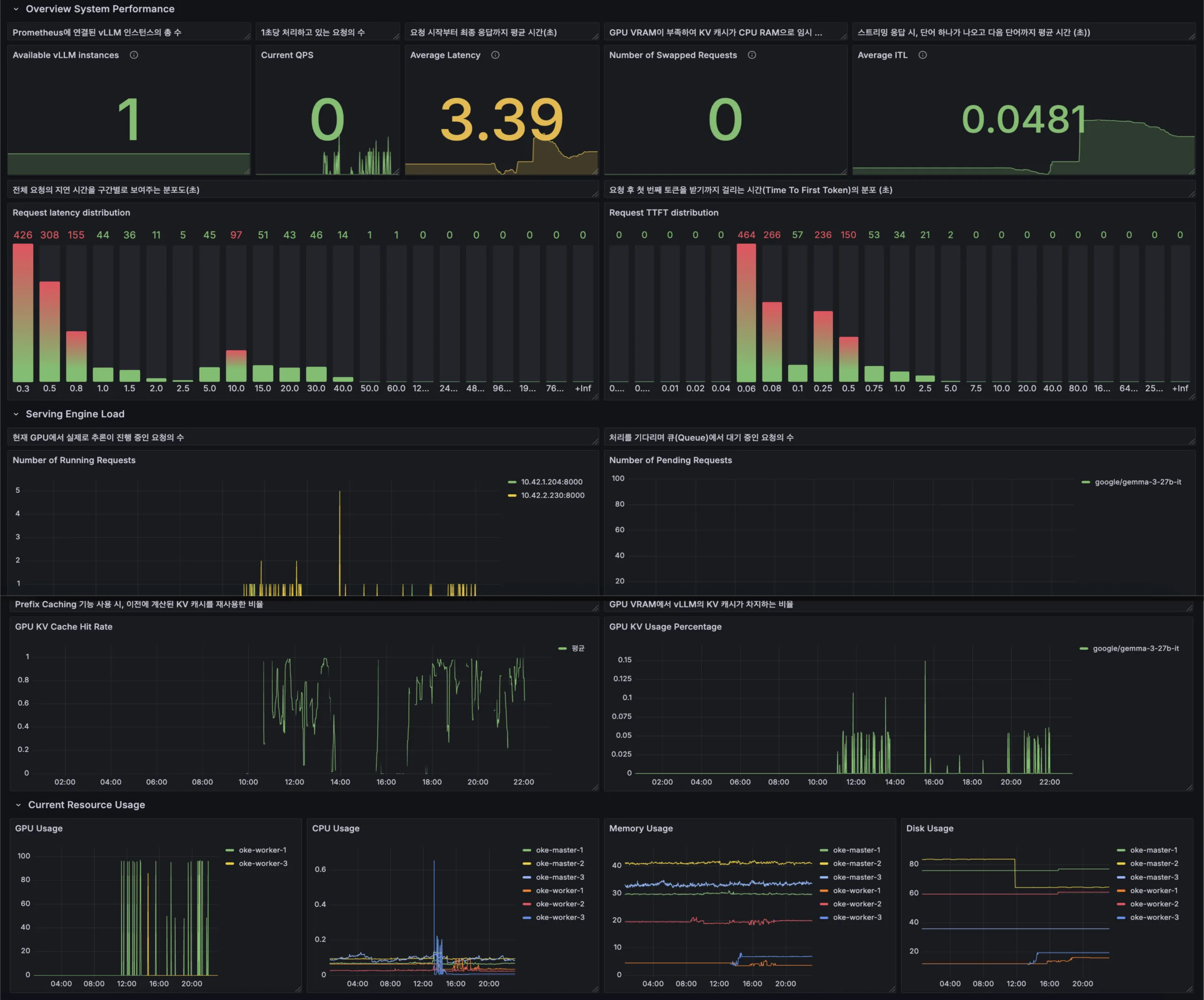
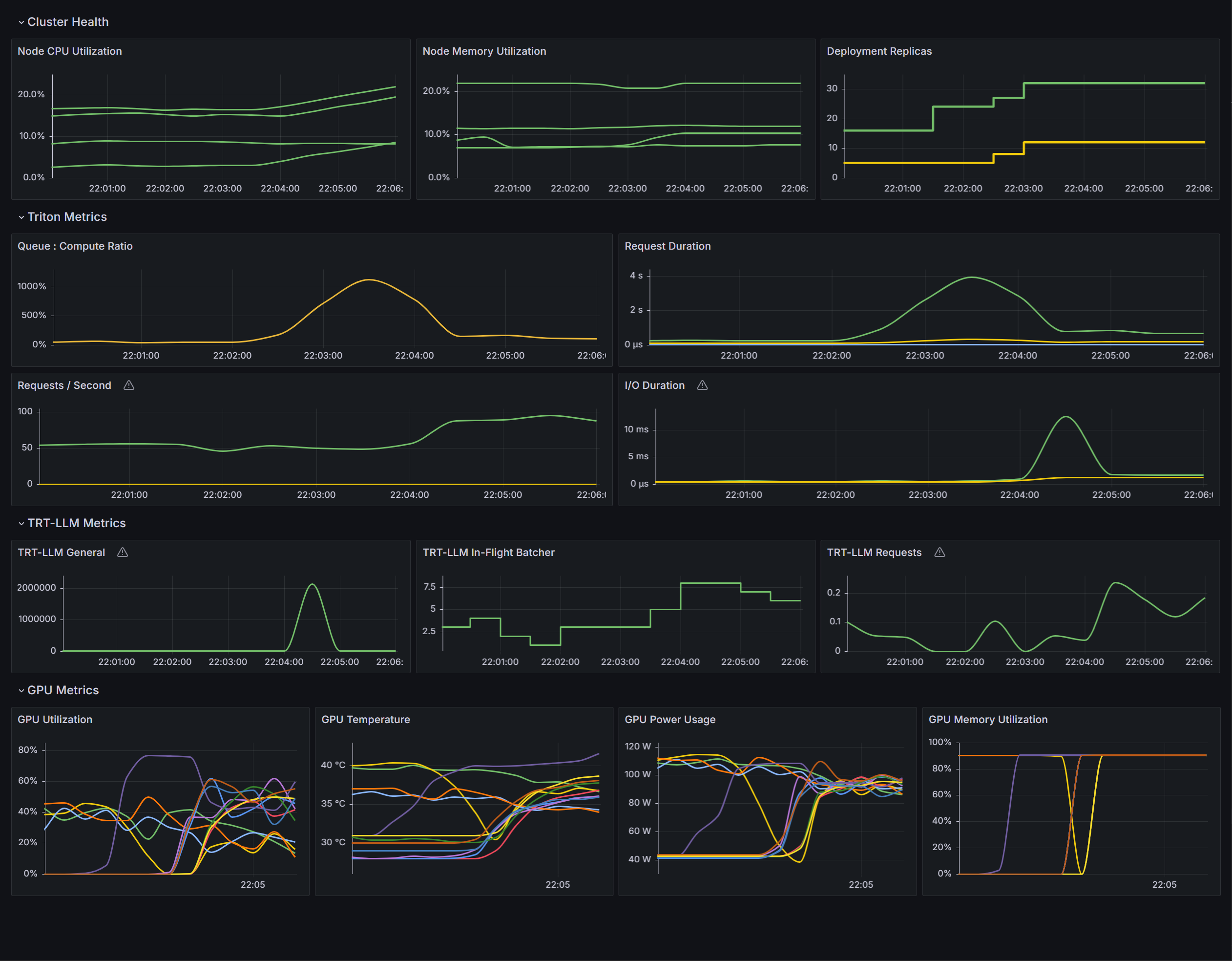
Below are two excellent examples of production-grade dashboards. Notice how they combine latency histograms, throughput gauges, and resource utilization charts into a single, dense view.
3. Integrating Cost and Quality Panels
While Grafana excels at time-series data, it's not inherently designed to track application-level concepts like cost or qualitative feedback. For this, we often turn to specialized LLM Observability platforms. These tools integrate with your application code to capture rich, request-level context.
Langfuse is a powerful open-source example. It captures detailed traces of every LLM interaction, enabling sophisticated dashboards for our final two pillars.
10 min Walkthrough of Langfuse – Open Source LLM Observability, Evaluation, and Prompt Management
This "10 min Walkthrough of Langfuse" showcases how a dedicated LLM observability tool can provide insights beyond what Prometheus can offer.
Focus on how it addresses our cost and quality requirements: Overview Dashboard: Note the prominent placement of cost breakdowns and quality metrics alongside latency. Tracing: See how traces provide the granular data (model, token counts, user ID) needed to calculate cost per request. Evaluation & Quality: This is key. Observe how it collects user feedback and LLM-as-a-judge scores, and then plots these quality metrics on the dashboard over time.
By integrating such a tool, you can create panels that answer questions like:
- "Did the drop in P99 latency after the last deployment correlate with an increase in positive user feedback?"
- "Which model is responsible for the majority of our costs this month?"
4. Assembling a High-Signal Dashboard
A great dashboard isn't just a collection of charts; it's a carefully organized tool designed for quick problem diagnosis. The article from Rost Glukhov (LINK) suggests an effective layout for on-call engineers:
-
Row 1: User Experience
- Panels: E2E Latency (P95/P99), TTFT (P95/P99), Error Rate, Quality Score Avg.
- Purpose: Is the user having a good experience right now?
-
Row 2: Throughput & Cost
- Panels: Tokens/Second (Prompt & Generation), Requests/Second, Total Cost (Today), Avg. Cost/Request.
- Purpose: What is the current load on the system and how much is it costing us?
-
Row 3: System Saturation & Resources
- Panels: GPU Utilization, GPU Memory Usage, KV Cache Usage, Queue Depth.
- Purpose: Are we approaching a resource limit? This row provides leading indicators for future problems.
This structure allows an engineer to quickly move from identifying a symptom (e.g., high latency in Row 1) to finding a cause (e.g., high KV cache usage in Row 3).
Conclusion
In this lesson, you've learned how to design and configure a comprehensive monitoring dashboard that provides a 360-degree view of an LLM service's health. You now understand how to combine general-purpose monitoring tools with LLM-specific ones to create a truly effective observability solution.
Key Takeaways:
- A comprehensive LLM dashboard should integrate four pillars: Latency, Throughput/GPU, Cost, and Quality.
- Prometheus and Grafana are the industry standard for monitoring system-level metrics like latency, token throughput, and GPU utilization.
- LLM-specific metrics like TTFT, tokens/second, and KV cache usage are critical additions to a standard dashboard.
- Specialized open-source tools like Langfuse are invaluable for tracking and visualizing application-contextual data like cost breakdowns and quality evaluations.
- The most effective dashboards are organized by signal type (e.g., user experience, system saturation) to streamline incident diagnosis.
In this lesson, we designed the structure of a comprehensive dashboard and saw how to visualize metrics from different sources. In our next lesson, we will focus on the 'cost' pillar in more detail. You will learn how to track per-request token usage to compute cost-per-request and cost-per-thousand-tokens metrics, which provides the raw data needed for the cost panels we discussed today.