Recommended resources
The freely available resources this lesson will direct you to.
Hello! In our last lesson, we explored how to build comprehensive dashboards to visualize the performance, resource usage, cost, and quality of our LLM services. These dashboards are essential for human operators to monitor system health. Now, let's take the next logical step: automating the response to poor performance.
Today, we will focus on configuring an automated rollback in your CI/CD pipeline that is triggered by an evaluation gate failure. Instead of just visualizing metrics for a human to interpret, we will use those same metrics to programmatically decide if a new model version is safe to promote. If it fails our automated checks, the system will automatically revert to the last known good version, protecting your users from a faulty deployment. This is a core principle of modern release engineering and a critical skill for an LLM Ops engineer.
We will use Argo Rollouts, a powerful Kubernetes-native tool, to implement this automated safety net.
1. From Manual Monitoring to Automated Rollbacks
In a traditional setup, an on-call engineer might notice a spike in latency on a Grafana dashboard, investigate the cause, and manually initiate a rollback. This process is reactive and depends on human availability and speed.
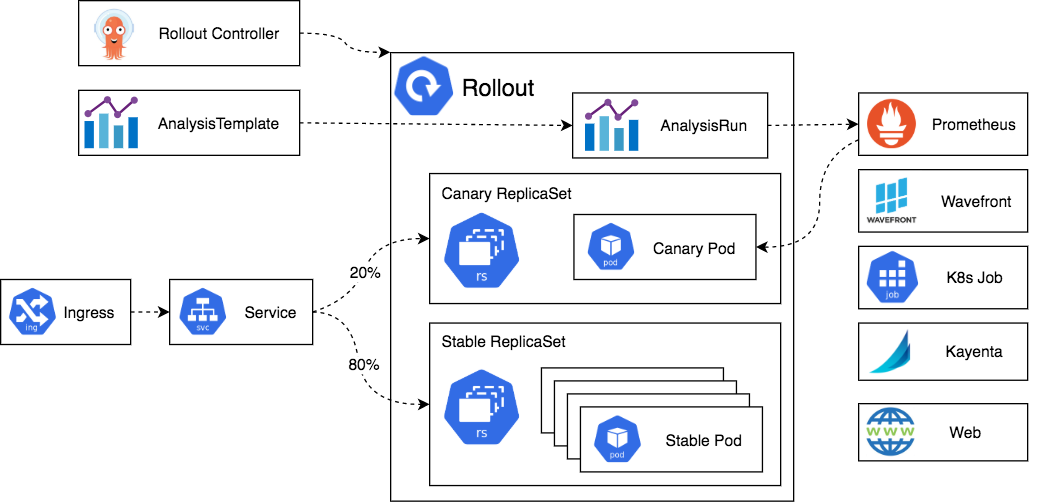
Progressive delivery tools like Argo Rollouts allow us to codify this decision-making process. They enhance standard Kubernetes Deployment objects with advanced strategies (like canary or blue-green) and, crucially, integrate analysis directly into the deployment lifecycle.
To understand the core idea, let's start with a short video that introduces Argo Rollouts and contrasts it with other tools you might know, like Argo CD.
This video, "Argo Rollouts in 15 minutes!", provides an excellent overview of the tool's purpose and functionality.
Watch the following segments to grasp the fundamentals: Argo CD vs. Argo Rollouts: This explains the unique role of Argo Rollouts in managing the process of a release, not just the state of manifests. Typical Canary Rollout: See a visualization of how traffic is progressively shifted. Metrics and Analysis: This part is key. It explains how Argo Rollouts hooks into observability tools like Prometheus to automate the promotion or rollback decision.
The key takeaway is that Argo Rollouts combines traffic shifting with metric analysis. This combination is what enables automated rollbacks.
2. Defining the Evaluation Gate: The AnalysisTemplate
The "evaluation gate" is the set of criteria a new model version must meet to be considered healthy. In Argo Rollouts, this is defined in an AnalysisTemplate or ClusterAnalysisTemplate Custom Resource Definition (CRD).
An AnalysisTemplate specifies:
- Metrics: What to measure (e.g., latency, error rate, token quality).
- Provider: Where to get the metrics from (e.g., Prometheus, a custom webhook, a Kubernetes job).
- Conditions: The thresholds for success and failure.
- Limits: How many failures are tolerated before the entire analysis is considered failed.
This is the heart of our automated rollback mechanism.
Progressive Deployment Using Argo Rollouts | by Neehara Govinda N
This article by Neehara Govinda N provides clear, commented YAML examples for an AnalysisTemplate.
Focus on the sections "Analysis Template" and "Explanation of Key Components". You'll see two metrics being defined: success-rate: Measures the HTTP 2xx success rate of the canary. avg-req-duration: Measures the average request latency. Notice how each metric has a successCondition, failureCondition, provider (Prometheus), and a PromQL query. This is the direct implementation of an evaluation gate.
Let's look at the structure of a metric within an AnalysisTemplate. For an LLM, we might want to check for an error rate below 1%. Using the example from the article as a base, it would look something like this:
...
spec:
  metrics:
  - name: success-rate
    interval: 1m              # How often to run the query
    count: 5                  # How many times to run the query
    failureLimit: 2           # Abort the entire analysis after 2 failed measurements
    failureCondition: result[0] < 0.99  # Fail the measurement if success rate is below 99%
    provider:
      prometheus:
        address: http://prometheus.example.com:9090
        query: |
          sum(rate(http_requests_total{app="my-llm-app", service="canary", code!~"5.."}[2m])) /
          sum(rate(http_requests_total{app="my-llm-app", service="canary"}[2m]))
In this example, the analysis will query Prometheus every minute for five minutes. If the success rate dips below 99% on two of those measurements, the AnalysisRun will fail, triggering a rollback. Your experience with PromQL is directly applicable here for defining robust queries against LLM-specific metrics like vllm_e2e_request_latency_seconds_bucket or custom quality scores.
3. Orchestrating the Rollback: Rollout and AnalysisRun
With our evaluation gate defined in an AnalysisTemplate, the next step is to integrate it into our deployment process. This is done within the Rollout object itself.
The Rollout object's strategy section defines the steps of the deployment. You can interleave traffic-shifting steps (setWeight) with analysis steps (analysis).
This video provides a fantastic end-to-end demonstration.
Argo Rollouts - Canary Deployments Made Easy In Kubernetes
The video "Argo Rollouts - Canary Deployments Made Easy In Kubernetes" shows a complete workflow, including a live failure and rollback.
Please watch these key segments: Analysis Template: See another example of an AnalysisTemplate definition. The speaker explains the successCondition, failureLimit, and the Prometheus query. Rollout Strategy: This is crucial. Observe how the steps section of the Rollout definition includes setWeight, pause, and analysis blocks. The analysis block references the template we just saw. Live Rollback Demo: The speaker intentionally deploys a faulty version of the application. You will see Argo Rollouts detect the metric failures during the analysis phase and automatically abort the deployment, scaling the bad version down to zero. This is our learning outcome in action.
The magic happens when an analysis step is executed. Argo Rollouts creates an AnalysisRun object from your template. It then blocks the rollout and waits for the AnalysisRun to complete.
- If the
AnalysisRunis Successful, theRolloutproceeds to the next step. - If the
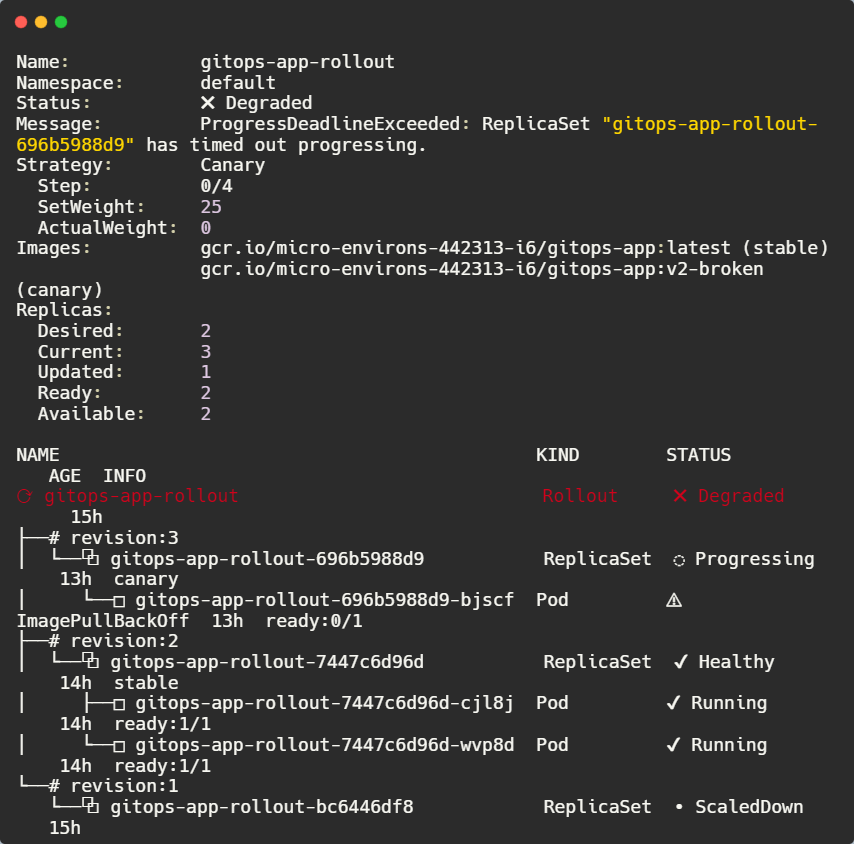
AnalysisRunis Failed, theRolloutis aborted and automatically rolled back to the previous stable version.
This "inline analysis" acts as a true synchronous gate in your deployment pipeline.
4. Putting It All Together
Let's review the complete workflow for an automated rollback triggered by a failed evaluation gate:
- A developer merges a change (e.g., a new model version) and a CI pipeline builds a new container image.
- The CD system (e.g., Argo CD) updates the
imagetag in theRolloutKubernetes manifest. - The Argo Rollouts controller detects the change and starts the canary process defined in
strategy.canary.steps. - It might first shift a small amount of traffic (e.g.,
setWeight: 10). - When it reaches an
analysisstep, it pauses the rollout and creates anAnalysisRun. - The
AnalysisRunbegins querying Prometheus for the metrics defined in theAnalysisTemplate(e.g., latency, error rate, quality score). - The new model version underperforms, causing the metrics to breach the
failureCondition(e.g.,result[0] < 0.99). - After exceeding the
failureLimit, theAnalysisRunis marked as Failed. - The Argo Rollouts controller sees the failed
AnalysisRun, marks theRolloutasDegraded, and immediately aborts the update. - It automatically scales the new, faulty
ReplicaSetdown to zero and shifts 100% of the traffic back to the previous, stableReplicaSet.
This entire process happens automatically, preventing a faulty model from ever reaching a majority of your users.
Conclusion
In this lesson, you've learned how to move beyond simple monitoring and implement a robust, automated safety mechanism for your LLM deployments. By combining the declarative nature of Kubernetes with the intelligent analysis capabilities of Argo Rollouts, you can build evaluation gates that automatically protect your production environment.
Key Takeaways:
- Argo Rollouts is a Kubernetes controller that enables progressive delivery with integrated metric analysis.
- The
AnalysisTemplateis where you define your "evaluation gate," specifying metrics, query providers (like Prometheus), and success/failure conditions. - The
Rolloutobject orchestrates the deployment by executingstepsthat can include both traffic shifting (setWeight) and metric validation (analysis). - A failed
AnalysisRunduring an inline analysis step will automatically trigger an abort and rollback of the deployment, a core pattern for release engineering.
We've focused today on evaluation gates that run during a progressive deployment. However, some issues might only surface after a model is exposed to 100% of production traffic for an extended period. In our next lesson, we will address this by learning how to configure automated rollbacks triggered by live monitoring SLO violations, providing a safety net not just during deployment, but throughout the entire lifecycle of a release.