Recommended resources
The freely available resources this lesson will direct you to.
- Argo Rollouts - Canary Deployments Made Easy In Kuberneteswww.youtube.com
- Kubernetes CI/CD: Build a Pipeline (ArgoCD + Github Actions)www.youtube.com
- Building a Production ML Inference Stack with KServe, vLLM, and ...timderzhavets.com
- Implementing Production-Grade Progressive Delivery with ... - Mediummedium.com
Welcome back. In our previous lesson, you successfully implemented an automated evaluation gate within a Jenkins CI pipeline. That gate is our first line of defense, ensuring that any new model version meets a minimum quality and performance bar before it's even considered for deployment.
Now, we'll build the next critical link in the chain. Your goal for this lesson is to build the full CI/CD pipeline that deploys model updates through canary stages in Kubernetes. We will connect your CI process to a Continuous Delivery (CD) system, automating the path from a passing evaluation to a safe, gradual rollout in a production-like environment. This is where your deep expertise in Kubernetes and infrastructure automation will come to the forefront as we orchestrate a sophisticated deployment strategy.
1. The GitOps Model: A Declarative Approach to CD
In our Jenkins pipeline, it might seem tempting to add a kubectl apply command to deploy the new model directly. However, this imperative approach has drawbacks: it makes the cluster state dependent on pipeline history, lacks a clear audit trail, and can lead to configuration drift.
A more robust, production-grade pattern is GitOps. Here, a Git repository becomes the single source of truth for the desired state of your Kubernetes cluster.
- CI Pipeline (e.g., Jenkins): Responsible for building, testing, and validating artifacts. If validation passes, its final job is to update a configuration file (e.g., a YAML manifest) in a dedicated GitOps repository.
- CD Tool (e.g., Argo CD): Runs inside the cluster, continuously monitoring the GitOps repository. When it detects a change, it automatically synchronizes the cluster to match the new desired state.
This separation of concerns is fundamental to modern SRE and DevOps practices. It provides a declarative, auditable, and self-healing deployment mechanism.
The following video provides an excellent overview of this architecture, using GitHub Actions for CI and Argo CD for CD. We will adapt this model for our Jenkins-based pipeline.
Kubernetes CI/CD: Build a Pipeline (ArgoCD + Github Actions)
Watch the introductory modules of "Kubernetes CI/CD: Build a Pipeline (ArgoCD + Github Actions)" from Rayan Labs to understand the relationship between the application repo, the GitOps repo, and the two phases of the pipeline.
Focus on these concepts: Architecture Overview: Pay attention to the distinction between the CI part (updating the GitOps repo) and the CD part (Argo CD syncing the cluster). Repo Setup and Workflow: This section clearly explains how a change in the application code triggers a build, which in turn updates a deployment.yaml in the GitOps repo, kicking off the CD process.
2. Progressive Delivery with Argo Rollouts
Standard Kubernetes Deployments offer a basic rolling update strategy, which is often too risky for mission-critical services like LLM inference endpoints. A bug in a new model could impact all users as pods are replaced.
We need a more intelligent strategy. Progressive delivery, specifically canary deployments, allows us to expose a new model version to a small subset of live traffic first. We can analyze its performance and quality in a real-world setting before gradually rolling it out to everyone.
Argo Rollouts is a Kubernetes controller that replaces the standard Deployment object with an advanced Rollout custom resource, enabling strategies like canary and blue-green.
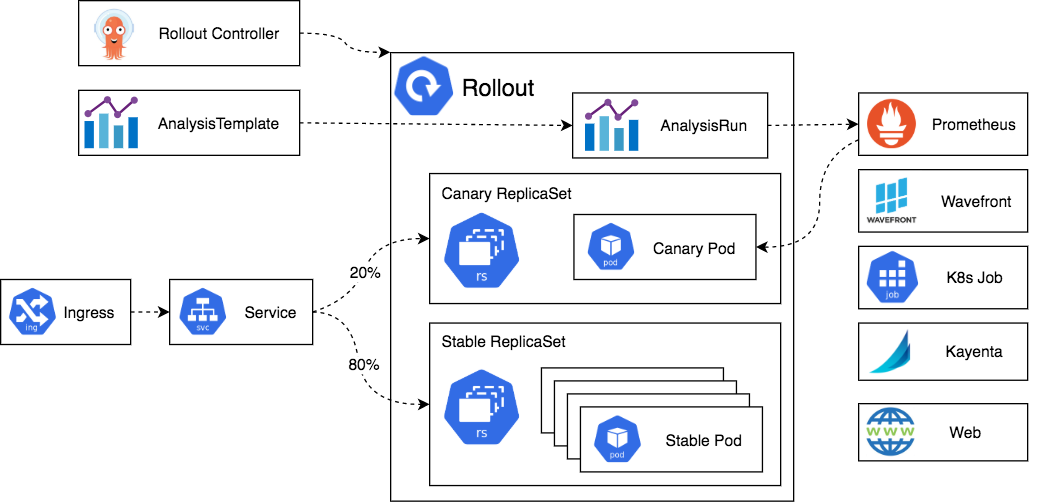
To get a practical feel for how Argo Rollouts works, let's watch a demonstration.
Argo Rollouts - Canary Deployments Made Easy In Kubernetes
This video, "Argo Rollouts - Canary Deployments Made Easy In Kubernetes," provides a clear, hands-on demonstration.
As you watch, note the key components we will be building: Introduction to Argo Rollouts: Understand its purpose as a tool for progressive delivery. The Rollout Definition: Observe how the Rollout manifest is structured. Pay close attention to the strategy.canary.steps, where the traffic shifting and pause durations are defined. This is the heart of our canary plan. Recap of Configuration: This summary reinforces that the main change is swapping a Deployment for a Rollout and defining the strategy.
3. Configuring the Full Canary Deployment Strategy
To implement a canary release for our LLM, we need to define three key sets of resources in our GitOps repository. These are explained in depth in the article "Implementing Production-Grade Progressive Delivery" (resource LINK).
A. The Rollout Resource
This resource defines the what and how of our deployment. It looks similar to a standard Deployment but includes a strategy block that specifies the canary steps.
# GitOps Repo: manifests/llm-rollout.yaml
apiVersion: argoproj.io/v1alpha1
kind: Rollout
metadata:
  name: llm-inference-app
spec:
  replicas: 5
  selector:
    matchLabels:
      app: llm-inference-app
  template: # Pod template
    metadata:
      labels:
        app: llm-inference-app
    spec:
      containers:
      - name: llm-server


        # The image tag is what our CI pipeline will update
        image: your-registry/llm-model:v1.0.0
        ports:
        - containerPort: 8000
  strategy:
    canary:


      # These services are used to route traffic to stable vs. canary pods
      stableService: llm-inference-stable
      canaryService: llm-inference-canary
      trafficRouting:
        istio:
          virtualService:
            name: llm-inference-vs # The Istio VirtualService to manage
            routes:
            - primary
      steps:
      - setWeight: 10 # 1. Shift 10% of traffic to the new version
      - pause: {duration: 5m} # 2. Pause for 5 minutes for analysis
      - setWeight: 50 # 3. Shift 50% of traffic
      - pause: {duration: 5m} # 4. Pause for another 5 minutes


      # If all steps pass, the new version is fully promoted.
In this configuration, when a new image tag is applied, Argo Rollouts will:
- Deploy a new set of pods with the new image.
- Instruct Istio to send 10% of traffic to them.
- Pause for 5 minutes, during which it runs automated analysis.
- If the analysis passes, it proceeds to the 50% step and repeats.
- If analysis fails at any point, it automatically rolls back by setting the canary weight to 0.
B. The AnalysisTemplate
This resource defines how to measure if the canary is healthy. It contains queries that Argo Rollouts will execute against a metrics provider like Prometheus. This is our automated SLO-based validation.
# GitOps Repo: manifests/analysis-template.yaml
apiVersion: argoproj.io/v1alpha1
kind: AnalysisTemplate
metadata:
  name: llm-inference-metrics
spec:
  args:
  - name: service-name
  metrics:
  - name: success-rate
    interval: 1m


    # Fail if success rate is below 99.5% for 3 consecutive checks
    successCondition: result[0] >= 0.995
    failureLimit: 1
    provider:
      prometheus:
        address: http://prometheus.monitoring.svc:9090
        query: |
          sum(rate(istio_requests_total{
            reporter="destination",
            destination_service_name=~"{{args.service-name}}",
            response_code!~"5.*"}[1m]))
          /
          sum(rate(istio_requests_total{
            reporter="destination",
            destination_service_name=~"{{args.service-name}}"}[1m]))
  - name: p99-latency
    interval: 1m


    # Fail if p99 latency exceeds 500ms
    successCondition: result[0] <= 500
    failureLimit: 1
    provider:
      prometheus:
        address: http://prometheus.monitoring.svc:9090
        query: |
          histogram_quantile(0.99, sum(rate(istio_request_duration_milliseconds_bucket{
            reporter="destination",
            destination_service_name=~"{{args.service-name}}"}[1m])) by (le))
This template defines two checks: one for request success rate and another for 99th percentile latency. The Rollout resource will reference this template to perform its analysis during the pause steps.
C. The Argo CD Application
Finally, this resource tells Argo CD to monitor our GitOps repository and apply its contents to the cluster.
# Deployed once to the cluster to bootstrap the process
apiVersion: argoproj.io/v1alpha1
kind: Application
metadata:
  name: llm-inference-app
  namespace: argocd
spec:
  project: default
  source:
    repoURL: 'https://github.com/your-org/llm-gitops-repo.git'
    targetRevision: main
    path: manifests # Directory within the repo to sync
  destination:
    server: 'https://kubernetes.default.svc'
    namespace: llm-serving
  syncPolicy:
    automated:
      prune: true
      selfHeal: true
4. Updating the Jenkins Pipeline for Continuous Delivery
Now, let's connect our CI pipeline to this GitOps workflow. We'll add a final Deploy stage to the Jenkinsfile from our last lesson. This stage will only execute if the Quality Gate stage passes.
Updated Jenkinsfile
pipeline {
    agent { /* ... Same as before ... */ }
    environment { /* ... Same as before ... */ }

    stages {
        stage('Checkout') { /* ... Same as before ... */ }
        stage('Run LLM Evaluation') { /* ... Same as before ... */ }
        stage('Quality Gate') { /* ... Same as before ... */ }

        // NEW STAGE: This only runs if the Quality Gate passes
        stage('Deploy to Production') {
            steps {
                script {
                    // This assumes the GitOps repo SSH key is stored as a Jenkins credential
                    withCredentials([sshUserPrivateKey(credentialsId: 'gitops-repo-key', keyFileVariable: 'GITOPS_KEY')]) {
                        sh '''
                            echo "Evaluation passed. Preparing for canary deployment."


                            # Configure Git to use the SSH key
                            git config --global core.sshCommand "ssh -i ${GITOPS_KEY} -o StrictHostKeyChecking=no"


                            # Clone the GitOps repository into a temporary directory
                            git clone git@github.com:your-org/llm-gitops-repo.git /tmp/gitops


                            # Use a tool like 'yq' to update the image tag in the Rollout manifest
                            # We assume yq is installed in the Jenkins agent or a custom Docker image
                            # The NEW_IMAGE_TAG would be a variable, e.g., from the build number
                            NEW_IMAGE_TAG="v1.1.${BUILD_NUMBER}"
                            yq e '.spec.template.spec.containers[0].image = "your-registry/llm-model:'${NEW_IMAGE_TAG}'"' -i /tmp/gitops/manifests/llm-rollout.yaml

                            cd /tmp/gitops


                            # Commit and push the change
                            git config user.email "jenkins-ci@your-org.com"
                            git config user.name "Jenkins CI"
                            git add .
                            git commit -m "Deploy new LLM version: ${NEW_IMAGE_TAG}"
                            git push origin main

                            echo "Pushed update to GitOps repo. Argo CD will now trigger the canary rollout."
                        '''
                    }
                }
            }
        }
    }

    post { /* ... Same as before ... */ }
}
This new Deploy to Production stage automates the final step. Upon a successful evaluation, it:
- Clones the GitOps repository.
- Programmatically updates the
imagetag in thellm-rollout.yamlfile. - Commits and pushes the change.
This push is the trigger. Argo CD detects the commit, syncs the updated Rollout manifest to Kubernetes, and Argo Rollouts takes over to execute the safe, automated canary deployment.
You can see this entire automated rollback process demonstrated in the video "Argo Rollouts - Canary Deployments Made Easy In Kubernetes" between
Conclusion
Congratulations! You have now designed a complete, end-to-end CI/CD pipeline for deploying LLM updates. By combining a CI-driven evaluation gate with a GitOps-driven progressive delivery system, you have an automated, safe, and auditable process for shipping new model versions.
Key Takeaways:
- GitOps provides a robust, declarative model for managing Kubernetes deployments, using a Git repo as the single source of truth.
- Argo CD is the CD agent that synchronizes the cluster state with the GitOps repository.
- Argo Rollouts enhances Kubernetes with advanced deployment strategies like canaries, using a
RolloutCRD to define traffic shifting steps and automated analysis. - An
AnalysisTemplatedefines the SLOs (e.g., success rate, latency) that a canary version must meet to be promoted. - The CI pipeline's role ends with a push to the GitOps repo, which triggers the entire CD process.
In the next lesson, we will focus on observability. Now that we have a pipeline that deploys and analyzes models, we need to see what's happening. We will learn how to configure a comprehensive monitoring dashboard that integrates latency, cost, GPU, and quality panels, giving us the visibility needed to operate this system effectively.