Recommended resources
The freely available resources this lesson will direct you to.
- Intents & Intent Filters - Android Basics 2023www.youtube.com
- Can Intent Flags Override Launch Modes? Android Activity Behavior Explained! - Part 8www.youtube.com
- Intents and intent filters | App architecturedeveloper.android.com
- Common intents | App architecture | Android Developersdeveloper.android.com
Hello! Last lesson, you traced how a manifest declaration and intent filter make a component available for an implicit request. Now you will build the request itself. An Intent has two audiences: Android uses some of its fields to choose a destination, while the receiving component uses others to carry out the requested operation. Keeping those roles separate is the key to constructing Intents that behave predictably.
In about 40 minutes, you will build explicit and implicit Intents in Kotlin, choose URI and MIME data correctly, add categories and typed extras, and use flags without confusing them with payload data.
An Intent names a destination or describes a job
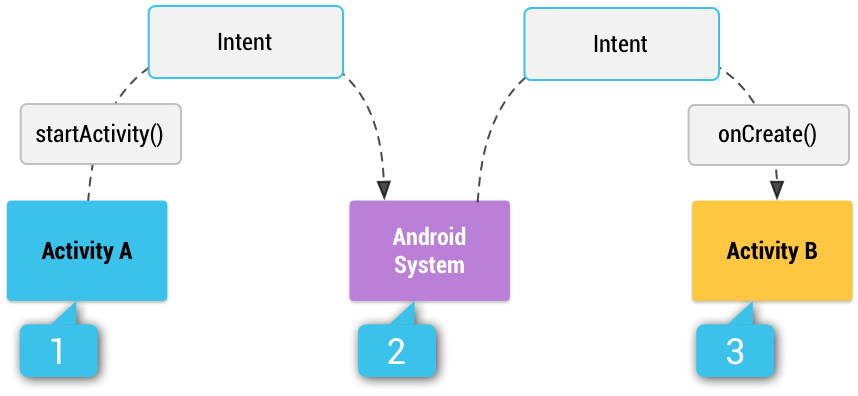
An explicit Intent names a component. An implicit Intent leaves the component unspecified and describes a job—typically with an action and data—so Android can find an eligible Activity. The diagram shows the implicit case: Activity A passes its Intent to startActivity(), and the system selects and starts Activity B.
Watch two portions of Philipp Lackner’s Intents & Intent Filters - Android Basics 2023. The first constructs an explicit Activity launch; the second introduces implicit requests. Focus on what the caller puts into the Intent, rather than revisiting the receiving filters from last lesson.
Intents & Intent Filters - Android Basics 2023
Watch Philipp Lackner’s “Intents & Intent Filters - Android Basics 2023” for Kotlin examples of both ways to construct an Intent.
Watch explicit launches for the named-component case. Then skip to implicit requests and track the action, data, and other values added before launch. We will distinguish extras from flags precisely below.
For the field definitions and an important URI/MIME pitfall, read the indicated parts of Android Developers’ Intents and intent filters. This is a reference to consult alongside the examples, not a request to read the entire guide.
Intents and intent filters | App architecture
Read Android Developers’ “Intents and intent filters” to pin down which fields identify a handler and which carry information for it.
In “Building an intent,” read component through data, including the “Component name,” “Action,” and “Data” entries. Continue through the “Category” entry, beginning at its definition, and stop before the paragraph beginning “These properties listed above.” Then read the “Extras” material, beginning with putExtra and continuing through the caution about cross-app Parcelable and Serializable values. Pay particular attention to why setDataAndType() exists.
A useful working distinction is:
| Field | Main purpose |
|---|---|
| Component | Names the recipient; makes the Intent explicit. |
| Action, data URI, MIME type, categories | Describe an implicit request for matching. |
| Extras | Carry values the chosen recipient needs; they do not select a handler. |
| Flags | Modify how Android performs the operation, such as launch behavior or a temporary URI access grant. |
An explicit Intent can still have an action, data, and extras. Naming the component means Android does not need an intent-filter match to select it.
Build an explicit Intent around a small contract
Suppose the internal EditorActivity from last lesson opens a document identified by a database ID. The caller knows exactly which Activity should open, so use the constructor that supplies its class:
private const val EXTRA_DOCUMENT_ID =
    "com.example.reader.extra.DOCUMENT_ID"

fun Activity.openDocumentEditor(documentId: Long) {
    require(documentId > 0L)

    val editIntent = Intent(this, EditorActivity::class.java).apply {
        putExtra(EXTRA_DOCUMENT_ID, documentId)
    }
    startActivity(editIntent)
}
Intent(this, EditorActivity::class.java) supplies the component. The extra supplies a Long value, not a string representation of the ID. Namespacing your own key reduces collisions when Intents pass between components. Because the destination is named, EditorActivity does not need an intent filter; it can remain non-exported while your app launches it internally.
The receiver must use the same key and expected type. For a positive-ID contract, it can reject a missing or invalid value:
override fun onCreate(savedInstanceState: Bundle?) {
    super.onCreate(savedInstanceState)

    val documentId = intent.getLongExtra(EXTRA_DOCUMENT_ID, -1L)
    if (documentId <= 0L) {
        finish()
        return
    }

    // Load the document identified by documentId.
}
putExtra() is overloaded: the Kotlin value you pass determines the stored type. Agreeing on a key alone is insufficient; sender and receiver must also agree on its type and meaning. Do not pass an entire mutable document merely because it could be made parcelable when a stable ID lets the destination load authoritative data. For cross-app Intents, prefer framework-defined keys and interoperable values; another app generally cannot rely on your app’s custom parcelable class being available.
Build an implicit Intent around the receiving contract
Now suppose the user wants to share selected text. Your app does not choose a particular receiving Activity. Instead, it states the operation and the type of content:
fun shareText(text: String): Intent =
    Intent(Intent.ACTION_SEND).apply {
        type = "text/plain"
        putExtra(Intent.EXTRA_TEXT, text)
    }
This construction matters in two different ways. ACTION_SEND and "text/plain" help Android find Activities whose filters accept that operation and MIME type. EXTRA_TEXT is the actual text the selected Activity will read. Putting text in an extra does not replace setting the MIME type: the extra is payload, not the data test for filter matching. Nor should the caller normally add CATEGORY_DEFAULT here; as you saw last lesson, Android applies that category when matching an implicit startActivity() request.
For a URI-based operation, the URI belongs in the Intent’s data field when the action’s contract calls for it. If you must specify both a URI and its MIME type, set them together:
fun viewPdf(pdfUri: Uri): Intent =
    Intent(Intent.ACTION_VIEW).apply {
        setDataAndType(pdfUri, "application/pdf")
    }
The parameter is a Uri, not an arbitrary path string, and "application/pdf" tells potential handlers what they would open. A subtle API trap is that assigning data and then assigning type separately does not retain both: each setter clears the other field. setDataAndType() preserves the pair. A content: URI also needs appropriate access arrangements before another app can read it; we will address secure file sharing in the provider module.
The distinction is not “explicit Intents have extras; implicit Intents have data.” Either kind can carry extras. Instead, follow the operation’s contract: a share request places text in EXTRA_TEXT, while a view request commonly identifies the item with a data URI.
Categories narrow requests; flags change their handling
Most caller-created Activity Intents need no manually added category. Add one when the operation specifically requires it. For example, an image-selection request can ask for content available as an openable stream:
val selectImages = Intent(Intent.ACTION_GET_CONTENT).apply {
    type = "image/*"
    addCategory(Intent.CATEGORY_OPENABLE)
    putExtra(Intent.EXTRA_ALLOW_MULTIPLE, true)
}
Here, CATEGORY_OPENABLE qualifies which handlers can satisfy the request. "image/*" specifies the requested MIME family. EXTRA_ALLOW_MULTIPLE is a Boolean instruction to the selected handler, not another category or a MIME type. This snippet only constructs the request; obtaining and handling selected results is covered later with the Activity Result APIs. Similarly, CATEGORY_BROWSABLE has a specific role in link-handling contracts; it is not a general “make this Intent work” switch.
A flag is different again. It tells Android how to handle a launch or grant, rather than supplying content for the recipient. For instance, when an Activity is started using an application Context instead of an Activity Context, the launch requires FLAG_ACTIVITY_NEW_TASK:
fun openEditorFromAppContext(appContext: Context) {
    val intent = Intent(appContext, EditorActivity::class.java).apply {
        addFlags(Intent.FLAG_ACTIVITY_NEW_TASK)
    }
    appContext.startActivity(intent)
}
Use an Activity Context for an ordinary UI-initiated launch when you have one. NEW_TASK is not permission to launch UI freely from the background, and its fuller back-stack effects belong to the tasks lesson. Another kind of flag, FLAG_GRANT_READ_URI_PERMISSION, can request a temporary read grant when passing an eligible content URI to another app; the URI and provider must also be set up to support that grant.
Use addFlags() when adding to flags already on an Intent. Setting flags or calling setFlags() replaces the existing flag set. Neither method puts a value in extras, and neither changes an implicit Intent’s MIME type or action.
Before launching any constructed Intent, check its contract in this order: Who should receive it? What action and data describe the job? Which extras will that recipient read, and with what types? Does a category or flag have a specific reason to be present? A well-formed implicit Intent may still have no installed handler; the next lesson deals with that runtime uncertainty.
Key takeaways
Name a component for an explicit Intent; leave it unnamed and supply a coherent action and data contract for an implicit one. Use the right storage place for each value: URI and MIME type for matching when the operation requires them, categories for additional qualifications, typed extras for recipient payload, and flags for Android’s handling behavior. When specifying both URI and MIME type, use setDataAndType().
Next, you will examine how Android resolves these implicit requests in practice—including package visibility—and handle the cases where zero, one, or several Activities can respond.