Recommended resources
The freely available resources this lesson will direct you to.
Hello! In the previous lesson, you chose a Context according to the operation’s UI needs and lifetime. Now consider what happens before a component has a context at all: Android must know that the component exists and, for some requests, whether it can handle a particular operation.
This lesson traces that decision from a manifest declaration to an intent filter match. You will distinguish being registered with the system, being discoverable for an implicit request, and being accessible to another app. Those distinctions matter whether you are adding a share target, exposing an entry screen, or keeping an internal component private.
The manifest registers components, not running objects
An Activity class in your source code is not yet an Activity the system can launch. The app’s built manifest must declare it under <application>. The same principle applies to services, manifest-registered broadcast receivers, and content providers. A declaration gives Android metadata about a component; it does not create an instance when the app is installed. The system creates or accesses a component when an appropriate request arrives.
Read the App manifest overview from Android Developers to establish what each declaration contributes.
App manifest overview | App architecture
Read this for the distinction between a component class and the manifest entry that makes it known to Android.
In “File features” → “App components,” begin with the four-item list of <activity>, <service>, <receiver>, and <provider>. Continue from component declarations, through the end of the following “Intent filters” subsection. Pay attention to what android:name identifies and to the different roles of a component declaration and its optional filters.
There is another practical wrinkle: the manifest you edit is not necessarily the entire manifest Android receives. Build variants and dependencies can contribute entries to a merged manifest. In Android Studio, inspect the Merged Manifest view when a component appears unexpectedly—or when a declaration you expect seems to have changed.
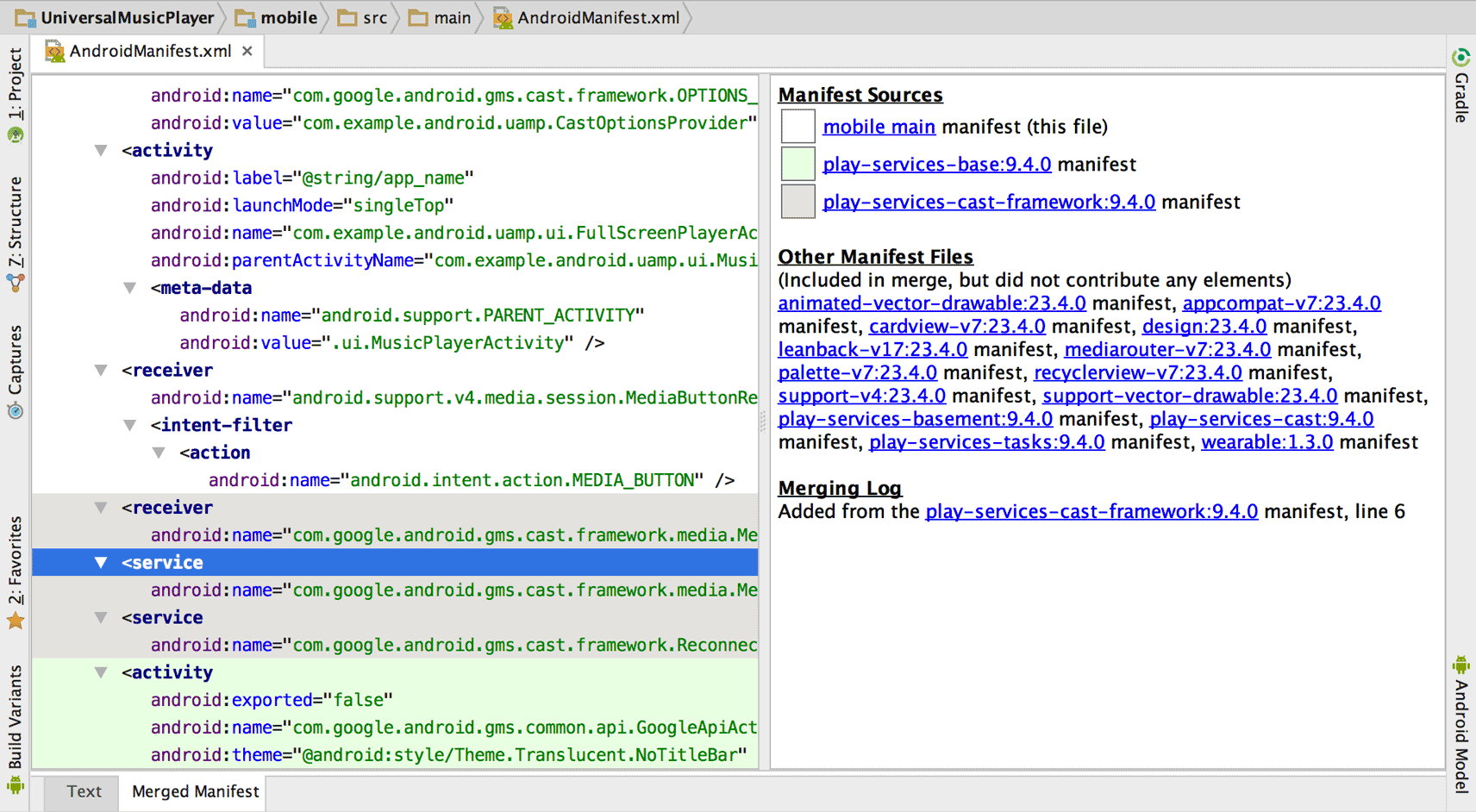
The image illustrates a diagnostic method, not a recommended configuration: it shows an older project and dependency names that need not resemble a current app. The useful question is, “Which source contributed this component, and what declaration ended up in the merged manifest?”
A filter advertises a capability
Suppose your app has an internal editor and a screen that can receive text shared from another app. Both screens need <activity> declarations. Only the share screen needs to advertise the kind of incoming request it can handle.
An explicit intent identifies a particular component. An implicit intent describes an operation and asks Android to find a suitable component. An <intent-filter> is the receiving component’s advertisement for implicit matching. It describes accepted combinations of:
- Action: what operation is requested, such as
android.intent.action.SEND. - Data: the URI and/or MIME type the component can handle.
- Categories: additional qualifications for the request.
The short demonstration below shows an app being added as an image-sharing target. Watch for the point at which declaring the filter changes which apps appear as possible recipients—not for the image-handling code, which is a separate concern.
Intents & Intent Filters - Android Basics 2023
Watch “Intents & Intent Filters - Android Basics 2023” by Philipp Lackner for a visual example of an incoming share request and the manifest filter used to advertise a handler.
Watch the share-target setup, from the proposal to receive an image shared from another app through the action, category, and MIME-type entries in the manifest. Focus on the receiving app’s declaration. One detail needs correction: for an Activity launched by an ordinary implicit startActivity() request, explicitly include android.intent.category.DEFAULT in its filter; do not rely on it being supplied to the filter automatically.
Here is a compact manifest to trace. Assume the app namespace is com.example.reader, so .ShareTextActivity names a class in that namespace.
<manifest xmlns:android="http://schemas.android.com/apk/res/android">
    <application>
        <activity
            android:name=".HomeActivity"
            android:exported="true">
            <intent-filter>
                <action android:name="android.intent.action.MAIN" />
                <category android:name="android.intent.category.LAUNCHER" />
            </intent-filter>
        </activity>

        <activity
            android:name=".ShareTextActivity"
            android:exported="true">
            <intent-filter>
                <action android:name="android.intent.action.SEND" />
                <category android:name="android.intent.category.DEFAULT" />
                <data android:mimeType="text/plain" />
            </intent-filter>
        </activity>

        <activity
            android:name=".EditorActivity"
            android:exported="false" />

        <service
            android:name=".UploadService"
            android:exported="false" />

        <receiver
            android:name=".RefreshReceiver"
            android:exported="false" />

        <provider
            android:name=".RecordsProvider"
            android:authorities="com.example.reader.records"
            android:exported="false" />
    </application>
</manifest>
HomeActivity advertises a launcher entry: launchers look for the pairing of MAIN and LAUNCHER. That filter is not the same as a general-purpose Activity filter with DEFAULT. ShareTextActivity advertises that it handles a SEND request carrying text/plain; it must actually implement that behavior when launched. EditorActivity has no filter, so it is not offered as a handler for implicit requests, but your app can still address it explicitly.
The service and receiver are declared so Android knows those components exist; neither advertises an implicit capability in this example. A manifest-registered receiver can have a filter for broadcasts, while a context-registered receiver—like the one in the previous lesson—is registered in code for a chosen period instead. A provider has a different discovery mechanism: clients address it through its authority and content URIs, not an Activity-style intent filter. We will examine each component’s communication rules in its dedicated module.
Trace an implicit request against a filter
Consider a caller that requests the SEND action with MIME type text/plain and asks Android to start an Activity. Android compares that request with installed Activity filters. ShareTextActivity is a candidate because its filter passes the relevant tests; merely finding its class in the manifest would not have been enough.
Read the Android Developers’ Intents and intent filters guide for the precise meaning of the filter and the rule for android:exported.
Intents and intent filters | App architecture
Read this to connect the manifest example to Android’s matching and external-access rules.
In “Receiving an implicit intent,” read filter declarations through the paragraph explaining that one component may have multiple filters. Focus on the android:exported warning, the Activity requirement for CATEGORY_DEFAULT, and why separate filters may be needed for separate jobs.
The three tests are easy to conflate, so trace them independently:
- Action: the request’s action must be accepted by the filter. A
SENDfilter does not become aVIEWfilter merely because both might involve text. - Category: every category being tested from the request must be present in the filter; the filter may declare additional categories. For an implicit Activity launch through
startActivity(), Android appliesCATEGORY_DEFAULTfor matching even when the caller did not add it explicitly. Thus a share Activity filter withoutDEFAULTis not an ordinary implicitstartActivity()candidate. - Data: both URI details and MIME type matter where specified. A request for
image/pngdoes not match the example’stext/plainfilter. A request with no data does not match simply because its action isSEND.
Read the matching rules rather than treating “has a matching action” as the whole algorithm.
Intents and intent filters | App architecture
Read this for the action, category, and data tests Android applies to an implicit request.
In “Intent resolution,” read the “Action test,” “Category test,” and “Data test” subsections. Follow the matching rules from the first action example through the numbered data rules, then read the immediately following note about a request containing a URI or MIME type when the filter has no <data> entry. Concentrate on which side supplies categories and on how a filter containing only a MIME type can match appropriate content data.
A filter is evaluated as a unit: the request must pass its action, category, and data tests. If a component has several filters, passing one complete filter is sufficient; you cannot take an action from one filter and a MIME type from another to manufacture a match. Conversely, placing several actions and several data specifications inside the same filter can advertise combinations you did not intend. Use separate filters when capabilities have meaningfully different accepted inputs.
Here is the manifest example traced from request to result:
| Incoming request | Relevant result |
|---|---|
A launcher looks for MAIN with LAUNCHER |
HomeActivity advertises that launcher entry. |
Another app starts an implicit Activity request for SEND, text/plain |
ShareTextActivity is a matching candidate, subject to normal resolution among all matching apps. |
Another app requests SEND, image/png |
ShareTextActivity does not match its text/plain filter. |
Your app explicitly names EditorActivity |
Its lack of a filter does not prevent an internal explicit launch. |
Another app explicitly names EditorActivity |
Its filter is irrelevant, but android:exported="false" prevents ordinary cross-app access. |
This traces candidate selection, not a promise that a particular matching Activity will always open: other apps may advertise the same capability, and user defaults or a selection UI can affect the result. We will study those resolution outcomes in a later lesson.
Discoverable is not the same as accessible—or safe
android:exported answers a different question from the intent filter: may another app invoke this component? In the example, ShareTextActivity is exported because receiving shares from other apps is its purpose. EditorActivity, UploadService, RefreshReceiver, and RecordsProvider are explicitly non-exported because this design does not offer them as cross-app entry points.
For apps targeting Android 12 or higher, an Activity, Service, or manifest receiver with an intent filter must explicitly specify android:exported; otherwise installation on Android 12 or higher fails. Declaring it explicitly for the other components as well makes the intended boundary easier to audit.
Crucially, an intent filter is not an authorization check. It guides implicit matching. If an Activity is exported, an external caller may address it explicitly without satisfying the advertised filter. The Activity must validate incoming actions, types, URIs, and other untrusted inputs before acting on them. If a component is internal, use android:exported="false" rather than relying on the absence or narrowness of a filter to protect it.
Finally, keep the direction of discovery straight. Your component’s filter advertises what your app receives. A <queries> declaration, when needed, concerns what your app can discover about other installed apps through package queries. It does not publish your component or replace its filter. We will revisit that distinction when examining package visibility and resolution results.
Key takeaways
A manifest declaration makes a component known to Android; an intent filter advertises which implicit requests it can handle; android:exported controls whether it is available for ordinary cross-app invocation. Trace all three separately. For an Activity request, test the filter’s action, categories—including the DEFAULT rule—and data as one complete match. Inspect the merged manifest when you need to know what was actually declared by the built app.
Next, you will construct Kotlin Intents yourself, supplying the action, data, categories, extras, and flags that become the other side of this matching conversation.