Recommended resources
The freely available resources this lesson will direct you to.
- Intents & Intent Filters - Android Basics 2023www.youtube.com
- #7 What are Intent filters in Android? | Android Intent filters Tutorialwww.youtube.com
- Intents and intent filters | App architecturedeveloper.android.com
- Fulfill common use cases while having limited package visibility | App architecture | Android Developersdeveloper.android.com
Hello! Last lesson, you built implicit Intents by specifying an action, data, MIME type, and any extras the recipient needs. The remaining question is what happens when you launch one: the Intent describes a job, but it does not guarantee that an eligible Activity exists—or that only one exists.
In this lesson, you will predict the matching result, choose when to let Android use a default and when to show a chooser, and distinguish launching another app from querying which apps are installed. That distinction matters on Android 11 and later.
Resolution starts with the receiving filters
For an implicit Activity launch, Android compares the request with eligible Activities’ intent filters. The core tests are action, categories, and data (the URI and MIME type). A candidate has to pass all applicable tests; extras such as EXTRA_TEXT are delivered to the chosen Activity but do not make its filter match.
Read the Intent resolution section of Android Developers’ Intents and intent filters. Follow its Action test, Category test, and Data test subsections. Pay particular attention to the direction of the category rule and to how a MIME-only filter treats a content: URI.
Intents and intent filters | App architecture
Android Developers gives the precise matching rules behind the Intents you constructed last lesson.
In “Intent resolution,” begin where the guide says Android searches for the best Activity. Read the matching rules through the MIME-only filter example near the end of “Data test.” Stop before the subsequent example of a filter with both a scheme and a data type. Focus on why a plausible-looking filter can still fail one of the three tests.
Consider the text-share request from last lesson:
val request = Intent(Intent.ACTION_SEND).apply {
    type = "text/plain"
    putExtra(Intent.EXTRA_TEXT, "A passage worth sharing")
}
Suppose installed Activities advertise these filters:
| Activity | Action | Categories | MIME type |
|---|---|---|---|
| A | SEND |
DEFAULT |
text/plain |
| B | SEND |
DEFAULT |
image/* |
| C | SEND |
BROWSABLE |
text/plain |
| D | SEND |
DEFAULT |
text/plain |
A and D are candidates. B fails the data test: this request is plain text, not an image. C has the right action and type but lacks CATEGORY_DEFAULT. For an implicit startActivity() call, Android requires that category in a receiving filter even though you did not explicitly add it to request.
Categories are not a requirement for identical category sets. Every category required by the Intent must be supported by the filter; a filter may declare additional categories. Likewise, a filter accepting text/plain does not become eligible merely because the Intent carries text in EXTRA_TEXT: the request’s MIME type is what participates in the data test.
Zero, one, or several eligible Activities
Once Android has identified eligible handlers, the practical outcomes differ:
- Zero: A direct
startActivity(request)cannot launch a handler and can throwActivityNotFoundException. The caller needs a useful fallback. - One: Android can launch that Activity directly.
- Several: Android can offer a selection UI, but do not assume that a dialog must appear. User defaults and platform handling can determine the destination without a fresh choice each time.
Read the guide’s Example implicit intent and Forcing an app chooser sections for the distinction between ordinary resolution and deliberately asking the user to choose.
Intents and intent filters | App architecture
This portion of the Android Developers guide connects matching results to the UI the user sees.
In “Example implicit intent,” read the launch outcomes. Then, in “Forcing an app chooser,” read the chooser guidance and the immediately following paragraph introducing createChooser(). Notice why sharing differs from repeatedly opening a web page.
The pictured share UI illustrates the choice a user may be offered. Its particular apps and appearance are not part of the Intent contract; they depend on the device and Android version.
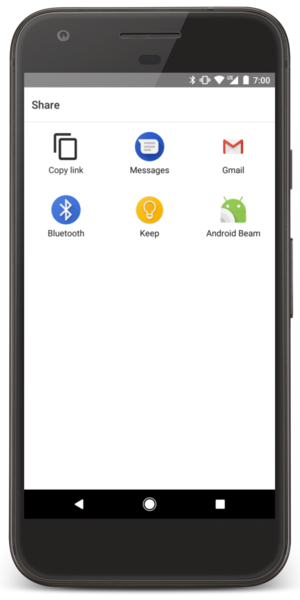
For an operation such as sharing, the user may want a different destination each time. Wrap the original request in Intent.createChooser() to explicitly offer that choice:
fun Activity.shareText(
    text: String,
    onLaunchUnavailable: () -> Unit
) {
    val request = Intent(Intent.ACTION_SEND).apply {
        type = "text/plain"
        putExtra(Intent.EXTRA_TEXT, text)
    }

    val chooser = Intent.createChooser(request, "Share with")
    try {
        startActivity(chooser)
    } catch (_: ActivityNotFoundException) {
        onLaunchUnavailable()
    }
}
For a normal link-opening operation, by contrast, a browser or another suitable app may already be the user’s preferred destination. A direct launch respects Android’s resolution behavior:
fun Activity.openLink(
    uri: Uri,
    onNoHandler: () -> Unit
) {
    val request = Intent(Intent.ACTION_VIEW, uri)

    try {
        startActivity(request)
    } catch (_: ActivityNotFoundException) {
        onNoHandler()
    }
}
The fallback could keep the user on the current screen and explain that no suitable app is available. A chooser is not a substitute for thinking through the zero-handler case: launching chooser UI does not prove that a recipient ultimately opened the content, and startActivity() does not report that the user completed a share.
Package visibility changes inspection, not the basic launch pattern
It is tempting to write if (request.resolveActivity(packageManager) != null) startActivity(request) and treat the check as a safety guarantee. On Android 11 and later, for apps targeting API 30 or higher, that reasoning has a gap: PackageManager discovery results are subject to package visibility limits. A query can show fewer apps than the system can launch for your Intent.
Read Android Developers’ Fulfill common use cases while having limited package visibility, from its introduction through the Open URLs guidance. Separate the advice about attempting a launch from the advice about inspecting available apps.
Android Developers explains why a failed discovery query is not the same thing as a failed Activity launch.
Start in the introduction at the launch guidance. Continue into “Open URLs,” especially “Open URLs in a browser or other app,” where the visibility distinction is made. Finish with “Check whether a browser is available” to see when declaring a query is appropriate and why even browser-query results need careful interpretation.
If your feature only needs to open another app, attempt the launch and handle ActivityNotFoundException. You do not need a broad installed-app inventory as a precondition. The link-opening function above follows that pattern.
If your UI genuinely needs advance knowledge—for example, to display available text-share handlers—declare a narrowly scoped visibility query in your manifest. This element belongs directly under <manifest>, not inside <application>:
<queries>
    <intent>
        <action android:name="android.intent.action.SEND" />
        <data android:mimeType="text/plain" />
    </intent>
</queries>
A corresponding queryIntentActivities() call can then inspect Activities visible for that request. Keep its purpose distinct from launching: it supports discovery for your UI; it does not reserve a handler. An app might be disabled or removed between a query and a launch, so the eventual launch still needs failure handling. Conversely, without appropriate visibility declarations, an empty discovery result is not reliable evidence that startActivity() would fail. For web URLs, defaults can also affect which browsers a query returns, as the reading notes.
The same caution applies to resolveActivity(): it is useful when you need resolution information, but a null result under limited visibility is not a general-purpose replacement for attempting the launch. Nor does a non-null result tell you how many Activities matched.
A reliable decision process
When an implicit launch behaves unexpectedly, reason about it in two passes.
First, check eligibility: does an exported Activity accept the action, each required category, and the URI/MIME combination? For an implicit startActivity() request, remember the receiving filter’s DEFAULT category. If you accidentally set a MIME type after setting a URI with separate setters, revisit last lesson’s setDataAndType() rule before blaming resolution.
Second, check selection and launch: if several handlers are eligible, is a saved default desirable, or should the user choose each time? Use createChooser() for the latter. Whatever choice you make, provide a sensible no-handler path for the operation instead of assuming a particular app is installed. Treat PackageManager queries as visibility-limited inspection, not as a guarantee about what a subsequent launch will do.
These rules also keep the component boundary honest: an eligible share target can receive the text you provide. Do not place sensitive information in a broadly addressed implicit Intent merely because you expect a particular app to win resolution.
Key takeaways
Android resolves an implicit Activity Intent against action, categories, and URI/MIME data, not extras. Zero eligible handlers call for a fallback; one can launch directly; several may be handled by defaults or user selection. Use a chooser when the user should make that selection for the current operation. On Android 11+, keep visibility-limited PackageManager queries separate from attempting startActivity(), and handle launch failure even if you previously inspected candidates.
Next, you will make these predictions observable by inspecting installed components and resolution results with PackageManager and adb.