Recommended resources
The freely available resources this lesson will direct you to.
In our previous lesson, we explored the power of STL containers like std::vector, std::map, and std::unordered_map for managing collections of data. You saw how we could declare a std::vector<int> or std::vector<float> to hold different types of data. This naturally leads to the question: how is this possible? How can one piece of code, std::vector, work with virtually any data type?
The answer lies in one of C++'s most powerful features: templates. This lesson will demystify templates, the mechanism behind generic programming in C++. You will learn to write your own basic function and class templates, which are essential for creating flexible, reusable, and type-safe code. Understanding templates is not just about C++ theory; it is the key to building the generic math libraries, data structures, and algorithms that form the bedrock of modern graphics engines.
The Problem: Writing the Same Logic Over and Over
Imagine you need a simple function to print a value to the console. You start by writing one for an integer:
void print(int value) {
    std::cout << value << std::endl;
}
Soon, you need to print a floating-point number, and then a string. You end up with a series of overloaded functions that all share the exact same logic, differing only by the type of their parameter.
void print(float value) {
    std::cout << value << std::endl;
}

void print(const std::string& value) {
    std::cout << value << std::endl;
}
This is classic code duplication. If you wanted to change the printing logic (e.g., add a prefix), you would have to modify every single function. This is tedious and error-prone. Templates were designed to solve this exact problem.
Function Templates: A Blueprint for Code
A template allows you to write a generic "blueprint" for a function or a class. The compiler then uses this blueprint to generate the specific versions of the code you need at compile time.
Let's watch a short video that introduces this core concept and shows how templates are much more than just "generics" found in other languages.
This video from The Cherno provides an excellent introduction to the "what" and "why" of templates in C++.
Please watch the first part of the video, focusing on these key ideas: What are templates? Understand the core idea that templates are a compile-time mechanism for generating code, like a blueprint. The concept. The code duplication problem: See how templates solve the issue of writing multiple overloads for a print function. The problem and solution. Compile-time instantiation: Grasp that the template code itself isn't compiled directly. Instead, the compiler generates and compiles a specific version of the function only when you call it with a certain type. The compilation process.
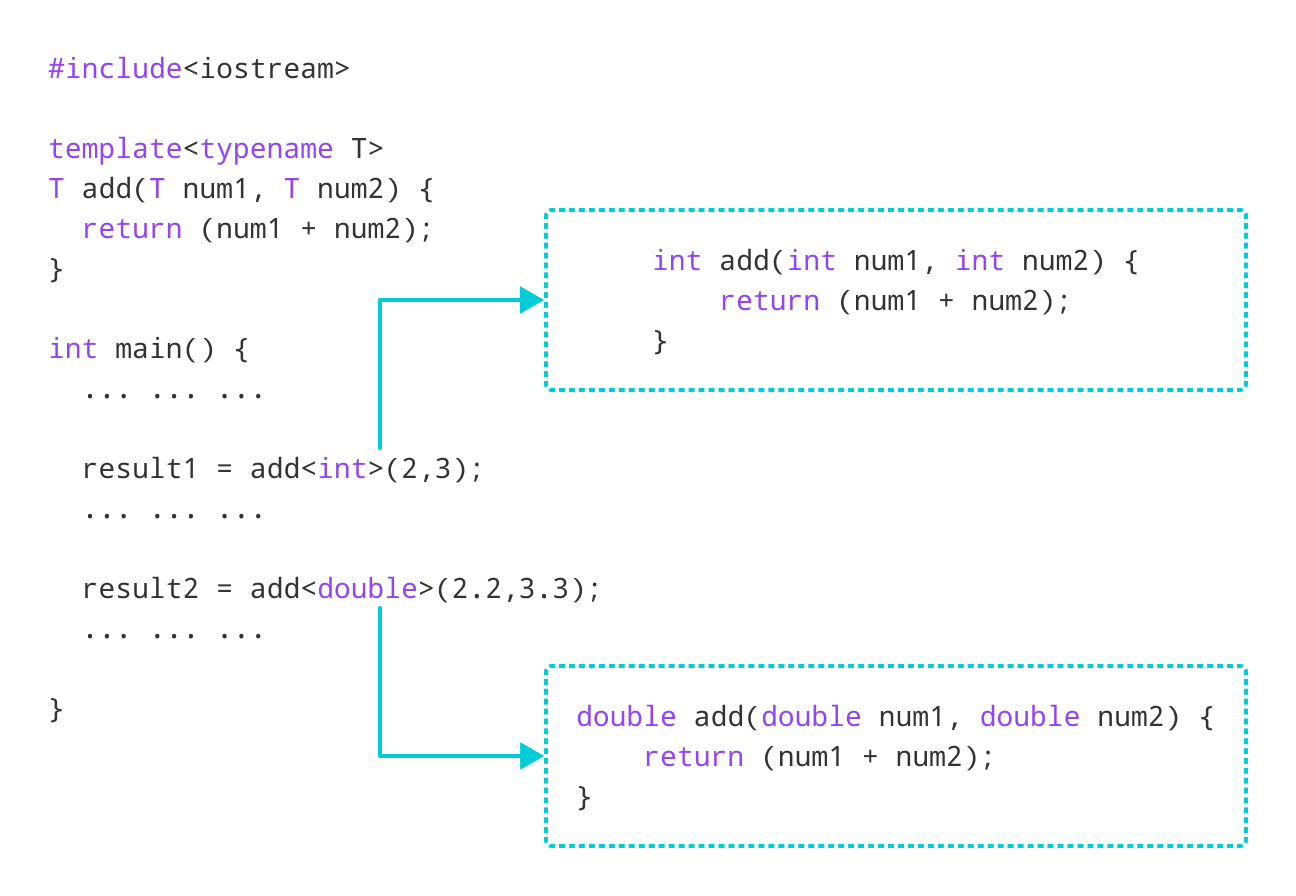
As the video explained, the compiler generates code through a process called template instantiation. Let's examine the syntax and process more closely.
C++ Templates Tutorial: Complete Guide to Generic ...
This article provides a clear, step-by-step breakdown of template syntax and the instantiation process.
Please read the sections "C++ Template Syntax & How Templates Work". As you read, pay close attention to: The template<typename T> Declaration: Understand what each part of this declaration means. Note that T is just a conventional name; you could call it anything. typename is also interchangeable with class in this context, but typename is preferred in modern C++ as it's more explicit. The Instantiation Process: Follow the step-by-step explanation of how the compiler sees a call like max(i, j), deduces that T must be int, and generates an int max(int, int) function from your template.
The image below perfectly visualizes this process for a generic add function. The single template on the left serves as a blueprint for the two concrete functions generated on the right, one for int and one for double, based on how they are called in main.
To see this in action, the next video uses a tool called CppInsights to show you the exact code the compiler generates behind the scenes. This is a great way to solidify your understanding of instantiation.
Generics in C++ 1 - Templates Introduction | Modern Cpp Series Ep. 71
Mike Shah provides another excellent introduction, focusing on the practical "how" and using a visual tool to prove what's happening.
Watch these sections of the video: Introduction to templates as a way to avoid copy-and-paste. Converting a function to a template using the template <typename T> syntax. Visualizing code generation with CppInsights. This is the most important part, as it directly shows the compiler's output. Template argument deduction, which explains why you often don't need to write my_func<int>(...).
Writing Class Templates
The power of templates extends beyond functions to entire classes. This is precisely how std::vector and other STL containers work. You can define a class template that can be instantiated to create a class that works with any data type.
The syntax is very similar:
template <typename T>
class MyContainer {
private:
    T value;
public:
    MyContainer(T val) : value(val) {}
    T getValue() const { return value; }
};

// To use it:
MyContainer<int> intContainer(10);
MyContainer<std::string> stringContainer("Hello");
Notice that with class templates, you must explicitly specify the type in angle brackets (e.g., <int>) when you create an object. The compiler doesn't deduce it from constructor arguments.
A Practical Example: Generic Pair and Stack
Let's look at two practical examples. First, a Pair class that can hold two values, potentially of different types. This is a simplified version of std::pair.
C++ Templates and Generic Programming Exercises
This exercise from PYnative demonstrates a class template with multiple type parameters.
Read through the problem description and the solution for this exercise. Notice the template <typename T1, typename T2> syntax and how it allows you to create pairs like Pair<int, double> and Pair<std::string, char>.
Now, let's build a more complex structure: a generic Stack. This example is particularly relevant as it builds upon our previous lesson by using a std::vector for its internal storage.
C++ Templates and Generic Programming Exercises
This exercise shows how to compose templates by creating a generic Stack class that uses a generic std::vector inside it.
Again, read through the problem and solution for this exercise. This demonstrates how you can build your own type-safe, generic data structures. The LIFO (Last-In, First-Out) logic is written only once, but it can be used to create a stack of integers, strings, or any custom object you define.
Non-Type Template Parameters
Templates can accept more than just types. They can also take constant values known at compile-time, such as integers. These are called non-type parameters.
This is the key to how std::array works. When you write std::array<float, 4>, float is a type parameter, and 4 is a non-type parameter that sets the size of the array at compile time. This is extremely useful in graphics for creating fixed-size mathematical objects like vectors (Vec<float, 3>) and matrices (Mat<float, 4>).
The following video segment demonstrates this by building a generic array class from scratch, combining both type and non-type template parameters.
Let's return to The Cherno's video to see how to create a more advanced class template.
Watch the section where he builds a custom Array class. First, with a non-type parameter int N for the size. Then, by adding a type parameter typename T to make it fully generic, just like std::array.
Conclusion
In this lesson, we've pulled back the curtain on the magic behind the STL and generic programming in C++. You now have the foundational knowledge to write code that is not only powerful but also highly reusable and type-safe.
Key Takeaways:
- Generic Programming: Templates are C++'s mechanism for generic programming, allowing you to write code that operates on arbitrary types.
- Compile-Time Blueprints: Templates are not functions or classes themselves, but blueprints that the compiler uses to generate concrete functions and classes at compile time. This process is called instantiation.
- Function Templates: Allow you to define a single function that can work with different data types, avoiding code duplication. The compiler can often deduce the type argument automatically.
- Class Templates: Allow you to create generic data structures, like containers or smart pointers. You must explicitly provide the type arguments when creating an instance.
- Type and Non-Type Parameters: Templates can be parameterized by types (
typename T) and by compile-time constant values (int N), enabling powerful constructs likestd::array<T, N>.
In our next lesson, we'll dive into another critical modern C++ topic: smart pointers and the RAII (Resource Acquisition Is Initialization) pattern. You'll see how class templates like std::unique_ptr<T> and std::shared_ptr<T> leverage the power of generic programming to provide safe, automatic memory management for objects of any type.