Recommended resources
The freely available resources this lesson will direct you to.
Welcome back! In our last lesson, we explored how inheritance and polymorphism allow us to create families of related classes, like a base SceneObject with specialized Mesh and Light derived classes. This is fundamental for organizing the components of a 3D scene. However, a scene isn't just one object; it's a collection of many. This raises the question: how do we efficiently manage, store, and access these collections of objects?
This is where the C++ Standard Template Library (STL) comes in. It provides a suite of powerful, pre-built data structures, known as containers, that are essential for any serious C++ application. In this lesson, we will focus on three of the most indispensable containers for graphics programming: std::vector, std::map, and std::unordered_map. Mastering these will enable you to handle everything from lists of vertices that define a 3D model to complex scenes of named objects, forming a critical part of your C++ toolkit for building rendering engines.
std::vector: The Go-To Dynamic Array
The std::vector is arguably the most common and versatile container in the STL. You can think of it as a "smart array" or a dynamic array that can automatically grow or shrink in size as you add or remove elements.
For graphics programming, std::vector is your workhorse. It stores its elements in a single, contiguous block of memory. This property is crucial for performance for two main reasons:
- Cache-friendliness: When the CPU processes elements in a vector, it can fetch them from memory very efficiently because they are located next to each other.
- GPU Interoperability: Graphics APIs like Vulkan and OpenGL are C-style APIs that need to copy large blocks of data (like vertex positions, normals, and UVs) to the GPU's memory. A
std::vector's contiguous storage makes it trivial to get a direct pointer to this data block for an efficient bulk transfer.
Let's dive into the practical aspects of using std::vector.
STL std::vector | Modern Cpp Series Ep. 116
This comprehensive video by Mike Shah covers everything you need to know to get started with std::vector, from basic usage to performance considerations that are highly relevant for graphics and systems programming.
Please watch the entire video. As you watch, pay close attention to the following key concepts: Concept and Growth: The initial explanation of std::vector as a dynamic array and how it adds elements with push_back. The concept. Size vs. Capacity: The distinction between the number of elements currently in the vector (size) and the amount of memory allocated (capacity). Understanding this is key to grasping its performance characteristics. The difference and the capacity experiment. reserve() for Optimization: How to pre-allocate memory to avoid costly re-allocations when you know the number of elements in advance (a very common scenario when loading 3D models). The reserve method. Erasing and Iterator Invalidation: The common pitfall of modifying a vector while iterating over it. The erase method. Passing to Functions: The importance of passing vectors by constant reference (const&) to avoid expensive copies. Passing vectors. The .data() Method: This is absolutely critical. Note how .data() gives you a raw pointer to the underlying array, which is exactly what you need to send vertex data to the GPU. The .data() method.
As the video demonstrated, std::vector is powerful and efficient, but requires some care. Here is a summary of its core characteristics:
- Declaration:
std::vector<MyType> myVector; - Adding Elements:
myVector.push_back(element); - Access: Use the square bracket operator
[]for fast access (e.g.,myVector[0]) or the.at()method for bounds-checked access (myVector.at(0)), which will throw an exception if the index is invalid. - Contiguous Memory: You can get a C-style pointer to the start of the data with
myVector.data(). - Performance: Fast indexed access and iteration. Adding/removing from the end is fast (amortized constant time). Adding/removing from the beginning or middle is slow because it requires shifting all subsequent elements.

Associative Containers: Storing by Key
While vectors are great for ordered sequences, we often need to look up data using a specific, meaningful identifier—not just a numerical index. For example, you might want to retrieve a texture by its filename ("rock_wall.png") or find a 3D object in your scene by its name ("PlayerCharacter").
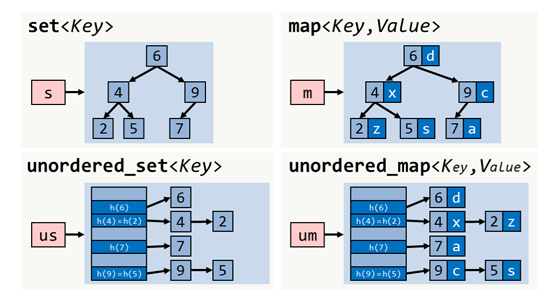
This is the job of associative containers. They store elements as key-value pairs. You provide a unique key, and the container gives you the associated value. The two main associative containers are std::map and std::unordered_map.
The key difference lies in how they organize the data internally, which affects their performance and ordering.
std::map: The Sorted Dictionary
A std::map internally uses a self-balancing binary search tree (typically a red-black tree).
- Ordering: It automatically keeps all its elements sorted based on the key.
- Performance: Lookups, insertions, and deletions are guaranteed to be logarithmic in time, . This is very efficient, but not as fast as a hash table.
- Use Case: Use
std::mapwhen you need key-value storage and require the ability to iterate through the elements in a sorted order. For example, displaying a list of high scores sorted by player name.
std::unordered_map: The Fast Hash Table
An std::unordered_map uses a hash table. It computes a "hash" from the key to determine where to store the value.
- Ordering: There is no guaranteed order; elements are arranged based on their hash value. Iterating through it will produce elements in a seemingly random sequence.
- Performance: On average, lookups, insertions, and deletions are constant time, . This makes it extremely fast, especially for large datasets.
- Use Case: This should be your default choice for key-value mapping unless you explicitly need sorting. Resource managers in game engines (mapping names to assets) are a classic example.
Let's watch a video that breaks down how to use both and highlights their crucial differences.
Maps in C++ (std::map and std::unordered_map)
The Cherno provides an excellent, practical guide to both std::map and std::unordered_map. He clearly explains the concepts, the syntax, and several important "gotchas".
As you watch, focus on these points: The "Why": Understand the problem that maps solve compared to vectors. The "why". map vs. unordered_map: The core difference in their underlying data structures and performance. The difference. Basic Usage: How to declare, insert ([]), and retrieve ([]) elements. Basic usage. Accessing: [] vs. .at(): This is a critical distinction. Note how the [] operator will insert a new element if the key doesn't exist, while .at() will throw an exception. This behavior is a common source of bugs. [] vs .at(). Checking for Existence: The correct way to check if a key exists using .find() before trying to access it. .find(). Iteration: How to loop through the key-value pairs, including the modern C++17 structured bindings syntax. Iteration. Custom Keys: The video explains what's needed to use your own custom types as keys: a less-than operator (operator<) for std::map (std::map custom key) and a hash function for std::unordered_map (std::unordered_map custom key). This is a more advanced topic but good to be aware of.
Let's solidify the key operations for unordered_map, as it's the one you'll likely use most often.
This article from Programiz serves as a great quick reference for the common operations on std::unordered_map.
Please read the following sections to reinforce what you saw in the video: Start with the introduction to understand the declaration syntax. In "Insert Key-Value Pairs," review the two ways to add elements using insert() and []. In "Access Values," note the difference in behavior between [] and at() when a key is not found. This is a very important point. Finally, in "Check if a Key Exists," see the code example for using find() and count() to safely check for a key's existence.
Choosing the Right Container
Knowing which container to use is a key skill. Here are some simple guidelines to start with.
STL Containers: Vector, Set and Map | by Megha B H
This section of the "STL Containers" article provides a concise set of rules for container selection.
Read the list under the heading "General Rules of Thumb". The advice to default to std::vector for sequences and std::unordered_map for key-value lookups is excellent practice.
Conclusion
Today, we've added three fundamental tools to your C++ arsenal. You've learned how to manage collections of data, a task central to any graphics application. By understanding the strengths and weaknesses of std::vector, std::map, and std::unordered_map, you can make informed decisions that lead to cleaner, more efficient, and more robust code.
Key Takeaways:
std::vectoris your default choice for a sequence of elements. Its contiguous memory layout is ideal for performance and for passing data to graphics APIs using the.data()method. Always consider using.reserve()if you know the size beforehand.std::unordered_mapis your default choice for key-value association. It provides very fast lookups and is perfect for managing resources or scene entities by name.std::mapis a specialized tool for when you need key-value pairs and require them to be iterated in sorted order.- Be mindful of the container-specific details: the difference between
size()andcapacity()in vectors, the inserting behavior ofoperator[]versus the non-insertingat()in maps, and the potential for iterator invalidation.
In our next lesson, we will look "under the hood" of the STL. We'll explore templates, the C++ feature that makes it possible to have a std::vector<int>, a std::vector<float>, or a std::vector of your own custom classes, all from a single, generic implementation.