Recommended resources
The freely available resources this lesson will direct you to.
- How to find the best model parameters in scikit-learnwww.youtube.com
- Tuning Random Forest with Grid Searchwww.blog.trainindata.com
- Grid Search for Hyperparameter Tuning in scikit-learncodesignal.com
- Machine Learning Tutorial Python - 16: Hyper parameter Tuning (GridSearchCV)www.youtube.com
- Machine Learning Fundamentals: Cross Validationwww.youtube.com
- Grid Search Hyperparameter Tuning Scikit-learnapxml.com
Hello! Welcome to your next lesson in the "Practical Machine Learning with Scikit-learn" module.
In our previous lessons, we built several machine learning models—from linear and logistic regression to decision trees and k-means clustering. We often used the default settings provided by Scikit-learn. However, to truly get the best performance from a model, we need to tune its settings, which are called hyperparameters.
This lesson will teach you how to systematically find the best hyperparameters for your models. We'll cover two essential techniques: cross-validation for robust model evaluation and grid search for automated hyperparameter tuning. Mastering this process is a critical step in moving from simply using models to building high-performing, reliable machine learning systems.
By the end of this lesson, you will be able to apply cross-validation and grid search to find the optimal hyperparameters for a given model.
1. The Challenge of Tuning Models
Before we dive in, it's crucial to distinguish between a model's parameters and its hyperparameters.
- Parameters are values that the model learns from the training data. For example, the coefficients in a linear regression model are parameters.
- Hyperparameters are settings that you, the data scientist, must configure before the training process begins. Examples include the number of neighbors (
n_neighbors) in a k-nearest neighbors model, the regularization strength (C) in logistic regression, or themax_depthof a decision tree.
The central question is: how do we find the best values for these hyperparameters? A naive approach would be to try different values, train the model, and see which one performs best on the test set. However, this introduces a serious problem called data leakage. If you use the test set to choose your hyperparameters, your model is effectively "learning" from the test set. Your final performance score will be overly optimistic and won't reflect how the model will perform on truly new, unseen data.
The solution is to split the data into three sets: a training set, a validation set, and a test set. You train on the training set and use the validation set to evaluate and choose hyperparameters. The test set remains locked away until the very end for a final, unbiased evaluation.
But even this has a drawback: your choice of hyperparameters might be sensitive to the specific data points that happened to land in your single validation set. A more robust approach is k-fold cross-validation.
To understand this crucial concept, please watch the following video.
Machine Learning Fundamentals: Cross Validation
This video from StatQuest provides an excellent and clear visual explanation of k-fold cross-validation and why it's a more reliable method for model evaluation than a single train-validation split.
Watch from 02:27 to 04:36. Pay close attention to how the data is partitioned into 'folds' and how each fold gets a turn to be the test set while the others are used for training.
In k-fold cross-validation, the training data is split into k subsets (or "folds"). The model is then trained k times. In each iteration, one fold is used as the validation set, and the remaining k-1 folds are used for training. The performance metric is then averaged across all k iterations.
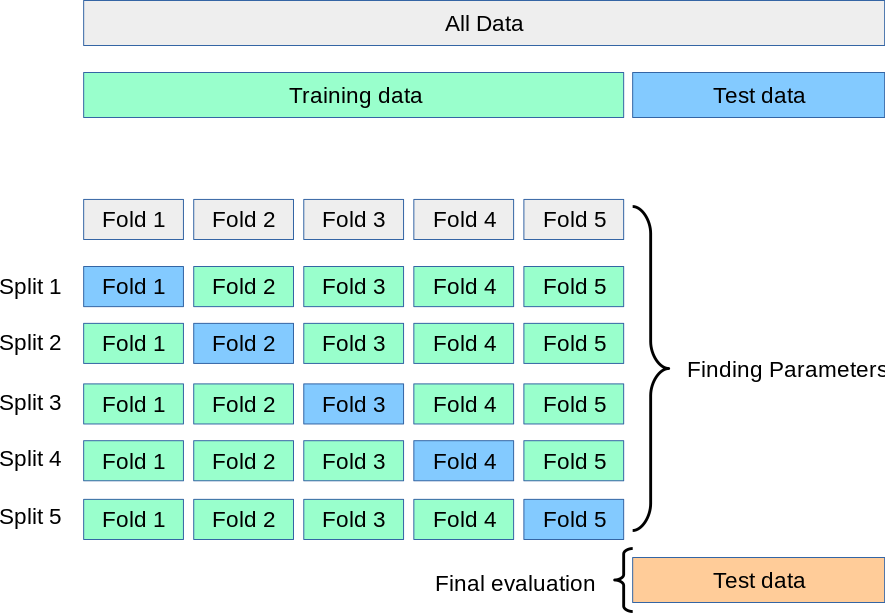
This process gives a much more reliable estimate of the model's performance for a given set of hyperparameters.
2. Hyperparameter Tuning: The Manual Way
Now that we understand cross-validation, let's see how we can use it to find the best hyperparameters. Before we look at Scikit-learn's automated tools, it's helpful to see how you would do it manually. This builds a strong intuition for what the automated tools are doing under the hood.
The video below demonstrates this manual approach using a for loop and Scikit-learn's cross_val_score function.
Machine Learning Tutorial Python - 16: Hyper parameter Tuning (GridSearchCV)
This segment from a codebasics video shows how to manually loop through different hyperparameter values and use cross_val_score to evaluate each combination.
Watch from 00:49 to 04:56. First, the video explains why a simple train-test split gives unstable scores. Then, it demonstrates how to implement a more robust evaluation using a for loop to test different values for an SVM's kernel and C hyperparameters, printing the average cross-validation score for each.
As you saw in the video, this manual approach works, but it quickly becomes cumbersome. If you have three or four hyperparameters to tune, you would need to write deeply nested loops, and the code would become very repetitive.
3. Automated Tuning with GridSearchCV
Fortunately, Scikit-learn provides a powerful and convenient tool to automate this process: GridSearchCV. The "Grid Search" part refers to the fact that it exhaustively tries every combination of the hyperparameter values you provide, creating a "grid" of possibilities. The "CV" refers to the cross-validation it performs for each combination.
Let's see how to implement it.
Machine Learning Tutorial Python - 16: Hyper parameter Tuning (GridSearchCV)
This is the core of our lesson. The same codebasics video will now demonstrate how to replace the manual for loop with a few lines of code using GridSearchCV.
Watch from 04:56 to 10:19. Focus on these key steps: Defining the param_grid: Notice the dictionary structure where keys are hyperparameter names and values are lists of values to test. Instantiating GridSearchCV: Pay attention to the main arguments: the estimator (the model), the param_grid, and cv (the number of folds). Fitting the object: The .fit() call triggers the entire search process. Accessing results: Observe how to get the best score, the best parameters, and view all results in a Pandas DataFrame.
To summarize the process:
-
Define the estimator and parameter grid:
from sklearn.svm import SVC # The model you want to tune svm = SVC() # The grid of hyperparameters to search param_grid = { 'C': [0.1, 1, 10, 100], 'kernel': ['rbf', 'linear'] } -
Instantiate and fit
GridSearchCV:from sklearn.model_selection import GridSearchCV # Create the GridSearchCV object grid_search = GridSearchCV(estimator=svm, param_grid=param_grid, cv=5, n_jobs=-1) # Fit it to your training data grid_search.fit(X_train, y_train)Note:
n_jobs=-1tells Scikit-learn to use all available CPU cores, which can significantly speed up the search. -
Examine the results: Once the fit is complete,
GridSearchCVprovides several useful attributes:grid_search.best_params_: A dictionary with the hyperparameter combination that gave the best cross-validation score.grid_search.best_score_: The average cross-validation score of the best estimator.grid_search.best_estimator_: The model instance with the best parameters, which has already been automatically refit on the entire training set for you. You can use this directly for predictions.
4. Analyzing and Visualizing Grid Search Results
While .best_params_ gives you the answer, a deeper analysis can reveal valuable insights about your model and its hyperparameters. The grid_search.cv_results_ attribute contains a wealth of information about every combination that was tested. It's most easily viewed as a Pandas DataFrame.
The following reading demonstrates how to explore these results and even create a heatmap to visualize the performance landscape.
Hyperparameter tuning by grid-search — Scikit-learn course
This tutorial from the official Scikit-learn course shows how to perform an in-depth analysis of grid search results.
First, read the section 'Tuning using a grid-search', focusing on how param_grid is defined for a pipeline using the classifier__ syntax and how GridSearchCV is instantiated and fit. Then, skip to the section that begins with the line cv_results = pd.DataFrame(model_grid_search.cv_results_). Follow the code that cleans up the results DataFrame and, most importantly, see how it's pivoted to create a heatmap visualization. This visual approach helps you understand the relationship between hyperparameters and model performance.
The heatmap is a powerful tool. It allows you to see, for example, if performance is sensitive to one hyperparameter more than another, or if there are interactions between them.
A Note on RandomizedSearchCV
Grid search is exhaustive, which can be computationally very expensive if you have many hyperparameters or a large range of values for each. An alternative is RandomizedSearchCV. Instead of trying every combination, it samples a fixed number of random combinations from the parameter space. This can often find a very good combination much faster than a full grid search.
Conclusion
Excellent work today! You've added one of the most important and practical skills to your machine learning toolkit. You now know how to move beyond default model settings to systematically optimize your model's performance in a robust and reliable way.
Key Takeaways:
- Hyperparameters are external settings of a model that must be tuned, unlike parameters which are learned from data.
- Tuning hyperparameters requires a validation set to avoid data leakage from the test set. K-fold cross-validation makes this process more robust.
GridSearchCVis a Scikit-learn tool that automates the process of testing a grid of hyperparameter combinations using cross-validation.- The best model configuration can be accessed via the
.best_params_and.best_estimator_attributes after fitting. - The
.cv_results_attribute allows for a detailed analysis of the search, which can be visualized to better understand hyperparameter interactions.
In our next and final lesson for this module, we will learn about Scikit-learn Pipelines. Pipelines are an incredibly powerful feature that allows you to chain together multiple steps, such as feature scaling, preprocessing, and model training (including a grid search!), into a single, clean, and reusable object. This helps prevent common errors and makes your machine learning code much more professional.