Recommended resources
The freely available resources this lesson will direct you to.
- Machine Learning Pipelines in Python: Step-by-Step Guide with Scikit-Learnwww.youtube.com
- Lecture 5: Preprocessing and sklearn pipelinesubc-cs.github.io
- Building a Machine Learning Pipeline with Python and Scikit-Learn | Step-by-Step Tutorialwww.youtube.com
- Implementing Machine Learninng Pipelines USsing Sklearn And Pythonwww.youtube.com
- A Comprehensive Guide For scikit-learn Pipelinesmahmoudyusof.github.io
- How to Improve Machine Learning Code Quality with Scikit-learn ...www.freecodecamp.org
Hello! Welcome to the final lesson of the "Practical Machine Learning with Scikit-learn" module.
Throughout this module, we've covered the essential steps of a machine learning project: loading and exploring data, applying preprocessing techniques like scaling and imputation, and training various models. In our last lesson, you learned how to use GridSearchCV to robustly tune hyperparameters.
So far, we've performed each of these steps independently. This approach can be repetitive and, more importantly, error-prone. It's easy to forget to apply the same transformations to your test set as you did to your training set, or to accidentally leak information from your validation data during cross-validation.
Today, we'll solve these problems by learning about Scikit-learn Pipelines. A Pipeline is an object that allows you to chain together multiple steps—such as data preprocessing and model estimation—into a single, unified workflow. This is a critical tool for writing clean, reproducible, and production-ready machine learning code.
By the end of this lesson, you will be able to build a Scikit-learn pipeline that combines one or more preprocessing steps with a model estimator.
1. Why Use a Pipeline?
Imagine your workflow for a typical project:
- Fill missing values in numerical columns with the mean.
- Fill missing values in categorical columns with the most frequent value.
- Scale all numerical features using
StandardScaler. - One-hot encode all categorical features.
- Train a Random Forest classifier.
You would need to apply steps 1-4 to your training data, then train the model in step 5. For prediction, you must remember to apply the exact same steps 1-4 to your new, unseen data before feeding it to the trained model. This is where mistakes happen.
A Scikit-learn Pipeline automates this entire sequence. It bundles your preprocessing "transformers" and your final "estimator" (the model) into a single object. This object behaves just like a regular Scikit-learn model: you call .fit() on it with your raw training data, and it handles all the intermediate steps for you.
This provides several key benefits:
- Convenience and Organization: It simplifies your code by encapsulating a complex sequence of operations.
- Preventing Data Leakage: When used with cross-validation (like in
GridSearchCV), the pipeline ensures that preprocessing steps are fit only on the training portion of each fold, preventing information from the validation set from "leaking" into your training process. - Reproducibility: A single pipeline object contains your entire workflow, making it easy to save, share, and deploy.
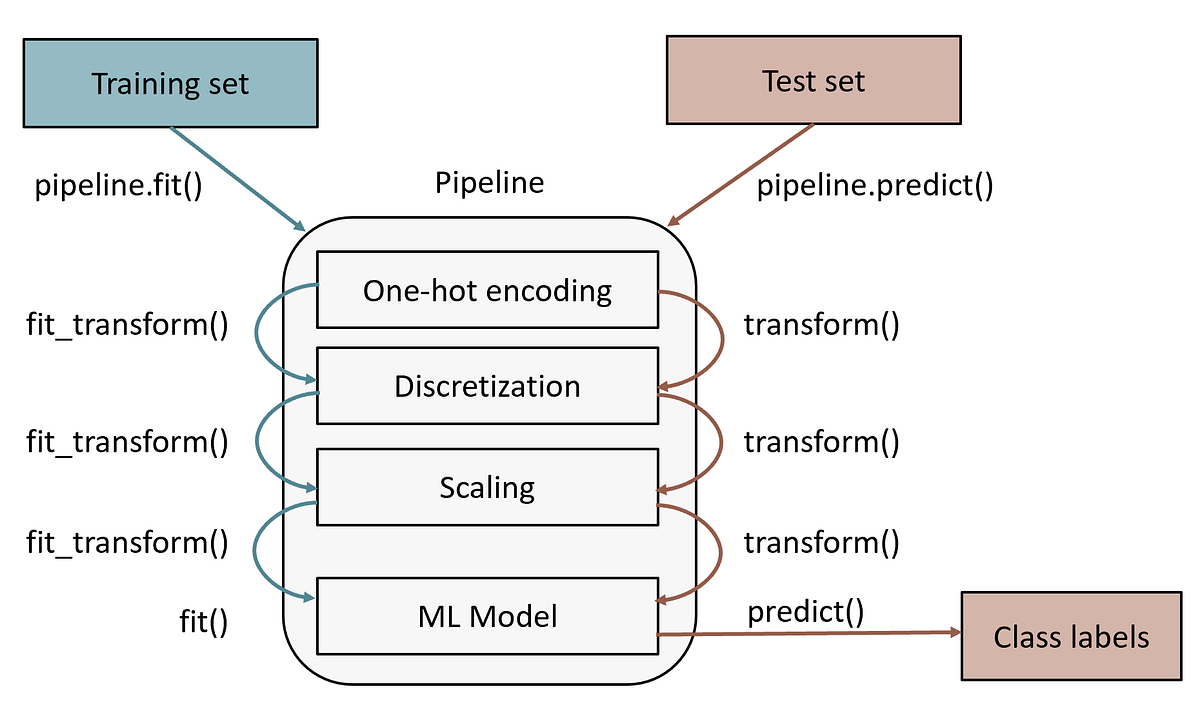
2. Building a Simple Pipeline with make_pipeline
Let's start with the simplest case: a pipeline with one preprocessing step and one model. For this, Scikit-learn provides a convenient function called make_pipeline.
The following video demonstrates how to use make_pipeline to chain a SimpleImputer (for handling missing values) and a LogisticRegression model.
Building a Machine Learning Pipeline with Python and Scikit-Learn | Step-by-Step Tutorial
This clip from Ryan & Matt Data Science will show you how to construct your first pipeline using make_pipeline. Notice how it simplifies the code by combining two steps into one.
Watch from 06:01 to 08:29. Focus on how the imputer and lr (logistic regression) objects are passed into make_pipeline, and how the resulting pipe1 object is then fit on the training data in a single step.
As you saw, the syntax is straightforward:
from sklearn.pipeline import make_pipeline
from sklearn.impute import SimpleImputer
from sklearn.linear_model import LogisticRegression


# Create the pipeline by passing the steps in order
pipe = make_pipeline(
    SimpleImputer(strategy='mean'),
    LogisticRegression()
)


# Fit the entire pipeline on the training data
pipe.fit(X_train, y_train)


# The pipeline handles imputation and then model training automatically
3. Handling Mixed Data Types with ColumnTransformer
The simple pipeline works well when all columns need the same transformation. But what about real-world datasets, which almost always contain a mix of numerical and categorical features? Numerical columns need scaling and imputation (with mean/median), while categorical columns need imputation (with a constant/mode) and one-hot encoding.
This is where ColumnTransformer comes in. It's a powerful tool designed to apply different transformers to different columns of your data. The typical workflow is:
- Create a small pipeline for your numerical transformations.
- Create another small pipeline for your categorical transformations.
- Use
ColumnTransformerto apply these specific pipelines to the correct columns. - Place this
ColumnTransformerobject as the first step in a final, main pipeline, followed by your model.
This might sound complex, but it's a very logical and organized pattern. The following video by Krish Naik provides an excellent walkthrough of this entire process.
Implementing Machine Learninng Pipelines USsing Sklearn And Python
This is the core of today's lesson. This video will guide you through creating separate processing pipelines for numeric and categorical data, combining them with ColumnTransformer, and then adding a final model to create a complete, end-to-end workflow.
Watch from 15:53 to 26:05. Follow these key stages in the video: Numeric Processor (17:16): A pipeline is created for numerical features, containing a SimpleImputer and a StandardScaler. Categorical Processor (19:05): A second pipeline is created for categorical features, with an imputer and a OneHotEncoder. ColumnTransformer (21:47): Watch closely as ColumnTransformer is used to specify which pipeline should be applied to which set of columns. Final Pipeline (24:36): See how make_pipeline is used to combine the ColumnTransformer (the entire preprocessing block) with the final LogisticRegression estimator.
Let's recap the structure you just saw, which is a very common and effective pattern:
from sklearn.pipeline import Pipeline, make_pipeline
from sklearn.compose import ColumnTransformer
from sklearn.preprocessing import StandardScaler, OneHotEncoder
from sklearn.impute import SimpleImputer
from sklearn.ensemble import RandomForestClassifier


# Define column lists
numeric_features = ['age', 'training_hours']
categorical_features = ['department', 'education_level']


# 1. Create a pipeline for numeric features
numeric_transformer = Pipeline(steps=[
    ('imputer', SimpleImputer(strategy='median')),
    ('scaler', StandardScaler())
])


# 2. Create a pipeline for categorical features
categorical_transformer = Pipeline(steps=[
    ('imputer', SimpleImputer(strategy='most_frequent')),
    ('onehot', OneHotEncoder(handle_unknown='ignore'))
])


# 3. Combine these using ColumnTransformer
preprocessor = ColumnTransformer(
    transformers=[
        ('num', numeric_transformer, numeric_features),
        ('cat', categorical_transformer, categorical_features)
    ])


# 4. Create the final pipeline with the preprocessor and a model
clf_pipeline = Pipeline(steps=[
    ('preprocessor', preprocessor),
    ('classifier', RandomForestClassifier())
])


# Now, you can fit the entire pipeline on your raw data
clf_pipeline.fit(X_train, y_train)
Notice the names we give each step (e.g., 'imputer', 'scaler', 'preprocessor'). These are important because they allow us to access and inspect the different components of our pipeline.
4. Integrating Pipelines with Grid Search
One of the most powerful features of pipelines is their seamless integration with the GridSearchCV you learned about in the last lesson. You can tune the hyperparameters of any step in the pipeline, whether it's the model or a preprocessor.
To do this, you specify the parameter in the param_grid using a special syntax: stepname__parametername.
For example, to tune the n_estimators of our RandomForestClassifier (named 'classifier') and the imputation strategy of our numerical imputer (named 'imputer' inside the 'num' transformer inside the 'preprocessor'), the grid would look like this:
param_grid = {
    'preprocessor__num__imputer__strategy': ['mean', 'median'],
    'classifier__n_estimators': [100, 200],
    'classifier__max_depth': [5, 10, None]
}
You can then pass the entire clf_pipeline object into GridSearchCV just like you would a regular model. The grid search will now not only find the best model hyperparameters but also the best preprocessing settings, all while correctly handling data within each cross-validation fold.
How to Improve Machine Learning Code Quality with Scikit-learn ...
This article from freeCodeCamp provides a clear example of using a pipeline with GridSearchCV. Pay special attention to the syntax used to define the parameter grid.
Read the section titled 'How to Find the Best Hyperparameter and Data Preparation Method'. Focus on the subsection 'How to Find the Best Hyperparameter Sets: Add a Pipeline to Grid Search'. Note the model__penalty and model__C syntax in the param_grid. This demonstrates the stepname__parametername convention.
Conclusion
Congratulations on completing the final lesson of this module! You have now mastered one of the most important tools for building professional and robust machine learning workflows. By encapsulating your entire process into a single pipeline, you make your code cleaner, safer from data leakage, and much easier to deploy.
Key Takeaways:
Pipelinechains multiple data transformation and modeling steps into a single Scikit-learn estimator.make_pipelineis a simple way to create a sequential pipeline.ColumnTransformeris essential for real-world datasets, allowing you to apply different preprocessing steps to different subsets of columns.- The standard pattern is to build separate transformation pipelines for numeric and categorical data, combine them with a
ColumnTransformer, and then place thatColumnTransformerand a final model into a masterPipeline. - Pipelines integrate perfectly with
GridSearchCV, allowing you to tune hyperparameters of both your preprocessors and your model simultaneously.
This marks the end of our journey into practical machine learning with Scikit-learn. You've built a solid foundation, from data handling to creating and tuning robust model workflows.
In the next module, Neural Networks from Scratch, we will shift gears and dive into the world of deep learning. You'll begin by understanding the fundamental building block—the neuron—and build your very first neural network using only NumPy. This will give you the deep intuition needed to master the powerful deep learning frameworks we'll explore later.