Recommended resources
The freely available resources this lesson will direct you to.
- Python Feature Scaling in SciKit-Learn (Normalization vs Standardization)www.youtube.com
- Machine Learning Pipelines in Python: Step-by-Step Guide with Scikit-Learnwww.youtube.com
- Data Preprocessing Guide for Beginners in MLtutorialsdojo.com
- Building a Machine Learning Pipeline with Python and Scikit-Learn | Step-by-Step Tutorialwww.youtube.com
- Handling Missing Data in Python: Simple Imputer in Python for Machine Learningwww.youtube.com
- Data Preprocessing: A Complete Guide with Python ...www.datacamp.com
Hello! In our last lesson, we took the essential first step of loading and exploring a dataset with Pandas. Using methods like .info() and .describe(), you learned how to get a high-level overview of your data's structure and content. A key discovery from this process is that real-world data is rarely perfect—it often contains missing values and features with vastly different scales.
Today, we'll tackle these challenges head-on. This lesson is about data preprocessing: the critical stage where we clean and transform raw data into a format that machine learning models can understand and learn from effectively. We will focus on two fundamental techniques:
- Handling missing values using imputation.
- Scaling numerical features to ensure they are treated equally by the model.
Mastering these steps is non-negotiable for building robust and accurate models, from the simple linear regression we'll build next to the complex deep neural networks you'll encounter later in the course.
Let's begin by looking at the landscape of preprocessing techniques.
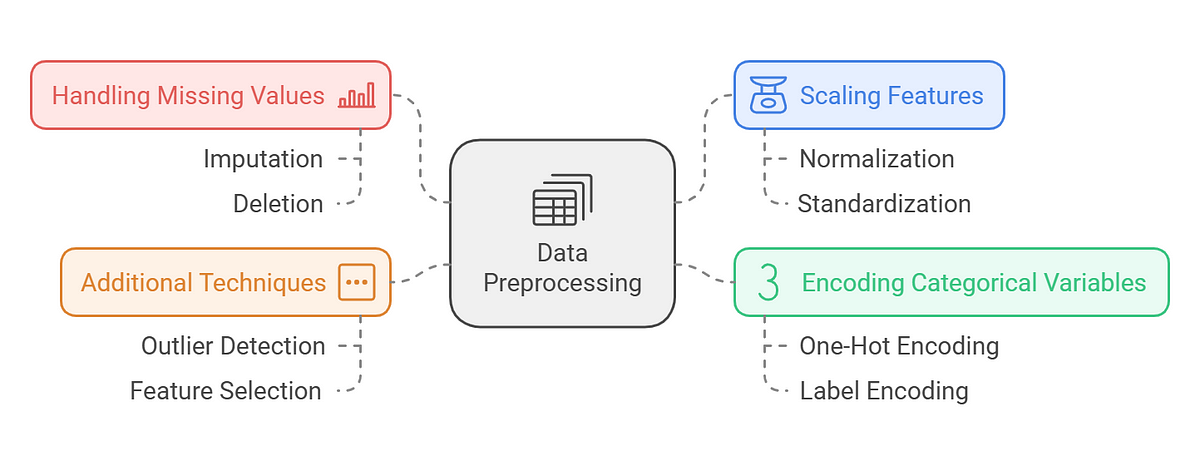
1. Handling Missing Values
In the previous lesson, you saw how .info() can reveal columns with fewer non-null entries than the total number of rows. These are missing values, often represented as NaN (Not a Number) in Pandas. Most machine learning algorithms in Scikit-learn cannot work with NaN values and will raise an error.
So, what can we do?
- Deletion: The simplest strategy is to drop rows or columns that contain missing values. This is done with
DataFrame.dropna(). However, this can lead to a significant loss of data, especially if missing values are widespread. - Imputation: A more common and generally better approach is to impute the missing values—that is, to fill them in with a sensible estimate.
Scikit-learn's SimpleImputer is the primary tool for this. It provides several strategies for imputation. The video below gives a clear, practical demonstration.
Handling Missing Data in Python: Simple Imputer in Python for Machine Learning
This video from the Ryan & Matt Data Science channel provides a concise tutorial on using SimpleImputer to handle missing data for both numerical and categorical features.
Please watch the following segments: Introduction (00:00 - 01:09): This explains why we need to handle missing data and introduces the different imputation strategies. Numerical Imputation (01:09 - 06:03): Focus on how the 'mean', 'median', 'most_frequent', and 'constant' strategies are applied to numerical data. Categorical Imputation (06:03 - 08:17): Observe how to use the 'constant' strategy for missing text data. \nPay attention to the different outcomes each strategy produces.
As the video demonstrated, the choice of strategy depends on your data:
strategy='mean': ReplacesNaNs with the average of the column. A good default for numerical data without significant outliers.strategy='median': ReplacesNaNs with the median of the column. This is more robust to outliers than the mean.strategy='most_frequent': ReplacesNaNs with the most common value (the mode). This is the go-to strategy for categorical (text) features.strategy='constant': ReplacesNaNs with a specific value you provide using thefill_valueparameter. This is useful when you want to explicitly mark missing values, for instance, by filling them with 0 for numerical data or a string like "Missing" for categorical data.
2. Scaling Numerical Features
After handling missing values, the next issue to consider is feature scale. If you look at the output of .describe() from our last lesson, you'll notice that different columns can have vastly different ranges. For example, a duration_ms column might have values in the hundreds of thousands, while a danceability score might range from 0 to 1.
Why is this a problem?
Many machine learning algorithms, including linear models, support vector machines, and the neural networks we will study, are sensitive to the scale of input features. If one feature has a much larger scale than others, it can dominate the learning process, causing the model to incorrectly perceive it as more important.
To prevent this, we scale our features. The most common method is Standardization.
Standardization (StandardScaler)
This technique rescales features so that they have the properties of a standard normal distribution, with a mean of 0 and a standard deviation of 1.
For each value in a feature, the standardized value is calculated as:
where is the mean of the feature and is its standard deviation.
The following reading explains the motivation for scaling and shows how to implement it with Scikit-learn's StandardScaler.
Lecture 5: Preprocessing and sklearn pipelines
This excerpt from a University of British Columbia lecture explains why scaling is critical and demonstrates the fit and transform methods used for all Scikit-learn preprocessing tools.
Please read the following sections: 'Motivation and big picture': Read this section to understand why scaling matters. Pay close attention to the example with the Spotify dataset and k-nearest neighbours, which shows how a feature with large values (duration_ms) can dominate the distance calculation. 'Scaling using scikit-learn’s StandardScaler': Read this section to see the syntax for using StandardScaler. Focus on the distinction between fit(), transform(), and fit_transform(). This is a crucial concept.
The Golden Rule of Preprocessing
The reading introduced the most important concept in data preprocessing: the separation of fit and transform.
fit(): Thefitmethod learns the parameters from the data. ForSimpleImputer, it calculates the mean, median, or mode. ForStandardScaler, it calculates the mean () and standard deviation (). This method should ONLY be called on the training data.transform(): Thetransformmethod applies the learned transformation to the data.fit_transform(): A convenience method that performs afitfollowed by atransformon the same data.
The Golden Rule: You fit your preprocessor (e.g., StandardScaler) on the training data and then use that same fitted preprocessor to transform both the training data and the test/validation data.
Why? This prevents data leakage, where information from the test set inadvertently influences the training process. If you were to fit the scaler on the full dataset (including the test set), the mean and standard deviation from the test data would "leak" into the transformation of your training data, giving your model an unfair and unrealistic preview of the test data.
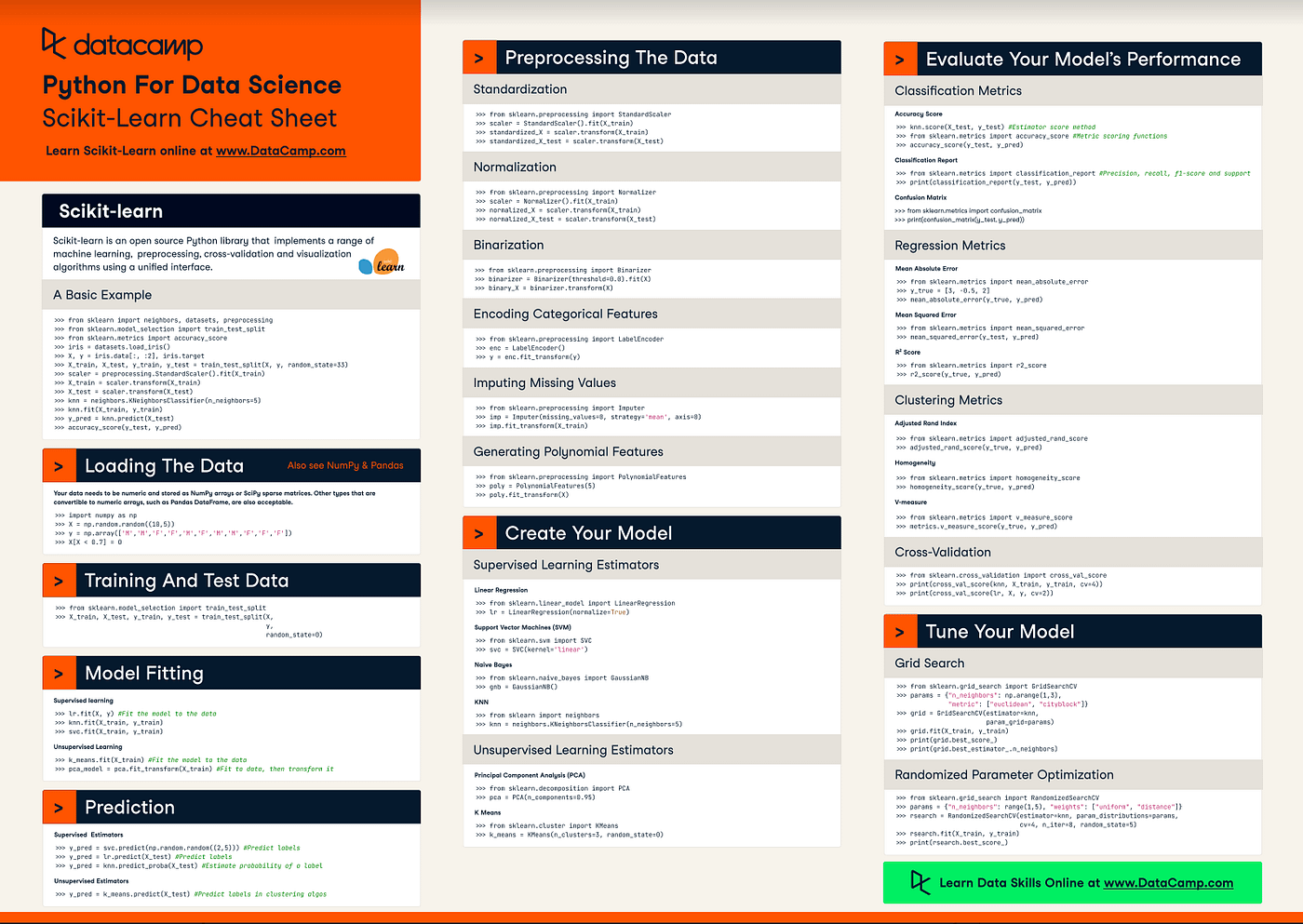
A Quick Reference
You've now been introduced to the core concepts and tools for cleaning your data. This cheat sheet serves as a fantastic quick reference for the Scikit-learn syntax we've discussed.
Conclusion
In this lesson, you've learned the fundamental techniques for preparing data for machine learning. This is where the practical, hands-on work of an AI practitioner truly begins.
Here are your key takeaways:
- Missing data is a common problem that must be addressed, as most models cannot handle
NaNvalues. SimpleImputeris the tool of choice for filling missing values, with strategies likemean,median, andmost_frequent.- Feature scaling is crucial for algorithms that are sensitive to the magnitude of feature values.
StandardScaleris a common method that rescales features to have a mean of 0 and a standard deviation of 1.- The Golden Rule: Always
fityour preprocessing tools on the training data only, and thentransformboth your training and testing data to prevent data leakage.
You are now equipped to take a raw dataset, clean it, and prepare it for modeling. In our next lesson, we will do exactly that: you'll train and evaluate your very first machine learning model, a linear regression, using the preprocessing skills you've just acquired.