Recommended resources
The freely available resources this lesson will direct you to.
- Machine Learning in Python: Building a Linear Regression Modelwww.youtube.com
- Mastering Multiple Linear Regression in Scikit-Learn: A Step-by-Step Guidewww.youtube.com
- Sklearn Linear Regression: A Complete Guide with ...www.datacamp.com
- Linear Regression in Scikit-learn and StatsModelmachinelearning-basics.com
- Hands-On Linear Regression with Scikit-Learn in Python (Beginner Friendly)www.youtube.com
- Scikit-Learn Full Crash Course - Python Machine Learningwww.youtube.com
Hello! Welcome to our next lesson.
In the previous session, we covered the essential data preprocessing steps of handling missing values with SimpleImputer and scaling numerical features with StandardScaler. You learned the "golden rule" of fitting these transformers only on the training data to prevent data leakage.
Today, you will leverage those skills to train and evaluate your very first machine learning model in Python. This lesson directly addresses the learning outcome: Train and evaluate a linear regression model using Scikit-learn.
You already have a strong theoretical understanding of linear regression. Now, we will bridge the gap between theory and practice. You'll learn the core Scikit-learn workflow: instantiate, fit, predict, and evaluate. This simple but powerful pattern is the foundation for training almost every model in the library, from the linear models of today to the more complex ensembles we'll see later.
1. A Quick Refresher on Linear Regression
Before we write any code, let's briefly revisit the core concepts. Linear regression aims to model the relationship between a dependent variable () and one or more independent variables () by fitting a linear equation to the observed data.
The goal is to find the optimal coefficients () and intercept () for the regression equation:
To find these "best" coefficients, the model minimizes the Sum of Squared Residuals (SSR)—the sum of the squared differences between the actual values () and the predicted values (). This is known as the method of ordinary least squares.
For a clear overview of these concepts, please read the following section from the Real Python article on linear regression.
This article, 'Linear Regression in Python', provides an excellent theoretical foundation. We will focus on the initial section that defines the problem and key terms.
Read the sections titled 'Linear Regression', 'Problem Formulation', 'Regression Performance', 'Simple Linear Regression', and 'Multiple Linear Regression'. Focus on understanding the regression equation, the concept of minimizing residuals, and the definition of the coefficient of determination (R²).
2. The Scikit-learn Workflow for Model Training
Training a model in Scikit-learn follows a consistent and intuitive five-step process. We will use LinearRegression as our example, but you will see this pattern repeated for many other models.
-
Import the model class: First, you import the specific model you want to use from the Scikit-learn library.
from sklearn.linear_model import LinearRegression -
Instantiate the model: You create an instance of the model class. This is like creating a blank template for your model, ready to be trained.
model = LinearRegression() -
Train the model: This is the core learning step. You call the
.fit()method on your model instance, passing your training features (X_train) and training target (y_train). The model learns the relationship between them and stores the resulting coefficients internally.model.fit(X_train, y_train) -
Make predictions: Once trained, you can use the
.predict()method to generate predictions on new, unseen data (likeX_test).y_pred = model.predict(X_test) -
Evaluate the model: Finally, you compare the model's predictions (
y_pred) with the actual true values (y_test) to assess its performance. The.score()method is a quick way to get the R² value. For other metrics, you'll use functions fromsklearn.metrics.r2_score = model.score(X_test, y_test)
This image provides a great visual summary of this process in code.
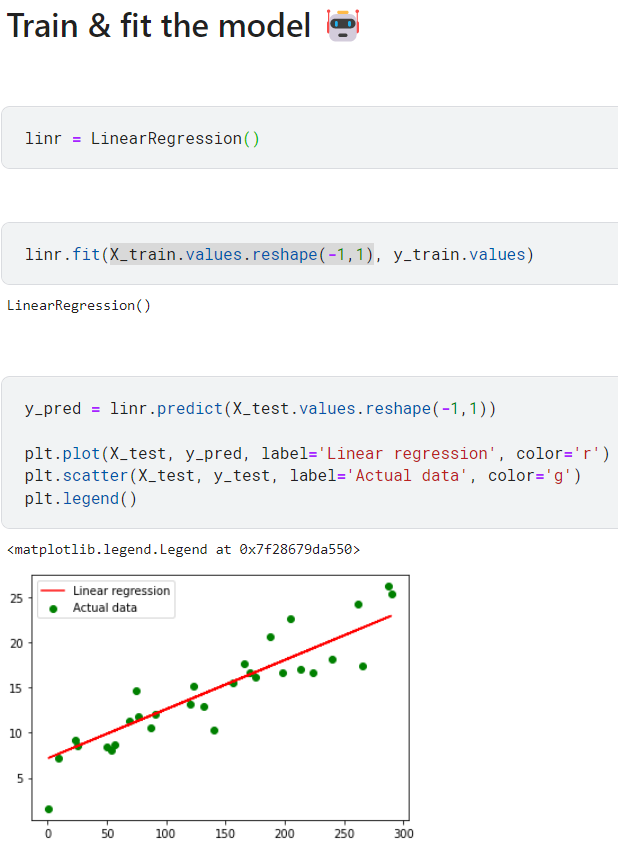
3. A Step-by-Step Video Walkthrough
Now, let's see this workflow in action. The following video provides a clear, hands-on demonstration of building a linear regression model from scratch.
Hands-On Linear Regression with Scikit-Learn in Python (Beginner Friendly)
This video from the Ryan & Matt Data Science channel is a beginner-friendly guide that walks through each step of training and evaluating a linear regression model.
Please watch the following segments: Splitting Data (09:34 - 11:45): See how to prepare the features (X) and target (y) and split them using train_test_split. Training the Model (11:45 - 12:28): Pay close attention to the instantiation of LinearRegression() and the use of the .fit() method. Prediction and Evaluation (13:30 - 16:40): This is a crucial section. Understand how .predict() is used and how to calculate key evaluation metrics like Mean Absolute Error (MAE), Mean Squared Error (MSE), and R² score. Interpreting the Model (16:40 - 17:54): Learn how to access the learned .coef_ (slope) and .intercept_ and what they represent.
4. Evaluating Regression Models
As you saw in the video, R-squared is not the only metric for evaluation. Let's briefly define the three most common ones:
-
Coefficient of Determination (R²): Indicates the proportion of the variance in the dependent variable that is predictable from the independent variable(s). It ranges from 0 to 1, with higher values indicating a better fit. The
.score()method of theLinearRegressionmodel conveniently returns this. -
Mean Absolute Error (MAE): The average of the absolute differences between the predicted and actual values. It gives you an idea of the magnitude of the error, on average.
-
Mean Squared Error (MSE): The average of the squared differences between the predicted and actual values. By squaring the errors, it penalizes larger errors more heavily than MAE.
This image provides an excellent visual breakdown of how MSE is calculated.

5. A Second Example with a Real Dataset
The previous video used synthetic data for simplicity. Now, let's watch a second example that uses a real-world dataset (California Housing) and also incorporates the scaling step from our last lesson. This will solidify your understanding of the complete pipeline.
Scikit-Learn Full Crash Course - Python Machine Learning
This segment from NeuralNine's 'Scikit-Learn Full Crash Course' demonstrates the entire workflow on a real dataset, including the preprocessing steps we learned previously.
Watch the section on Regression (01:00:22 - 01:04:49). Notice how the code follows the same pattern: load data, split, scale, instantiate, fit, and score. This reinforces how preprocessing and modeling fit together seamlessly.
This video shows that even with a more complex, real-world dataset, the fundamental Scikit-learn steps for training and evaluating a linear regression model remain exactly the same.
Conclusion
Congratulations! You have now trained and evaluated your first machine learning model. You've translated the mathematical theory of linear regression into practical Python code using the powerful and intuitive Scikit-learn library.
Here are the key takeaways from today's lesson:
- The core Scikit-learn workflow for supervised learning is instantiate, fit, predict, and evaluate.
LinearRegression().fit(X_train, y_train)is the command that trains your model by finding the optimal coefficients.- Model performance is assessed by comparing predictions to true values using metrics like R-squared (R²), Mean Absolute Error (MAE), and Mean Squared Error (MSE).
- The learned model parameters,
.intercept_and.coef_, are interpretable and describe the linear relationship the model has found in the data.
In our next lesson, we will shift our focus from regression (predicting continuous numbers) to classification (predicting discrete categories). You will train a Logistic Regression model and discover that the Scikit-learn workflow you learned today remains almost identical, highlighting the library's consistency and ease of use.