Recommended resources
The freely available resources this lesson will direct you to.
- A Complete Guide To Vercel’s AI SDK // The ESSENTIAL Tool For Shipping AI Appswww.youtube.com
- Claude Code for Non-Coders | A Complete Beginner's Guidewww.youtube.com
- How to Build a Chatbot UI with React, Next.js, Tailwind, and OpenAIblog.stackademic.com
- Vercel AI SDK Complete Guide: Building Production ...dev.to
Welcome back! In our last lesson, we demystified the process of communicating with major Large Language Models (LLMs) like those from OpenAI and Anthropic. You learned about the core workflow: getting a secret API key and structuring a conversational request using the messages array with its system, user, and assistant roles.
Today, we'll take that conceptual knowledge and put it into practice by doing exactly what you set out to do: connecting an LLM API to a simple web app to create a basic chat interface. This lesson is the bridge between knowing what to say to the API and actually building the application that does the talking. We'll explore the common patterns an LLM might use to generate this code for you, so you'll understand the "why" behind the files and commands it produces.
The Big Picture: A Secure Bridge to Your LLM
Before we dive into code, let's establish a crucial architectural pattern. When you build a chat app that uses an API from a service like OpenAI, you can't just put your secret API key directly into the user-facing part of your app. If you did, anyone could view the source code of your webpage, find your key, and use it, running up costs on your account.
To prevent this, we split the app into two parts, a concept we touched on earlier:
- The Frontend: This is the chat interface your user sees and interacts with in their browser. It's built with HTML, CSS, and JavaScript (often using a framework like React/Next.js). Its job is to manage the chat history you see on screen and send the user's new message somewhere for processing.
- The Backend: This is a secure, private part of your application that runs on a server, not in the user's browser. Your secret API key is stored here safely. Its job is to receive the chat history from the frontend, add the new message, make the actual call to the OpenAI API, and then pass the AI's response back to the frontend to be displayed.
In modern web frameworks like Next.js, this "backend" is often just a special file inside your project called an API route. Think of it as a private doorway in your app that only your frontend can talk to.
Method 1: The "From Scratch" Build with Next.js
Often, when you ask an LLM to build a simple chat app, it will generate the fundamental pieces for you. This approach is excellent for understanding how the data flows through the system. Let's explore a typical step-by-step guide that mirrors what an LLM might produce.
The article "How to Build a Chatbot UI with React, Next.js, Tailwind, and OpenAI" provides a perfect blueprint for this. You don't need to code along, but rather focus on understanding the roles of the different files it describes.
How to Build a Chatbot UI with React, Next.js, Tailwind, and OpenAI
This guide walks through creating a chat app by building the frontend UI and the backend API route separately. We'll use it to understand the flow of information.
Focus on these key parts: Folder Structure: First, look at the folder structure. Notice the separation: index.jsx is the frontend UI, and api/chat.js is the backend API route. The Frontend UI (pages/index.jsx): Skim the code in the section Create the Chat UI. The important part is the handleSubmit function. See how it creates a userMessage, adds it to the messages array, and then uses axios.post('/api/chat', ...) to send the entire conversation history to our backend route. The Backend API Route (pages/api/chat.js): Now, read the code in the section Add the API Route. This is the heart of the operation. It receives the messages from the frontend. It securely uses process.env.OPENAI_API_KEY to access your secret key. It calls openai.createChatCompletion, which is the actual request to OpenAI. It extracts the text from the response and sends it back to the frontend.
When the backend API route in chat.js receives a response from OpenAI, it gets a structured piece of data in JSON format. Your code then needs to parse this to find the actual message content.
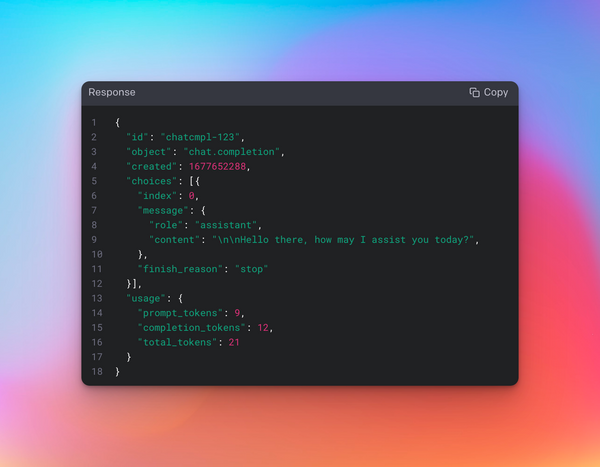
This manual method clearly shows the two-part architecture: the frontend handles the display, and the backend handles the secure API call.
Method 2: The Shortcut with the Vercel AI SDK
Building everything manually is insightful, but developers often use tools to work faster. For AI applications, the Vercel AI SDK is an incredibly popular and powerful toolkit that simplifies building chat interfaces. An advanced LLM assistant might suggest this method for a more robust and efficient solution.
So, why use an SDK? It provides pre-built components and functions that handle the common, repetitive tasks for you.
A Complete Guide To Vercel’s AI SDK // The ESSENTIAL Tool For Shipping AI Apps
In this video, Matt Pocock gives a great overview of what the Vercel AI SDK is and the problem it solves.
Watch the introduction from the beginning. The key idea is that the SDK provides a unified, simple way to interact with different LLM providers, so you don't have to write custom "glue code" for each one.
The AI SDK's "superpower" for chat interfaces is a React hook called useChat. This single hook replaces almost all the manual state management and API-calling logic we saw in the first method.
Let's see what that looks like in practice.
Vercel AI SDK Complete Guide: Building Production ...
This guide demonstrates how to build a chat app using the Vercel AI SDK and its useChat hook.
First, look at the code under the heading Basic Usage. This is the entire frontend. Notice how much simpler it is! The useChat hook gives you: messages: The full conversation history. input and handleInputChange: Tools to manage the text box. handleSubmit: A function that automatically sends the conversation to your backend and updates the message list. Next, look at the backend code in the previous section under Basic Chat Route. The SDK's streamText function handles the entire interaction with OpenAI and even streams the response back to the user token-by-token, which creates that "typing" effect you see in ChatGPT.
By using the Vercel AI SDK, you write less code, get more features (like streaming), and can even switch between AI models (e.g., from OpenAI to Anthropic) with a single line of code. For "vibe coding," this is often the preferred path because it lets you focus more on the user experience and less on the boilerplate.

Your "Vibe Coding" Workflow in Action
So, how do these concepts connect to your process of prompting an LLM in a tool like the Claude Code CLI? When you give Claude a prompt like "build a chat app," it's essentially running through one of these two methods for you.
This video of someone using Claude Code to build a chat application demonstrates this perfectly.
Claude Code for Non-Coders | A Complete Beginner's Guide
This video provides a real-world example of using an LLM assistant (Claude Code) to generate and connect a chat application.
First, watch how the user prompts Claude to create the frontend. Claude plans out the HTML and CSS to create the visual chat window, similar to the index.jsx file in our first example. Later, the user needs to connect this frontend to a backend service (n8n). Watch how they give Claude the backend webhook URL and ask it to set up a server to test the connection. Finally, see the iterative debugging process from this point. The user gives Claude feedback on the JSON response format it should expect from the backend. This is exactly the "parsing" step we discussed earlier!
When you use a tool like Claude Code, you are the director. The LLM is writing the frontend and backend code based on your instructions. Understanding the underlying architecture—the separation of the UI and the secure API route—is what empowers you to give better instructions and debug problems when the LLM's initial attempt isn't quite right.
Conclusion
You've now seen the complete journey of an idea from a prompt to a working application. You have a mental model for how a simple web-based chat app is constructed, which will be invaluable as you continue your vibe coding journey.
Here are the key takeaways:
- Chat apps are typically split into a frontend (the UI) and a backend (a secure API route) to protect your secret API keys.
- You can build this manually to understand the flow of data: the frontend collects user input and sends it to the backend, which calls the LLM API and returns the response.
- Specialized tools like the Vercel AI SDK provide shortcuts (like the
useChathook) that handle most of this complexity for you, enabling faster development. - Your "vibe coding" workflow with tools like Claude Code is simply a conversational way to generate and connect these frontend and backend components.
In our next lesson, we'll zoom in on the practical realities of using these APIs, covering the critical topics of API rate limits, token usage, and how to estimate and manage the costs associated with your AI-powered applications.