Recommended resources
The freely available resources this lesson will direct you to.
Hello! In our last lesson, we connected the dots between your ideas and a functional application by building a simple chat interface that communicates with an LLM. You saw how a 'frontend' UI talks to a secure 'backend' API route, which then calls the AI model.
Now that your app is "live" in a conceptual sense, we need to tackle the practical realities of running it. What happens if your app becomes popular? How much will it cost to operate? What stops a single user—or a bug in your code—from sending thousands of requests and running up a massive bill or crashing the service?
This lesson addresses those crucial questions. We will explore the fundamental concepts that govern the use of commercial AI services: token usage, costs, and API rate limits. Understanding these three pillars is essential for any designer or developer moving from a "vibe coded" prototype to a sustainable, real-world product.
The Currency of AI: Understanding Tokens and Costs
When you use ChatGPT on their website with a Pro subscription, you pay a flat monthly fee for a certain amount of access. However, when your application uses an AI model via an API, the model is entirely different. It’s not a subscription; it's a metered service, much like your home's electricity meter. You pay for exactly what you use. The fundamental unit of "usage" for an LLM is the token.
So, what exactly is a token?
An LLM doesn't process text as words or characters directly. Instead, it breaks text down into smaller chunks called tokens. A token can be a whole word, a part of a word, a punctuation mark, or even a space.
This article from Microsoft Learn provides a clear, concise explanation of what tokens are and why they are the basic building block for LLMs.
Please read the introductory section, the definition, and then the sections Common tokenization methods. Pay close attention to the table that compares the pros and cons of different token sizes. This will help you understand why "token count" is not always the same as "word count."
As you just read, a common rule of thumb for English text is that one word is roughly equivalent to 1.3 tokens, or 100 tokens is about 75 words. However, this can vary. Complex words might be broken into multiple tokens.
This video provides an excellent visual demonstration using OpenAI's own Tokenizer tool and introduces the all-important pricing model.
LLM Pricing Explained (OpenAI API Pricing)
This video, "LLM Pricing Explained," does a great job of making the abstract concept of token-based pricing tangible using the electricity meter analogy.
First, watch the section from this point where the speaker explains the "metered" billing model and introduces the idea of separate costs for input tokens and output tokens. Next, see how text is converted into tokens in practice from this segment, which demonstrates the OpenAI tokenizer. Finally, watch the short walkthrough of a cost calculation. This will solidify how the number of tokens and the model's price list combine to determine the cost of a single API call.
As the video explained, the cost of every single interaction with the API is calculated based on two things:
- Input Tokens: The number of tokens in the prompt you send to the model (including the system prompt and entire conversation history).
- Output Tokens: The number of tokens in the response the model generates for you.
Notice that the rates for input and output are different. Generating new text (output) is more computationally expensive for the model provider, so it almost always costs more than processing the text you provide (input).
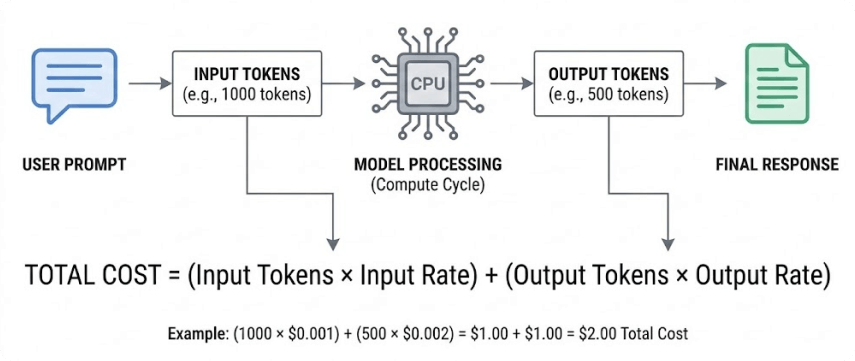
For a simple chat app, the cost per message is tiny. But as a product designer, you can imagine scenarios where costs could escalate. If you build an app that summarizes long documents, your input token count will be very high. If you design an app that writes lengthy articles, your output token count will be the main driver of cost.
The Rules of the Road: API Rate Limits
Now that you know you're paying per token, you might wonder: what stops my app from sending an infinite number of requests, either by design or by accident? The answer is rate limits.
Rate limits are restrictions that API providers like OpenAI and Anthropic place on how many requests you can make, and how many tokens you can process, within a specific time frame (usually one minute). They exist for a few key reasons:
- Stability: To prevent a single user from overwhelming the system and slowing it down for everyone else.
- Fairness: To ensure all users get reasonable access to the service.
- Security: To protect against buggy scripts or malicious attacks that could spam the API.
Understanding these limits is non-negotiable for building a reliable application.
This article offers a fantastic deep dive into the "what," "why," and "how" of rate limits. It compares the strategies of different providers, which is great for your general knowledge.
Start by reading the introduction to understand the core concept and the common metrics: Requests Per Minute (RPM) and Tokens Per Minute (TPM). Next, skim the sections on OpenAI and Anthropic. Notice how they both use "tiers" where your limits increase as your usage (and spending) grows. Finally, read about DeepSeek's unique model. Instead of rejecting requests, they just slow them down. This is a great example of a different design philosophy for managing the same problem.
When your application exceeds these limits, the API will respond with an error—typically a 429 "Too Many Requests" error code—and refuse to process your request. For your users, this would mean the app simply stops working. As a designer, you know that's a terrible user experience. So, how do you design your application to handle these limits gracefully?
Strategies for Managing Costs and Rate Limits
Managing limits isn't just about avoiding errors; it's also about being efficient with your resources, which directly translates to lower costs. The two goals are deeply intertwined. Here are the most effective strategies, which you can instruct an LLM assistant to help you implement.

Let's dive into the most important ones.
1. Implement Smart Retries: Exponential Backoff
Occasionally, you might hit a rate limit due to a sudden spike in activity. Your code shouldn't just give up or immediately try again (which would also fail). The standard best practice is to retry with exponential backoff.
This sounds complex, but the idea is simple:
- If a request fails with a
429error, wait for a short, random time (e.g., 1 second) and try again. - If it fails again, wait for a longer time (e.g., 2 seconds).
- If it fails a third time, wait even longer (e.g., 4 seconds), and so on.
This approach gives the rate limit window time to reset and prevents all your users from retrying in perfect sync, which would just cause another traffic jam.
This section of the previous article explains exponential backoff clearly and concisely.
Read the section titled Exponential Backoff. The key takeaway is that this allows your app to recover automatically from temporary spikes in traffic, providing a much smoother user experience than a hard failure.
2. Optimize Token Usage
The most direct way to manage both costs and TPM (Tokens Per Minute) limits is to simply use fewer tokens.
How to Fix OpenAI’s 429 Rate Limit Error: 7 Proven Solutions (+ 1 Bonus Tip!)
This video on fixing rate limit errors gives some excellent, practical tips for reducing token consumption.
Watch the segment from this point which covers four key actions: Shorten your input prompts. Remove redundancies. Delete unnecessary "knowledge files" (if you're using features like OpenAI's Assistants API). Explicitly instruct the model to give shorter, more concise answers.
Another critical technique is to control the model's output length using the max_tokens parameter in your API call. If you only need a yes/no answer, don't leave the max_tokens setting at its default of 4,000. Set it to a small number, like 10. This prevents the model from rambling, saves you money, and helps you stay under your TPM limit.
3. Batch Your Requests
If you have many small, non-urgent tasks, it's inefficient to send them as a stream of individual API calls. This will quickly burn through your RPM (Requests Per Minute) limit. A better approach is batching.
Let's return one last time to the rate limits article to understand this powerful technique.
Read the section <span data-type="resource_reading_textrange" data-resource-subitem-id="c8724d67" data-range-start="Batching Requests for Efficiency" data-range-end="increase throughput without hitting that dreaded "Too Many Requests" error as quickly.">on batching. Note the two different kinds: Asynchronous Batching: Using a special feature like OpenAI's Batch API to process huge jobs offline. This is perfect for big, non-interactive tasks like analyzing a dataset. Synchronous Batching: Combining multiple tasks into a single, more complex prompt to get multiple answers from one API call. This is great for reducing your RPM count for real-time tasks.
4. When in Doubt, Ask for More
Finally, remember that rate limits are not always set in stone. They are tied to your account's "usage tier." If you're working on a legitimate project that requires higher throughput, you can often just ask for it.
How to Fix OpenAI’s 429 Rate Limit Error: 7 Proven Solutions (+ 1 Bonus Tip!)
The same video on fixing rate limits has a fantastic "bonus tip" that many developers overlook.
Watch the final tip starting from this point. The speaker explains how they contacted OpenAI support, described their project's needs, and were granted a higher rate limit. This is a powerful, practical step you can take when your app's needs outgrow the default limits.
Conclusion
You've now uncovered the economic and operational engine that powers LLM APIs. Moving beyond the "magic" of code generation, you're now equipped with the practical knowledge needed to design and build AI-powered applications that are not only functional but also robust and economically viable.
Here are the key takeaways from today's lesson:
- AI API usage is a metered service, paid for by the token, not a flat subscription.
- Costs are calculated based on input tokens and output tokens, which are priced differently. You can estimate costs but must monitor actual usage.
- Rate limits (RPM and TPM) are a fundamental constraint to prevent system overload. Hitting a limit will cause your app to fail if not handled properly.
- You can manage these constraints by designing your app to be efficient: optimize token usage, use smart retries (exponential backoff), batch requests, and choose the right model for the task.
- If your project has legitimate needs, you can often request higher limits from the provider.
We've spent this module looking at how your application can talk to an AI model. In our final lesson of this module, we'll flip the script and explore how your design tools, like Figma, can talk directly to models like Claude. We'll demystify a special protocol called MCP that is purpose-built for this creative collaboration.