Recommended resources
The freely available resources this lesson will direct you to.
Hello! In the previous lesson, you created an isolated Python environment and recorded its dependencies. That gives your project a reliable place to run. Now you will give the code a structure that makes it easier to reuse and review.
You will write functions for a small prediction-error calculation, move them into an importable module, and keep the code that runs the example in a separate script. This separation will serve you well when an experiment grows beyond one file.
Give each calculation a clear boundary
Imagine comparing a model’s prediction with a known value. You could repeat the subtraction wherever you need it, but a function gives that calculation a name and a defined interface.
Python Functions | Python Tutorial for Absolute Beginners #1
Watch Python Functions, from Programming with Mosh, for a visual introduction to definitions, arguments, return values, and local variables.
Watch function basics, paying particular attention to the difference between printing a result and returning it. Then skip to local scope to see why a variable created inside one function is not automatically available elsewhere.
A function definition specifies parameters; a call supplies arguments. The indented body runs when you call the function, not when Python first reads its definition:
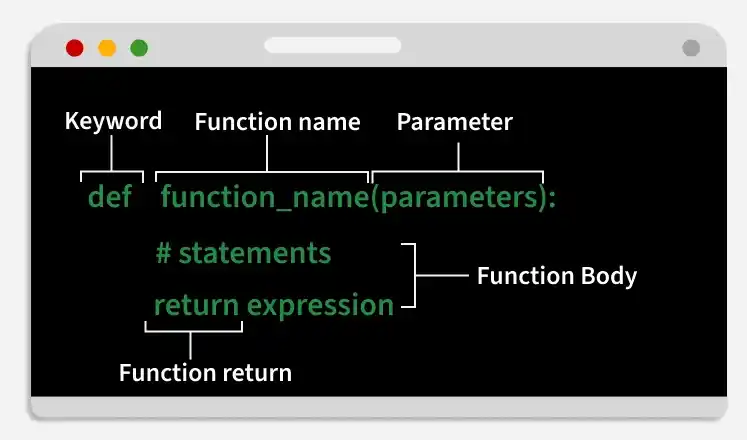
For example:
def absolute_error(actual, predicted):
    """Return the absolute difference between a target and prediction."""
    return abs(actual - predicted)


error = absolute_error(3, 5)
print(error)  # 2
Here, actual and predicted are parameters. In the call, 3 and 5 are arguments. The function returns 2; the separate print call displays it. That distinction matters: another part of your program can store a returned error, add it to other errors, or display it. A function that only prints the error cannot provide that number to another calculation. A function with no explicit return value returns None.
The one-line string inside the function is its docstring. It states what a caller can expect rather than narrating every line of implementation.
4. More Control Flow Tools — Python 3.14.0 documentation
Read the Python documentation’s guidance on documentation strings to see how a short function contract is normally written.
In “4.9.7. Documentation Strings,” read the conventions. Start at the paragraph beginning “Here are some conventions” and stop before the my_function example. Focus on the concise first-line summary; you do not need “4.9.8. Function Annotations” for this lesson.
A useful function accepts the information it needs as arguments and keeps intermediate values local. This makes its result easier to understand than a calculation that silently depends on a variable elsewhere in the file.
Build a reusable calculation
Return to the project directory from the previous lesson and reactivate its .venv using the command for your shell. In a text editor, create metrics.py alongside README.md and requirements.txt. Enter the following code:
def absolute_error(actual, predicted):
    """Return the absolute difference between a target and prediction."""
    return abs(actual - predicted)


def mean(values):
    """Return the arithmetic mean of a nonempty sequence."""
    if len(values) == 0:
        raise ValueError("values must not be empty")
    return sum(values) / len(values)


def mean_absolute_error(actual, predicted):
    """Return the average error for paired target and prediction sequences."""
    if len(actual) != len(predicted):
        raise ValueError("actual and predicted must have the same length")

    errors = []
    for target, estimate in zip(actual, predicted):
        errors.append(absolute_error(target, estimate))

    return mean(errors)
Mean absolute error averages the sizes of prediction mistakes, without allowing positive and negative differences to cancel out. For actual values [2, 4, 6] and predictions [1, 5, 5], each absolute error is 1, so the mean absolute error is 1.0. This is only a small calculation, not a complete model-evaluation workflow; its purpose here is to show how functions cooperate.
Notice the boundaries between the functions. absolute_error handles one pair of numbers. mean handles averaging and rejects an empty input, for which an average is undefined. mean_absolute_error checks that its inputs have matching lengths, builds a list of errors, and delegates the averaging to mean. The length check is important because zip would otherwise stop at the shorter sequence and quietly omit unmatched values. If both sequences are empty, mean raises the empty-input error.
The list errors exists inside a call to mean_absolute_error; it is not a result the caller can access by name. The caller receives only what the function returns. This is a practical use of local scope: intermediate details stay inside the calculation, while the return value forms its interface.
The docstrings, descriptive lowercase_with_underscores names, four-space indentation, and blank lines also help a reviewer find each function and understand what it promises. Readability is part of reusability.
Put the functions in a module
A Python file such as metrics.py is a module. Another file can import its definitions instead of copying them. Watch a short demonstration before creating the second file:
Python Tutorial for Beginners 9: Import Modules and Exploring The Standard Library
Watch Python Tutorial for Beginners 9: Import Modules and Exploring The Standard Library, from Corey Schafer, for an example of importing functions from a file in the same folder.
Watch custom modules. Follow the contrast between import module_name and from module_name import function_name, and notice that top-level statements in an imported file run during import. You can stop at 06:10; the later search-path configuration is unnecessary for this project.
Create run_metrics.py in the same directory as metrics.py:
import metrics


def main():
    actual = [2, 4, 6]
    predicted = [1, 5, 5]

    print("Mean actual value:", metrics.mean(actual))
    print("Mean absolute error:", metrics.mean_absolute_error(actual, predicted))


if __name__ == "__main__":
    main()
From your project directory, run:
python run_metrics.py
You should see:
Mean actual value: 4.0
Mean absolute error: 1.0
import metrics makes the module name available; metrics.mean(...) identifies where mean comes from. You could instead write from metrics import mean, then call mean(...) directly. For this small project, the module-qualified form makes the source of each calculation particularly clear. Avoid from metrics import *: it hides which names were imported.
The files now have different responsibilities. metrics.py contains calculations that other scripts could reuse. run_metrics.py chooses example data and displays results. Importing a module executes its top-level statements, so keeping example prints out of metrics.py prevents an import from unexpectedly producing output.
The final two lines of run_metrics.py provide another safeguard. Read how Python distinguishes a file run as a script from one imported as a module:
6. Modules — Python 3.14.0 documentation
Read the Python documentation’s explanation of the __main__ guard so you can interpret the last two lines of run_metrics.py.
In “6.1.1. Executing modules as scripts,” begin at “When you run a Python module with” and read the script example through the demonstration that importing does not run the guarded block. Stop before “6.1.2. The Module Search Path.” Focus on what value __name__ has when a file is run directly versus imported.
When you run run_metrics.py directly, its __name__ is "__main__", so main() runs. When another program imports it, the guard is false, so the example does not run. You can check that distinction from the project directory:
python -c "import run_metrics"
python -c "import metrics; print(metrics.mean([2, 4, 6]))"
The first command should print nothing; the second should print 4.0. If Python cannot find metrics, first check that both .py files are saved in the project directory and that you are running the commands from there.
What to take forward
You now have three levels of organization: functions name calculations and return reusable results; a module groups related functions in a .py file; a separate script supplies inputs and runs an example. The import test confirms that importing your code need not run the example.
Keep these files in your project. Next, you will use NumPy arrays to perform numerical transformations; the same distinction between reusable calculations and the code that runs an experiment will still apply.