Recommended resources
The freely available resources this lesson will direct you to.
- How to schedule deep work: Time blocking | Cal Newport and Lex Fridmanwww.youtube.com
- How I Manage My Time - The Weekly Productivity Template To Achieve More | Cal Newportwww.youtube.com
- The Anti-Context Switch Toolkit: Reclaim Deep Worksuper-productivity.com
- Mitigating Context Switching in Software Development - Jellyfishjellyfish.co
Introduction
In our last session, we focused on developing an internal locus of control by learning to reframe problems into actionable challenges. You now have a framework for identifying what you can control and influence in your work environment. Today, we transition from identifying problems to creating the structured time needed to solve them. This lesson is about designing your day with intention, rather than letting it be dictated by the reactive demands of notifications and meetings.
Your learning outcome for this session is to implement time blocking with dedicated deep work sessions to minimize context switching and maximize focus. We will dissect the high cost of fragmented attention for a software developer, and then build a practical, multi-layered system—inspired by productivity expert Cal Newport—to reclaim your focus and create the space for the high-value, creative work that defines a senior engineer.
1. The Developer's Enemy: Context Switching
As a software developer, your primary asset is your ability to hold complex mental models in your working memory—database schemas, API contracts, business logic, and call stacks. The greatest threat to this asset is context switching, the act of stopping one task to shift your attention to another.
This is not the same as multitasking. You can listen to music while coding because the activities use different cognitive resources. Context switching, however, forces your brain to discard one complex mental model and load an entirely new one, incurring a significant penalty known as "attention residue."
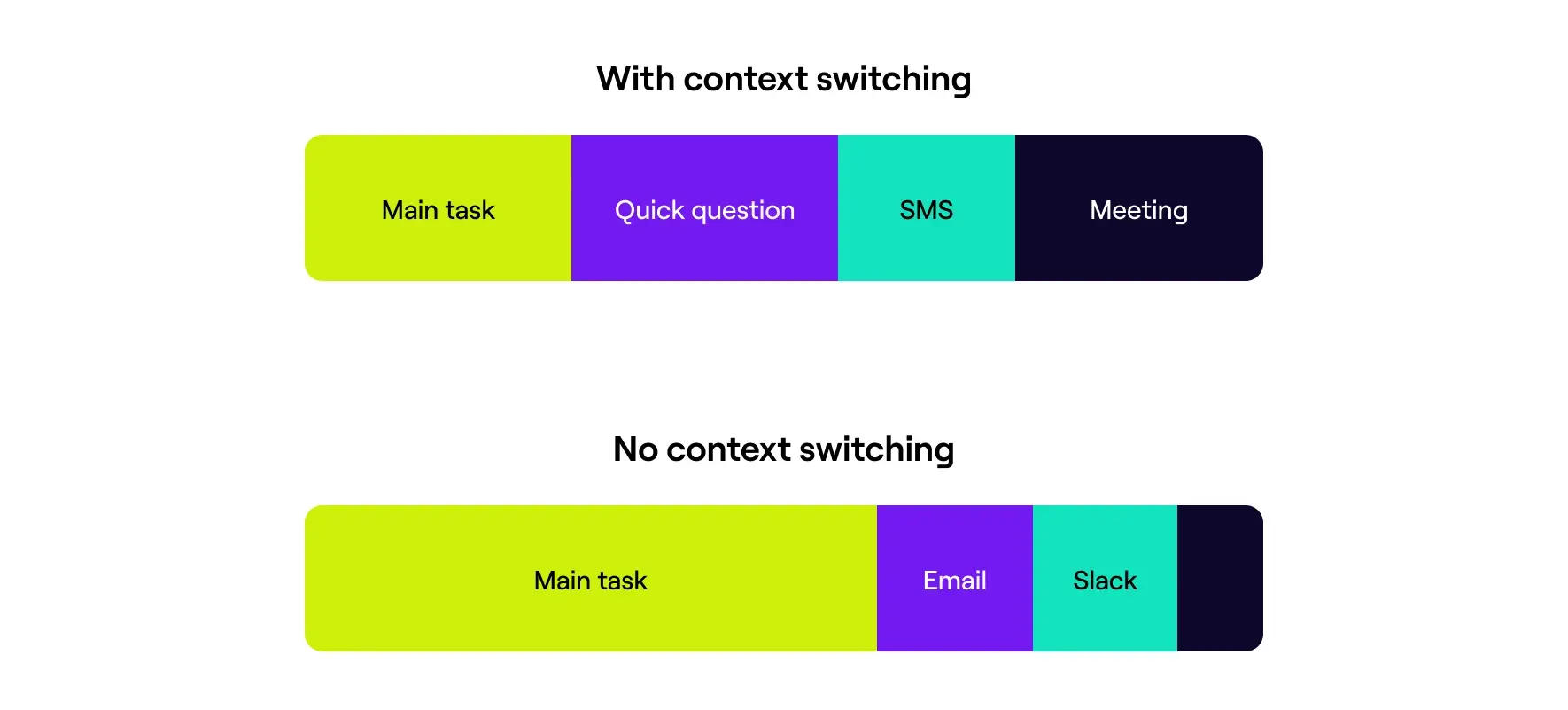
The cost of this mental "reloading" is steep. Research shows that every interruption, no matter how small, can cost you significant focus.
Mitigating Context Switching in Software Development - Jellyfish
This article from Jellyfish provides an excellent, data-driven overview of context switching specifically for engineering teams. It quantifies the cost and explains the underlying psychology.
Start by reading the section What Is Context Switching? Pay close attention to the concept of "attention residue," which explains why it takes so long to regain focus. Then, read the following section, The Impact of Context Switching on Developers, to understand how this phenomenon directly affects code quality, error rates, and developer burnout.
As the article highlights, a day filled with constant context switches doesn't just make you less productive; it increases stress and leads to lower-quality work. The solution is not to "try to focus harder" but to fundamentally redesign your workflow to minimize the need to switch contexts.
2. The Solution: Designing Your Time with Intention
Time blocking is the practice of proactively scheduling every minute of your workday. Instead of working from a reactive to-do list, you assign specific tasks to specific blocks of time on your calendar. This transforms your calendar from a record of appointments made by others into a detailed plan for what you want to accomplish.
Cal Newport, the author of Deep Work, is the leading proponent of this methodology. In this clip, he explains the core philosophy.
How to schedule deep work: Time blocking | Cal Newport and Lex Fridman
In this conversation with Lex Fridman, Cal Newport introduces the fundamental concept of time blocking as a way to move from a reactive to a proactive workday.
Watch the first minute of the video, from the introduction to time blocking. Notice his emphasis on making a plan for the time available before the day begins.
When implemented, a time-blocked schedule looks like a concrete plan of action, clearly distinguishing between different types of work.

3. A Practical Framework for Time Blocking
A truly effective time-blocking system operates on multiple scales, connecting your long-term goals to your daily actions. We will build this system in three steps.
Step 1: Group by Cognitive Mode, Not by Project
The most common mistake is to group tasks by project (e.g., "Project X bug fixes"). A far more effective approach for minimizing cognitive friction is to group tasks by the mental mode they require. Your brain finds it much easier to stay in one mode than to switch between different types.
The Anti-Context Switch Toolkit: Reclaim Deep Work
This article provides a powerful framework for batching tasks based on the cognitive effort they demand.
Read the section titled The Categorization Filter. Focus on understanding the four primary batch types: Deep Work, Shallow Work, Communication, and Planning.
For you as a developer, these categories might look like this:
- Deep Work: Architecting a new feature, writing complex algorithms, debugging a non-trivial issue, writing technical design documents.
- Shallow Work: Responding to non-urgent PR comments, updating dependencies, fixing typos in documentation, triaging low-priority bugs.
- Communication: Answering emails and Slack messages, scheduled meetings, daily stand-ups.
- Planning: Grooming the backlog, planning your week, breaking down a large epic into smaller tickets.
By batching these activities, you can perform all your communication in one block, tackle several shallow tasks in another, and reserve your best energy for uninterrupted deep work.
Step 2: Design Your Weekly Template
Before you plan your day, you must plan your week. Cal Newport calls this creating a "weekly template," which is a set of recurring rules and pre-defined blocks that reflect your priorities for the quarter. This is the strategic layer of your productivity system.
How I Manage My Time - The Weekly Productivity Template To Achieve More | Cal Newport
In this video, Cal Newport explains the key components of a weekly template that serves as the blueprint for your weekly and daily plans.
Watch the following three segments to understand the core elements: Protected Time: Learn how to preemptively block out recurring time for your most important work (e.g., "Mornings are for deep coding"). Daily Themes: Discover how to assign themes to different days (e.g., Tuesdays are "meeting days," Wednesdays are "heads-down coding days") to reduce context switching across the week. Autopilot Scheduling: Understand the concept of 'office hours' and how scheduling recurring times for predictable interruptions (like colleague questions) can protect your deep work blocks.
Your weekly template is not set in stone; it's a guide that you create at the start of a quarter and adjust as you learn what works. It simplifies your daily planning by making key decisions ahead of time.
Step 3: Block Your Daily Schedule
With your work categorized and your weekly template in place, daily planning becomes a much simpler, tactical exercise. Each morning (or the evening before), you look at your weekly plan and create a concrete, minute-by-minute schedule for the day ahead.
Remember the key insight from Newport's philosophy: the goal is intentionality, not rigid adherence. If a deep work session is going well, you can let it run long and simply adjust the rest of your day's plan. The schedule serves you, not the other way around.
4. Defending Your Focus Blocks
Creating time blocks is the easy part. The real challenge is protecting them from the inevitable onslaught of interruptions. This requires actively engineering your environment and communication patterns.
- Engineer Your Digital and Physical Space: Follow the "Environment Lock-Down" checklist from the Anti-Context Switch Toolkit. During a deep work block, close Slack and email completely. Put your phone in another room. Use headphones as a signal to yourself and others that you are unavailable.
- Define Clear Communication Protocols: Your team needs to know when and how to reach you. Establish "office hours" where colleagues know they can interrupt you. For asynchronous communication like Slack, set expectations that you only check it during your scheduled "Communication" blocks. This is a key strategy for managing interruptions without being unresponsive.
Mitigating Context Switching in Software Development - Jellyfish
This section of the Jellyfish article offers concrete strategies for establishing rules of engagement with your team.
Read the strategy titled Define Clear Communication Protocols. This provides a framework for setting up "focus time" and managing expectations around response times.
Practical Application: Design Your Deep Work Operating System
This exercise will guide you through creating the first version of your own time-blocking system.
1. Cognitive Mode Audit (10 minutes):
- Open a document or notebook.
- List at least 15-20 of your typical weekly tasks as a software developer.
- Categorize each task into one of the four modes: Deep Work, Shallow Work, Communication, or Planning.
2. Draft Your V1 Weekly Template (15 minutes):
- Look at your calendar for a typical week.
- Based on your audit, design a simple template. Answer these questions:
- Protected Time: Which 2-3 hour blocks can you consistently protect for Deep Work? (e.g., 9 AM - 11:30 AM every day).
- Daily Themes: Could you make Tuesdays the day for all your recurring 1:1s and team meetings? Could Friday afternoons be reserved for planning and shallow work?
- Autopilot: Can you schedule a 30-minute "office hours" block each day where you are available for quick questions from colleagues?
3. Time Block Tomorrow's Schedule (10 minutes):
- Using your weekly template as a guide, create a detailed time block schedule for your next workday.
- Assign every hour from the start to the end of your day to a specific block. Be sure to include breaks and lunch.
4. Implement and Reflect (Throughout your next workday):
- Follow your time-blocked schedule as best you can. When you get interrupted or need to change the plan, simply note it down and adjust the rest of your day.
- At the end of the day, spend 5 minutes reflecting: What was the biggest challenge? When did you feel most focused? Which interruption caused the most significant context switch? Use these insights to refine your template for the next week.
Conclusion
In this lesson, you have learned a systematic approach to reclaiming control over your time and focus. By moving from a reactive to-do list to a proactive, time-blocked schedule, you create the conditions necessary for high-quality, deep work.
Your key takeaways are:
- Context switching is the enemy of deep work, and its cost in software development is exceptionally high due to the need for complex mental models.
- Time blocking is the proactive solution, allowing you to design your day with intention.
- Batching tasks by cognitive mode (Deep, Shallow, Communication, Planning) is more effective than batching by project.
- A weekly template provides a strategic framework for your daily plans, embedding your priorities into your schedule.
- Protecting your blocks by engineering your environment and communication protocols is as important as creating them.
You now have a system for managing your time and focus. In our next lesson, we will build a complementary system for managing the information and knowledge you generate during your deep work sessions. We will explore how to build a personal knowledge management system using tools like Notion or Obsidian to document solutions and reduce cognitive load, creating what is often called a "Second Brain."