Recommended resources
The freely available resources this lesson will direct you to.
Introduction
In our last lesson, we focused on architecting your time using time blocking to create space for deep, focused work. Now that you have a system for managing your time, we need a corresponding system for managing the knowledge you generate. The most valuable output of your deep work sessions—the solutions, insights, and mental models—can easily be lost if not captured effectively. This lesson is about building a durable home for that knowledge.
Your learning outcome is to build a personal knowledge management system (PKM) using tools like Notion or Obsidian to document solutions and reduce cognitive load. We'll explore the concept of a "Second Brain," a system that acts as an external extension of your memory. You'll learn the principles of effective knowledge capture for a software developer and get a practical, step-by-step guide to building the initial version of your own PKM, a critical asset for your growth into a senior role.
1. The "Why": A Second Brain for Software Developers
As a developer, you constantly juggle a massive amount of information: API contracts, legacy code quirks, architectural decisions, debugging rabbit holes, and new technologies. Relying solely on your biological memory is not just inefficient; it's a significant source of stress and cognitive drain. The goal of a PKM system, often called a "Second Brain," is to systematically offload this information into a trusted, searchable external system.
This concept was popularized by productivity expert Tiago Forte. The video below gives a great introduction to his core frameworks, CODE (Capture, Organize, Distill, Express) and PARA (Projects, Areas, Resources, Archives), which provide the foundational philosophy for building such a system.
🧠 Building a Second Brain for Engineers in Notion!
This video from engineer Liz Rowe provides a concise overview of Tiago Forte's "Building a Second Brain" concept and its core principles.
Watch the first two minutes, from the introduction to the frameworks. Focus on understanding the purpose of the CODE and PARA acronyms. We will adapt these ideas for a developer-specific context.
For a developer, this isn't just about personal productivity. It's a professional discipline. How many times have you solved a tricky configuration issue, only to forget the solution six months later? How often have you wished the developer before you had documented why they made a certain choice? Your PKM becomes the answer to these problems. It's the private documentation that saves your future self hours of repeated work.
Curtis McHale's experience highlights this perfectly. After struggling with an undocumented, custom library, he writes:
"It took me around 20 minutes to write the documentation, but if it had been written already I would have saved at least 3 hours of my time... A good development team writes documentation, not just code."
Your PKM is where this practice begins.
2. The "What": Choosing Your Tool (Notion vs. Obsidian)
You requested guidance on Notion and Obsidian. Both are excellent, but they are built on different philosophies. Choosing the right one depends on what you value most in your system.
Knowledge Management for Software Developers
In this video, Alex Hyett provides a developer-centric comparison of various note-taking tools, clearly outlining the pros and cons of Notion and Obsidian.
Watch the following segments to understand the key differences: First, watch the section on what developers need in a note-taking app, such as code blocks and diagrams. Next, watch the review of Notion, paying attention to its strengths in organization (databases, Kanban) and its markdown limitations. Finally, watch the review of Obsidian, focusing on its local-first, markdown-based approach and plugin ecosystem.
To summarize the trade-offs:
- Notion is an all-in-one, collaborative workspace. Its strengths lie in structured data (databases, calendars, Kanban boards) and ease of use. If your primary goal is project management with a team and creating beautiful, structured documents, Notion is fantastic. However, your data lives in their cloud and their format.
- Obsidian is a private, local-first knowledge base. Its strengths lie in its foundation on plain Markdown files, which means you own your data forever. It's fast, works offline, and its superpower is connecting notes through backlinks, creating a web of knowledge. For a developer, this aligns perfectly with practices like using Git for version control and valuing data portability.
Recommendation: While both tools are powerful, Obsidian is often the preferred choice for developers building a long-term personal knowledge base due to its principles of local ownership, data portability, and extensibility. The rest of this lesson will focus on building your PKM in Obsidian, but the organizational principles are transferable to any tool.
3. The "How": Building Your Developer Knowledge Vault in Obsidian
We'll now construct the foundation of your vault. A good PKM system shouldn't be rigid; it should evolve with you. We'll start with a simple but powerful structure inspired by practices from other software engineers.
The following article provides a comprehensive look at a mature Obsidian vault. We won't build this entire system today, but we will use it as our primary reference for best practices.
How I use Obsidian to take notes and manage all my knowledge
This article by software engineer Bruno Paz is an excellent, in-depth guide to a developer-centric Obsidian setup. It covers the core philosophy, structure, and powerful techniques.
As you read the following sections, focus on the principles behind the structure, not just the details. First, read Why Obsidian? to internalize the value of plain markdown files and data portability. Next, review the list under How I Use Obsidian to see the types of knowledge you can capture. Then, read the section My vault structure up to the end of "The Inbox Folder" section. This introduces the critical concept of a low-friction capture location. Finally, read about The Power of Backlinks and Frontmatter and Templates. These are the mechanisms for organizing and connecting your knowledge.
Drawing from these principles, here is a starter framework for your vault.
Principle 1: Low-Friction Capture (The Inbox)
Your system must make it effortless to save an idea or a piece of information. If it's cumbersome, you won't use it. The solution is an Inbox folder. This is the default location for all new notes, thoughts, and clippings. You don't have to think about where it goes; you just capture it. You can sort and process the notes later during a weekly review.
Principle 2: Organize for Action and Retrieval
While a flat structure of notes can work, a simple folder hierarchy provides a clear starting point. The author of the reference article uses a complex system; we will start with a simplified version tailored for you:
01_Inbox/: Your default capture location.02_Projects/: For notes related to your active work. Each project or major feature gets a sub-folder. This is where you document specific bug investigations, meeting notes, and research for current tasks.03_Dev/: Your permanent technical library. When you solve a problem in a project and distill a general principle, the "how-to" guide goes here. This folder can have sub-folders forJava,React,SQL,System-Design, etc.04_Resources/: For assets like images, PDFs, and templates that support your notes.
This structure separates transient project work from permanent, reusable knowledge.
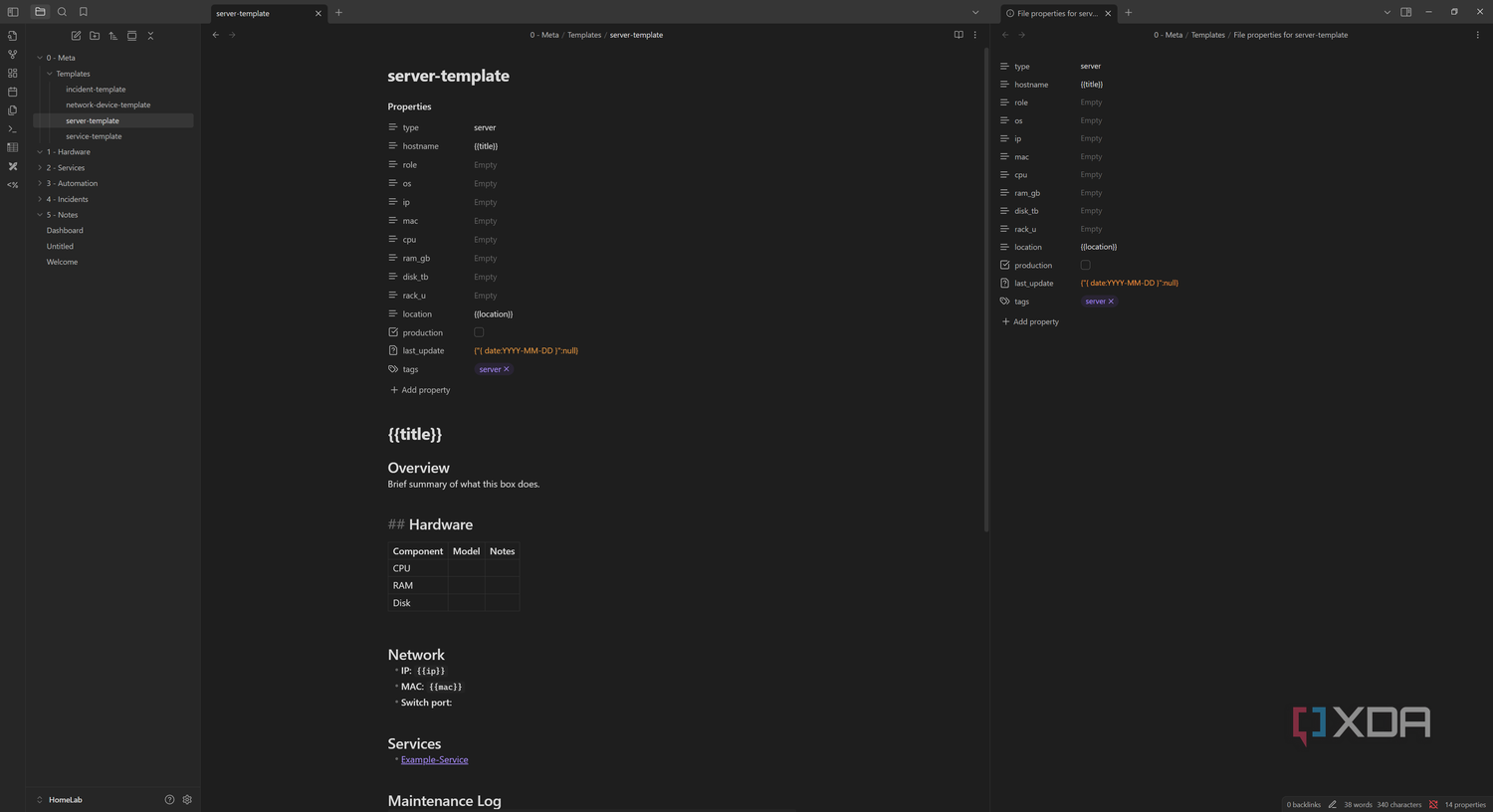
Principle 3: Standardize with Templates
To ensure your notes are consistent and useful, use templates. With the Templater plugin, you can create a template for different note types. For example, a template for a new solution you've discovered could automatically prompt you for the problem, the solution, and related concepts.
Principle 4: Connect Knowledge with Links
This is Obsidian's core strength. A note is not an island. When you document a solution to a bug in 02_Projects/Project-X/Fix-Auth-Bug.md, you should link to the general concept of authentication in 03_Dev/System-Design/Authentication.md.
This creates a rich, connected web of knowledge. The graph view in Obsidian visualizes these connections, allowing you to discover relationships between ideas you might not have noticed before.

Practical Application: Build Your V1 Knowledge Vault
This exercise will take you from zero to a functioning PKM in under 30 minutes.
1. Install and Configure (5 mins):
- Download and install Obsidian.
- Create a new "vault". Name it something like
MySecondBrain. Store it in a local folder that you can back up (e.g., in Dropbox, Google Drive, or a Git repository). - Go to
Settings>Community Plugins>Turn on community plugins. Install and enableTemplater.
2. Create Your Starter Structure (5 mins):
- In the file explorer pane on the left, create the following four folders:
01_Inbox02_Projects03_Dev04_Resources
- Go to
Settings>Files & Links. Set "Default location for new notes" toIn the folder specified belowand choose your01_Inboxfolder.
3. Create Your First Template (10 mins):
- Create a new note inside your
04_Resourcesfolder. Name itT - Solution Log.md. TheT -prefix is a common convention for templates. - Paste the following Markdown into the note:
---
tags:
  - solution
date: {{date}}
problem_context:
related_tech:
---


# {{title}}


## 1. The Problem
*Describe the problem or task. What was the goal? What error were you seeing?*


## 2. Investigation & Dead Ends
*What did you try that didn't work? Document the journey, including failed hypotheses. This is incredibly valuable.*


## 3. The Solution
*Describe the final, working solution. Include code snippets, configuration files, or step-by-step instructions.*
- Go to
Settings>Templater. Set "Template folder location" to04_Resources.
4. Document Your First Solution (10 mins):
- Think of a small but non-trivial problem you solved at work recently. It could be a bug, a configuration issue, or how to use a specific library feature.
- Create a new note (Ctrl/Cmd + N). Use the
Templaterhotkey (you can set this inSettings>Hotkeys) to insert your "Solution Log" template. - Fill out the template. Be concise but clear. Your audience is your future self. Give the note a descriptive title like "Fixing Spring Boot CORS Error on Localhost".
- Move this completed note from your
Inboxto a relevant folder, perhaps02_Projects/Your-Current-Project/.
You have now created your first piece of reusable knowledge—a "paper trail of competence."
Conclusion
In this lesson, you've laid the groundwork for one of the most powerful systems in a developer's toolkit: a personal knowledge management system. This "Second Brain" is not just a collection of notes; it is a dynamic partner in your problem-solving process, designed to reduce cognitive load and compound your knowledge over time.
Key takeaways from today are:
- A PKM system allows you to offload information, freeing up mental space for deeper thinking.
- Obsidian's local-first, plain-text philosophy makes it an ideal choice for developers who value data ownership and extensibility.
- A simple structure based on
Inbox,Projects, andDevfolders provides a robust starting point. - Templates and backlinks are the tools that transform individual notes into a connected, searchable knowledge graph.
You now have a system for managing your time (from the previous lesson) and a system for managing your knowledge. In our next lesson, we will focus on a specific application of your new PKM: maintaining a structured 'brag document' that records weekly problems solved, contributions made, and impact delivered. The solutions you log in Obsidian will become the direct inputs for this crucial career development tool.