Recommended resources
The freely available resources this lesson will direct you to.
Introduction
Welcome to the final lesson in our module on building an elite mindset and productivity system. In our previous sessions, you've assembled a powerful toolkit: you've learned to manage your focus with time blocking, capture knowledge in your Obsidian "Second Brain," and document your impact in a structured "brag document." Now, it's time to create the engine that drives it all—the weekly review.
This lesson addresses the learning outcome: to establish a weekly review protocol to plan and prioritize your technical and personal development goals. Think of this as the master script that runs every week to debug your priorities, garbage-collect mental clutter, and deploy your attention to what matters most. It is the single most important habit for transforming you from a reactive developer into a proactive leader who is in control of their time and career trajectory.
1. The Purpose of the Weekly Review: Gaining Clarity and Control
Before diving into the "how," it's crucial to understand the "why." A weekly review is not a tedious chore; it's a strategic ritual for gaining clarity and peace of mind. Without it, our digital lives and mental spaces slowly accumulate clutter, leading to stress and the feeling of being perpetually behind. Productivity expert David Allen, creator of the "Getting Things Done" (GTD) method, calls the weekly review the "master key" to the entire system.
The following video from Todoist provides an excellent overview of the concept and its three core stages as defined by the GTD methodology.
Beginner's Guide to The Weekly Review
This video, "Beginner's Guide to The Weekly Review," introduces the core philosophy and structure of this powerful habit.
Please watch the following sections: First, watch from the beginning to understand the benefits of the weekly review, such as gaining clarity, direction, and peace of mind. Next, watch the segment on the 'Get Clear' phase. This involves processing your inboxes and, most importantly, emptying your head of all open loops. Then, learn about the 'Get Current' phase, which focuses on reviewing your projects and calendar to ensure everything is up to date. Finally, watch the section on the 'Get Creative' phase. This is where you look at your long-term goals and decide what small step you can take this week to move them forward.
The key idea is to create a weekly appointment with yourself to consciously move from chaos to order, ensuring your daily actions are aligned with your larger goals.
2. The Weekly Review as Your Personal Operating System
As a software developer, you understand the importance of a stable operating system that manages resources and executes processes efficiently. Tiago Forte, a leading productivity expert, extends this metaphor to our personal lives. He argues that the weekly review functions as our personal "operating system."
The Weekly Review is an Operating System - Forte Labs
This article frames the weekly review not as a simple checklist, but as the fundamental process that governs your entire productivity system.
Please read these two key parts: Read the introduction, from the beginning of the article to understand why the weekly review is the "master program on which all other programs run." Then, jump to the section titled Cadence and synchronization. The analogy of bus schedules is a powerful illustration of how small, unaddressed issues can accumulate and cause system-wide failure, which the weekly review is designed to prevent.
This "resynchronization" is what prevents small anxieties, missed follow-ups, and forgotten ideas from accumulating into overwhelming stress. It's the preventative maintenance for your mind.
3. The Protocol: A 5-Step Checklist for Clarity
Now let's move from theory to a concrete, actionable protocol. The goal is to make this process efficient and sustainable—something you can complete in about 30-60 minutes each week. We will use a refined version of the GTD process, focusing on clearing your digital inboxes in a specific order.
The infographic below provides a high-level view of a typical review flow.
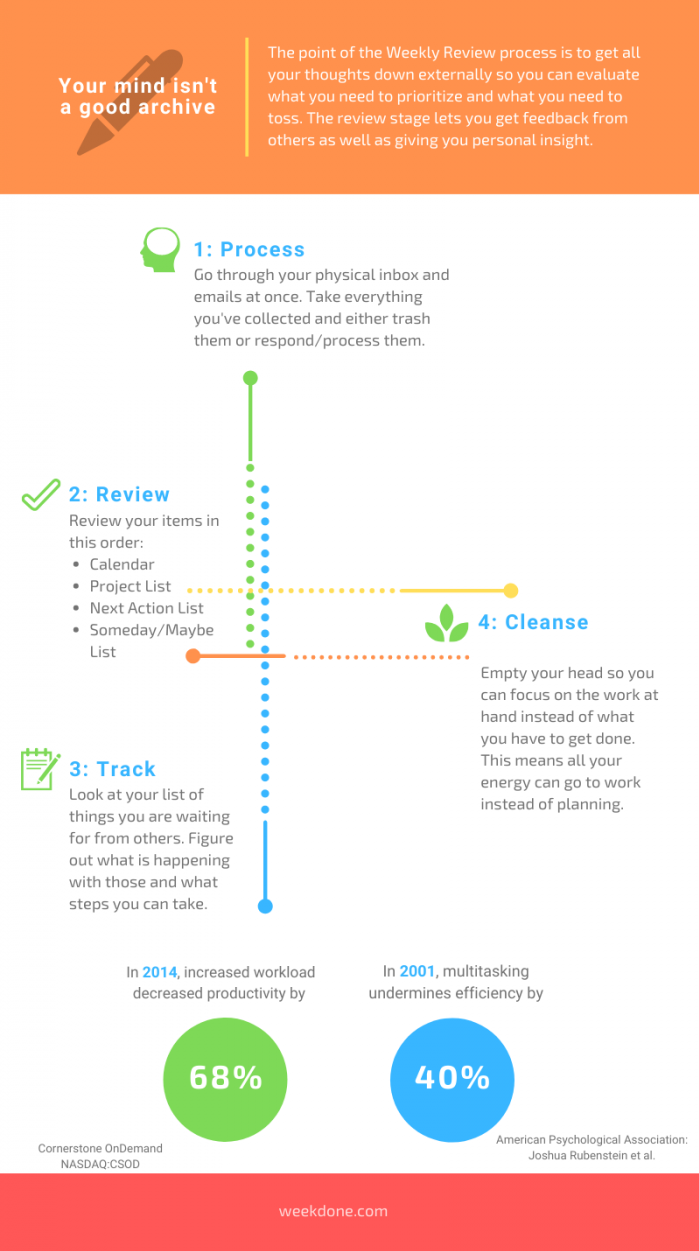
We will follow a similar, more detailed five-step process laid out by Tiago Forte. It’s a cascading workflow where each step feeds into the next, ensuring you only have to "touch each item once."
The One-Touch Guide to Doing a Weekly Review - Forte Labs
This guide provides the detailed "how-to" for an effective weekly review. It breaks the process down into manageable steps that cover all your digital inputs.
Please read the following sections to understand the complete workflow: Start with How to do a Weekly Review to see the 5-point checklist. Read through the explanations for each of the five steps: Step One: Email Step Two: Calendar Step Three: Desktop/Downloads Step Four: Notes Step Five: Tasks
Let's summarize and integrate this with the systems you've already built:
- Clear Inboxes (Email, Desktop, Downloads): Go through your email, computer desktop, and downloads folder. The goal is not to do the work, but to process it. Extract tasks into your task manager, file reference material into your Obsidian vault (e.g.,
03_Assets), and archive or delete the rest. - Review Calendar: Look back 1-2 weeks. Did you have a meeting that resulted in an achievement? Add it to your brag document. Is there a follow-up you missed? Create a task. Then, look forward 2-4 weeks. Are there any big meetings or deadlines you need to prepare for? Create tasks for preparation.
- Review Notes: Open your Obsidian vault and process your
01_Inbox. These are the fleeting ideas you captured during the week. For each note, decide what it is. Is it a task? An idea for a project? Or just reference material? File it in the appropriate folder (02_Projects,03_Areas, etc.) and create tasks as needed. - Update Brag Document: This is a crucial step for your career growth. Dedicate 5-10 minutes to reflect on the past week. Review your completed tasks, your calendar, and your notes. Identify 1-3 significant accomplishments and create new entries in your
05_Brag-Bookusing the template you created. - Plan the Week Ahead: Finally, with a clear head and an updated view of all your commitments, define your priorities for the coming week. Choose your Top 3 goals (work or personal). Then, open your calendar and schedule the deep work blocks necessary to make progress on them.
This entire process is about creating a clean slate, ensuring nothing is forgotten, and intentionally directing your energy for the week to come.
The OFFICIAL Notion Second Brain Setup
This short clip reinforces the idea of the weekly review as a quick, essential maintenance ritual for your digital systems.
Watch the section from "How do you actually maintain all of this?". The speaker emphasizes that this 30-minute ritual is what prevents your "Second Brain" from becoming cluttered and useless.
Practical Application: Create Your Weekly Review Template
To make this habit stick, let's build it directly into your Obsidian vault. You will create a checklist template that you can use every week to guide you through the process.
1. Create Your Weekly Review Template (10 mins):
- In your Obsidian vault, navigate to your templates folder (e.g.,
04_Resources). - Create a new note named
T - Weekly Review.md. - Paste the following Markdown into the note. This template combines the GTD framework with the practical steps we've discussed and integrates your other systems.
---
tags:
  - weekly-review
date: {{date:YYYY-MM-DD}}
week: {{date:YYYY}}-W{{date:WW}}
---


# Weekly Review for {{date:YYYY}}-W{{date:WW}}


## 1. GET CLEAR (Process Inboxes)
- [ ] **Email:** Process all emails to inbox zero. Archive, delete, or create tasks.
- [ ] **Desktop/Downloads:** Clear computer desktop and downloads folder. File, task, or delete.
- [ ] **Physical:** Process any physical mail or papers.
- [ ] **PKM Inbox:** Process all notes in Obsidian's `01_Inbox`. File them into PARA folders.
- [ ] **Mind Sweep:** Dump any remaining open loops or ideas into the `01_Inbox` for processing.


## 2. GET CURRENT (Review & Update)
- [ ] **Calendar (Past):** Review last week's calendar. Any follow-ups needed? Any wins to record?
- [ ] **Calendar (Future):** Review next 2-4 weeks. Any prep needed for upcoming events?
- [ ] **Brag Document:** Create at least one new entry in `05_Brag-Book`.
- [ ] **Task Manager:** Review 'Waiting For' list. Any follow-ups required?
- [ ] **Project Lists:** Briefly review active projects in `02_Projects`. Are next actions clear?


## 3. GET CREATIVE (Plan & Prioritize)
- [ ] **Review Goals:** Look at your `Someday/Maybe` list or higher-level goals. Is there one you can move forward this week?
- [ ] **Define Priorities:** What are the 3 most important things to accomplish this week? (technical or personal)
    1.
    2.
    3.
- [ ] **Schedule:** Block deep work sessions on your calendar for these top 3 priorities.


## 4. REFLECTION
- **What went well this week?**
- **What was challenging?**
- **What will I do differently next week?**
2. Schedule Your First Review (5 mins):
- Choose a consistent time and place for your weekly review. Popular options are Friday afternoon to close the work week, Sunday evening to prepare for the week ahead, or Monday morning to set the agenda.
- Create a recurring 60-minute event in your calendar right now. Title it "Weekly Review." Protecting this time is non-negotiable.
Conclusion
You have now designed the capstone habit of your personal productivity system. The weekly review is the command center that ensures all the other components—your PKM, your brag document, your task manager, and your calendar—are working together in service of your goals.
Key takeaways from this lesson:
- The weekly review is your "preventative maintenance for the mind," preventing the buildup of stress and chaos.
- A structured protocol (Clear, Current, Creative) allows you to systematically process information and regain clarity.
- This ritual integrates all your productivity tools, ensuring your knowledge is organized, your accomplishments are documented, and your time is focused on what truly matters.
- Consistency is key. Protecting this weekly 60-minute appointment with yourself is one of the highest-leverage investments you can make in your career.
This completes our module on building an elite mindset. You now have a robust internal operating system. With this foundation in place, we are ready to turn our focus outward. The next module, Career Strategy and Professional Branding, will begin the journey of shaping how you are perceived in the industry, starting with how to define and communicate your unique value as a developer.