Recommended resources
The freely available resources this lesson will direct you to.
Welcome back. In the previous lesson, you gave a p5.js sketch memory with variables such as playerX, playerSpeed, and travelScore, then updated those values inside the repeating draw() loop.
A game becomes more interesting when it can react to its current state. This lesson adds that ability: you will compare values and use an if/else statement to make your sketch choose one of two actions. This is the basis for warnings, score messages, boundaries, pickups, wins, and many other game behaviors.
Programs can ask true-or-false questions
Suppose your game has a moving player and an “alert line” near the right side of the canvas. The game needs to decide:
Is the player still before the alert line?
In JavaScript, that question can be written as:
playerX < alertX
This is a comparison expression. It compares two values and produces a Boolean value:
true, if the comparison is correctfalse, if it is not
For example, if the current values are:
let playerX = 120;
let alertX = 500;
then this expression:
playerX < alertX
produces true, because 120 is less than 500.
If playerX later becomes 520, the same expression produces false.
Useful comparison operators
| Operator | Meaning | Example that is true |
|---|---|---|
< |
less than | 4 < 9 |
<= |
less than or equal to | 9 <= 9 |
> |
greater than | 10 > 3 |
>= |
greater than or equal to | 10 >= 10 |
=== |
exactly equal to | score === 10 |
!== |
not equal to | lives !== 0 |
The direction of the symbols matters. Think of the opening side of < or > as facing the larger value:
3 < 8
8 > 3
Both comparisons are true.
The “equal to” versions are especially useful at game boundaries. For instance, score >= 10 means “the score has reached 10 or gone beyond it.” That is usually safer than score === 10, because a score may increase by more than one point at a time.
From a comparison to a choice
An if statement runs a block of code only when its condition is true:
if (playerX < alertX) {
  text("Area is safe", 20, 30);
}
Read it as: “If playerX is less than alertX, display the safe message.”
The punctuation has a job:
| Part | Purpose |
|---|---|
if |
Starts the conditional instruction. |
( ... ) |
Holds the comparison or other Boolean condition. |
{ ... } |
Holds the code block that runs when the condition is true. |
But an if statement alone does nothing when the condition is false. For a game that must choose between two outcomes, use if/else:
if (playerX < alertX) {
  text("Area is safe", 20, 30);
} else {
  text("Danger zone!", 20, 30);
}
Exactly one block runs each time JavaScript reaches this statement:
- When
playerX < alertXistrue, the first block runs. - When it is
false, theelseblock runs.
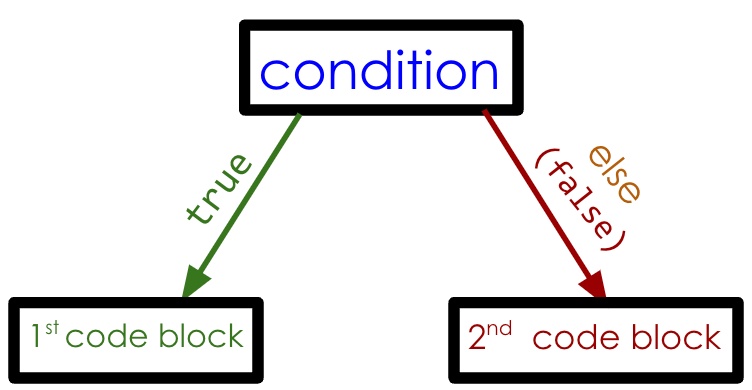
In a p5.js sketch, this decision is made repeatedly because draw() repeats. A player crossing a line can therefore change the chosen block on the very next frame.
Conditionals (If, Else If, Else) - Creative Coding with p5.js
Watch “Conditionals (If, Else If, Else)” by Patt Vira for a compact visual explanation of how one condition selects one of two p5.js actions.
Watch if/else basics. Focus on the fact that the condition sits inside parentheses, the two possible actions sit in curly-brace blocks, and only one block runs for each evaluation.
Build a two-state flight warning
Start with this complete sketch. It continues the moving-player idea from the prior lesson, but now the player changes color and receives a different message after crossing an alert line.
let playerX = 60;
let playerY = 150;
let playerSpeed = 1.5;
let alertX = 500;

function setup() {
  createCanvas(600, 300);
  textSize(20);
}

function draw() {
  background(35, 70, 140);

  playerX += playerSpeed;

  stroke(255, 170, 0);
  strokeWeight(3);
  line(alertX, 0, alertX, height);

  noStroke();

  if (playerX < alertX) {
    fill(255, 210, 40);
    text("Cruising: stay clear of the alert line.", 20, 30);
  } else {
    fill(255, 80, 80);
    text("Alert! The player crossed the line.", 20, 30);
  }

  circle(playerX, playerY, 40);
}
Run it and watch carefully:
- The player starts at
playerXequal to 60. - Each frame increases
playerXbyplayerSpeed. - While
playerXis less thanalertX, the condition is true. The player is yellow and the cruising message appears. - Once the player is no longer less than
alertX, the condition becomes false. The player becomes red and the alert message replaces the earlier one.
The line:
if (playerX < alertX)
does not permanently remember an answer. It is a fresh question asked during every run of draw().
Why use a variable for the alert line?
You could write this:
if (playerX < 500) {
It works, but this is clearer:
if (playerX < alertX) {
The name tells you what 500 means. It also makes tuning easier:
let alertX = 400;
Now the alert line is farther left without needing to hunt through the rest of the code.
Read conditions in plain English
A reliable way to understand or debug a condition is to translate it into a sentence.
| Code | Read it as |
|---|---|
playerX < alertX |
“The player is before the alert line.” |
playerX >= alertX |
“The player has reached or passed the alert line.” |
travelScore === 10 |
“The travel score is exactly 10.” |
travelScore !== 0 |
“The travel score is not zero.” |
For the flight warning, the else branch covers every situation that the first condition does not cover. So:
if (playerX < alertX) {
  // before the line
} else {
  // at or beyond the line
}
Notice that the second meaning includes equality. If playerX is exactly equal to alertX, then playerX < alertX is false, so the else block runs.
This is one reason if/else is useful: you do not need to write the opposite comparison yourself. JavaScript guarantees one of the two blocks will be selected.
Conditionals and Interactivity
Read the p5.js tutorial “Conditionals and Interactivity” to reinforce how comparisons create Boolean values and how if/else selects between two code blocks in a sketch.
In the “Boolean expressions & values” subsection, read the comparison overview, including the table of operators. Then continue to “The IF-ELSE Statement” and read the two-path structure. Focus on translating each condition into a question whose answer can only be true or false.
Equality is not assignment
The previous lesson used = to store a value:
playerX = playerX + playerSpeed;
That is assignment. It changes playerX.
To test whether two values match, use ===:
if (travelScore === 10) {
  text("Ten points!", 20, 30);
}
This is strict equality. It asks whether the two values are the same, without changing either one.
A common mistake is writing this:
if (travelScore = 10) {
That does not ask a question. It assigns 10 to travelScore, which can cause confusing behavior and erase the score your game had stored.
Keep this visual distinction in mind:
travelScore = 10;      // store 10
travelScore === 10;    // check whether it already is 10
For this course, use === for equality checks rather than ==. Strict equality is more predictable in JavaScript.
Make a small controlled remix
Change one part of the flight-warning sketch at a time, run it, and observe the result.
- Move the warning line by changing
alertXto300, then to550. - Change the comparison from
<to<=. The visible difference may be brief because the player moves continuously, but the condition now counts the exact boundary position as safe. - Change the two colors and messages so the line represents something else: a finish marker, a storm wall, or a portal.
- Set
playerSpeedto3and notice that the player can pass the exactalertXvalue between frames. This is why game logic often uses comparisons such as>=rather than relying on exact equality.
For a quick visual check while editing, add this beneath the status message:
fill(255);
text("playerX: " + playerX, 20, 60);
This makes the changing value visible, helping you connect the number to the moment when the chosen code block changes.
Key takeaways
A comparison expression asks a true-or-false question, such as:
playerX < alertX
An if/else statement uses that answer to select exactly one of two code blocks:
if (condition) {
  // runs when condition is true
} else {
  // runs when condition is false
}
Use comparison operators such as <, >=, ===, and !== to express game rules precisely. Most importantly, remember that = changes a variable, while === checks whether values match.
Next, you will define and call your own JavaScript function with parameters, so repeated pieces of game logic can be written once and reused cleanly.