Recommended resources
The freely available resources this lesson will direct you to.
Hello. In the previous lesson, you handled failures that occur while code runs. There is another runtime boundary to consider: a JSON document can be read successfully and still contain values your program cannot safely use. TypeScript cannot inspect that document for you.
This lesson shows how to keep incoming data untrusted until you have checked it. You’ll use TypeScript’s unknown type, build a small runtime schema, and handle both valid and invalid results. Allow about 40 minutes, including time to run the example in your Node.js project.
A type annotation is not an input check
Suppose a project record arrives as JSON. Your application expects a title, so you might be tempted to write:
type Project = { id: string; title: string };

const project = JSON.parse(text) as Project;
console.log(project.title.toUpperCase());
The as Project assertion changes what TypeScript believes; it does not check what JSON.parse returned. The JSON could contain "title": 42, omit title, or contain null instead of an object. Any of those can break the subsequent code.
A safer starting point is unknown:
const incoming: unknown = JSON.parse(text);
Now you must establish what incoming contains before using its properties. For a single value, an ordinary JavaScript check may be enough: typeof incoming === "string" lets TypeScript treat it as a string inside that branch. For an object, there are more possibilities to rule out. In particular, typeof null is "object", and arrays are objects too.
Read the relevant parts of TypeScript’s Narrowing handbook page before moving to schemas.
TypeScript: Documentation - Narrowing
Read the TypeScript handbook’s explanation of how runtime checks refine what the compiler knows. This is the foundation for treating incoming data as unknown.
In “Narrowing,” find the padLeft example near the top. Read the narrowing explanation, continuing through the subsection “typeof type guards” and its null example. Focus on what the typeof check proves within a branch—and why checking only for "object" does not prove that a value is a usable record.
For example, the following check establishes just enough to use a title string:
if (
  typeof incoming === "object" &&
  incoming !== null &&
  !Array.isArray(incoming) &&
  "title" in incoming &&
  typeof incoming.title === "string"
) {
  console.log(incoming.title.toUpperCase());
}
It does not establish that id exists, that the title is nonempty, or that any other project fields are valid. You could add those checks one by one. A runtime schema gives you a more maintainable way to define and apply the complete set of rules at an input boundary.
A schema checks values, not just types
A schema describes acceptable runtime data: its shape, field types, and relevant constraints. Watch the opening demonstration in Learn Zod In 30 Minutes by Web Dev Simplified. The presenter uses a different TypeScript project setup; concentrate on the validation operations rather than that setup.
Watch Learn Zod In 30 Minutes by Web Dev Simplified for a first example of defining a schema, parsing an object, and obtaining a typed result.
Watch the first schema demo. Notice the difference between parse, which throws on invalid data, and safeParse, which returns a result you can inspect. Also notice that a TypeScript type can be inferred from the schema rather than maintained separately.
For an input you expect might be invalid, safeParse makes the two outcomes explicit. Read Zod’s Basic usage documentation for its precise result shape and type-inference syntax.
Read Zod’s official Basic usage guide to pin down how validation failures and inferred types are represented in code.
In “Handling errors,” start where the guide explains what happens when parse fails. Read the parsing results, including the safeParse example immediately below. Then, in “Inferring types,” read the type explanation and its z.infer code example. You can stop before the discussion of schemas whose input and output types diverge.
The important distinction is between the input and the validated result. On success, use result.data; do not assume the original input has become safe merely because you called a validation function. A schema can also supply defaults or normalize values, so its output need not be identical to its input.
Validate a project record in your Node.js project
Install Zod in the strict TypeScript project you configured earlier:
npm install zod
For this standalone demonstration, save the previous src/index.ts elsewhere if you want to keep it, then replace its contents with the following. The input records are local strings so you can run the example without building an API yet; the same validation step belongs at the boundary when data comes from a file or remote service.
import * as z from "zod";

const ProjectSchema = z.object({
  id: z.string().min(1),
  title: z.string().trim().min(1).max(100),
  tags: z.array(z.string().min(1)).max(5).default([])
});

type ValidatedProject = z.infer<typeof ProjectSchema>;

function describeProject(project: ValidatedProject): string {
  return `${project.title} (${project.tags.length} tags)`;
}

const payloads: unknown[] = [
  JSON.parse('{"id":"p1","title":"  Portfolio  "}'),
  JSON.parse('{"id":"p2","title":42,"tags":["node"]}'),
  JSON.parse('{"id":"p3","title":"   "}'),
  null
];

for (const incoming of payloads) {
  const result = ProjectSchema.safeParse(incoming);

  if (!result.success) {
    console.log(
      "Invalid project:",
      result.error.issues.map((issue) => ({
        field: issue.path.join(".") || "(root)",
        message: issue.message
      }))
    );
    continue;
  }

  console.log(describeProject(result.data));
}
Run npm run check, npm run build, and npm start from the project root. The first record should produce Portfolio (0 tags). Its title has been trimmed, and its missing tags field has become an empty array in the parsed output. The other three records should produce validation issues: one for a title of the wrong type, one for a title that is empty after trimming, and one because null is not a project object.
There are two safeguards working together here:
- Runtime validation checks each actual value against
ProjectSchema. It rejects records that do not meet the rules. - Static typing lets
describeProjectrely on the type inferred from that schema. It receivesresult.dataonly after the success check.
safeParse returns a result whose success property distinguishes its alternatives. In the failure branch, TypeScript gives you result.error; in the success branch, it gives you typed result.data. This is the same kind of discriminated-union narrowing you used earlier for application data, now applied to a validation result.
One boundary remains before schema validation: JSON.parse itself throws if the text is not valid JSON. safeParse handles a valid JavaScript value that fails the schema; it does not catch a syntax error raised while producing that value. In a real input handler, you would decide separately how to report malformed JSON and how to report a well-formed document with invalid fields.
What validation establishes—and what it does not
A successful parse establishes only the rules you wrote. z.string() does not mean “nonempty string”; that is why the schema adds .min(1). Likewise, a title meeting the schema does not prove that a user should be allowed to edit the project.
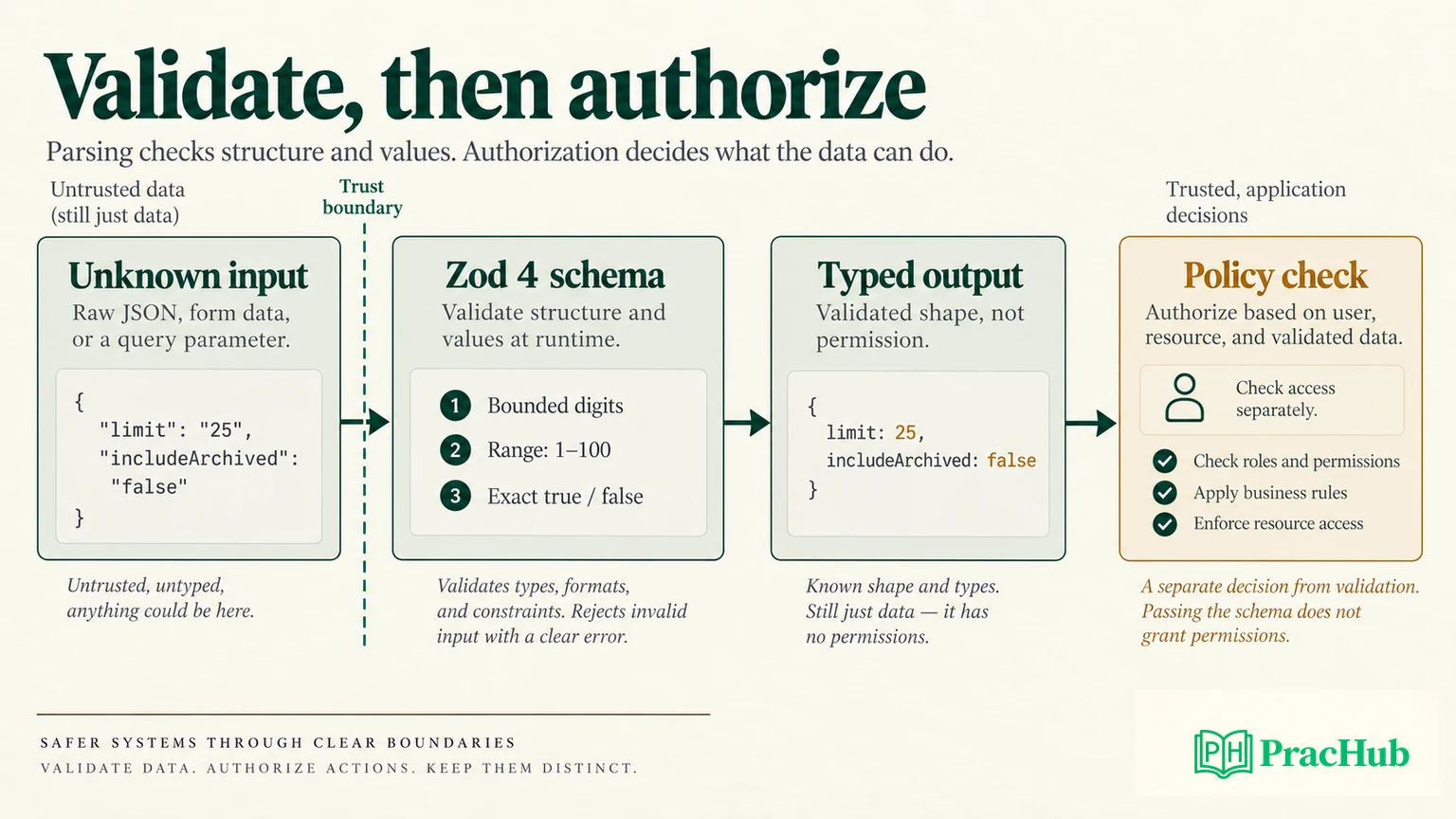
The diagram also illustrates a choice you will encounter with query parameters. A URL might supply "25" and "false" as strings, even when your application wants a number and a boolean. Checking their types is different from deliberately converting them. Define the accepted format and conversion rules at the boundary; do not treat a TypeScript annotation as a conversion. You will apply this more directly when you build request validation for an Express API.
For now, the reliable habit is straightforward: receive external data as unknown, validate it once near where it enters the application, handle a failed result, and pass the parsed output to code that expects the validated type. Keep authorization as a separate decision.
Key takeaways
Type assertions and interfaces do not validate runtime values. unknown prevents premature property access; runtime checks or a schema establish which values are safe to use. With Zod, safeParse gives you an explicit failure or typed, potentially normalized output, and z.infer keeps the TypeScript type aligned with the schema.
Next, you’ll apply the same attention to boundaries when working with environment-specific configuration, including values that must not be exposed in source code.