Recommended resources
The freely available resources this lesson will direct you to.
Hello. Last time, you configured a strict TypeScript project and saw that findById can return undefined. Checking that possibility prevents one kind of bug. It does not prevent a file from disappearing or a network connection from failing while your program runs.
This lesson is about telling those situations apart in asynchronous Node.js code. You’ll learn how failures reach an async caller, when a fallback is appropriate, and when an error should remain visible rather than being disguised as a successful result. Allow about 40 minutes, including a short run in the project you configured last time.
Two questions to ask about a failure
An operational failure is a condition a correctly written program might encounter during normal operation: a requested project does not exist, an optional file is missing, or a remote service refuses a connection. Correct code needs a policy for such conditions, but the policy depends on the operation. It might return “not found,” use a fallback, or report that the operation cannot currently finish.
A programming error means the program has violated one of its own assumptions. If code assumes a project exists and reads its title without checking, the resulting TypeError points to a defect in the code. Returning “No title yet” would hide that defect rather than fix it.
Watch the brief distinction in Error Handling in NodeJS (Complete Guide) by Nikita Dev, then read Joyent’s fuller explanation. The reading adds an important nuance: the same incident can be an operational failure for one program and a programming error for another.
Error Handling in NodeJS (Complete Guide) | Node Tutorial
Nikita Dev’s Error Handling in NodeJS (Complete Guide) introduces programming errors and anticipated operational failures with application examples.
Watch the two categories. Focus on whether a failure is part of the operation’s expected possibilities, not on whether it happened inside an async function.
Read Joyent’s Error Handling for a more precise account of the distinction and why a response must depend on what failed.
Under “Operational errors vs. programmer errors,” begin where the author defines operational errors as conditions correct programs must deal with. Read the distinction through the end of that section. Pay particular attention to the connection-refused example: the connection failure is operational, but neglecting to handle it is a bug. Then, under “Handling operational errors,” read the opening paragraph. Notice why a single blanket response cannot decide what every failure means.
The distinction describes the cause and the program’s obligations, not the syntax used to report the failure. An operational failure can reject a promise; a programming error can also reject a promise. Likewise, catching an error does not automatically make it safe to continue.
How an asynchronous error reaches you
Node.js APIs report failures in several ways. The promise-based file APIs you’ll use here reject their promises. Older callback-based APIs usually pass an error as the callback’s first argument. Streams and other event emitters can emit an 'error' event. You need to know which mechanism an API uses so that its failure is actually observed.
Errors | Node.js v25.2.1 Documentation
Use the official Node.js Errors documentation to connect concrete system errors to the mechanisms that deliver them.
In “Errors,” read the opening categories. Notice the distinction between a human-readable message and a system error’s code. In “Error propagation and interception,” read the propagation overview. Follow the separate descriptions of promise rejection, callback errors, and the 'error' event; you do not need to reproduce the examples’ older module syntax. Finally, in “Common system errors,” start at the permission-denied description and read the error examples through ETIMEDOUT. Locate ENOENT, ECONNREFUSED, and ETIMEDOUT and consider what operation each says failed.
For a promise-returning operation, put the await inside the try block if that block is meant to handle its rejection:
try {
  const text = await readFile("./project-note.txt", "utf8");
  console.log(text);
} catch (error: unknown) {
  console.error("Reading the note failed:", error);
}
By contrast, a try block that merely assigns const pending = readFile(...) does not catch a rejection that arrives later. The error belongs to the promise; a caller must await it or attach a rejection handler. If nobody does, it becomes an unhandled rejection. That term describes a missing handler, not a third category of error: either an operational failure or a bug can be left unhandled.
Make a decision at the point that has enough context
Let’s extend the previous lesson’s project lookup. Suppose a text note beside your project is genuinely optional. A missing note has a useful fallback; a permission failure does not. Replace src/index.ts with this code, retaining src/project.ts from last time:
import { readFile } from "node:fs/promises";
import { findById, type Project } from "./project.js";

const projects: Project[] = [
  { id: "p1", title: "Portfolio" }
];

async function describeProject(id: string): Promise<string> {
  const project = findById(projects, id);

  if (!project) {
    return "Project not found";
  }

  try {
    const note = await readFile("./project-note.txt", "utf8");
    return `${project.title}: ${note.trim()}`;
  } catch (error: unknown) {
    if (
      error instanceof Error &&
      "code" in error &&
      error.code === "ENOENT"
    ) {
      return `${project.title}: No note yet`;
    }

    throw error;
  }
}

try {
  console.log(await describeProject("p1"));
  console.log(await describeProject("missing"));
} catch (error: unknown) {
  console.error("Project description failed:", error);
  process.exitCode = 1;
}
From the project root, run npm run check, npm run build, and npm start. With no project-note.txt in the root, the first line should use “No note yet”; the second should say “Project not found.” If you create project-note.txt there and run the build and start scripts again, the first line should contain its text. The relative path is resolved from the process’s working directory; npm start from the project root provides that directory here.
There are three deliberately different decisions in describeProject:
- Missing project:
findByIdreturnsundefined, so the function returns a normal “not found” result. An absent lookup result need not become an exception. - Missing optional note:
readFilerejects. The function recognizesENOENTand supplies the fallback promised by this feature. - Other file failure: the function rethrows. It cannot honestly claim “No note yet” if, for example, access was denied. The caller decides how to report the failed operation.
The catch variable is unknown because JavaScript permits values other than Error to be thrown. The checks establish that this value is an Error with the code being tested. The code is more useful for this decision than matching prose in an error message. Even ENOENT is not universally harmless: if this were a required configuration file, its absence would prevent the operation—or perhaps the application—from starting correctly. Classify a failure in the context of what the program promised to do.
An async function can reject because of a bug
Now compare the careful lookup with this deliberately broken function:
async function brokenTitle(id: string): Promise<string> {
  const project = findById(projects, id)!;
  await Promise.resolve();
  return project.title;
}
The ! tells TypeScript to disregard the possibility of undefined; it does not create a project at runtime. Calling brokenTitle("missing") produces a rejected promise when the code tries to read title. The missing project is an expected possibility for a lookup, but dereferencing it after asserting it exists is a programming error. The await does not change that diagnosis.
This is why a broad catch such as catch { return "Project not found"; } is dangerous around the whole function. It would label a TypeError, a permission problem, and an actual absent project identically. Catch only where you can make a justified decision; otherwise, let the failure reach a caller that can report it. At an application boundary, log an unexpected error and mark the operation as failed rather than pretending it succeeded. For a long-running service, an unexpected bug may call for terminating and restarting the process under supervision instead of assuming its state remains sound. That is a reliability decision, not a rule that every TypeError requires an identical response.
The supplied flowchart shows one possible API setting for these decisions. It is a preview, not a requirement to build an Express error handler now.
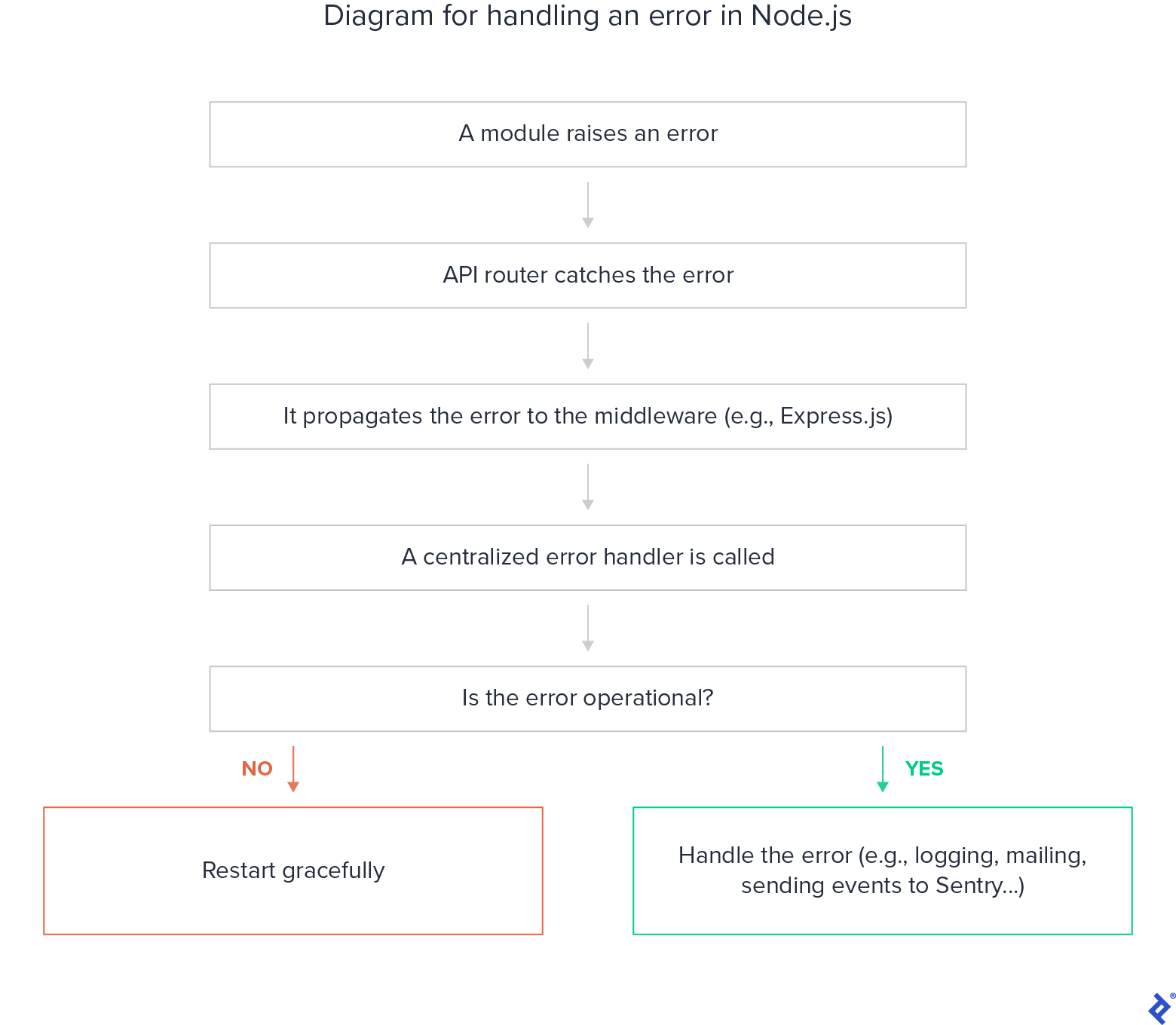
In particular, an operational failure should be handled where its meaning is known, as the optional-note example does. A central handler can report what remains, but it cannot safely turn every operational error into a fallback. Nor does catching an unexpected programming error prove that the process is healthy enough to continue.
Key takeaways
An operational failure is a possibility correct code must account for; a programming error is a defect in the code or an assumption it made. Both can appear as rejected promises. With async/await, observe a rejection by awaiting the promise, handle only failures for which you have a justified policy, and propagate the rest. In Node.js, a system error’s code helps identify a condition, while the operation’s purpose determines what that condition means.
Next, you’ll look more closely at another boundary TypeScript cannot check by itself: untrusted data arriving at runtime.