Recommended resources
The freely available resources this lesson will direct you to.
Hello! In the previous lesson, you used functions to build a question and return it to the rest of a program. One string was enough to hold that question, but an application often needs to keep track of several documents, each with a title, source, and text. You could create a separate variable for every field of every document, but that quickly becomes difficult to manage.
In this lesson, you’ll use a dictionary to represent one record and a list to hold a collection of records. You’ll create, inspect, update, and search that collection in Python. Allow about 40 minutes to watch, read, and run the examples; this data shape will be useful when you later work with documents, API responses, and retrieval results.
A list keeps related items together
Suppose you want to keep track of document titles:
titles = ["Embedding notes", "Search guide"]
print(titles[0])    # Embedding notes
print(titles[-1])   # Search guide
print(len(titles))  # 2
A list uses square brackets and holds items in an order. Its first item has index 0, not 1; -1 selects the last item. You can add an item without creating another variable:
titles.append("Model overview")
print(titles)  # ['Embedding notes', 'Search guide', 'Model overview']
The list has changed in place. append() adds one item to the end and does not return the updated list, so write titles.append(...), not titles = titles.append(...).
Watch selected parts of Corey Schafer’s Python Tutorial for Beginners 4: Lists, Tuples, and Sets. The video uses course names rather than documents, but the list operations are the same.
Python Tutorial for Beginners 4: Lists, Tuples, and Sets
Watch Corey Schafer introduce list indexing, adding an item, and looping through a list.
Watch list basics for square brackets, len(), and zero-based and negative indices. At adding an item, focus on what append() changes. Then watch the list loop to see how a for loop visits each item without requiring you to know its index.
A list is useful when you have many items of the same kind. You can loop over titles, and two documents may even have the same title—the list can contain duplicates. But a title alone is not a complete document record. To keep its title, source, and text associated with one another, you need another structure.
A dictionary describes one record
A dictionary stores values under named keys. Here is one document record:
document = {
    "title": "Embedding notes",
    "source": "notes.txt",
    "text": "Embeddings represent text as vectors."
}

print(document["title"])   # Embedding notes
print(document["source"])  # notes.txt
The curly braces contain key-value pairs. "title" is a key; "Embedding notes" is its value. The image shows the same relationship using shorter keys and values:
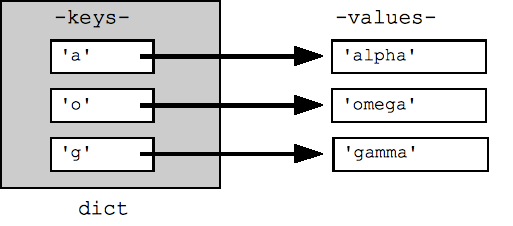
Unlike a list index, a dictionary key names what a value means, rather than where it sits. Keys within one dictionary must be unique. Assigning to an existing key replaces that field’s value; assigning to a new key adds a field:
document["title"] = "Revised embedding notes"
document["summary"] = "A short introduction to embeddings."
Read the beginning of 5.5. Dictionaries in the Python documentation for the key-value model and the difference between looking up an existing key and a missing one. You can leave the later dictionary-constructor and comprehension examples for another time.
5. Data Structures — Python 3.14.0 documentation
Read the opening of “5.5. Dictionaries” to connect the record example to Python’s rules for dictionary keys, updates, and lookups.
In “5.5. Dictionaries,” begin with keys and lookups. Start at the paragraph contrasting sequences with dictionaries; stop after the paragraph explaining get() for a possibly missing key. Focus especially on what happens when you assign to a key that already exists.
If a field is required, square-bracket lookup makes your expectation clear: document["title"]. If you ask for a key that is absent, Python raises a KeyError. For an optional field, get() lets you supply a fallback:
print(document.get("summary", "No summary available"))
print(document.get("author", "Unknown author"))  # Unknown author
Here, "summary" exists because you added it; "author" does not. Choose a fallback that makes sense for the field rather than treating every missing value as an error.
A list of dictionaries holds many records
Now combine the two structures. The dictionary keeps the fields of one document together; the list keeps multiple document dictionaries together:
documents = [
    {
        "title": "Embedding notes",
        "source": "notes.txt",
        "text": "Embeddings represent text as vectors."
    },
    {
        "title": "Search guide",
        "source": "guide.txt",
        "text": "Search finds passages relevant to a question."
    }
]

print(len(documents))            # 2
print(documents[0]["title"])     # Embedding notes
print(documents[1]["source"])    # guide.txt
Read documents[0]["title"] in two parts: documents[0] selects the first dictionary from the list, and ["title"] selects a field from that dictionary. An invalid list position raises an IndexError; an absent dictionary key raises a KeyError. Those errors point to different mistakes.
For a second example of this shape, read “Putting It All Together” in Pluralsight’s Manipulating Lists and Dictionaries in Python. Its records describe players rather than documents; focus on how whole dictionaries are added to a list, not on the particular fields.
Manipulating Lists and Dictionaries in Python - Pluralsight
Read the “Putting It All Together” example to see another list of records assembled with append().
In “Putting It All Together,” start at the combined example. Stop after the text introduces the completed list, before its later slicing and sorting examples. Notice that each call to append() adds one entire dictionary as one list item.
You can start with an empty collection and add a record later:
documents = []
documents.append({
    "title": "Model overview",
    "source": "overview.txt",
    "text": "A model generates a response from its input."
})
This is intentional nesting: the item you append is one dictionary, so documents becomes a list containing one document record. By contrast, {} creates an empty dictionary, not an empty list.
Work with the collection, one record at a time
A loop lets you process records without writing a separate statement for each list position:
for document in documents:
    print(document["title"], "-", document["source"])
On each pass, document refers to the next dictionary. You can also pass the collection into a function and return a record that meets a condition, just as your question-building function returned a string in the previous lesson.
Run this complete example:
def find_document(documents, wanted_title):
    for document in documents:
        if document["title"].lower() == wanted_title.lower():
            return document
    return None


documents = [
    {
        "title": "Embedding notes",
        "source": "notes.txt",
        "text": "Embeddings represent text as vectors."
    },
    {
        "title": "Search guide",
        "source": "guide.txt",
        "text": "Search finds passages relevant to a question."
    }
]

wanted_title = input("Document title: ").strip()
found = find_document(documents, wanted_title)

if found is None:
    print("No document with that title was found.")
else:
    print(f"Source: {found['source']}")
    print(f"Text: {found['text']}")
Try entering Search guide, then run it again with a title that is not in the list. find_document returns the dictionary when it finds a matching title and None otherwise. The code outside the function decides what to display. This search returns the first match, so if titles can repeat and you need every match, the program would need to collect matching records instead.
Keeping the same field names across your document dictionaries matters. If one record uses "source" and another uses "file", code expecting document["source"] will fail for the second record. The list does not enforce consistency for you; you establish it when creating records.
Key takeaways
Use a list when you need an ordered collection of items, and a dictionary when you need named fields for one item. A list of dictionaries gives you a practical collection of records: you can append a record, select one by position, access its fields by key, or loop through the collection. Use get() for fields that may legitimately be absent, and keep required field names consistent.
So far, these records exist only while the program runs. In the next lesson, you’ll read and write text and JSON files so Python can load data from outside the program and save it for later use.