Recommended resources
The freely available resources this lesson will direct you to.
- Python Functions: Visually Explainedwww.youtube.com
- Python Functions | Python Tutorial for Absolute Beginners #1www.youtube.com
- 6.2. Functions that Return Values — How to Think like a Computer Scientist: Interactive Editionrunestone.academy
- More functions - Python Programming MOOC 2023programming-23.mooc.fi
Hello! Last time, you used conditionals and loops to make a search-question builder handle blank topics and length limits. The program works, but its logic is tied to one place. Functions let you give a piece of that logic a name, supply different inputs on different calls, and use the result elsewhere.
In this lesson, you’ll define and call functions with parameters and return values, then refactor part of the question builder. Allow about 40 minutes to watch, read, and run the examples. These same skills will later help you separate tasks such as preparing a document query from displaying an answer.
From a block of code to a function call
You’ve already called functions: len(question) receives a string and gives you its length. You can define your own with def:
def make_question(topic):
    return f"Find documents about {topic}."


question = make_question("vector databases")
print(question)
The output is Find documents about vector databases. The first two lines define make_question; they do not build a question yet. Execution of its indented body happens when Python reaches the call, make_question("vector databases").
Here, topic is a parameter: a variable named in the function definition. "vector databases" is an argument: the value supplied by this particular call. Python makes that value available as topic while the function runs. You can call the same function again with "RAG" without changing its definition.
Watch Python Functions | Python Tutorial for Absolute Beginners #1 from Programming with Mosh. Its greeting example uses the same mechanics, then shows why sending a value back is different from displaying one.
Python Functions | Python Tutorial for Absolute Beginners #1
Watch this introduction to defining functions, passing arguments, and returning values. Pay particular attention when the example changes from printing a greeting to returning one.
Watch definition and call for def, indentation, and calling a function. Continue through parameters and arguments to see how a call supplies values. In returning a value, focus on what the calling code can do with the result; the brief file-writing preview is not needed yet. Finish with implicit None to see what happens when a function prints but does not explicitly return a value.
A function can take more than one argument. Unless you specify otherwise, Python matches them to parameters by position:
def characters_remaining(question, max_chars):
    return max_chars - len(question)


remaining = characters_remaining("Find documents about RAG.", 50)
print(remaining)  # 25
On this call, question receives the string and max_chars receives 50. Reversing those arguments would not give the intended calculation. Leaving one out would produce an error because both parameters are required.
Follow a returned value back to the caller
A return statement evaluates its expression, sends that value back to the call site, and ends that call. In the preceding example, the call to characters_remaining(...) produces 25; the assignment stores that value in remaining. You could instead use the result directly in another expression:
print(characters_remaining("Find documents about RAG.", 50))
The image below traces two calls to a function that doubles the sum of its two inputs. Follow the colors from each call’s arguments to x and y, then from return z to the variable receiving the result.
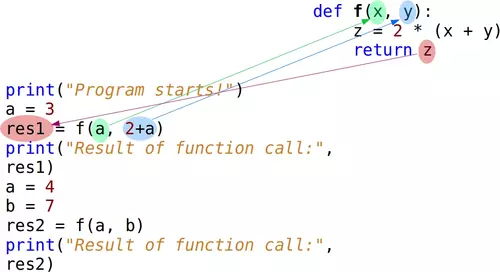
For the first call, a is 3, so f(a, 2+a) receives 3 and 5 and returns 16 into res1. Later, a is changed to 4 and b is 7; f(a, b) returns 22 into res2. The parameters x and y belong to the function call. They do not need to have the same names as the variables in the calling code.
Runestone Academy’s 6.2. Functions that Return Values offers a step-through view of this distinction. Read the indicated passages, then use the page’s CodeLens controls to watch execution leave the call, enter the function, and return.
6.2. Functions that Return Values — How to Think like a Computer Scientist: Interactive Edition
Read the passages in Runestone Academy’s “Functions that Return Values” to reinforce where arguments, parameters, and returned values live during a call. The interactive trace makes the execution order visible.
In Section 6.2, after the square function’s black-box diagrams, read the paragraph beginning “Notice something important here” about the caller’s variable and the function’s parameter: caller and parameter. Farther down the same section, find the paragraph beginning “When you click on the forward button.” Read the execution trace through the paragraph’s end. In the nearby CodeLens example, notice that Python passes over the function body at definition time and enters it only at the call. Then read the following paragraph, beginning “Finally, there is one more aspect,” through its instruction to inspect the returned value: missing return.
Parameters and variables created inside a function are local to that call. For example, the z in the image is used to compute the answer inside f; calling code receives the returned number, not a variable named z. This is why res1 can receive a result even though its name never appears in the function definition.
Return a value rather than only printing it
Printing and returning can look similar when you run a small program, but they serve different purposes:
def show_question(topic):
    print(f"Find documents about {topic}.")


def make_question(topic):
    return f"Find documents about {topic}."


shown = show_question("RAG")
made = make_question("RAG")

print(shown)  # None
print(made)   # Find documents about RAG.
show_question displays text immediately. Because it has no explicit return value, its call produces None, Python’s value for “no result.” make_question displays nothing by itself; it gives the string to its caller. The caller can then print it, check its length, or pass it to another function. A function that performs an action such as printing can still be useful—the important point is not to mistake that action for returning the printed value.
A return can also handle a condition and stop early:
def make_question(raw_topic):
    topic = raw_topic.strip().lower()

    if not topic:
        return ""

    return f"Find documents about {topic}."
For a spaces-only argument, .strip() makes topic empty, so the function returns an empty string. It does not continue to the final return. For " Vector Databases ", it returns Find documents about vector databases. Both paths return a string, making the result straightforward for the calling code to use.
Refactor the question builder
Here is a complete, runnable version that gives each function a narrow job. make_question cleans a topic and builds text. characters_remaining calculates a length difference. The code outside the functions handles input and decides what to display.
def make_question(raw_topic):
    topic = raw_topic.strip().lower()

    if not topic:
        return ""

    return f"Find documents about {topic}."


def characters_remaining(question, max_chars):
    return max_chars - len(question)


question = make_question(input("Topic to research: "))
max_chars = 50

if not question:
    print("No question created: the topic was blank.")
else:
    remaining = characters_remaining(question, max_chars)

    if remaining < 0:
        print(f"Question is {-remaining} characters too long: {question}")
    elif remaining == 0:
        print(f"Question fits exactly: {question}")
    else:
        print(f"Question fits with {remaining} characters to spare: {question}")
Run it with Vector Databases: make_question returns a 38-character question, and characters_remaining returns 12. The final branch displays the question and its spare capacity. Run it again with spaces only: make_question returns "", so the program never tries to calculate a length report for a question it did not create.
Notice the boundary between jobs. The functions do not call input() or decide which message to print; the caller supplies their arguments and uses their return values. That separation will let you reuse question-building logic when input eventually comes from somewhere other than a keyboard. For now, the central pattern is simple: define a function, call it with arguments, and use the value it returns.
Key takeaways
A function definition gives reusable code a name; a call runs it. Parameters name the inputs in the definition, while arguments supply values at the call. return sends a value to the caller and ends that call; print() merely displays something. Variables inside a function are local, so return the result that other code needs.
You’ve turned part of a single-purpose script into reusable pieces. Next, you’ll use lists and dictionaries to represent multiple records and the fields within each record—values that functions can also receive and return.