Recommended resources
The freely available resources this lesson will direct you to.
- Python Tutorial for Beginners 6: Conditionals and Booleans - If, Else, and Elif Statementswww.youtube.com
- Python Tutorial for Beginners 7: Loops and Iterations - For/While Loopswww.youtube.com
- 4. More Control Flow Tools — Python 3.14.0 documentationdocs.python.org
- Control Flow Structures in Pythonrealpython.com
Hello! In the previous lesson, you cleaned a topic, built a search question, and calculated how many characters remained under a length limit. The program always followed the same instructions, even when the topic was blank or the question exceeded the limit.
Today you’ll give it choices and repetition. Conditionals select what happens for a particular value; loops let a program process several values or ask again when input needs attention. These skills will also matter later when you put limits on automated AI workflows. Allow about 40 minutes to watch the selected video segments, run the code, and trace what each branch does.
Make a decision with if, elif, and else
A comparison produces a Boolean value: True or False. Unlike assignment with =, equality uses ==. Other useful comparisons include != (not equal), <, >, <=, and >=.
Watch the selected portions of Corey Schafer’s Python Tutorial for Beginners 6: Conditionals and Booleans. Focus on how a colon and indentation define the code belonging to each branch.
Python Tutorial for Beginners 6: Conditionals and Booleans - If, Else, and Elif Statements
Corey Schafer demonstrates comparisons and the three kinds of conditional branch, then combines conditions with Boolean operators.
Watch the first condition for if, indentation, and the difference between = and ==. Continue with alternative branches for else and elif. Finally, watch combined conditions for and, or, and not. The access example illustrates the operators; treat it as a syntax example, not a security design.
Recall that the previous program calculated remaining. You can now respond differently to its three possible states:
remaining = -4

if remaining < 0:
    print(f"Question is {-remaining} characters too long.")
elif remaining == 0:
    print("Question fits exactly.")
else:
    print(f"Question fits with {remaining} characters to spare.")
This prints Question is 4 characters too long. Python tests branches from top to bottom and runs only the first matching branch. The else has no condition: it handles everything not covered above. Here, once remaining is neither negative nor zero, it must be positive.
The four spaces before each print() matter. They place that statement inside its branch. A line returned to the left margin would run after the entire conditional, regardless of which branch matched. Try changing remaining to 0 and then 12; predict the message before running each version.
You can combine tests when a decision depends on more than one fact:
topic = "vector databases"
remaining = 12

if topic and remaining >= 0:
    print("A nonblank topic and a fitting question are available.")
and requires both conditions to be true; or requires at least one; not reverses a condition’s truth value. An empty string is treated as false in a conditional, so topic here tests whether the string contains characters. Spaces count as characters, though: clean input with .strip() before using this test to reject a blank-looking topic.
Repeat work with for
Use a for loop when you want to visit the values in a sequence. A string is one sequence you already know: iterating over it visits its characters in order.
topic = "RAG AI"
non_space_count = 0

for character in topic:
    if character == " ":
        continue
    non_space_count = non_space_count + 1

print(non_space_count)  # 5
Each time through the loop—each iteration—character holds the next character. When it is a space, continue skips the rest of that iteration and moves to the next character. Otherwise, the count increases. The final print() is not indented under for, so it runs once, after the loop.
For a fixed number of repetitions, use range():
for attempt in range(1, 4):
    print(f"Attempt {attempt}")
This prints attempts 1, 2, and 3. The stopping value, 4, is excluded. When you have already found what you need, break exits the loop altogether; unlike continue, it does not move on to the next iteration.
Watch the relevant parts of Corey Schafer’s Python Tutorial for Beginners 7: Loops and Iterations. His first example uses a collection of numbers; apply the same idea to the characters in the example above.
Python Tutorial for Beginners 7: Loops and Iterations - For/While Loops
Corey Schafer shows how for visits values, how break and continue differ, and how range() sets a repetition count.
Watch iteration and exits, paying attention to whether a matching value is printed before or after break or continue. Then skip to counted repetition for range() and its excluded endpoint.
In later lessons, you’ll use the same for structure to process collections of document records. The loop body changes; the idea of visiting one value at a time does not.
Repeat until a condition changes with while
A for loop is a natural choice for a sequence or a known attempt count. A while loop instead repeats while its condition remains true. It checks that condition before every iteration, including the first.
Suppose a search question should not have an empty topic:
topic = input("Topic to research: ").strip().lower()

while not topic:
    print("Please enter a nonblank topic.")
    topic = input("Topic to research: ").strip().lower()

print(f"Find documents about {topic}.")
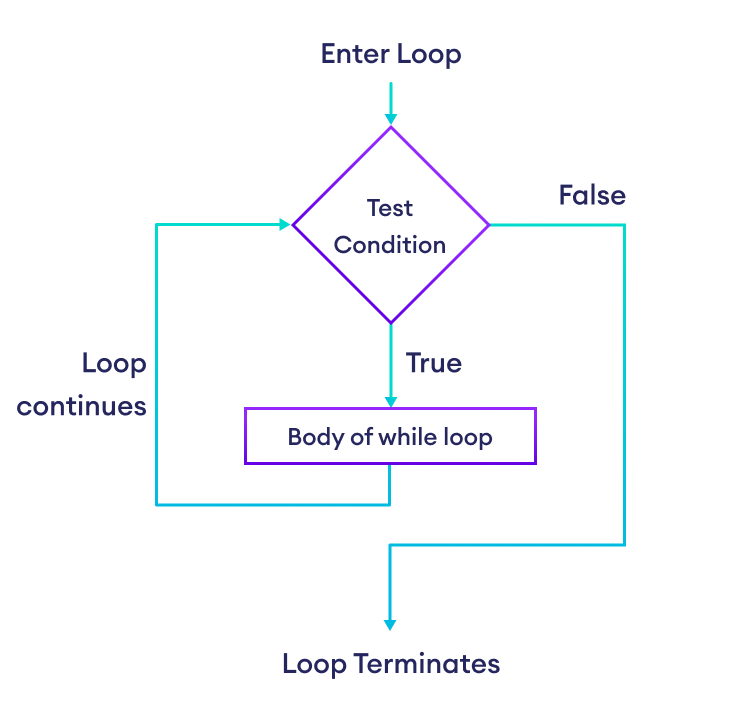
If the first entry is Vector Databases, the condition not topic is false and the loop runs zero times. If the entry contains only spaces, .strip() produces an empty string; not topic is true, so the program asks again. Crucially, the input line inside the loop updates topic. Without an update—or another way to leave—the condition could remain true forever.
The flowchart below shows that the condition is tested again after each execution of the loop body. The false branch leaves the loop.
Continue with the while section of Corey Schafer’s loop video. Watch for the updated counter that eventually makes its condition false, and for the alternative of leaving with break.
Python Tutorial for Beginners 7: Loops and Iterations - For/While Loops
The while demonstration makes the exit condition visible: the counter changes inside the loop until another iteration is no longer allowed.
Watch the condition and identify where the counter changes. Then watch the early exit to see break end a while loop before its condition becomes false.
The topic loop has no attempt limit: someone could keep entering blanks. That can be appropriate when waiting for a person, but an automated task generally needs a clear stopping rule. Next, you’ll use a for loop to allow only three attempts.
Put the controls into a question builder
Run this complete program in your existing Python workspace. It extends the previous lesson’s search-question builder: it allows three attempts to supply a topic, asks again for a positive whole-number limit, and reports how the finished question fits.
topic = ""

for attempt in range(1, 4):
    topic = input(f"Topic to research (attempt {attempt}/3): ").strip().lower()

    if topic:
        break

    print("Please enter a nonblank topic.")

if not topic:
    print("No question created after three attempts.")
else:
    question = f"Find documents about {topic}."

    limit_text = input("Maximum characters (positive whole number): ").strip()
    while not limit_text.isdecimal() or int(limit_text) <= 0:
        print("Please enter a positive whole number.")
        limit_text = input("Maximum characters: ").strip()

    max_chars = int(limit_text)
    remaining = max_chars - len(question)

    if remaining < 0:
        print(f"Question is {-remaining} characters too long: {question}")
    elif remaining == 0:
        print(f"Question fits exactly: {question}")
    else:
        print(f"Question fits with {remaining} characters to spare: {question}")
Read the program in sections. The for loop allows attempts 1 through 3. A nonblank cleaned topic triggers break; otherwise the loop either tries again or runs out of attempts. The if not topic check after the loop distinguishes those outcomes, so no question is built when every attempt was blank.
For the limit, .isdecimal() checks whether the entered text consists of decimal digits. The while condition asks again if that check fails or the numeric value is zero. Python’s or stops evaluating as soon as its left side is true. Thus, when the text is hello or empty, Python does not try int(limit_text); when it reaches that conversion, the text has passed the digit check. Finally, if/elif/else selects exactly one length message.
Try Vector Databases and 50: the question has 38 characters and fits with 12 to spare. Then run the program again with a limit of 38, and again with 37. These runs expose the exact-fit and too-long branches without changing the question. A negative limit is rejected rather than treated as a valid number.
Key takeaways
Conditionals choose a branch; loops repeat a block. Use if/elif/else for alternative outcomes, for to visit a sequence or allow a fixed number of attempts, and while when repetition depends on a changing condition. break leaves a loop early; continue skips to its next iteration. For every loop, identify what makes it finish.
You can now make the question builder respond to blank input and length limits rather than merely calculating a result. In the next lesson, you’ll place reusable behavior into functions with parameters and return values, so programs do not have to duplicate the same logic.