Recommended resources
The freely available resources this lesson will direct you to.
- 5 Power Tips for Better Supersaws in Serum (Sound Bigger, Wider & More Professional)www.youtube.com
- Odd vs Even Unison in Serum | The Secret to Wide & Focused Soundswww.youtube.com
- Hidden Serum Tip: Modulate the Unison Engine on the Global Pagewww.adsrsounds.com
- Odd vs Even Unison Voices in Xfer Serum – Sound Design Tipswww.adsrsounds.com
Hello! In our last lesson, we established the crucial theoretical groundwork for building wide lead sounds, focusing on the trade-off between stereo width and mono compatibility. We learned why choosing an odd number of unison voices can create a solid mono "anchor" and how excessive detuning, while creating width, can lead to phase cancellation.
Today, we'll put that theory into practice. Our goal is to design a wide, powerful supersaw base, the kind you'd hear in a high-energy dancefloor DnB track. We'll move beyond the basic oscillator controls and dive into Serum's more advanced unison settings, specifically those that allow you to manipulate the character and stereo image of your unison voices. This lesson is all about taking a simple saw wave and transforming it into a rich, complex, and impressively wide starting point for a lead sound.
Building a Layered Supersaw Foundation
A common and highly effective technique for creating a supersaw that is both massive and well-defined is to layer two oscillators, each with a distinct role. One oscillator provides the solid, central body of the sound, while the other provides the expansive stereo width and high-frequency "sizzle."
Let's walk through this setup in Serum:
-
Initialize a patch.
-
Oscillator A (The Core):
- Wavetable: Start with a basic
Analog_BD_Sinor a simple saw wave. - Unison Voices: Set this to an odd number, like 7 or 9. This follows our strategy from the last lesson, establishing a strong mono-compatible core.
- Detune: Dial in a moderate amount of detune. Listen as you increase it—you're looking for thickness, not a washed-out, "phasey" sound.
- Blend: Keep the blend relatively high, around 70-85%.
- Wavetable: Start with a basic
-
Oscillator B (The Width):
- Enable the oscillator and set its level to be slightly lower than Oscillator A.
- Wavetable: Use a standard saw wave.
- Pitch: Pitch this oscillator up by one octave (
+12 st). This adds harmonic brilliance and helps it occupy a different frequency space from the core. - Unison Voices: Use a higher, even number, like 12 or 16. Since this is our width layer, mono compatibility is less of a concern, and we can prioritize a wide stereo image.
- Detune: Be more generous with the detune here to create a wide, shimmering texture.
This is a classic starting point for a professional-sounding supersaw.
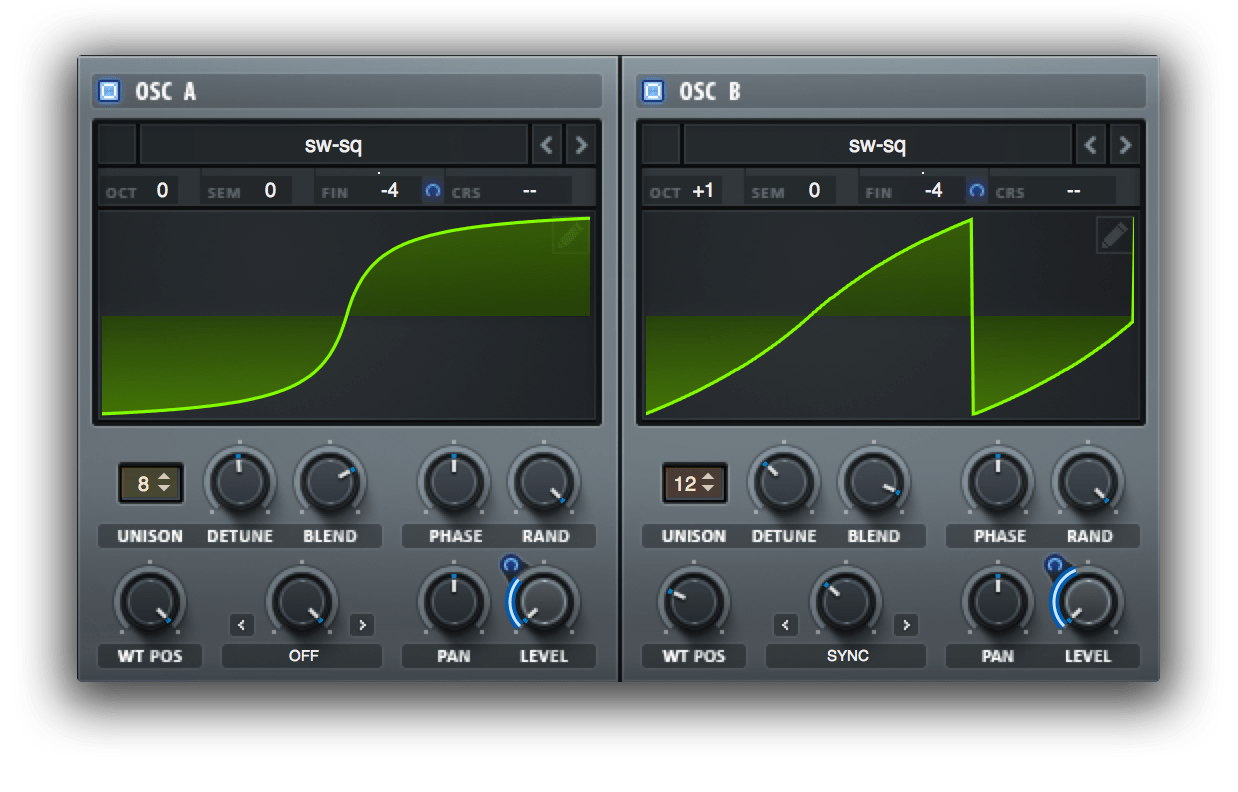
Now, let's see this layering technique in action and hear how these initial settings come together.
5 Power Tips for Better Supersaws in Serum (Sound Bigger, Wider & More Professional)
In this video, "5 Power Tips for Better Supersaws," ADSR Music Production Tutorials demonstrates the foundational settings for a supersaw.
Watch the segment on introducing and blending unison voices. Pay attention to how the second oscillator is given fewer voices (in this example) and pitched up to add thickness and character. This demonstrates the core principle of layering different unison characters.
Advanced Unison Control in the Global Tab
So far, we've only used the unison controls on the main oscillator panel. However, Serum offers a deeper level of control in the GLOBAL tab, allowing you to fundamentally change how the unison voices are generated and spread. This is where you can truly sculpt the stereo image and harmonic texture of your supersaw.
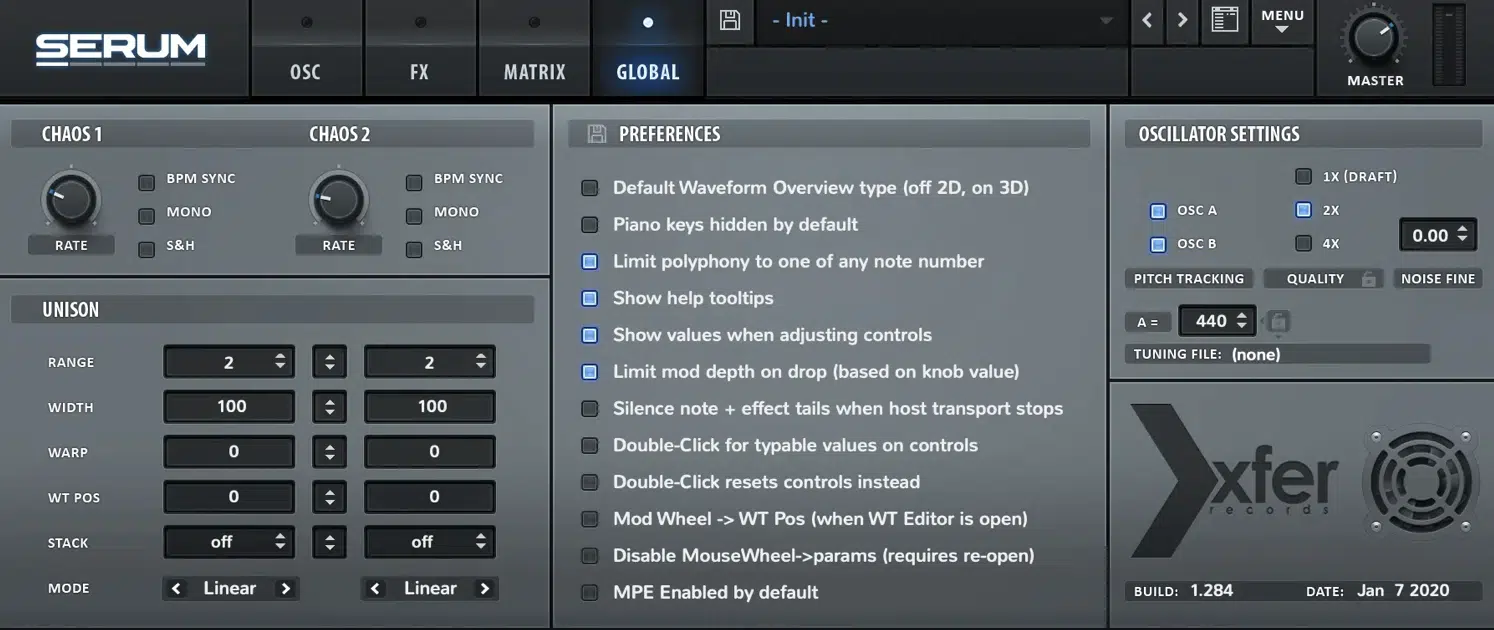
Let's break down the most important controls here:
- Width: This knob acts as a master stereo spread control for each oscillator's unison voices. While the main
Detuneknob creates the initial pitch spread, thisWidthcontrol determines how far to the left and right those voices are panned. Reducing the width from 100% can "tuck in" the stereo image, improving phase correlation and focus without sacrificing the richness of the unison effect. - Stack: This is an incredibly powerful feature for adding harmonic complexity. Instead of just detuning voices around the fundamental pitch, the stack modes create additional voices at specific harmonic intervals. For example, selecting
12 [1x]will add a unison voice an octave above the original note. Other modes add fifths (+7) or sub-octaves (-12). This is a way to make your sound harmonically richer and "thicker" without simply adding more detuned saw waves, which can lead to muddiness. - Mode: This dropdown selects different algorithms for how the unison voices are detuned. The default
Linearmode spreads them out evenly. TheSupermode uses a slightly different distribution of detuning and panning that is often considered ideal for classic supersaw sounds. Experimenting with these modes can subtly alter the character of your unison.
The following video segment provides an excellent overview of these controls and how to use them.
5 Power Tips for Better Supersaws in Serum (Sound Bigger, Wider & More Professional)
Let's return to the "5 Power Tips for Better Supersaws" video to explore these advanced options.
Watch the section covering the Global page Unison settings. The presenter demonstrates: How the Width control can manage the stereo field and improve phase correlation. The effect of different Stack modes, such as adding octaves or fifths, to create a huge sound. The subtle differences between the unison Modes like Super.
Practical Application
With the two-oscillator patch you conceptualized earlier, navigate to the GLOBAL tab. On Oscillator B (your width layer), try selecting a Stack mode like 12 [1x]. You should immediately hear the sound become brighter and more complex as an octave layer is added to the unison voices. This is a key technique for achieving the bright, energetic character of dancefloor DnB leads.
Augmenting Width with Effects: Hyper/Dimension
After shaping the unison in the oscillators and Global tab, you can add a final layer of width and detuning using Serum's built-in effects. The Hyper/Dimension effect is purpose-built for this.
- Hyper: This is essentially another unison engine. It creates copies of the incoming signal and detunes them. A key advantage is that it affects the entire output of the synth before it, including the Sub and Noise oscillators, which do not have their own unison controls. You can use this to add a subtle, final detuning "sheen" to the whole sound.
- Dimension: This is a stereo expansion tool modeled after a classic hardware effect. It uses short delays and phase manipulation to widen the stereo image. It's great for adding a sense of space and width without adding more pitch variation.
5 Power Tips for Better Supersaws in Serum (Sound Bigger, Wider & More Professional)
The same video also covers the Hyper/Dimension effect.
Watch this short segment on using the Hyper/Dimension effect. Note how the Hyper can be used to detune the sub oscillator, a source that is normally mono. This demonstrates its utility as a global unison tool.
When designing your supersaw, think of the Hyper effect as a final polishing step. After you've set your core unison character with the oscillators, a small amount of Hyper (e.g., 4-5 voices with a low Rate and Mix) can tie all the elements together and add an extra layer of size.
Conclusion
You've now moved from the basic concept of unison to a multi-stage process for designing a wide, complex, and intentional supersaw base. By making deliberate choices at each stage, you can craft a sound that has both immense stereo width and the necessary harmonic character to cut through a mix.
Key Takeaways:
- A robust supersaw is often built by layering a focused core oscillator with a wide, high-pitched oscillator.
- Serum's Global Tab offers deep control over the stereo image and harmonic content of unison voices.
- The Width control allows you to manage the overall stereo spread and mono compatibility.
- Stack modes are essential for adding harmonic complexity by creating pitched unison voices (e.g., octaves, fifths).
- The Hyper effect acts as a global unison engine, useful for adding a final layer of detuned width to the entire sound.
In our next lesson, we'll address the next critical step. We have a huge, harmonically rich sound, but it's still a raw, unfiltered signal. We will explore how to use Serum's various filter types to fundamentally shape this raw material, carving its frequency content to give it a distinct character—be it aggressive, vocal-like, or smooth.