Recommended resources
The freely available resources this lesson will direct you to.
- Odd vs Even Unison in Serum | The Secret to Wide & Focused Soundswww.youtube.com
- What Kompany Taught Me to Make My Basses Mono Compatiblewww.youtube.com
- Odd vs Even Unison Voices in Xfer Serum – Sound Design Tipswww.adsrsounds.com
- Mixing in Mono: A Powerful Technique for Better Balance and ...artistsindsp.com
Welcome to the first lesson of our module on shaping the body and character of your leads. In the previous module, we focused on generating core timbres using wavetables, FM, and warp modes. We learned how to create harmonically complex and dynamic single-oscillator sounds. Now, we're going to take those sounds and make them massive.
This lesson dives into one of the most critical aspects of modern DnB lead design: the use of unison. You've expressed a specific interest in creating the wide, powerful supersaw leads characteristic of dancefloor DnB artists like Grafix, and mastering unison is the key. However, creating a huge sound isn't as simple as just turning up the unison voices. There are crucial trade-offs to consider.
Today, we will focus on explaining the trade-offs between unison voice count, detune amount, and mono compatibility in a dense DnB mix. Understanding this balance is the difference between a lead that sounds huge in your studio and one that maintains its power and presence on a club sound system.
The Unison Dilemma: Width vs. Power
Unison works by creating multiple copies (or "voices") of an oscillator, slightly detuning them from each other, and spreading them across the stereo field. This process is what transforms a simple, static saw wave into a rich, wide, and moving supersaw.
The immediate benefit is a sound that feels big and immersive. The problem? This width is created through stereo manipulation and timing differences between the left and right channels. When these channels are summed to mono—as they often are in clubs, on portable speakers, or even on mobile phones—these differences can cause phase cancellation.
Mixing in Mono: A Powerful Technique for Better Balance
This article from artistsindsp.com explains why mono compatibility is not just a technical chore but an essential part of ensuring your music translates to real-world listening environments.
First, read the section "The Crucial Need for Checking Mono Compatibility". This will solidify why we're so concerned with how our wide leads sound on mono systems. Next, read "Unmasking Phase Issues: The Mono Check Advantage". Pay close attention to the list of "Common Causes of Phase Issues." You'll notice that "Layered Synth Patches" with detuning and unison effects are listed as a prime culprit. This is the core problem we are tackling today.
When out-of-phase signals are summed, their waveforms cancel each other out, leading to a thin, hollow sound. This phenomenon is often called comb filtering, as it carves out specific frequencies from the sound spectrum.
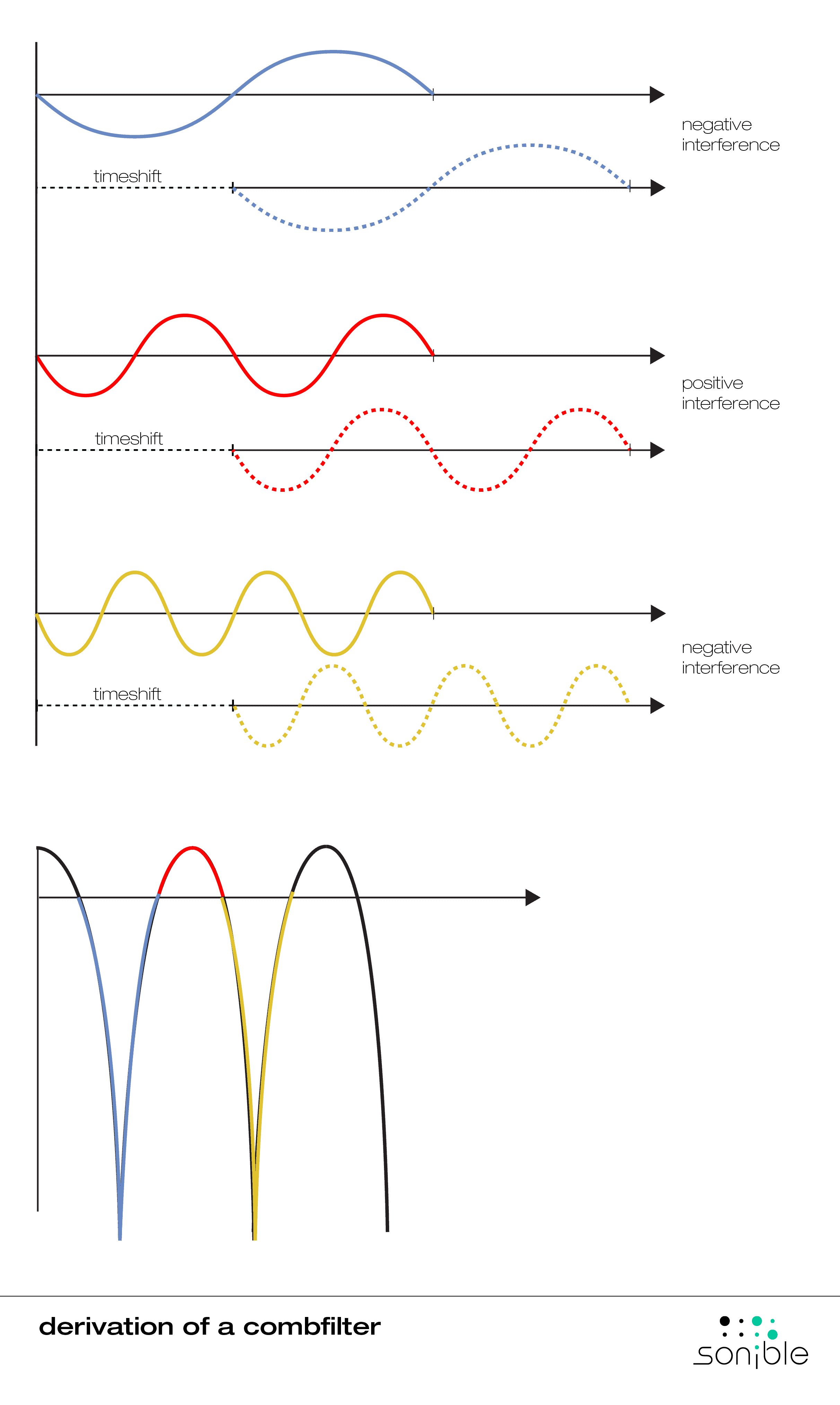
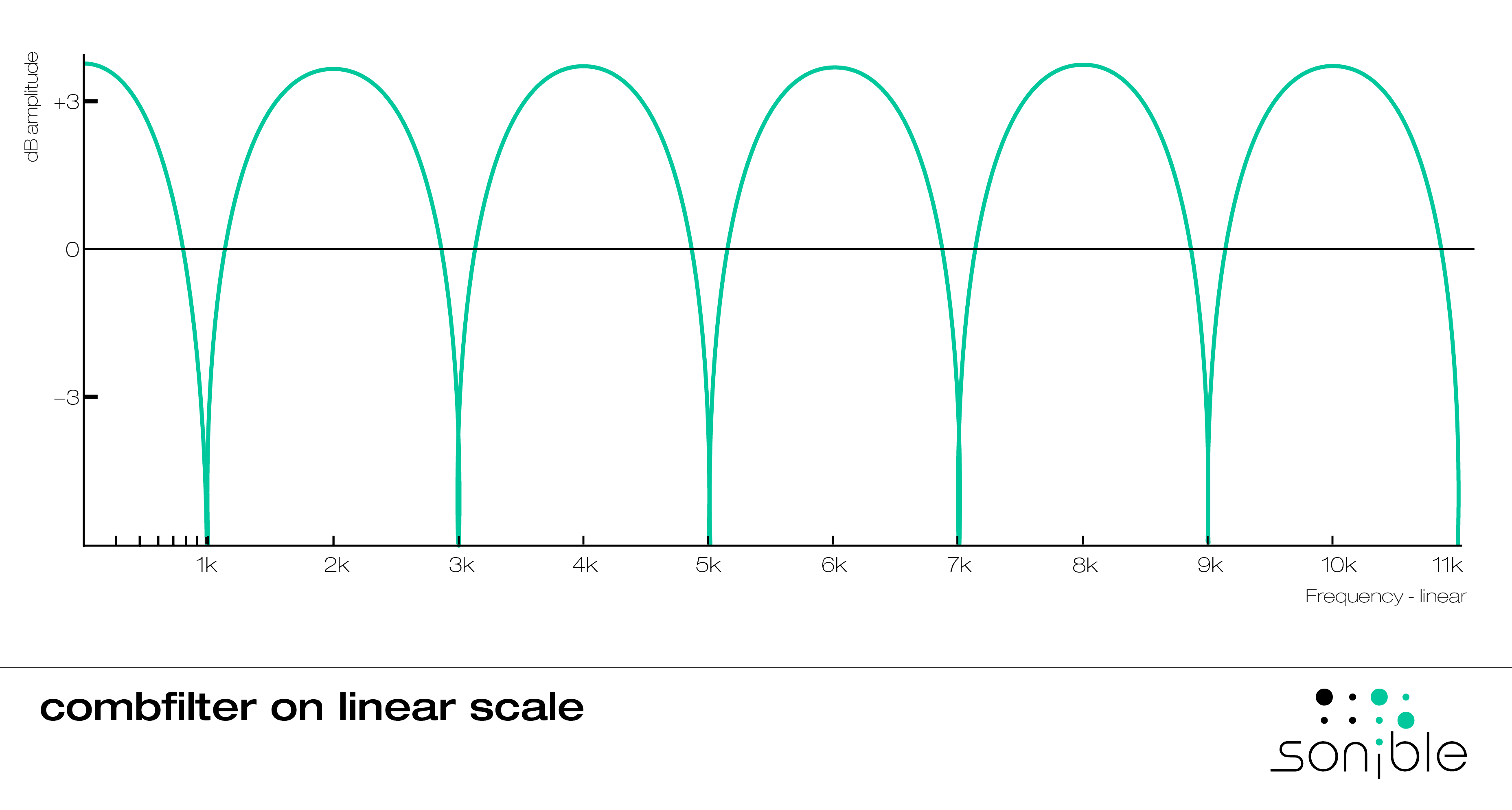
Our goal is to leverage unison for maximum width and richness while minimizing destructive phase cancellation. The first decision we can make to control this is choosing our voice count.
Unison Voices: The Odd vs. Even Strategy
In Serum, the number of unison voices you choose is not just a matter of "more is better." There is a fundamental difference in how odd and even numbers of voices are distributed in the stereo field, which directly impacts mono compatibility.
Let's watch a clear demonstration of this principle.
Odd vs Even Unison in Serum | The Secret to Wide & Focused Sounds
This video from ADSR, "Odd vs Even Unison in Serum," gets straight to the point, visually and audibly demonstrating the core concept.
First, watch the introduction to understand the fundamental premise. Next, observe what happens with an even voice count (like 2 or 4). Notice in Serum's visualizer that there is a gap in the center. Now, see the difference with an odd voice count (like 3 or 5). A voice is placed directly in the center of the stereo field. Finally, listen to the practical advice on when to use each for different elements in a mix.
To summarize the key strategic insight:
-
Odd Voice Counts (3, 5, 7, 9...)
- How it works: Always places one unison voice directly in the center of the stereo field.
- The Result: This center voice acts as a "mono anchor." It guarantees that a solid, focused version of your sound will always be present, even when summed to mono.
- The Trade-off: The sound might be perceived as slightly less wide or spacious than one with an even voice count, but it will be far more robust and powerful in mono.
- Best for: Core lead sounds, basses, and any element that needs to be front-and-center and maintain its impact on all playback systems.
-
Even Voice Counts (2, 4, 8, 16...)
- How it works: Voices are distributed evenly to the left and right, leaving a "hole" in the center.
- The Result: Creates a very wide, spacious stereo image.
- The Trade-off: With no central anchor, the sound is highly susceptible to phase cancellation and can sound significantly thinner or drop in volume when summed to mono.
- Best for: Pads, atmospheric layers, or secondary lead layers where stereo width is the primary goal and mono presence is less critical.
For a primary DnB lead, especially a dancefloor supersaw, starting with an odd number of voices is almost always the correct strategic choice. It provides the best foundation for a sound that is both wide and powerful.
The Detune Knob: A Balancing Act
The Detune knob controls how far apart in pitch the unison voices are spread. This parameter has a direct and crucial relationship with both the perceived richness of the sound and its mono compatibility.
- Low Detune: Creates a tight, subtle chorusing. The voices are very close in pitch, leading to slower phase interactions. The result is a sound that feels thick and unified, with better mono compatibility.
- High Detune: Creates a wide, rich, and "smeared" sound. The voices are spread further apart, causing rapid phase interactions. This is the heart of the classic supersaw sound, but it dramatically increases the risk of destructive phase cancellation in mono.
The trade-off is between richness and clarity. As you increase detune, you gain width and harmonic movement, but you sacrifice mono definition and punch. The key is to find the sweet spot where the lead is wide enough to feel big but not so detuned that it becomes a "phasey" mess in mono. There is no single magic number; it depends entirely on the source waveform and the other elements in your mix.
Practical Application: Taming the Beast in Serum
Now that we understand the theory, let's apply it. How do you build a wide supersaw lead but keep it mono-compatible?
1. Start with an Odd Voice Count
As discussed, begin with 7 or 9 voices on your main oscillator. This establishes your mono anchor from the start.
2. Dial in Detune, Checking in Mono
Increase the Detune knob while frequently toggling your DAW's master channel to mono. Listen for the point where the sound starts to thin out or lose its impact. Back the detune off slightly from that point.
3. Use Serum's Width and Blend Controls
Serum offers more granular control than just voice count and detune.
- Blend Knob: This knob controls the volume balance between the center voice (or "dry" signal) and the side (or "wet") unison voices. At 100%, all voices are at equal volume. Turning it down (e.g., to 75%) lowers the volume of the detuned side voices, effectively "tucking in" the width and reinforcing the mono core.
- Oscillator Width: In Serum's
GLOBALtab, you'll findWidthcontrols for each oscillator. This is a master control for the stereo spread of that oscillator's unison voices. Reducing this from 100% can help narrow the stereo image just enough to improve mono compatibility without sacrificing the unison effect entirely.
This next video demonstrates this exact technique. While the presenter is working on a bass sound, the principle of managing width inside Serum is identical for a lead.
What Kompany Taught Me to Make My Basses Mono Compatible
In "What Kompany Taught Me to Make My Basses Mono Compatible," Wheysted Music shows a very practical approach to solving these issues directly within Serum.
Skip ahead and watch the section on fixing phasing issues within Serum. He demonstrates how to use the Width controls in the Global tab to narrow the stereo image of an overly wide sound, making it more mono-compatible. This is a key tool in your arsenal.
4. The Layering Technique: Best of Both Worlds
A highly effective pro technique is to construct your powerful lead from two separate oscillators, each with a specific job.
- Oscillator A (The Mono Core):
- Unison: 1 or 3 voices.
- Detune: 0 or very low.
- Purpose: This is your solid, punchy, mono-compatible foundation. It provides the body and attack of the lead.
- Oscillator B (The Stereo Width):
- Unison: 8 or more voices (even number is fine here).
- Detune: Higher, to taste.
- Purpose: This layer provides the wide, rich, stereo "sparkle." You can even use a high-pass filter on this oscillator (using the filter in the oscillator section itself, not the main filter) to ensure any low-mid frequency phase issues don't conflict with your mono core.
By blending these two oscillators, you get a lead that has a powerful, unwavering center from Osc A and a wide, immersive stereo image from Osc B. When summed to mono, Osc B might thin out, but Osc A will remain strong, preserving the lead's impact in the mix.
Conclusion
You now have a strategic framework for using unison, moving beyond simply turning it on and hoping for the best. By understanding the core trade-offs, you can make intentional decisions to build leads that are both wide in stereo and powerful in mono.
Key Takeaways:
- Unison creates width and richness at the potential cost of mono compatibility due to phase cancellation.
- Odd voice counts (3, 5, 7...) create a strong mono core and are ideal for primary leads.
- Even voice counts (2, 4, 8...) create maximum width but are weak in mono, making them better for layers or pads.
- Higher detune amounts increase richness and width but also increase the risk of phase issues. You must find the balance by checking your sound in mono.
- Use Serum's Blend and oscillator Width controls to fine-tune the stereo image and improve mono compatibility.
- A powerful technique is to layer a focused mono oscillator with a wide stereo oscillator to get the best of both worlds.
In our next lesson, we will move on to the next stage of shaping our sound. Now that we have a powerful, wide unison base, we will explore how to use Serum's filters to sculpt its timbre, carving a raw supersaw into a polished and characterful lead ready for a dancefloor track.