Recommended resources
The freely available resources this lesson will direct you to.
Introduction
Welcome to the first lesson in our module on Executive Communication for Engineers. In the previous module, we concluded by focusing on how to negotiate for promotions and raises, a critical skill that often involves high-stakes verbal communication. Now, we shift our focus to the bedrock of daily professional influence: asynchronous communication, starting with the most common form—email.
The learning outcome for this lesson is to structure professional emails for clarity, tone, and actionability. As a developer aiming for senior and management roles, your ability to communicate effectively in writing is just as impactful as your ability to code. A well-crafted email saves time, prevents misunderstandings, builds trust with colleagues and stakeholders, and signals your professionalism and respect for others' time. This lesson will provide you with a systematic approach to transform your emails into powerful tools for collaboration and influence.
1. The Anatomy of a Professional Email
Before diving into strategy, let's establish a common framework. Every professional email, regardless of its content, shares a fundamental structure. Understanding these components is the first step toward mastering the format.
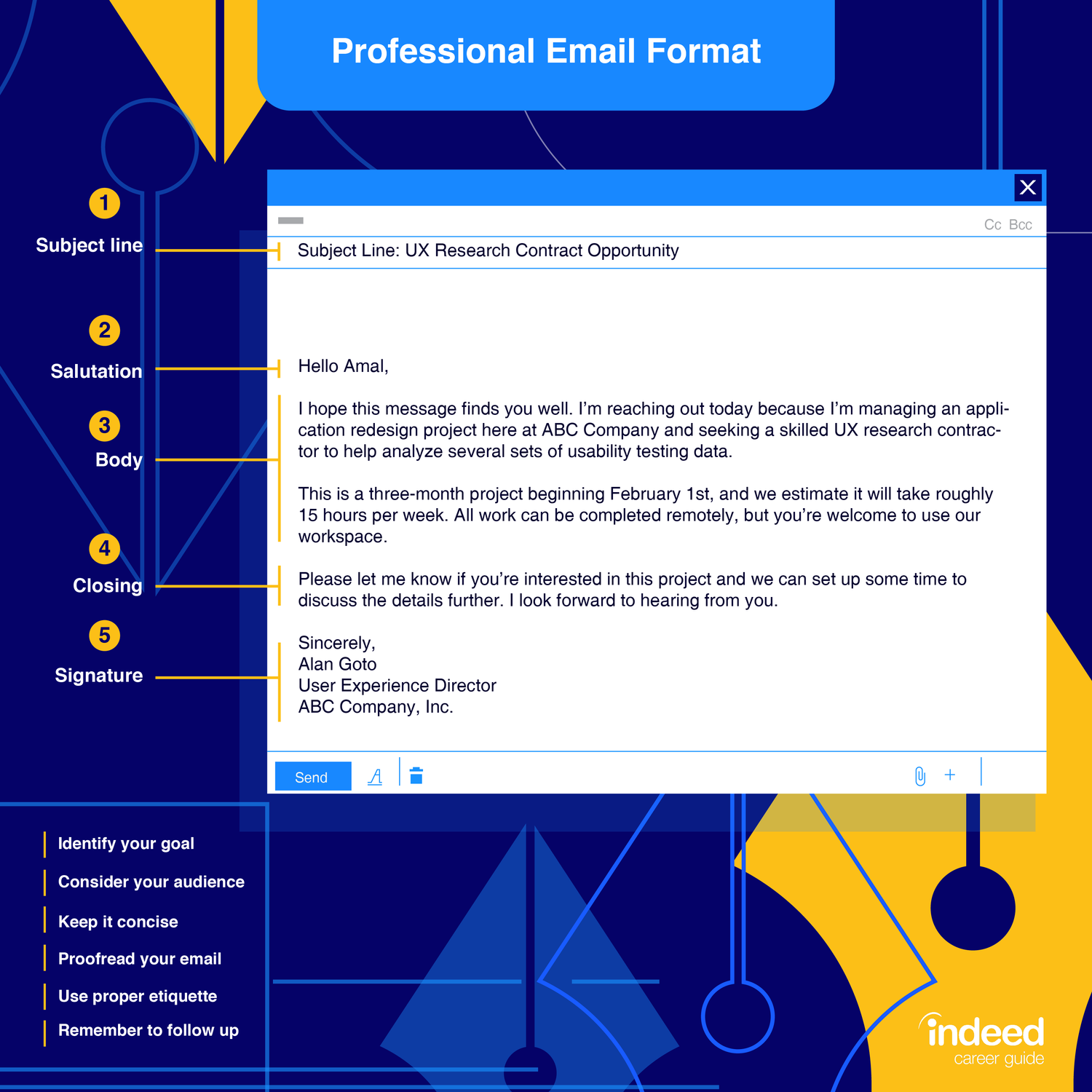
As you can see, the structure is simple but powerful:
- Subject Line: The single most important element for getting your email opened and prioritized. It must be clear and descriptive.
- Salutation: The greeting. It sets the tone and level of formality.
- Body: The core message. This is where clarity and structure are paramount.
- Closing: The sign-off. It provides a polite end to the conversation.
- Signature: Your professional contact information.
We will deconstruct how to optimize each of these, with a special focus on the subject line and body, where you can make the biggest impact.
2. The Golden Rule: Main Point First
In a professional setting, especially when communicating with senior colleagues or managers, time is the most valuable resource. Your goal is to make your email as efficient as possible for the reader. The single most effective way to do this is to state your main point or request immediately.
This "main point first" or "bottom line up front" (BLUF) approach is counter-intuitive for many, who feel the need to build up context before making an ask. However, providing the core message first allows the recipient to immediately understand the email's purpose and how they can help.
The following video from Harvard Business Review explains this principle perfectly.
8 Email Etiquette Tips - How to Write Better Emails at Work
This clip provides a clear, practical comparison between an email that buries the lead and one that states the main point first.
Please watch the segment from "Tip number four" on placing your main point first. Notice how the revised email is far more effective and respectful of the reader's time.
This idea is so crucial that many successful professionals consider it a key factor in their career growth.
Effective Email Communication For Engineers
In this excerpt from a LinkedIn article collection, MJ Jaindl, a former Chief Customer Officer, credits clear communication as the number one factor in his rapid success. His advice on writing to superiors is direct and highly actionable.
Read the section titled "how to fix it". Pay close attention to his six points, especially "Main Point First" and "Context Second." This reinforces the principle we just discussed.
3. Engineering Your Email for Action
Once you've stated your main point, the rest of the email should be structured to drive a clear outcome. An email without a purpose is just noise. Your email should always have a clear Call to Action (CTA)—what do you want the recipient to do after reading it?
A great way to signal this is in the subject line itself.
8 Email Etiquette Tips - How to Write Better Emails at Work
This next clip from the same Harvard Business Review video offers a brilliant and simple trick to make your subject lines more effective.
Watch the section on making subject lines actionable, from "have a call to action". The suggestion to include the estimated time commitment (e.g., "5-minute survey") is particularly powerful.
With the main point and CTA established, the body of your email should provide just enough detail to support them. Use formatting to make this information easy to scan. As a software developer, think of it as writing clean, readable code.
- Use short paragraphs. One idea per paragraph.
- Use bullet points or numbered lists. This is perfect for breaking down technical details, steps, or questions.
- Use bolding to highlight key terms or deadlines.
- Hyperlink your links. Never paste a raw URL. It clutters the email and looks unprofessional.
The "Quick Business Email template" in the Talaera article provides a great visual for this structure.
150+ Useful Email Phrases That Will Make Your Life Easier
This resource from Talaera is a fantastic guide for professional English communication. This section contains a simple but effective visual template.
Scroll down to the heading "Quick Business Email template" and study the image. It breaks the email body into three logical parts: Purpose, Details, and Action. This is the mental model you should follow.
4. Mastering Professional Tone and Phrasing
Structuring an email correctly is half the battle. The other half, especially since English is your second language, is mastering the tone. You want to sound confident and direct, yet polite and respectful. This is where having a "phrasebook" of professional expressions can be invaluable.
Effective Email Communication For Engineers
This article provides excellent "before and after" examples that show how small changes in wording can dramatically improve your professional tone.
First, review the "bad" vs. "good" examples in the section that begins "Here’s how to make every email polished". Then, review the 12 tips from Victoria Repa in the section that starts with "12 tips top leaders use". These examples are perfect for learning how to rephrase common statements to sound more collaborative and professional.
To build your vocabulary further, the Talaera article is an extensive resource. Don't try to memorize it all. Instead, use it as a reference when you're feeling unsure about how to phrase something.
150+ Useful Email Phrases That Will Make Your Life Easier
This article is your go-to reference for professional email phrases. It covers everything from openings to closings.
I recommend you bookmark this article. For now, skim through these key sections to get a feel for the content: Email openings Making requests Email closings The key insight, as the article notes later, is that confidence comes from understanding why certain phrases work. These lists are your training wheels.
5. Putting It All Together: A Developer's Example
Let's synthesize these principles with a realistic scenario from your work as a software developer.
Scenario: You need to ask a senior developer to review a complex pull request.
An Ineffective Email:
Subject: PR review
Hey Alex,
I hope you're doing well. I was working on the ticket for the performance issue and I finally have a PR ready. It was pretty complex because I had to touch some of the old config files to get the new database connection to work. I think it's ready but I'd like another pair of eyes on it.
Here's the link: http://github.com/company/project/pulls/123
Let me know what you think.
Thanks
This email fails because it buries the lead, has a vague subject line, provides a raw link, and has no clear call to action or timeline.
An Effective, Actionable Email:
Subject: [Review Request: 20 min] Caching Logic for User Service (PROJ-451)
Hi Alex,
Could you please review my pull request for the new caching layer in the User Service?
Context: This PR implements the solution we discussed for ticket PROJ-451 to reduce P95 latency. My tests show it reduces the average response time from 450ms to 80ms.
Technical Details:
- The main logic is in
UserServiceCache.java.- The most complex part is the modification to
LegacyConfig.javato inject the Redis client. I would particularly appreciate your feedback here.- The PR description contains detailed steps for local testing.
The pull request is ready here: New Caching Layer for User Service.
Would you have time to review it by tomorrow afternoon?
Best regards,
[Your Name]
This email excels because it has a specific subject line with a time estimate, states the request first, provides concise context and technical pointers, uses formatting, hyperlinks the PR, and includes a clear, time-bound call to action.
Conclusion
In this lesson, you've learned a systematic approach to crafting professional emails that are clear, actionable, and tonally appropriate. This skill is a force multiplier for your technical abilities, helping you build a reputation for competence and professionalism.
The key takeaways are:
- Structure is everything: A clear subject, salutation, body, and closing create a predictable and professional format.
- Lead with your main point: Respect the reader's time by stating your request or key message immediately.
- Engineer for action: Every email should have a clear purpose (a Call to Action), and the content should be formatted for scannability using lists, bolding, and hyperlinks.
- Leverage professional phrases: Use established phrases to manage your tone effectively, especially in a second language, but strive to understand the underlying context.
The example of a good pull request review email serves as a perfect bridge to our next topic. In the next lesson, we will dive deeper into another critical form of asynchronous communication for developers: writing a clear pull request description that includes business context, technical approach, and testing instructions.