Recommended resources
The freely available resources this lesson will direct you to.
- What is a Pull Request, and How Do I Write Great Pull Requests?www.youtube.com
- Best Practices for Pull Requests | Code like Senior Engineers | Part 2www.youtube.com
- An Undefeated Pull Request Template - Ashlee M Boyerashleemboyer.com
- Writing A Great Pull Request Description - HackerOnewww.hackerone.com
Introduction
In our last lesson, we focused on structuring professional emails for maximum clarity and impact, a foundational skill for all asynchronous communication. We concluded with an example of a well-crafted email requesting a pull request (PR) review. This serves as a perfect bridge to today's topic, where we'll dissect the content of that PR itself.
The learning outcome for this lesson is to write a clear pull request description that includes business context, technical approach, and testing instructions. As a developer aspiring to a senior role, mastering the art of the PR description is non-negotiable. A great PR is more than just a code diff; it's a piece of persuasive writing, a historical document, and a critical tool for team collaboration. It transforms a low-context code change into a high-context, easily reviewable package, saving your team time and reducing the cognitive load on your reviewers.
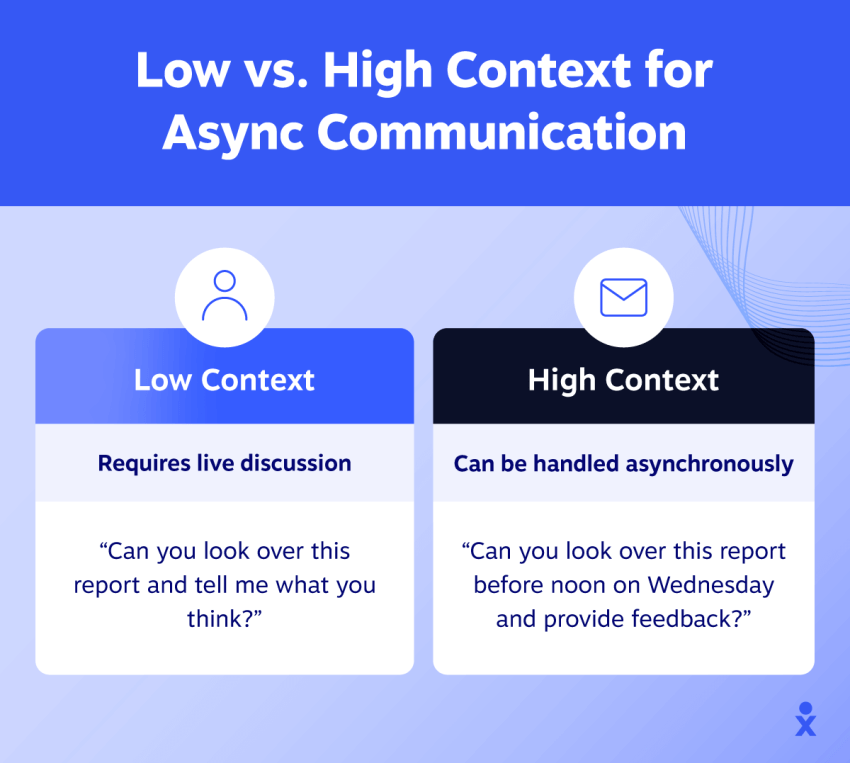
By the end of this lesson, you will have a template and a mental model for creating PRs that not only get reviewed and merged faster but also signal your maturity and professionalism as an engineer.
1. The Philosophy of a Great Pull Request
Before we dive into templates, it's crucial to understand the mindset behind a senior-level PR. A pull request is not a code dump. It is:
- A Conversation: You are starting a dialogue with your reviewer. Your goal is to make their job as easy and efficient as possible.
- A Piece of Documentation: Months or years from now, another developer (maybe even you) will use
git blameand land on your PR. The description should provide enough context to understand why a change was made. - A Demonstration of Ownership: A well-documented PR shows that you have thought through the problem, the solution, and its implications, demonstrating a high degree of ownership.
The video below gives an excellent overview of what a PR is and why presenting it well is so critical for getting your changes merged efficiently.
What is a Pull Request, and How Do I Write Great Pull Requests?
This video from Matt Stauffer explains the fundamental purpose of a pull request and why a well-crafted one is a key to effective collaboration.
Watch the introduction from the beginning to the end of the introduction. Pay attention to his key phrase: "Help me help you." This is the core philosophy of a great PR description.
2. The Anatomy of a Senior-Level PR Description
The most effective way to ensure your PRs are consistently high-quality is to use a structured template. A template acts as a checklist, ensuring you provide the three critical pieces of information from our learning outcome: business context, technical approach, and testing instructions.
The article "An Undefeated Pull Request Template" provides a fantastic, comprehensive structure that we will use as our foundation.
An Undefeated Pull Request Template - Ashlee M Boyer
This article by Ashlee M. Boyer breaks down a pull request into clear, actionable sections. It's an excellent guide for creating descriptions that preemptively answer your reviewer's questions.
Read through the descriptions for these four key sections: The overview of the components. The section on Why, which explains how to provide the business context. The section on How, which details the technical approach. The section on Test Steps, which provides a brilliant framework for writing clear testing instructions.
Let's break down how these sections map directly to our learning goals.
a. Business Context (The "Why")
This is the most crucial part of your PR description and what separates a junior from a senior developer's mindset. Don't just link to a Jira or Asana ticket. Tell a story.
- What is the problem? Explain the user pain point, business need, or technical debt you are addressing.
- Why is this change necessary? Connect the code to a business objective. For example, "This change reduces API latency, which is expected to improve user retention by 2%," is far more powerful than "Optimized the endpoint."
- Link to artifacts. Include links to the Jira ticket, Figma designs, or architecture documents, but only after you have summarized the context.
The video below shows a fantastic side-by-side comparison of a PR with no context versus one that clearly explains the "why."
Best Practices for Pull Requests | Code like Senior Engineers | Part 2
This video by Devtools Tech visually contrasts a minimal PR with a detailed, senior-level PR.
Watch the segment from the example comparison. Notice how the "good" example starts by linking to the Jira ticket and Figma file, immediately grounding the change in business and design context.
b. Technical Approach (The "How")
Here, you guide the reviewer through your solution. You are the expert on this code; share your knowledge.
- Summarize the changes. What was the overall strategy? Did you add a new library, refactor a service, or create a new component?
- Highlight key decisions. Why did you choose this specific approach? Did you consider alternatives? For example, "I used a Strategy pattern here to allow for new pricing models in the future without modifying existing code."
- Point out tricky areas. Is there a complex piece of logic or an interaction with a legacy system that the reviewer should pay special attention to? You can even add comments directly in the GitHub file view to pinpoint these areas.
c. Testing Instructions (The "How to Verify")
Your goal here is to make it effortless for a reviewer to validate your work. Never assume they know how to test your change.
- Provide step-by-step instructions. Be explicit. As the "Undefeated Pull Request Template" article suggests, frame each step as an "action" (e.g., "Click the 'Submit' button") or an "observation" (e.g., "Verify a success toast appears").
- Include setup requirements. Does the reviewer need to enable a feature flag, run a database migration, or set an environment variable with an API key? State this clearly at the top of the testing section.
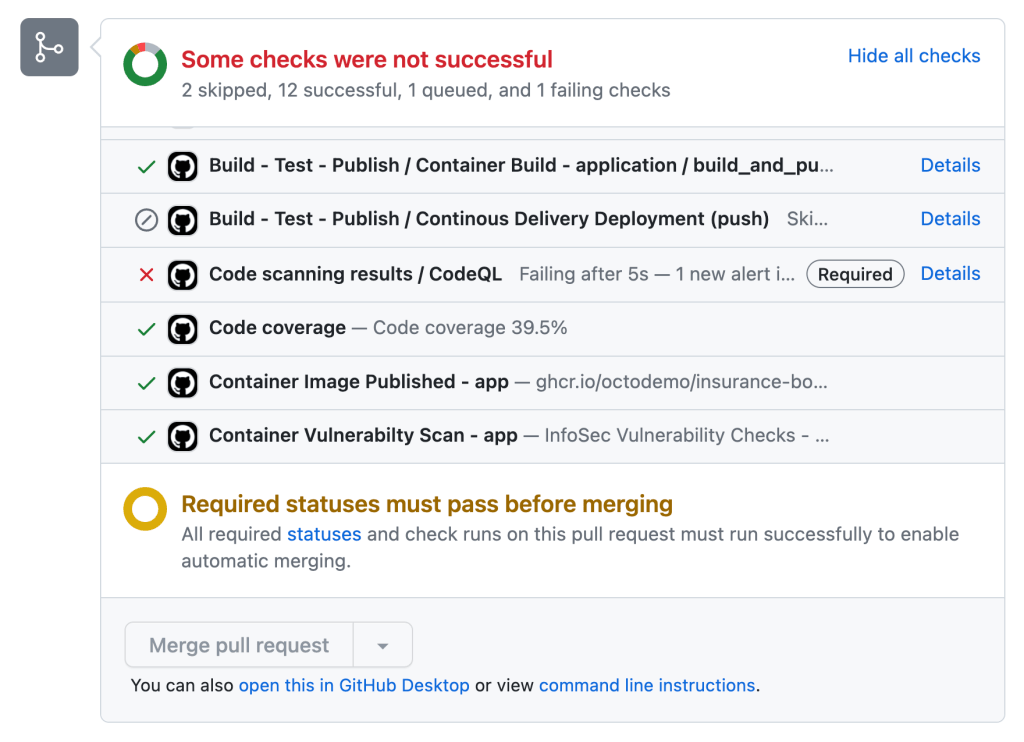
- Mention automated tests. Note what unit, integration, or E2E tests you've added. This builds confidence that the change is well-covered. The PR interface in GitHub will show the status of these checks, providing immediate feedback.
3. Putting It All Together: A Practical Example
Let's create a hypothetical PR description for a change you might make in a Spring Boot application.
Title: feat(auth): PROJ-451 Implement JWT-based token refresh
Poor Description:
Implements token refresh. Fixes PROJ-451.
A Senior-Level Description:
Related Links
- Jira Ticket: PROJ-451
- Design Doc: Token Handling Strategy
Why (Business Context)
Currently, users are logged out every 60 minutes when their access token expires, causing a disruptive user experience, especially during long sessions. This PR introduces a token refresh mechanism using refresh tokens stored in a secure, HTTP-only cookie. This will allow users to stay logged in seamlessly for up to 30 days, aligning with our Q3 goal of improving user engagement.
How (Technical Approach)
- Added a new endpoint
/api/auth/refreshinAuthController.javathat validates a refresh token and issues a new access token.- The refresh token is a long-lived, single-use JWT that is rotated upon each use to enhance security. This logic is handled in
RefreshTokenService.java.- On the frontend, the API client interceptor will now automatically call the refresh endpoint upon receiving a 401 Unauthorized response, then retry the original request.
- I chose to store the refresh token in a cookie instead of localStorage to mitigate XSS risks.
Test Steps
- Setup:
- Pull down this branch and run the application.
- Temporarily change the
ACCESS_TOKEN_EXPIRATION_MSvalue inapplication.propertiesto60000(1 minute) for easy testing.- Execution & Verification:
- Log in to the application. Using your browser's dev tools, inspect the cookies and verify a
refreshTokencookie is present.- Wait for 1 minute for the access token to expire.
- Attempt to access a protected resource (e.g., navigate to your profile page).
- Observe: The initial request should fail with a 401, but a second request to
/api/auth/refreshshould be made automatically.- Observe: The original request to the protected resource should be retried and succeed. The user should see their profile page without being logged out.
- Observe: The
refreshTokencookie in the browser should have a new value (confirming rotation).Other Notes
- New unit tests covering the
RefreshTokenServicehave been added.- I've created a follow-up ticket, PROJ-452, to add a mechanism to revoke all active refresh tokens for a user.
4. Practical Application: Create Your Own Template
The most effective way to internalize this is to make it part of your workflow. Most modern version control systems like GitHub allow you to create a default PR template for your repository. This is a fantastic initiative to propose to your team.
The Devtools Tech video demonstrates exactly how to do this.
Best Practices for Pull Requests | Code like Senior Engineers | Part 2
This clip shows the practical steps to create a pull_request_template.md file in a GitHub repository, which will automatically populate the description for all new PRs.
Watch the short segment from "how it's done". This is a high-leverage action you can take to improve process for your entire team.
As a starting point, you can use the markdown from the "An Undefeated Pull Request Template" article, which provides a complete, copy-paste-ready template.
Conclusion
In this lesson, we deconstructed the art and science of writing a clear, effective pull request description. You've learned that a PR is a critical form of high-context, asynchronous communication that showcases your skills as a senior engineer.
Key Takeaways:
- Adopt a Senior Mindset: Treat every PR as a conversation, a historical document, and an act of ownership. Your goal is to make the reviewer's job easy.
- Structure is Key: Always provide the Business Context (Why), the Technical Approach (How), and explicit Testing Instructions.
- Use a Template: Standardize your process by creating and using a
pull_request_template.md. This ensures quality and consistency.
The ability to clearly explain your code's purpose is a cornerstone of executive communication. In our next lesson, we will build on this by learning how to write a concise technical summary of a complex concept for a non-technical audience. This will challenge you to adapt your communication style from talking to fellow engineers to engaging with business stakeholders.