Hello! Welcome back to your course on AI-assisted book authoring.
In our last lesson, we focused on controlling the creativity of the AI by adjusting the temperature parameter. You learned how to dial it up for brainstorming and dial it down for precise, factual writing. This is like choosing the right tool for the job.
Today, we move from the tool's setting to the craftsman's signature. This lesson addresses the learning outcome: to create custom instructions or system prompts to maintain a consistent authorial style and tone. This is one of the most important skills for moving beyond generic AI text to producing writing that sounds uniquely yours. For your goal of writing across different genres—from technical mentoring to children's stories—mastering this will allow you to create distinct and convincing authorial "personas."
We will cover two main approaches:
- In-chat style replication: A quick method for mimicking a writing style for a single session.
- Persistent style guides: A more robust method for defining and saving your authorial voice so the AI remembers it across conversations.
1. In-Chat Style Replication: The Quick and Direct Method
Imagine you've written a paragraph that perfectly captures the tone you want for a chapter. Instead of just describing that tone to the AI, you can show it the paragraph and say, "Write like this." This is a fast and effective way to guide the AI's style within a single conversation.
A fantastic video from The AI Advantage demonstrates two powerful prompt structures for this.
How-To Force ChatGPT To Write In Your Style
This video, "How-To Force ChatGPT To Write In Your Style," will show you two practical techniques to get the AI to adopt a specific writing voice on the fly.
Please watch from 02:12 to 05:56. Pay close attention to the two distinct methods presented: the simple one-prompt technique and the more powerful two-prompt analysis technique. Also, note the final tip about choosing a good, representative example.
To recap the video's key techniques:
- Method 1 (Simple): Combine your request and your example in a single prompt.
Prompt:
Write a [TYPE OF TEXT] about [TOPIC] in the style of the provided example, capturing its tone, voice, vocabulary, and sentence structure. Example: [PASTE YOUR WRITING HERE] - Method 2 (Advanced): Use a two-step process. First, have the AI analyze your style, then ask it to apply that analysis to future requests in the same chat.
Prompt 1:
Analyze this example text for tone, voice, vocabulary, and sentence structure. Apply the identified elements to all your future outputs in this conversation. [PASTE YOUR WRITING HERE]
Prompt 2:Now, write a [TYPE OF TEXT] about [TOPIC].
The second method is more powerful because the AI internalizes the style rules first, which often leads to more consistent application on new topics.
2. Creating a Reusable AI Style Guide: The Systematic Approach
While in-chat replication is great for quick tasks, it's temporary. For a long-term project like writing a book, you need a more permanent solution. The goal here is to create a detailed, reusable Style Guide that acts as a blueprint for your authorial voice.
Given your IT background, you can think of this as creating a configuration file or a CSS stylesheet for your writing. You define the rules once, and then apply them consistently across the entire project.
The following article from Forte Labs provides an excellent, step-by-step walkthrough of this process. It demonstrates how to feed multiple samples of your writing to an AI and have it synthesize a comprehensive style guide.
How to Create an AI Style Guide: Write With ChatGPT in ...
Let's read the article "How to Create an AI Style Guide: Write With ChatGPT in Your Own Voice" by Tiago Forte. This will guide you through the process of building a detailed style profile from your own work.
Please read from the section "Step 1: Grab a “signature” piece of writing" all the way to the end. Focus on: The prompt used to ask the AI to perform the analysis. How the author provides multiple examples to refine the AI's understanding. The final, synthesized Author's Writing Style Guide that the AI produces. This is the kind of document you'll want to create for each of your book genres.
As you saw, by iteratively feeding the AI your best work and asking it to synthesize its findings, you can generate a rich, detailed style guide. This guide, which breaks down your voice, tone, sentence structure, and signature patterns, becomes your core asset for maintaining consistency.
3. Making Your Style Persistent: System Prompts and Custom Instructions
You've now created a style guide. But how do you make the AI remember it without pasting it into the chat every single time? The answer lies in system prompts and a feature in ChatGPT called Custom Instructions.
A system prompt is a foundational set of instructions given to an AI at the very beginning of a session. It acts as the AI's "job description" or core programming for that conversation.
Guide to Writing System Prompts: The Hidden Force ...
This article, "Guide to Writing System Prompts," explains the concept clearly. While it discusses advanced API usage, the core principles are directly applicable to the tools we are using.
Please read the introduction and the first two sections: "The Invisible Architecture of AI Conversations" and "How Consumer AI Products Use System Prompts". Focus on understanding the difference between a user prompt and a system prompt.
In free tools like ChatGPT, you don't have direct access to the main system prompt, but you can use the Custom Instructions feature to achieve a similar effect. This feature allows you to provide persistent information about yourself and how you want the AI to respond.
This official video from OpenAI provides a quick tour.
Personalize ChatGPT with custom instructions
The video "Personalize ChatGPT with custom instructions" shows you exactly where to find this feature and how to use it.
Watch the entire video. It's short and will show you the user interface and the immediate effect of setting these instructions.
Here is what the interface looks like:
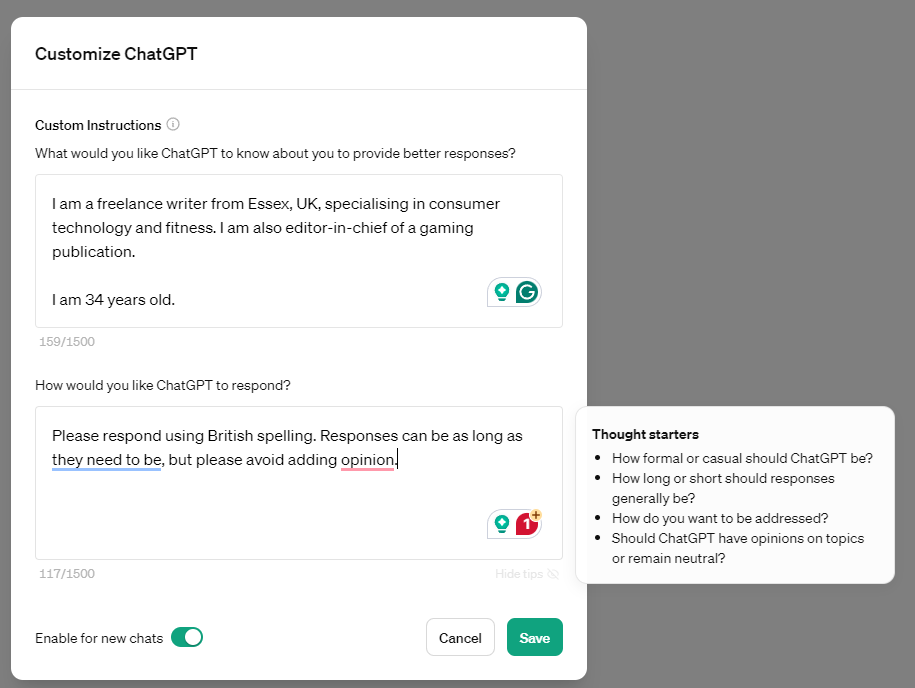
This is where your AI-generated style guide becomes incredibly powerful. You can paste the key elements of your style guide into the second box, "How would you like ChatGPT to respond?".
Best Practices for Your Custom Instructions
To make your instructions effective, borrow these best practices, adapted from the "Guide to Writing System Prompts" article.
- Define the AI’s Role and Identity: Tell it what its job is.
- Example for your tech book: "You are an expert technical writer and mentor, helping me explain complex IT concepts to junior developers."
- Set the Tone and Style: This is where you insert your style guide rules.
- Example: "Write in an encouraging, clear, and authoritative yet approachable tone. Use analogies to explain technical topics. Keep sentences varied, with short ones for emphasis."
- Establish Constraints and Guardrails: Set your "do's and don'ts."
- Example: "Always use American spelling. Do not make up facts or statistics. Avoid overly casual slang. If you are unsure about a technical detail, state that you cannot confirm it."
- Define Refusal Style: Tell it how to act when it can't answer.
- Example: "If a request involves giving financial or legal advice, politely decline and state that you are an AI assistant and not qualified to do so."
Test your understanding!
You are about to start writing your children's book. Using the principles above, draft a short (3-4 bullet points) set of "Custom Instructions" for ChatGPT that defines the AI's role and desired tone for this specific project.
Show answer
Here's one possible example. Your answer may vary, but it should capture a similar spirit.
- Role: You are a creative and whimsical storyteller, helping me write a children's book for ages 4-7.
- Tone & Style: Your tone should be gentle, magical, and full of wonder. Use simple language, short sentences, and repetition. The mood should always be positive and reassuring.
- Constraints: Avoid complex vocabulary or scary situations. Focus on themes of friendship, curiosity, and kindness. Use onomatopoeia (e.g., "buzz," "thump") where appropriate.
Your Workflow for Consistent Authorial Voice
Here is a repeatable workflow you can use for each book you write:
- Gather Samples: Collect a few hundred words of writing that represent the voice you want for a specific book (e.g., a tech blog post you wrote, or a new passage you draft for your business book).
- Generate Your Style Guide: Use the method from the Forte Labs article to have the AI analyze your samples and produce a detailed style guide.
- Save the Guide: Store this guide in a document, labeling it clearly (e.g., "Tech Mentor Persona Style Guide," "Children's Book Persona Style Guide").
- Load into Custom Instructions: When you're ready to work on a book, copy and paste the relevant style guide into your AI tool's Custom Instructions.
- Test and Refine: Write a few paragraphs with the new instructions. If the output isn't quite right, tweak the style guide and update your custom instructions. This iterative process of testing is key.
Conclusion
You now have a complete workflow for defining, capturing, and deploying a consistent authorial voice. This moves you from being a simple user of AI to an architect of its personality. By creating distinct style guides for your different book projects, you can ensure that your tech book sounds professional and your children's book sounds magical, all while using the same underlying AI tool.
Key Takeaways:
- Use in-chat style replication for quick, one-off style mimicry.
- Create a reusable AI Style Guide by having the AI analyze multiple samples of your best writing.
- Use Custom Instructions (or the concept of a system prompt) to make your style guide persistent, saving you time and ensuring consistency.
- Develop separate style guides for each "author persona" or genre you plan to write in.
Preview of the Next Lesson:
Now that we can generate content with a consistent style, it's time to ensure that content is reliable. In our next lesson, we will focus on how to verify the factual accuracy of AI-generated content using reliable external sources. This is an essential quality control step, especially for your non-fiction books.