Hello! Welcome to the next lesson in your AI authoring course.
In our last session, we built a powerful workflow using prompt chaining to construct a book chapter step-by-step. This gave you a systematic way to manage the structure and flow of your content. You learned to act as a project manager, guiding the AI through a logical production pipeline.
Today, we're going to zoom in from the process to the product. Once you have a prompt chain, how do you control the texture of the writing itself? This lesson will teach you how to adjust AI model parameters, specifically "temperature," to control the output's creativity and consistency. Think of it as moving from the architect's blueprint to adjusting the thermostat in the house—you're fine-tuning the environment to get the exact atmosphere you want. For your goal of writing across diverse genres, mastering this "creativity knob" is essential.
What is AI Temperature? An Intuitive Guide
At its core, temperature is a parameter that controls the randomness of an AI's output.
- Low Temperature: The AI becomes more focused and deterministic. It will pick the most obvious, statistically likely next word. This leads to predictable, consistent, and sometimes repetitive text.
- High Temperature: The AI becomes more adventurous. It's more willing to pick less common words, leading to creative, diverse, and sometimes surprising (or incoherent) text.
To build a strong intuition for this, let's watch a short video that uses a great analogy from physics. Given your technical background, you might find this "states and energy" metaphor a helpful way to visualize how the AI makes its choices.
Softmax - What is the Temperature of an AI??
The video "Softmax - What is the Temperature of an AI??" from MarbleScience provides an excellent, intuitive explanation of what temperature means in this context.
Please watch from 00:45 to 06:03. The first part uses a physics analogy to explain the concept, and the second part shows how it works when generating text. Focus on how a change in temperature affects the probability of different words being chosen.
As the video explained, at a low temperature, the AI will almost always choose the word with the highest probability (like "mouse" after "a cat is chasing a..."). At a high temperature, other plausible but less common words (like "bear" or "shadow") have a higher chance of being selected.
This image provides a simple visual summary of the concept:

How Temperature Works Under the Hood
Now that you have the intuition, let's briefly look at the mechanism. When an AI language model generates text, it doesn't just pick one word. It calculates a probability score (called a "logit") for every single word in its vast vocabulary. The Softmax function then converts these scores into a probability distribution.
The temperature parameter modifies this process. It divides the logits before the softmax function is applied.
- A low temperature (a number less than 1, e.g., 0.2) makes the differences between high- and low-probability words much larger. The top choice becomes overwhelmingly likely.
- A high temperature (a number greater than 1, e.g., 1.5) squashes the scores together, making the probabilities more even.
Let's dive a little deeper with a concise article that explains this process.
LLM Temperature - The Secret Sauce to Tuning AI ...
The article "LLM Temperature - The Secret Sauce to Tuning AI..." on ProjectPro breaks down the mechanics and practical applications of temperature.
Please read the first three main sections: "What is LLM Temperature?", "How does the Temperature Parameter Work in LLM Models?", and "Role of Temperature Parameter in the Decoding Process of LLM". This will solidify your understanding of the what, how, and why.
Practical Application: Setting the Right Temperature for Your Books
This is where theory meets your goal of writing books. The ideal temperature setting depends entirely on the task at hand. Since you're interested in multiple genres, you'll be adjusting this parameter frequently.
Here are some guidelines for different writing tasks, based on your interests:
1. Low Temperature (e.g., 0.1 - 0.5): For Precision and Consistency
Use this when you need factual, straightforward, and reliable text. The AI will stick to the most common phrasing and safest information.
- Best for:
- Writing technical explanations for your IT mentoring books.
- Defining terms or summarizing established concepts.
- Generating a simple, factual list or a step-by-step guide.
- Ensuring consistency when describing a character or setting based on a fixed description.
2. Moderate Temperature (e.g., 0.6 - 1.0): For Balanced Creativity
This is the default for many tools and a good all-purpose range. It produces writing that is creative enough to be engaging but not so random that it becomes illogical.
- Best for:
- Drafting the main body of your non-fiction chapters (business, mentoring, psychology).
- Writing general narrative prose for a children's book.
- Creating your book descriptions for Amazon KDP.
3. High Temperature (e.g., 1.1 - 2.0): For Maximum Creativity and Brainstorming
Use this when you want to break out of conventional patterns and generate novel ideas. Be prepared to edit heavily, as the output can be nonsensical.
- Best for:
- Brainstorming book titles, plot twists, or unique character concepts.
- Writing poetry or highly stylized prose.
- Generating funny or whimsical dialogue for children's books or comics.
- Coming up with creative metaphors or analogies.
The article you just read has excellent examples of this in action. I recommend you now read the sections that demonstrate these different use cases.
LLM Temperature - The Secret Sauce to Tuning AI ...
Let's return to the ProjectPro article to see concrete examples.
Please read the sections "LLM Temperature Setting", "How Does Temperature Affect the Output of an LLM?", and "Which Scenarios Benefit from High Temperature Settings in LLMs". Pay close attention to the example prompts and their corresponding outputs at different temperatures.
Test your understanding!
You are working on two different tasks for your books. For each task, which temperature setting would you choose (Low, Moderate, or High) and why?
- Task A: You are writing a chapter for your tech mentoring book that explains the difference between a SQL and a NoSQL database for junior developers.
- Task B: You are trying to come up with three unique and magical plot ideas for a new children's book about a squirrel who can talk to clouds.
Show answer
-
Task A (SQL vs. NoSQL): You should use a Low Temperature (e.g., 0.2). The goal here is factual accuracy, clarity, and consistency. You want the AI to provide a standard, correct explanation without getting creative or introducing potentially confusing analogies.
-
Task B (Magical Squirrel Plot): You should use a High Temperature (e.g., 1.5). The goal is brainstorming and idea generation. You want the AI to explore unconventional and imaginative possibilities. A low temperature would likely result in very standard, unoriginal plot points.
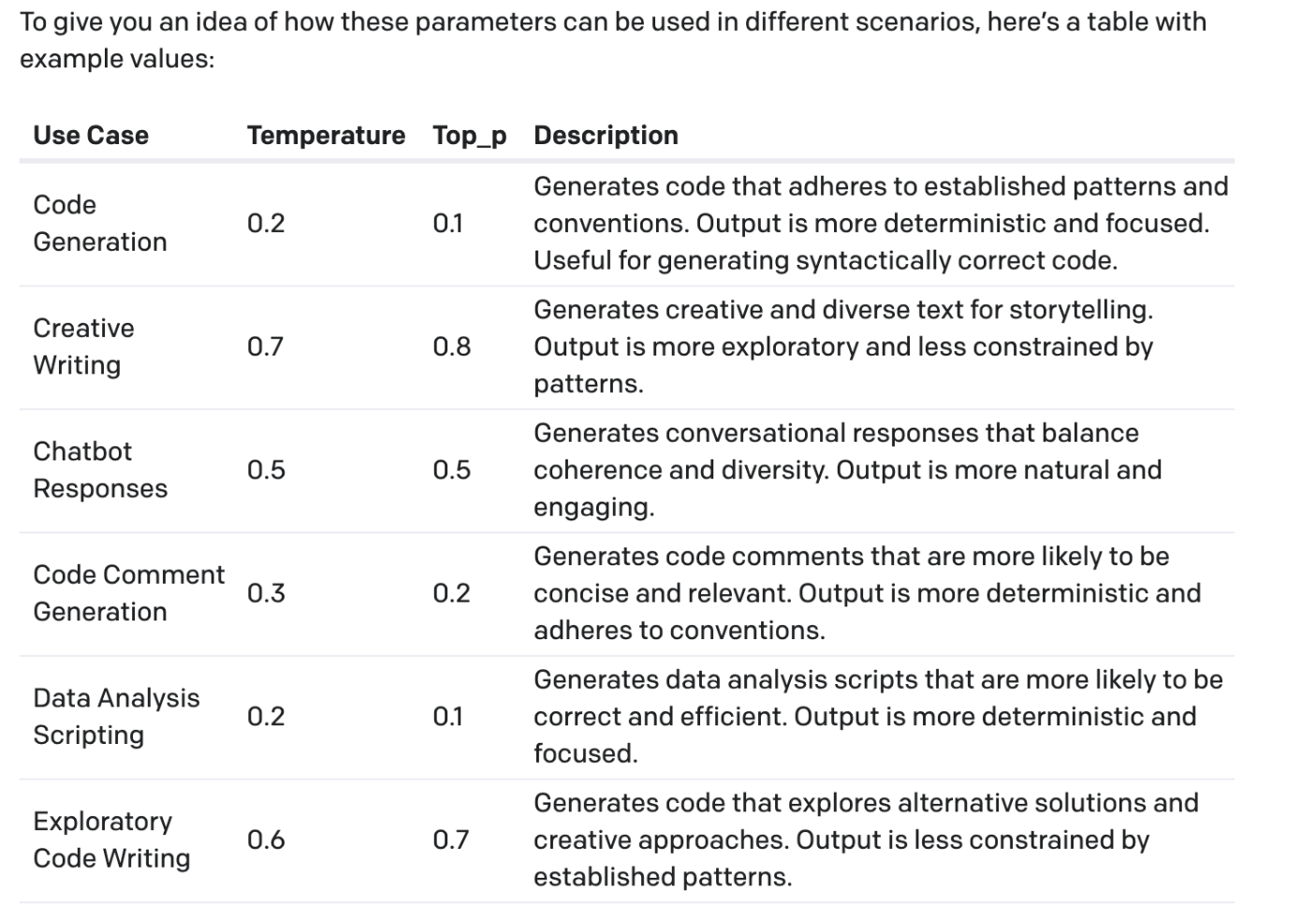
A Quick Note on a Related Parameter: Top-p
As you explore different AI tools, you may also encounter a parameter called Top-p (or "nucleus sampling"). Like temperature, it also controls the randomness of the output, but in a different way.
- Temperature reshuffles the probabilities of all words in the vocabulary.
- Top-p tells the AI to first create a shortlist of the most likely words whose cumulative probability adds up to a certain value (the 'p' value), and then it picks a word only from that list.
For example, a top_p of 0.9 tells the AI to consider only the most likely words that make up the top 90% of the probability mass.
Many experts recommend you adjust either Temperature or Top-p, but not both at the same time. For your purposes, focusing on mastering Temperature is more than sufficient, as it's the most common and intuitive "creativity dial" available in free tools.
Conclusion
You've now added a crucial tool to your AI authoring toolkit. By adjusting the temperature, you can move beyond just prompting the AI for content and start artfully shaping its voice and style. This control is fundamental to adapting a single AI tool to the diverse range of books you plan to write, from precise technical guides to whimsical children's stories.
Key Takeaways:
- Temperature is a parameter that controls the balance between predictability and creativity in AI-generated text.
- Low temperature (<1.0) produces focused, consistent, and factual output. It's ideal for technical explanations and summaries.
- High temperature (>1.0) produces diverse, creative, and surprising output. It's perfect for brainstorming, creative writing, and generating novel ideas.
- Choosing the right temperature depends on your specific writing goal for that session.
Preview of the Next Lesson:
We've covered how to structure your writing (prompt chaining) and how to control the AI's creativity (temperature). Now, we must turn to a topic you've highlighted as a major priority: the legal framework. In our next lesson, we will begin Module 2 by addressing the crucial question: "What is the current copyright landscape for AI-generated text and images?" This will lay the legal foundation for everything you publish.