Welcome to your second lesson. In our previous discussion, we established React's first core principle: its declarative, component-based architecture. You learned to think of UIs as a composition of reusable components, each describing a piece of the interface based on its current props and state.
Today, we delve into the second pillar that makes React so effective: the Virtual DOM. This lesson will answer the crucial question of how React takes the declarative UI you define and translates it into highly efficient updates on the web page. Your goal is to describe this concept and its role in optimizing UI updates, a key piece of the puzzle for explaining the "magic" of React to your future students.
The Problem with Direct DOM Manipulation
With your background in JavaScript, you know that you can directly manipulate the Document Object Model (DOM) to change what's on a web page. While this is powerful, it comes with significant challenges in large, dynamic applications.
-
Performance: The browser's DOM is a complex, tree-like structure. Every time you change it, the browser may need to perform expensive operations like recalculating the layout of elements ("reflow") and redrawing them on the screen ("repaint"). If an application has many frequent updates, doing this directly and naively can lead to a slow and janky user experience.
-
Complexity: As we touched upon in the last lesson, imperatively managing state changes is difficult. You have to write specific code to find the correct DOM node and update it for every possible state change. This process is error-prone and doesn't scale well.
The LogRocket article, "What is the virtual DOM in React?", demonstrates this issue with a simple vanilla JavaScript example that updates a clock every second.
What is the virtual DOM in React? - LogRocket Blog
Please read the section "How re-rendering impacts performance" in the LogRocket article.
Focus on the initial JavaScript code example and the description of the problem it causes. You can find this by looking for the code block that begins with the simulation code. Notice how using innerHTML to update the time causes the entire element to be rebuilt, making the text input lose its state. This is the exact problem React aims to solve.
This example vividly illustrates that even a small change, when handled crudely, can force the browser to do unnecessary work and disrupt the user's interaction.
The Real Purpose of the Virtual DOM
A common misconception is that the Virtual DOM is simply "faster" than the real DOM. This isn't accurate. In fact, using a Virtual DOM introduces extra steps. So, what problem does it actually solve?
The primary motivation for the Virtual DOM is to enable a declarative programming paradigm. It allows us to write our components as if we are re-rendering the entire UI from scratch on every update, without suffering the massive performance penalty that would entail.
The article "Virtual DOM: What problem does it solve?" provides a fantastic narrative on this very topic, dispelling the performance myth and clarifying the VDOM's true role.
Virtual DOM: What problem does it solve? - DEV Community
This article offers a personal journey to understanding the VDOM. It's great for grasping the core concept.
First, read the section that directly challenges the performance myth, starting from the initial skepticism and ending with the key insight: Virtual DOM doesn't increase your application's performance! Next, jump to the section "The Elm Architecture" and read the crucial takeaway: The main motivation. This connects the VDOM to the declarative approach we discussed. Finally, read the section "Couldn't we do all this directly into the DOM?". This answers the logical follow-up question, explaining why we can't just regenerate the real DOM from a performance and user-experience perspective.
In essence, the Virtual DOM is an abstraction that makes the declarative UI = f(state) model practical. It acts as a lightweight blueprint in memory. It's cheap to create and compare these blueprints, allowing React to figure out the most efficient way to update the actual, "heavy" browser DOM.
How It Works: Reconciliation
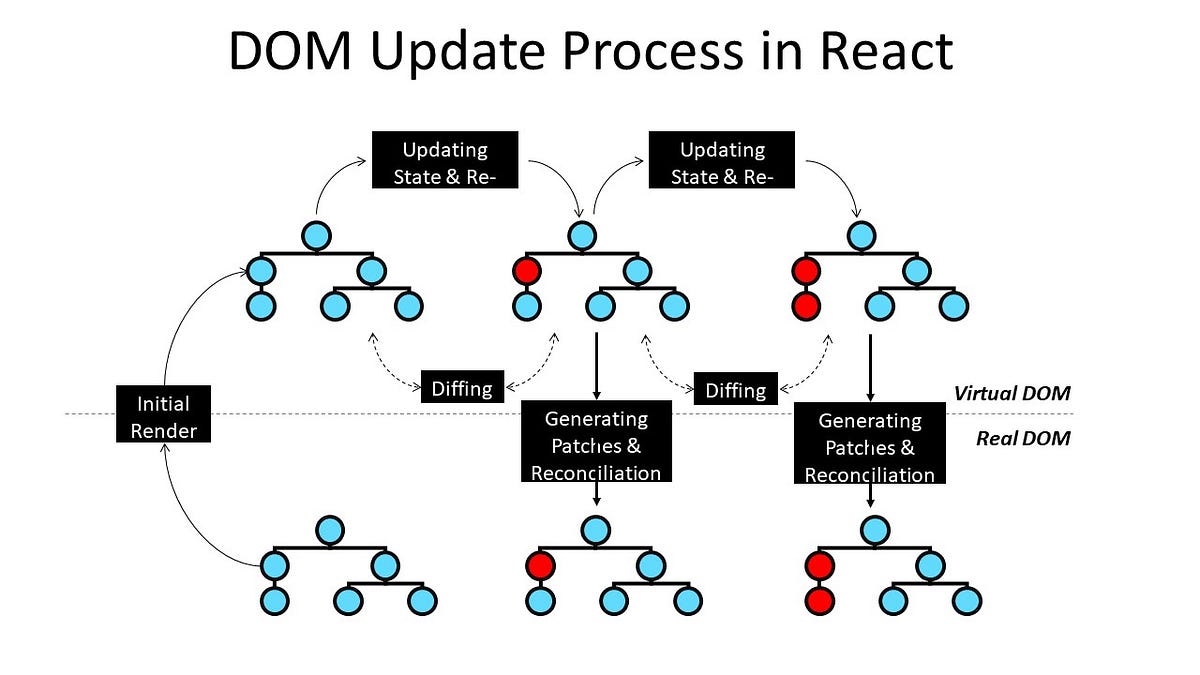
So, how does React use this blueprint to perform efficient updates? The process is called reconciliation. It can be broken down into a cycle of three main steps:
- Trigger: A re-render is triggered, either by the initial rendering of the application or by a state update within a component.
- Render: React executes your component functions to create a new Virtual DOM tree—a JavaScript object representing the UI you want.
- Commit: React compares the new Virtual DOM tree with the previous one. This comparison is called "diffing." It then calculates the smallest possible set of changes and applies ("commits" or "patches") only those changes to the real DOM.
This entire cycle is beautifully illustrated in the following diagram.
The following video provides an excellent walkthrough of this trigger-render-commit process.
How React ACTUALLY works (DEEP DIVE 2023)
The video "How React ACTUALLY works" clearly explains the update cycle.
Watch the segment that covers the three steps of an update: Trigger, Render, and Commit. Pay close attention to how it describes the creation of the VDOM and the comparison between the old and new versions.
The Diffing Algorithm: React's Optimization Strategy
The "magic" of reconciliation lies in its diffing algorithm. To avoid the computationally expensive task of comparing two entire trees (which is an O(n³) problem), React uses a set of heuristics, or simplifying assumptions, to find differences in O(n) time.
The video "The Magic of React's Reconciliation" offers a clear and concise explanation of these rules.
The Magic of React's Reconciliation: Behind the Scenes with a Microsoft Frontend Developer
This video from a Microsoft engineer breaks down the specific rules of reconciliation.
Please watch the following segments: Start with the introduction to the Virtual DOM as a concept that avoids costly direct DOM manipulation: the VDOM concept. Next, focus on the core rules of the diffing algorithm: how React handles different element types, same element types, and components. Finally, watch the explanation of how React handles lists and why the key attribute is so important for optimization: recursing on children.
As you saw, the main rules are:
- Different Element Types: If the type of an element changes (e.g., a
<div>becomes a<span>), React destroys the old tree and builds a new one from scratch. - Same Element Types: If the element type is the same, React keeps the underlying DOM node and only updates the attributes that have changed (like
classNameorstyle). - Lists and Keys: When rendering a list of items, React needs a way to track each item across renders. The special
keyprop provides a stable identity for each item, allowing React to efficiently add, remove, or reorder items without rebuilding the entire list. We will put this into practice in Module 2.
Clarification: Virtual DOM vs. Shadow DOM
Finally, it's important to distinguish the Virtual DOM from another term you might encounter: the Shadow DOM. They are not the same and solve different problems.
- The Virtual DOM is a concept used by libraries like React to optimize UI updates by batching changes. It's a JavaScript object that is not part of the browser itself.
- The Shadow DOM is a browser technology designed for encapsulation. It allows you to create a scoped, isolated DOM tree within an element, which is useful for building reusable web components whose styles and scripts don't leak out or clash with the rest of the page.
The LogRocket article provides a handy table that summarizes these differences.
What is the virtual DOM in React? - LogRocket Blog
This table provides a quick, clear reference.
Review the comparison chart at the end of the article. This is a perfect summary to have in your "teacher's toolkit" to answer common questions.
Conclusion
In this lesson, we've unpacked the mechanism that makes React's declarative nature not just elegant, but also performant.
Key Takeaways:
- The Problem: Direct and frequent DOM manipulation is slow and complex to manage.
- The Solution: The Virtual DOM is a programming concept—a lightweight copy of the UI kept in memory—that enables a declarative approach.
- The Process (Reconciliation): When state changes, React creates a new VDOM, "diffs" it against the old one, and commits only the necessary changes to the real DOM.
- The Optimization: The efficiency comes from a heuristic-based diffing algorithm that minimizes expensive DOM operations and the crucial use of
keysto track items in a list.
You now have a solid understanding of React's two foundational pillars: a component-based architecture for describing your UI, and the Virtual DOM for rendering it efficiently.
With this conceptual groundwork in place, we are ready to start building. In our next lesson, you will set up your first local React development environment using Vite and render your first piece of UI to the screen.