Welcome to your first lesson in the React course! We're kicking things off by diving straight into the most fundamental concept that underpins the entire library. Today's goal is to understand React's component-based architecture. This isn't just about code; it's about a powerful mental model for building user interfaces. Mastering this concept is the first and most crucial step toward your goal of being able to teach React effectively, as it explains the "why" behind how React applications are structured.
Given your comfort with JavaScript, HTML, and CSS, you're already familiar with building web pages by directly manipulating the Document Object Model (DOM). In this lesson, we will explore a different paradigm that React introduces—one that shifts from imperative instructions to a declarative, component-driven approach.
The Problem with Imperative UI Development
Before we see what React does, it's essential to understand the problems it was designed to solve. When web applications grow in complexity, managing the UI by directly telling the browser how to change every little piece of the DOM can become chaotic. State gets scattered, code becomes difficult to follow, and bugs become frequent and hard to track.
To see a powerful illustration of this challenge, let's watch a segment from the video "Why React is Declarative?". The presenter uses a simple to-do list and then a real-world example from Facebook's history to show how imperative UI updates can lead to fragile, complex code.
This video provides an excellent deep dive into the historical context and conceptual foundation of React's declarative nature.
Please watch the section that demonstrates the complexity of imperative DOM manipulation. Focus on how adding new features to a simple app makes the code increasingly difficult to manage. Pay close attention to the Facebook chat example, as it's a real-world case of the problem React solves. Watch from the to-do list example up to the end of the Facebook chat bug explanation.
As you saw, every time a new feature is added, the code that updates the UI has to be manually modified in multiple places. It's easy to forget a step, leading to an unsynchronized and buggy user interface. This is the core problem of imperative UI management at scale. React's answer to this is a completely different approach: component-based architecture.
Building with Components: The Lego Brick Analogy
At its heart, React is about building UIs out of components. A component is a self-contained, reusable piece of code that represents a part of the user interface. Think of them as custom, reusable HTML elements that you can use to build your application.
A common and effective analogy is building with Lego bricks. You don't build a complex Lego castle by carving it from a single block of plastic. Instead, you use small, standard, reusable bricks (components) and assemble them to create the final structure. A button, a search bar, a user profile card—each of these can be a component.
To get a formal introduction to this core idea, please read a short section from the article "Welcome to React World".
# Welcome to React World: Grasp the Fundamentals and Mental Model! (React Day 1) - DEV Community
This article provides a great, beginner-friendly overview of React's core concepts. We'll focus on the section that introduces component-based architecture.
Please read the section titled "Component-Based Architecture: Building with Lego Bricks". Pay attention to the analogies and the key benefits mentioned: reusability, modularity, and easier testing.
This modularity is the cornerstone of building modern web applications. You can develop and test each component in isolation and then compose them—that is, nest them inside one another—to build complex user interfaces.
Learning to "See" in Components
Understanding components is one thing; learning to see a user interface as a collection of components is a skill. This is a crucial part of "Thinking in React" and a vital skill for you to develop in order to teach it.
Let's look at a practical example. The following video breaks down a familiar webpage—the Google search results page—into its constituent components.
What Is React And Why You Need To Know It
This video, from the "Web Dev Simplified" channel, offers a clear and practical demonstration of how to deconstruct a complex UI into React components.
Watch the segment from the Google example. Notice how the same component can be reused in different places (like the search results) and how a single component can contain other components within it. Also, observe how a component can look different based on the data it receives.
This exercise of breaking down a UI is the first step in designing any React application. The official React documentation provides a fantastic, structured guide for this exact process. Let's walk through it.
This is the official guide from the React team on the thought process behind building a React app. It's an invaluable resource for understanding the mental model.
Please read Step 1 of this guide. Focus on the methodology: drawing boxes around UI elements and arranging them into a hierarchy. You don't need to dive into the code in Step 2 yet; for now, concentrate on the conceptual breakdown of the UI mockup.
This methodical approach—identifying components and establishing their hierarchy—is precisely the kind of clear, teachable process you'll want to convey to your own students.
How Components Handle Data: Props and State
So, we can build a static UI by nesting components. But how do we make them dynamic? How does a component know what to display? This is where two crucial concepts come in: props and state.
-
Props (short for properties): Props are how you pass data from a parent component down to a child component. They are read-only for the child component. Think of them as arguments you pass to a function. This allows you to configure a component from the outside, making it more reusable. In the Google example, the text of each search result link would be passed as a prop to a
SearchResultcomponent. -
State: State is a component's internal memory. It's data that a component can hold and change over time, typically in response to user events like clicks or form inputs. When a component's state changes, React automatically re-renders that component to reflect the new data.
Understanding the difference between props and state is fundamental. The "Thinking in React" guide has a "Deep Dive" section that explains this distinction perfectly.
Let's return to the official guide to clarify the difference between props and state.
Read the "Deep Dive" box titled Props vs State. This is a core concept, so take your time to absorb the definitions.
We will explore how to manage state and handle events in detail in Module 3. For now, what's important is to know that props are for passing data down the component tree, and state is for managing data that changes over time within a component.
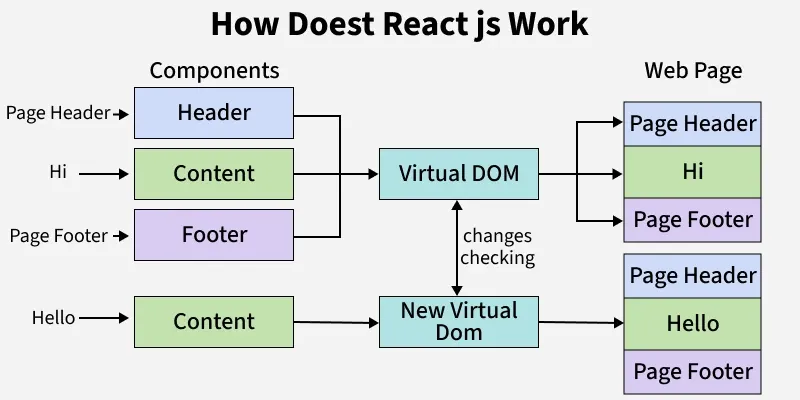
This combination of components, props, and state enables React's declarative nature. Instead of writing step-by-step instructions to change the UI (imperative), you simply declare what the UI should look like for any given state.
Conclusion
In this lesson, we've laid the groundwork for your entire React journey. You now have the foundational mental model for building UIs with React.
Key Takeaways:
- Component-Based Architecture: React applications are built by composing small, reusable, and self-contained units of UI called components.
- Managing Complexity: This architecture solves the problems of scaling and maintainability that are common in traditional, imperative DOM manipulation.
- Thinking in Components: A key skill is the ability to look at a UI design and break it down into a hierarchy of components.
- Props vs. State: Components are made dynamic using
props(data passed down from a parent) andstate(internal, changeable data). - Declarative Paradigm: By using components that react to changes in props and state, we can declaratively describe our UI, and trust React to handle the updates.
This understanding of components is the first of React's two main pillars. In our next lesson, we will explore the second pillar: the Virtual DOM. We'll discover the clever mechanism that allows React to take our declarative component descriptions and translate them into highly efficient updates on the actual web page.