Hello again! Welcome back.
In our last lesson, we built the TelemetryManager, the central registry that owns and manages our collection of per-thread SPSC ring buffers. This was a critical step in setting up the "spine" of our telemetry system. Now, with the producer side's infrastructure in place, it's time to bring the other half of the system to life: the consumer.
Today's lesson addresses the learning outcome: Implement a background consumer thread that polls all thread buffers and consolidates events. This thread will be the workhorse of our data pipeline, tirelessly collecting the events captured by your application threads and preparing them for the next stage. We will focus on creating, managing, and gracefully shutting down this thread using modern C++ features.
This is where our system starts to feel dynamic. By the end of this lesson, you will have a running, multi-threaded application where producer threads generate data and a dedicated consumer thread processes it in near real-time.
1. Creating a Background Thread with std::jthread
To avoid impacting the performance of our main application, the work of collecting events must happen on a separate, dedicated thread. In modern C++, std::jthread (introduced in C++20) is the preferred tool for this job.
Unlike its predecessor std::thread, std::jthread is an RAII-style (Resource Acquisition Is Initialization) thread object. This means it automatically manages its own lifetime. When a std::jthread object goes out of scope, its destructor automatically signals the thread to stop and waits for it to finish (a process called "joining"). This prevents common bugs like unterminated threads that can crash an application on exit.
An Introduction to Multithreading in C++20 - Anthony Williams - CppCon 2022
To understand the fundamentals of std::jthread and the cooperative cancellation mechanism it uses, please watch these selections from Anthony Williams' CppCon talk, 'An Introduction to Multithreading in C++20'.
Please watch the following three segments: Dedicated Threads (10:01 - 10:44): This introduces the concept of using threads to separate concerns, which is exactly our goal. Cooperative Cancellation (11:47 - 17:43): This is crucial. It explains std::stop_token and std::stop_source, the mechanism we'll use to gracefully shut down our consumer thread. std::jthread in Detail (17:59 - 24:10): This segment shows how std::jthread is created and how it automatically integrates with std::stop_token to provide safe, RAII-based thread management. Focus on how the destructor works.
The key idea from the video is that a jthread can be given a function to run. That function will automatically receive a std::stop_token as its first argument, which it can periodically check to see if a stop has been requested.
2. Designing the Consumer's Polling Loop
Our consumer thread's primary job is to run in a loop, continuously polling the SPSC buffers for new events. This pattern is central to many high-performance systems.
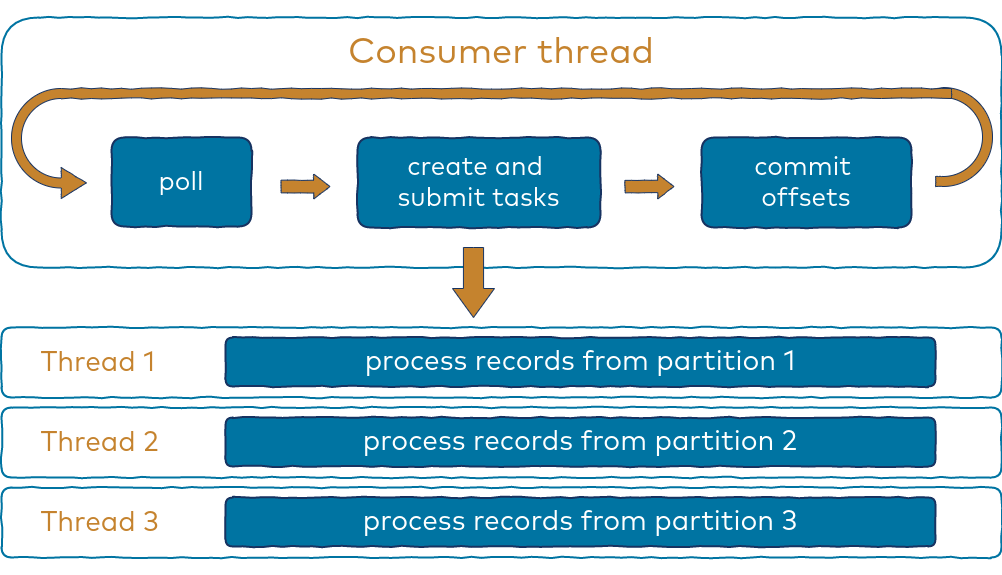
Here's the logic for our consumer's main loop:
- Start an infinite loop that only terminates when a stop is requested via the
stop_token. - Inside the loop, call the
TelemetryManager::for_each_buffer()method we created in the last lesson. - The lambda function passed to
for_each_bufferwill contain the logic to drain a single SPSC queue. It will calltry_pop()in a loop until the queue is empty. - For now, "consolidating" an event simply means printing it to the console.
Let's integrate this with the TelemetryManager from the previous lesson.
#include <iostream>
#include <vector>
#include <memory>
#include <mutex>
#include <functional>
#include <thread> // For std::jthread and std::stop_token
#include <chrono> // For std::this_thread::sleep_for

// Forward-declare the TelemetryManager to be used by the ConsumerThread
class TelemetryManager;

// A simplified stub for our SPSC queue from the previous module.
template<typename T>
class SPSCQueue {
public:
    SPSCQueue(size_t capacity) { (void)capacity; }
    // In a real implementation, this would be a complex atomic operation.
    bool try_push(const T& value) { return false; /* placeholder */ }
    bool try_pop(T& value) { return false; /* placeholder */ }
};

using Event = int;

// From the previous lesson:
class TelemetryManager {
public:
    TelemetryManager() = default;
    TelemetryManager(const TelemetryManager&) = delete;
    TelemetryManager& operator=(const TelemetryManager&) = delete;

    SPSCQueue<Event>* register_new_thread_buffer(size_t capacity) {
        std::lock_guard<std::mutex> lock(m_mutex);
        auto new_queue_ptr = std::make_unique<SPSCQueue<Event>>(capacity);
        SPSCQueue<Event>* raw_ptr = new_queue_ptr.get();
        m_buffers.emplace_back(std::move(new_queue_ptr));
        return raw_ptr;
    }

    void for_each_buffer(const std::function<void(SPSCQueue<Event>*)>& func) {
        std::lock_guard<std::mutex> lock(m_mutex);
        for (const auto& buffer_ptr : m_buffers) {
            func(buffer_ptr.get());
        }
    }

private:
    std::mutex m_mutex;
    std::vector<std::unique_ptr<SPSCQueue<Event>>> m_buffers;
};


// --- NEW CODE FOR THIS LESSON ---

class ConsumerThread {
public:
    ConsumerThread(TelemetryManager& manager) : m_manager(manager) {}

    // The destructor for m_thread will automatically request stop and join.
    ~ConsumerThread() {
        if (m_thread.joinable()) {
            // This is good practice for explicit shutdown, though RAII handles it.
            stop();
        }
    }

    void start() {
        // Start the thread, passing our polling loop function.
        // The lambda captures `this` to access member variables.
        m_thread = std::jthread([this](std::stop_token st) {
            this->poll_loop(st);
        });
    }

    void stop() {
        // Request the thread to stop and wait for it to finish.
        m_thread.request_stop();
        m_thread.join();
    }

private:
    void poll_loop(std::stop_token st) {
        std::cout << "Consumer: Starting poll loop." << std::endl;

        while (!st.stop_requested()) {
            // In each iteration, we check all buffers.
            m_manager.for_each_buffer([&](SPSCQueue<Event>* buffer) {
                Event event;
                // Drain the buffer completely
                while (buffer->try_pop(event)) {
                    // "Consolidate" the event by printing it.
                    std::cout << "Consumer: Popped event " << event << std::endl;
                }
            });

            // IMPORTANT: Add a small sleep to prevent busy-waiting
            // and consuming 100% of a CPU core when idle.
            std::this_thread::sleep_for(std::chrono::milliseconds(10));
        }

        std::cout << "Consumer: Stop requested, exiting poll loop." << std::endl;
    }

    TelemetryManager& m_manager;
    std::jthread m_thread;
};
3. The Polling Strategy: Avoiding Busy-Waiting
Notice the std::this_thread::sleep_for call at the end of the poll_loop. This is critical. Without it, the while loop would spin as fast as possible, consuming an entire CPU core even when there are no events to process. This is known as busy-waiting and is highly inefficient.
By sleeping for a short duration (e.g., 1-10 milliseconds), we yield control back to the OS scheduler, allowing other processes to run and drastically reducing CPU usage during idle periods.
Choosing the right polling strategy is a common problem in systems design. Let's look at how a real-world library handles this.
User's API - Quill v11.1.0 - C++ Logging Library
The C++ logging library 'Quill' uses a nearly identical architecture with a background consumer thread. Its configuration options provide excellent insight into professional polling strategies.
Read the section BackendOptions. Notice the parameters sleep_duration and enable_yield_when_idle. This shows that high-performance libraries make the polling behavior configurable, allowing users to trade between latency (shorter sleep) and CPU efficiency (longer sleep).
The Quill options demonstrate the trade-off:
- Low
sleep_duration: The consumer checks for events more frequently, reducing the latency between an event being produced and it being processed. The cost is higher CPU usage. - High
sleep_duration: The consumer is more CPU-efficient but introduces more latency.
For a telemetry profiler, low latency is often desirable, so a short sleep duration (or even a more advanced adaptive strategy) is a good starting point. Our hardcoded 10ms is a reasonable default.
Test your understanding!
What is the main drawback of using std::condition_variable to wake the consumer thread instead of polling with a sleep? (Hint: Think about the core data structure we're using).
Show answer
The main drawback is that std::condition_variable requires a std::mutex to operate correctly. Integrating a mutex into our SPSC queue would defeat the purpose of it being lock-free. The producer thread would have to acquire a lock to notify the consumer, re-introducing the very contention and overhead we sought to eliminate. In high-throughput scenarios, a well-tuned polling loop on a lock-free queue often outperforms a lock-based condition variable approach.
4. Putting It All Together
Now we can write a main function that simulates the entire system. We'll create our TelemetryManager, start the ConsumerThread, and then spawn a couple of temporary "producer" threads to generate some data.
// --- In your main.cpp ---
// (Include the class definitions from above)

// A simple function to simulate a producer thread's work
void producer_task(TelemetryManager* manager, SPSCQueue<Event>* buffer, int start_event_id) {
    std::cout << "Producer " << start_event_id / 100 << ": Started." << std::endl;
    for (int i = 0; i < 5; ++i) {
        Event e = start_event_id + i;
        // In a real system, the push would be atomic. We'll simulate by just logging.
        std::cout << "Producer " << start_event_id / 100 << ": Pushing event " << e << std::endl;
        // buffer->try_push(e); // This would be the actual call
        std::this_thread::sleep_for(std::chrono::milliseconds(15));
    }
    std::cout << "Producer " << start_event_id / 100 << ": Finished." << std::endl;
}

int main() {
    std::cout << "Main: Setting up telemetry system." << std::endl;
    TelemetryManager manager;
    ConsumerThread consumer(manager);

    // Start the background consumer thread
    consumer.start();

    // --- Simulate Producer Threads ---
    // In a real application, these threads would be part of the main program.
    // Here, we create them just for demonstration.

    // In a real system, we wouldn't use std::thread directly like this, but macros.
    auto* buffer1 = manager.register_new_thread_buffer(1024);
    std::thread producer1(producer_task, &manager, buffer1, 100);

    auto* buffer2 = manager.register_new_thread_buffer(1024);
    std::thread producer2(producer_task, &manager, buffer2, 200);

    // Let the producers run to completion
    producer1.join();
    producer2.join();

    // Let the consumer run for a bit longer to ensure it processes all events
    std::this_thread::sleep_for(std::chrono::milliseconds(100));

    // The consumer's destructor will automatically stop and join the thread
    // when `main` exits, but we can also do it explicitly.
    std::cout << "Main: Shutting down telemetry system." << std::endl;
    consumer.stop();

    std::cout << "Main: Shutdown complete." << std::endl;
    return 0;
}
Note: Since our SPSCQueue is just a stub, running this code won't show the consumer popping events. The output will primarily demonstrate the lifecycle management: the threads starting, the consumer polling (sleeping), and everything shutting down cleanly.
When you build and run this, you will see output demonstrating that the main thread, the producers, and the consumer are all running concurrently and, most importantly, shutting down in an orderly fashion thanks to std::jthread.
Conclusion
Congratulations! You have successfully implemented the heart of the telemetry engine's data collection pipeline. We now have a robust, decoupled system where multiple producer threads can generate data without being blocked, and a dedicated background thread consolidates that data efficiently and safely.
Key Takeaways:
std::jthreadis the modern standard for RAII-based thread management in C++. Its automatic stop-and-join behavior prevents common multithreading bugs.- Cooperative cancellation via
std::stop_tokenis the correct way to signal a background thread to shut down. - A polling loop is a common pattern for consumers in high-performance systems. However, it's crucial to avoid busy-waiting by yielding (
std::this_thread::yield()) or sleeping (std::this_thread::sleep_for()). - The consumer thread successfully decouples data collection from data production, which is a cornerstone of our zero-overhead design goal.
What's Next?
We have our producer threads and our consumer thread. But how do events get from an arbitrary line of application code into the correct per-thread SPSC buffer? Manually passing buffer pointers around is not feasible. The next lesson will solve this problem by exploring the role of C++ preprocessor macros for code instrumentation. We'll learn how to create a simple PROFILE_EVENT(...) macro that automatically captures data and pushes it to the correct thread's buffer, making the instrumentation process nearly invisible to the application programmer.