Hello! Welcome to the next lesson in our journey to build a high-performance telemetry engine.
In our last session, we successfully set up the core data pipeline: a TelemetryManager to hold per-thread SPSC buffers and a dedicated ConsumerThread to poll and consolidate events. This established a clean separation between the threads producing data (the application) and the thread consuming it (our profiler). However, we left a crucial question unanswered: how do we get events from arbitrary points in the application code into the correct per-thread buffer, without cluttering our logic or introducing significant overhead?
Today's lesson addresses the learning outcome: Explain the role of C++ preprocessor macros for code instrumentation. We will explore how macros act as the "injection mechanism" for our telemetry system. You'll learn why they are the industry-standard tool for this task, enabling us to write clean, context-aware instrumentation points that can be completely compiled out to achieve the "zero-overhead" goal that is central to our project.
1. The Preprocessor: C++'s Code Generation Engine
Before the C++ compiler even begins to analyze your code for syntax errors or generate machine instructions, another program runs first: the preprocessor. Its job is to scan your source files for special directives (lines beginning with #) and perform text-based transformations.
This is a fundamental concept. The preprocessor doesn't understand C++ syntax; it just follows rules to manipulate text. The most common directives are #include (which literally pastes a header file's content) and #define, which creates a macro.
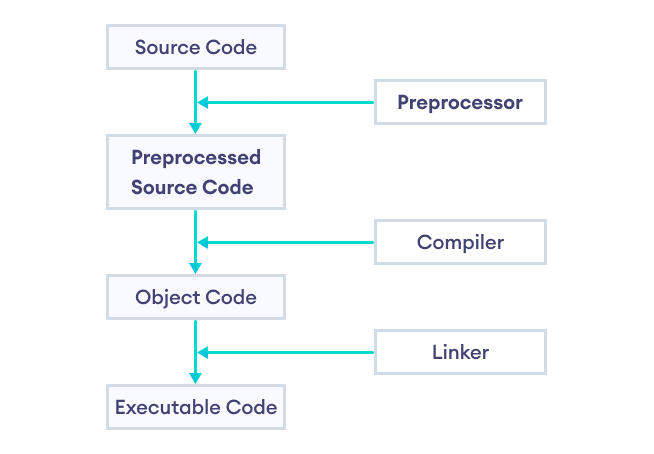
2. The Role of Macros in Instrumentation
So, why use macros for instrumentation instead of just calling a function? For our telemetry engine, macros solve two critical problems:
- Automating Boilerplate: We want to capture not just an event, but also its context: which file, which function, and what line number did it occur on? A macro can capture this information automatically, saving us from typing it out for every single event.
- Conditional Compilation: This is the most important role for our high-performance goal. When we build our application for release, we want the profiling code to have zero cost. Not low cost—zero. Because macros are a text-replacement step, we can define them to expand to nothing, effectively erasing all instrumentation from the final executable. A function call, even if it does nothing, might still have a small overhead.
To see a practical example of this, let's turn to a video that demonstrates building a simple profiler.
VISUAL BENCHMARKING in C++ (how to measure performance visually)
The Cherno's video, 'VISUAL BENCHMARKING in C++', provides a perfect demonstration of using macros to create clean and conditional instrumentation points. It directly mirrors the technique we will use.
Please watch the segment from 09:55 to 13:30. Pay close attention to: How a PROFILE_SCOPE macro is created to wrap the timer object, reducing boilerplate. How it's controlled by a PROFILING flag (#if PROFILING). How the macro is defined as empty when PROFILING is 0, completely removing the timer from the code. How predefined macros like __FUNCTION__ and __FUNCSIG__ are used to automatically capture the function name without the programmer having to type it as a string.
This video perfectly illustrates the core principles. By wrapping our instrumentation logic in a macro, we get an easy-to-use API that can be completely disabled with a single switch during compilation. This is the key to achieving the "zero-overhead" promise of our telemetry engine.
3. Key Macro Techniques for Robust Instrumentation
Now that we understand the why, let's look at the how. There are a few standard C++ techniques for writing powerful and safe macros.
Conditional Compilation (#ifdef/#if)
As seen in the video, we can control whether our macro generates code using preprocessor conditionals. This is typically tied to a master switch, like PROFILING or DEBUG.
#if PROFILING_ENABLED
    // When PROFILING_ENABLED is 1 (or defined), the macro expands to this code.
    #define PROFILE_SCOPE(name) InstrumentationTimer timer(name)
#else
    // When PROFILING_ENABLED is 0 (or not defined), the macro expands to nothing.
    #define PROFILE_SCOPE(name)
#endif

// Usage in code:
void MyFunction() {
    PROFILE_SCOPE("MyFunction"); // This line is either an object creation or literally nothing.
    // ... do work ...
}
This technique is fundamental. You can learn more about it in the following resource.
CPP / C++ - Preprocessor and Macros
This article, 'Preprocessor and Macros', provides concise examples of the techniques we're discussing.
Please quickly read sections 1.1 ('Enable and disable macros during compilation') and 1.2 ('Temporarily disable a code block'). These sections reinforce the core concept of using preprocessor directives to conditionally include or exclude code, which is exactly what we need for our profiler.
Automatic Context Capture (Predefined Macros)
Manually typing the name of the function for every scope is tedious and error-prone. The preprocessor provides several "magic" predefined macros that are automatically filled in by the compiler.
| Macro | Description | Compiler Support |
|---|---|---|
__FILE__ |
The name of the current source file (as a string literal). | All |
__LINE__ |
The current line number in the source file (as an integer). | All |
__FUNCTION__ |
The name of the current function (e.g., "MyFunction"). |
All |
__PRETTY_FUNCTION__ |
A more descriptive function signature (e.g., "void MyFunction(int)"). |
GCC, Clang |
__FUNCSIG__ |
The MSVC equivalent of __PRETTY_FUNCTION__. |
MSVC |
By using these inside our PROFILE_SCOPE macro, we can automatically capture rich contextual information. The __PRETTY_FUNCTION__ and __FUNCSIG__ are particularly valuable for profiling, as they distinguish between overloaded functions.
The do-while(0) Idiom for Syntactic Safety
What if our macro needs to contain multiple statements? A common mistake is to wrap them in simple curly braces {}. This can lead to surprising syntax errors.
Consider this unsafe macro:
#define UN-SAFE_MACRO(x) std::cout << (x); std::cout << std::endl;

if (condition)
    UN-SAFE_MACRO("Hello"); // Expands to: if (condition) std::cout << ("Hello"); std::cout << std::endl;
else
    // ...
The else will cause a compile error because the compiler sees the semicolon after the first std::cout, ending the if statement.
The standard C++ solution is the do-while(0) idiom. It creates a proper statement block that works correctly in all contexts.
#define SAFE_MACRO(x) \
    do { \
        std::cout << (x); \
        std::cout << std::endl; \
    } while(0)

if (condition)
    SAFE_MACRO("Hello"); // Works perfectly!
else
    // ...
This is a critical technique for writing professional, robust macros. It's so important that it's mentioned in almost every serious discussion of macros.
CPP / C++ - Preprocessor and Macros
To solidify your understanding of this crucial idiom, let's revisit the 'Preprocessor and Macros' resource.
Please read section 1.4, 'Do while 0 macro idiom'. It gives a clear explanation of the problem and the solution. This is a pattern you will use frequently in systems programming.
Test your understanding!
Given the following code, what will the preprocessor output look like if PROFILING_ENABLED is 0?
#define PROFILING_ENABLED 0

#if PROFILING_ENABLED
    #define PROFILE_EVENT(name) \
        do { \
            const char* eventName = name; \
            int line = __LINE__; \
            submit_telemetry(eventName, line); \
        } while(0)
#else
    #define PROFILE_EVENT(name)
#endif

void process_data() {
    PROFILE_EVENT("DataProcessingStart");
    // ... heavy computation ...
}
Show answer
The preprocessor will transform the process_data function into this:
void process_data() {

    // ... heavy computation ...
}
The PROFILE_EVENT("DataProcessingStart"); line is replaced with nothing, completely removing it before the compiler even sees it. This demonstrates the "zero-overhead" principle in action.
Conclusion
Today we've uncovered the "magic" behind how high-performance tools like profilers can instrument code without affecting its performance in release builds. You've learned that C++ preprocessor macros are not just a convenience but a powerful code generation tool that is essential for this task.
Key Takeaways:
- Macros are a pre-compilation tool: The preprocessor runs before the compiler, performing text replacements based on
#definedirectives. - Conditional compilation is their superpower: Using
#if/#else, we can make macros expand to real code in a debug/profile build, but expand to nothing in a release build, achieving zero overhead. - Macros reduce boilerplate: Predefined macros like
__FILE__,__LINE__, and__FUNCTION__allow our instrumentation points to automatically capture rich context. - The
do-while(0)idiom is essential: It ensures that multi-statement macros are syntactically safe and behave like a single, proper C++ statement.
What's Next?
We've established the role and the key techniques for using macros in instrumentation. In our next lesson, we will put this theory into practice. We'll tackle the next learning outcome: Implement a variadic macro that captures source location, timestamp, and a formatted message. You'll build the first version of our project's primary instrumentation macro, PROFILE_EVENT(...), which will be capable of taking a formatted string and arguments, much like printf.