Hello! In our last lesson, we explored how Spring Boot handles web requests, from embedding a servlet container like Tomcat to dispatching requests to your controllers via the DispatcherServlet. This gave us a solid understanding of the application's runtime mechanics.
Today, we'll address another fundamental aspect of building robust, deployable applications: configuration management. A single application artifact must be able to run across various environments—development, staging, production—each with its own database credentials, API endpoints, and feature flags. This lesson will equip you with the knowledge to describe how Spring Boot's profiles and externalized configuration system make this possible, a key topic in any system design or technical deep-dive interview.
By the end of this 60-minute lesson, you will be able to describe Spring Boot profiles and the various methods for externalizing configuration, including property files, environment variables, and command-line arguments, with a focus on their order of precedence.
1. The Principle of Externalized Configuration
In modern software development, particularly in microservice architectures, a core principle is the separation of configuration from code. This is a tenet of the 12-Factor App methodology, which states that configuration should be stored in the environment. An application should be deployable to any environment with a single, immutable build artifact (e.g., a JAR file or Docker image). The only thing that changes between deployments is the configuration.
Spring Boot is designed around this principle. It provides a sophisticated system for externalizing configuration, allowing you to supply property values to your application from a wide variety of sources. These sources are arranged in a strict hierarchy, allowing for sensible defaults and predictable overrides.
The following video provides a practical demonstration of the most common override mechanisms.
Using external property sources with Spring Boot - Microservice configuration with Spring Boot [04]
This video from the Java Brains channel clearly demonstrates how properties can be overridden by sources external to the application JAR.
Watch how an external properties file, placed next to the JAR, overrides the one packaged inside it. This happens between this section. Next, observe how command-line arguments provide an even higher level of precedence, overriding both the internal and external files. This is shown from this point.
2. The Hierarchy of Property Sources
As you just saw, Spring Boot doesn't just pick one configuration source; it composites them. The key to mastering Spring Boot configuration is understanding the order of precedence. A property defined in a source with higher priority will always override the same property from a source with lower priority.
While there are many sources, for interview purposes, you should focus on the most common and impactful ones. The official Spring Boot documentation provides the definitive list.
Externalized Configuration :: Spring Boot
This is the official documentation for Spring Boot's externalized configuration. It is the ultimate source of truth for the property source hierarchy.
First, carefully read the introductory section and the list of property sources. You don't need to memorize all 15+, but pay close attention to the relative positions of: Command-line arguments OS environment variables application.properties files (both inside and outside the JAR, which we'll detail next) @PropertySource annotations Next, read the section on External Application Properties. This explains the specific locations Spring Boot searches for application.properties/.yml files and their precedence. Note that a file outside the JAR (e.g., in the config/ directory) overrides one inside the JAR.
To summarize the most critical part of the hierarchy for a microservices developer (from highest to lowest priority):
- Command-line arguments: (
--server.port=9090) - OS Environment Variables: (
SERVER_PORT=9090) - Application properties outside of your packaged JAR: (
config/application.yml) - Application properties packaged inside your JAR: (
classpath:application.yml) @PropertySourceannotations on your@Configurationclasses.- Default properties (specified with
SpringApplication.setDefaultProperties).
This structured hierarchy allows you to package sensible default configurations within your application JAR and then selectively override them at deployment time using environment variables or command-line arguments, adhering perfectly to the 12-Factor App principles.
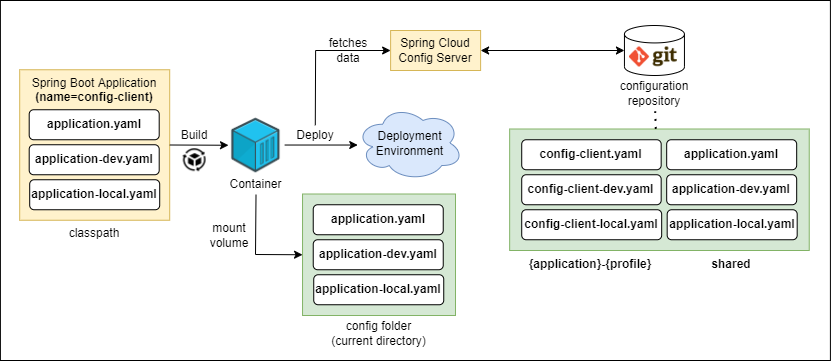
3. Using Profiles to Manage Environments
While the priority hierarchy is powerful, managing individual properties for different environments can become complex. Spring Profiles provide a framework for grouping sets of properties together. You can define a profile for dev, qa, and prod, and Spring Boot will load the appropriate configuration based on which profile is active.
Spring profiles explained - Microservice configuration with Spring Boot [08]
This Java Brains video provides an excellent conceptual introduction to Spring Profiles, explaining their purpose and activation.
Start by watching the section that explains how profiles work, from this segment. It introduces the concept of the default profile and how to create a new profile-specific configuration file. Next, see how an active profile overrides the default. This is a key concept, explained from this point. Finally, watch the most important part for real-world deployments: how to activate profiles via command-line arguments, from this clip. This allows a single JAR to be used across all environments.
There are two primary ways to structure your profile-specific configurations:
1. Separate Files (Recommended for larger projects):
You create distinct files for each profile following the application-{profile}.yml naming convention. Spring Boot automatically loads application.yml and then the file for the active profile, with the profile-specific properties overriding the common ones.
/resources
├── application.yml         # Common properties for all environments
├── application-dev.yml     # Properties specific to the 'dev' environment
└── application-prod.yml    # Properties specific to the 'prod' environment
2. Multi-Document YAML File:
You can use the --- separator within a single application.yml to define different profile sections. The spring.config.activate.on-profile property is used to associate a document with a profile.
This article provides practical examples of profile management.
Review the YAML example under the Base Structure heading. It shows how --- and spring.config.activate.on-profile are used to define dev, staging, and prod sections in one file. Also, note the quiz question and explanation at the end regarding spring.config.activate.on-profile.
You can activate a profile by setting the spring.profiles.active property. Given its high precedence, it's almost always set via an environment variable or command-line argument in a CI/CD pipeline:
- Environment Variable:
export SPRING_PROFILES_ACTIVE=prod - Command-line Argument:
java -jar my-app.jar --spring.profiles.active=prod
4. Configuration in a Containerized World
Your experience with Docker and Kubernetes is directly relevant here. In modern cloud-native deployments, configuration is almost exclusively managed via environment variables and mounted configuration files (like Kubernetes ConfigMaps and Secrets).
Relaxed Binding
Spring Boot makes it easy to work with environment variables, which have naming restrictions (e.g., no dots, typically uppercase). It uses a "relaxed binding" mechanism to map environment variables to property names.
For example, the environment variable SPRING_DATASOURCE_URL is automatically mapped to the property spring.datasource.url.
Externalized Configuration :: Spring Boot
This section of the official documentation explains the rules for mapping different naming conventions (kebab-case, camelCase, snake_case, UPPERCASE) to your configuration properties.
Read the introduction to Relaxed Binding and review the table that shows the different valid formats. Pay special attention to the rules for Binding From Environment Variables.
Configuration Trees (Kubernetes Integration)
A powerful feature for Kubernetes deployments is the ability to treat a directory of files as a set of properties. This is done using the configtree: prefix. You can mount a Kubernetes ConfigMap or Secret as a volume into your pod, and Spring Boot will map the directory structure and filenames to property keys.
Externalized Configuration :: Spring Boot
This documentation details how to map mounted volumes, like Kubernetes ConfigMaps, into Spring properties.
Read the section on Using Configuration Trees. This example shows how a volume mounted at /etc/config/ containing files like myapp/username can be imported and accessed as the properties myapp.username. This is a crucial pattern for managing configuration and secrets in container orchestrators.
5. Type-Safe Configuration with @ConfigurationProperties
While you can inject individual properties using @Value("${my.property}"), it becomes cumbersome for large, hierarchical configurations. The recommended approach is to use the @ConfigurationProperties annotation to bind properties to a type-safe Java object.
This practice provides several advantages:
- Type Safety: You work with native Java types (integers, durations, lists) instead of strings.
- Validation: You can use JSR 303 annotations (
@NotNull,@Min, etc.) on the fields to validate configuration at startup. - IDE Support: With the
spring-boot-configuration-processordependency, your IDE can provide autocompletion and validation for your custom properties in.ymlfiles.
This section provides a clear, practical example of creating and registering a @ConfigurationProperties class.
Review the section starting with Using @ConfigurationProperties. Observe how the nested YAML structure under the app: prefix is mapped to the AppProperties Java class and its nested static classes.
This approach is considered a best practice and is something you should be prepared to discuss in an interview as the preferred way to manage application configuration in code.
Conclusion
In this lesson, we've formalized your understanding of how to configure a Spring Boot application for different environments. You are now equipped to explain the entire mechanism, from the underlying principles to modern, cloud-native practices.
Key takeaways for your interviews:
- Externalized Configuration: Spring Boot embraces the 12-Factor App principle by strictly separating code from configuration.
- Property Source Hierarchy: Configuration is loaded from multiple sources with a clear order of precedence, where command-line arguments and environment variables have the highest priority.
- Spring Profiles: Profiles are the primary mechanism for grouping and managing environment-specific configurations (
dev,qa,prod). They are typically activated via command-line arguments or environment variables in CI/CD pipelines. - Cloud-Native Configuration: Relaxed binding and configuration trees (
configtree:) are essential features for integrating with container environments like Docker and Kubernetes (using ConfigMaps/Secrets). @ConfigurationProperties: This is the recommended, type-safe, and validated method for consuming hierarchical configuration within your application code.
In our next lesson, we will look at Spring Boot Actuator. Actuator provides production-ready features that help you monitor and manage your application, including endpoints that expose information about the very configuration we've just discussed.