In the previous lesson, we dove into the native SQL editor, leveraging your developer background to construct a query that answered a specific business question. You transformed that static query into a dynamic tool using Metabase's Field Filters, a crucial step in building flexible analytics. Now that you've created a valuable analytical asset, the next logical step is to save and organize it.
This lesson focuses on completing the basic analyst workflow: saving your work and organizing it for team collaboration. You will learn how to save questions and use "collections" to structure your analytics environment. For you as a team lead, this isn't just about tidiness; it's about understanding the principles of information architecture and governance within a BI tool. These concepts are fundamental to managing your team's output and ensuring that valuable insights are discoverable, trusted, and reusable.
Saving Your Analytical Work
In Metabase, the combination of a query, its results, and its visualization is called a Question. Think of it as a saved, reusable unit of analysis. Let's take the "Top 5 Products" query you built in the last lesson and save it.
After running a query you're happy with, you'll see a "Save" button at the top right. Clicking it opens a dialog where you provide a name, a description, and choose where to save it.
Questions | Metabase Documentation
The Metabase documentation provides a clear overview of the saving process and, crucially, explains the difference between saving a question to a dashboard versus a collection.
Please read the section on saving. Pay close attention to the two subsections that follow: "Saving questions to dashboards" and "Saving questions to collections". This distinction is key to understanding reusability.
The main takeaway here is about reusability. A question saved directly to a dashboard is tied to that dashboard. A question saved to a collection, however, is an independent, reusable component that can be placed on multiple dashboards. For building a library of trusted analytics for a team, saving to collections is generally the preferred approach.
Your Turn: Save Your Question
- If you don't still have it open, recreate the "Top 5 Products" query from the last lesson.
- Click the Save button.
- Name it
Top 5 Products by Revenue. - For the description, add something helpful, like
Calculates the top 5 best-selling products based on the sum of order subtotals. - When asked where to save it, you'll see your personal collection and "Our analytics." For now, save it in Our analytics. We'll move it shortly.
Organizing with Collections
You've now saved your first question. But as a team creates dozens or hundreds of questions, just saving them isn't enough. They need to be organized. This is where Collections come in.
Think of collections as folders or directories for your analytics content. They are the primary way to structure your Metabase instance, allowing you to group related questions, dashboards, and other assets. Given your background in web development, you can think of this as analogous to structuring a project's source code into logical directories (/controllers, /models, /views) for clarity and maintainability.

The documentation below provides a solid introduction to what collections are and how to manage them.
Collections | Metabase Documentation
This document introduces collections and the different ways you can manage them and the items within them.
Focus on these sections: Read the introduction to understand their purpose. Review the brief section on creating a collection. Read the section on Your personal collection. This is a very important concept for an analyst's workflow. Finally, skim the section on moving items between collections.
Your Turn: Create a Collection and Organize Your Work
- In the left sidebar, click the + icon next to the COLLECTIONS heading.
- Name your new collection
Sales Analyticsand click Create. - Now, let's move the question you just saved. Navigate to the "Our analytics" collection where you saved it.
- Find your
Top 5 Products by Revenuequestion. Click the three-dot menu (...) on the question and select Move. - In the dialog that appears, select your new
Sales Analyticscollection as the destination and confirm the move.
You've just implemented a basic but essential organizational structure.
Strategies for Structuring Your Analytics Workspace
Creating a single folder is a start, but in a real-world team environment, the structure of your collections becomes a critical part of your data strategy. How should you organize things? By department? By project? Should some content be read-only?
This is where your role as a manager comes into play. The following video discusses best practices for organizing a Metabase instance, which are applicable concepts for any BI tool your team might use, including Power BI.
Best practices for organizing data in your Metabase instance | Webinar recording
This webinar recording from Metabase explores common and effective patterns for structuring collections to support team collaboration and governance.
Please watch the segment from organizational strategies. The speaker discusses two common patterns: Organizing by content type: Having top-level collections like "Official" and "Departments". Organizing by department: Having top-level collections like "Marketing" and "Sales", with sub-collections for official content inside each.
A key concept from the video and documentation is the distinction between your Personal Collection and shared collections. Your personal collection is your private scratchpad. It's where you and your team members can experiment, build drafts, and work on ad-hoc analyses without cluttering the official, shared spaces. Once an analysis is ready for a wider audience, it can be moved to a shared, public collection like Sales Analytics. This workflow—drafting in private, publishing to public—is a cornerstone of good analytical practice.
Building Trust: Verification and Permissions
Your goal is to lead your team effectively and ensure the quality of their work. Two final concepts are vital here: verification and permissions.
Content Verification
How do you know which "Total Revenue" calculation is the correct one when three different versions exist? BI tools provide mechanisms for this. In Metabase, you can "verify" a question or model. This adds a green checkmark icon, signaling to the entire organization that this is a trusted, official piece of analysis. As a manager, you can establish a process where key metrics and reports must be verified before they are used for critical decision-making.
Watch this short segment from the same webinar to see how verification works.
Best practices for organizing data in your Metabase instance | Webinar recording
This part of the webinar demonstrates the content verification feature.
Watch the clip from verifying a question to see how an item is verified and how that verification is automatically removed if the underlying query changes.
This feature directly addresses your concern about being "led on"—it provides a mechanism to formalize which analytics are the gold standard.
Permissions
Finally, collaboration requires access control. Who can see what? Who can edit what? Collections are the primary level at which permissions are managed. For example, you can give the entire company 'View' access to the Sales Analytics collection, but only grant 'Curate' (edit) access to members of the data analysis and sales leadership teams.
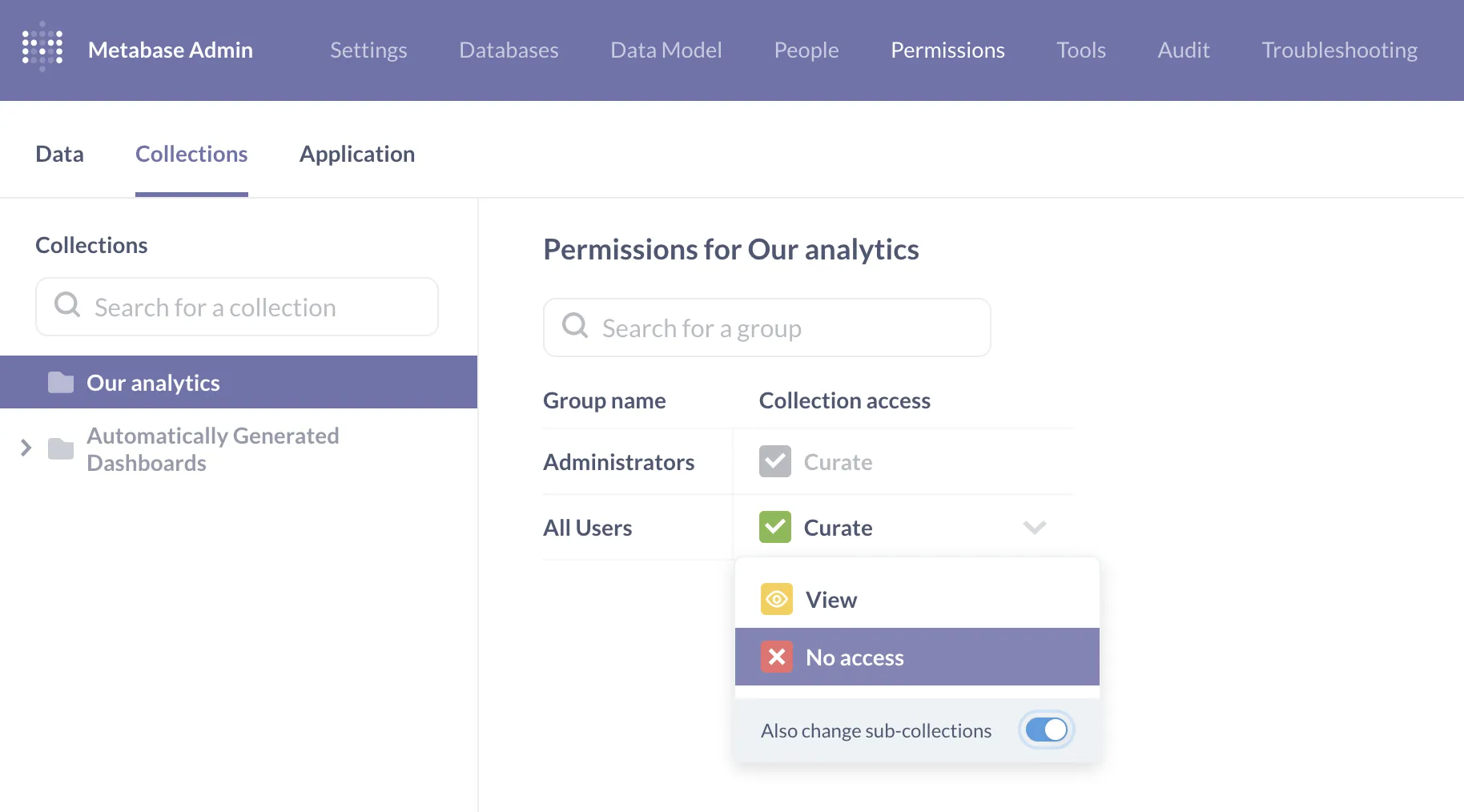
Understanding this allows you to have meaningful conversations with your team about data security and governance. You now have the vocabulary (Curate, View, Collection Permissions) to discuss and implement an access control strategy that makes sense for your organization.
Conclusion
In this lesson, you completed the fundamental workflow of an analyst by saving and organizing your work. You've moved beyond simply writing a query to thinking about how that query lives within a larger ecosystem of shared knowledge.
Key Takeaways:
- Questions are the saved, reusable building blocks of analysis in Metabase.
- Collections are like folders used to organize questions and dashboards, forming the information architecture of your BI tool.
- A robust organizational strategy (e.g., using personal collections for drafts and shared collections for published work) is vital for effective team collaboration.
- Governance features like Content Verification and Permissions are essential tools for building trust in data and controlling access to sensitive information.
You now have a solid grasp of the end-to-end process of answering a question and sharing that answer within Metabase. In our next module, we will pivot back to the code and begin exploring the more advanced analytical SQL functions that are the bread and butter of data analysts, starting with more powerful ways to group and aggregate your data.