Hello! Welcome to the fourth lesson in our module on LLM fundamentals.
In our last lesson, we mastered the art of prompt engineering, learning how to craft effective zero-shot, few-shot, and chain-of-thought prompts. We now understand what to say to an LLM. Today, we'll focus on how to say it using code.
Our learning goal is to use a pre-trained LLM via a provider API (e.g., OpenAI, Anthropic, Hugging Face). This is where your software engineering background comes directly into play. We'll be interacting with these powerful models just as you would with any other third-party web service: through a well-defined API.
The Big Picture: LLMs as a Service
Instead of running these massive models on your own hardware, which is often infeasible, we typically access them as a service. As a developer, your application will make authenticated API calls to a provider (like OpenAI, Anthropic, or Google), sending a prompt and receiving a completion.
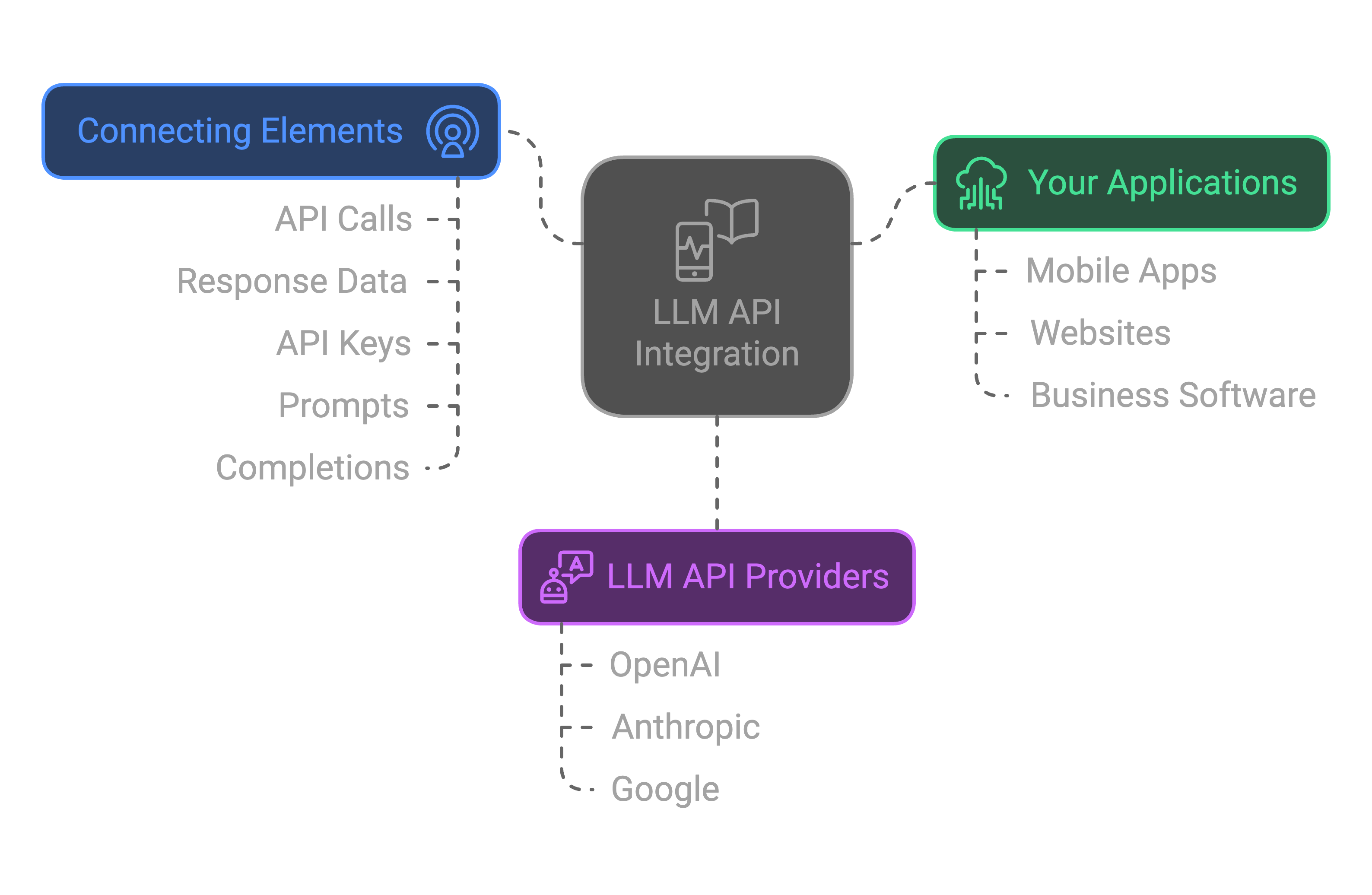
Today, we'll implement this pattern using Python, focusing on two of the most popular providers: OpenAI and Anthropic. This will show you the common principles and give you practical, hands-on experience.
1. Interacting with the OpenAI API
Let's start with OpenAI, the company behind models like GPT-4. The process for any provider generally follows three steps:
- Obtain an API key for authentication.
- Install the provider's Python SDK (Software Development Kit).
- Write code to create a client, build a request, and parse the response.
Since you're experienced with backend development, steps 1 and 2 will feel very familiar.
Setting Up Your OpenAI Access
First, you'll need to get an API key and configure it securely. The best practice, which you've likely used for database credentials or other service keys, is to store it as an environment variable rather than hardcoding it in your script.
Developer quickstart | OpenAI API
OpenAI's official developer quickstart guide provides the most direct instructions for getting set up. We'll follow it to create a key and install the library.
Please follow the instructions in the first two sections, 'Create and export an API key' and the 'Python' subsection that follows. You'll need to create an account on the OpenAI platform if you don't have one. Once you have your key, follow the instructions to set it as an environment variable (export OPENAI_API_KEY=...). Then, install the Python library using pip install openai. You can stop before the .NET section.
Note: OpenAI may provide some free credits for new accounts, but using the API beyond that will incur costs. These are typically very low for the small experiments we'll be doing.
Making Your First API Call
With the setup complete, let's write the code to send a prompt and get a response. The following video provides a clear walkthrough of this process.
How to use the OpenAI API in Python
This video by Kie Codes demonstrates the core mechanics of using the OpenAI Python client.
Watch the sections from 01:37 to 05:53. The first part recaps the setup we just did. The second part is key: pay close attention to how the client.chat.completions.create method is used and, specifically, the structure of the messages parameter. This is where our prompt engineering skills come into play.
Let's break down the essential code snippet:
from openai import OpenAI

# The client automatically finds the API key from your environment variables
client = OpenAI()

response = client.chat.completions.create(
    model="gpt-3.5-turbo",  # Specify which model to use
    messages=[
        {"role": "system", "content": "You are a helpful assistant that explains technical concepts simply."},
        {"role": "user", "content": "What is an API?"}
    ]
)

# Extract the text content from the response object
generated_text = response.choices[0].message.content
print(generated_text)
Key components to notice:
client = OpenAI(): Instantiates the client. Because we set theOPENAI_API_KEYenvironment variable, we don't need to pass the key in the code.model: A string identifying the model you want to use. Different models have different capabilities and costs.messages: A list of dictionaries representing the conversation. This is the heart of the API call.role: "system": Sets the context or persona for the model (e.g., "You are a witty assistant"). This is where you set the overall behavior.role: "user": Represents the input from the end-user. This is the main prompt or question.role: "assistant": Represents the model's previous responses. To have a multi-turn conversation, you append the user's new message and the assistant's last response back into themessageslist for the next API call.
The response object contains a lot of metadata. The actual generated text is nested inside, which you access via response.choices[0].message.content.
Test your understanding!
Using the code structure above, how would you ask the model to act as a senior Python developer and explain the purpose of a __init__ method in a class?
Show answer
You would modify the messages list to set the new persona and provide the new user question.
from openai import OpenAI

client = OpenAI()

response = client.chat.completions.create(
  model="gpt-3.5-turbo",
  messages=[
    {"role": "system", "content": "You are a senior Python developer with a knack for clear explanations."},
    {"role": "user", "content": "What is the purpose of the __init__ method in a Python class?"}
  ]
)

print(response.choices[0].message.content)
2. Interacting with the Anthropic (Claude) API
To show that these concepts are transferable, let's do the same thing with another major provider: Anthropic, the creator of the Claude family of models. You'll see that while the library and method names differ slightly, the core principles are identical.
Setup and First Call with Claude
The process is the same: get a key, set it as an environment variable (ANTHROPIC_API_KEY), and install the SDK (pip install anthropic).
Claude 3.5 API in Python • Explore AWESOME Use Cases!
This video from pixegami provides a concise guide to getting started with the Claude API. It mirrors the steps we took for OpenAI.
Watch from 03:00 to 06:48. Notice the strong parallels: creating a key, setting an environment variable, installing an SDK, and making a client.messages.create call. Pay attention to the parameters like model, max_tokens, system, and messages.
Here is the equivalent "Hello, World!" for the Anthropic API:
import anthropic

client = anthropic.Anthropic() # Finds the ANTHROPIC_API_KEY from environment

message = client.messages.create(
    model="claude-3-5-sonnet-20240620",
    max_tokens=1024,
    system="You are a helpful assistant that explains technical concepts simply.", # System prompt is a top-level parameter here
    messages=[
        {"role": "user", "content": "What is an API?"}
    ]
)

generated_text = message.content[0].text
print(generated_text)
Notice the small differences:
- The system prompt is a top-level parameter (
system=...) instead of being inside themessageslist. - The response structure is slightly different; you access the text via
message.content[0].text.
Despite these minor syntactic differences, the fundamental concept of sending a model identifier and a list of user/assistant messages remains the same.
Understanding the API Contract
As a software engineer, you're used to thinking in terms of API contracts or schemas. This class diagram for Anthropic's API provides exactly that—a formal specification of the request and response objects.
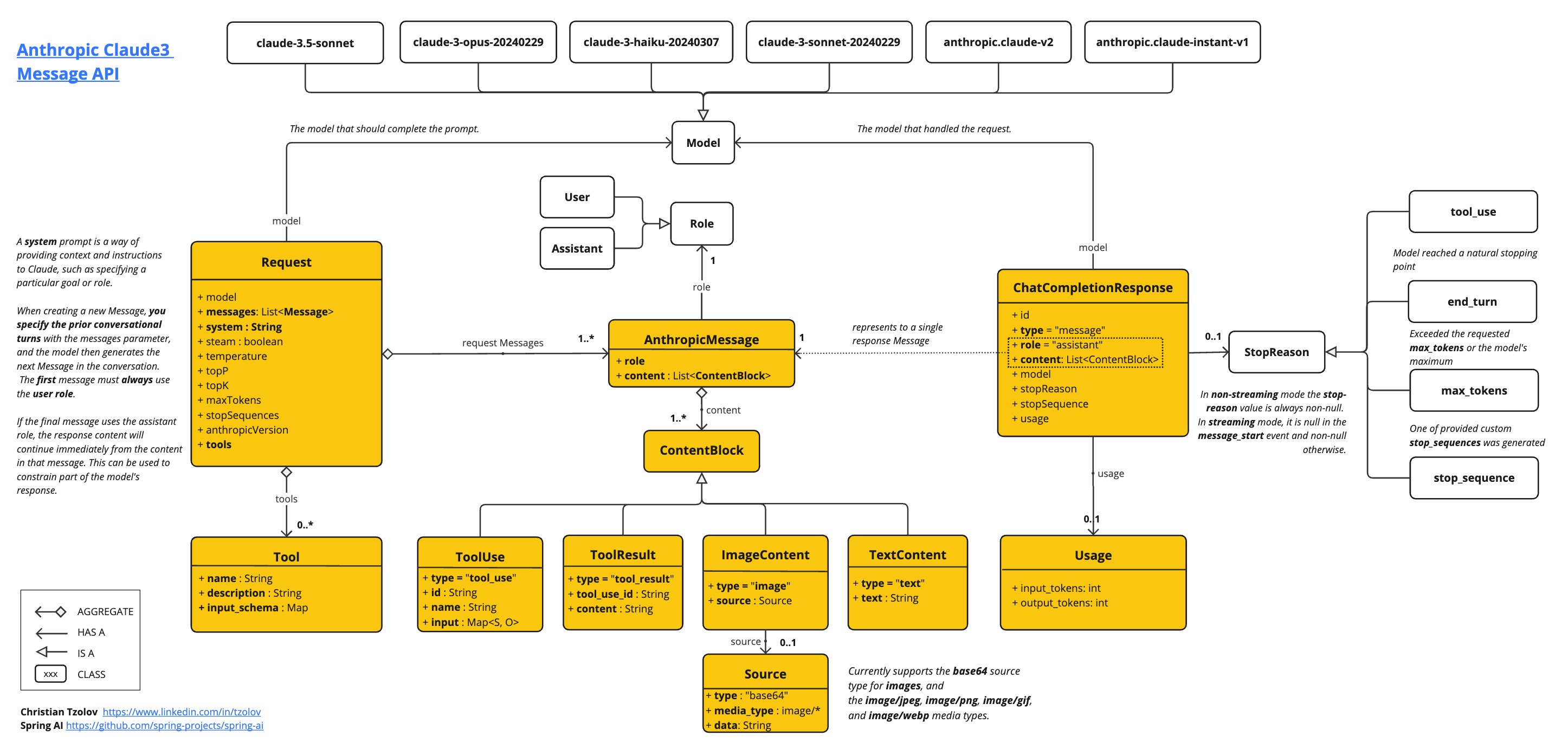
This diagram clearly lays out the parameters we've discussed (model, messages, system, temperature, maxTokens) and shows their types. Being able to read and understand a diagram like this allows you to quickly learn any new LLM API by seeing the "shape" of the data it expects and returns.
Conclusion
Congratulations! You've successfully bridged the gap from theory to practice. You now know how to take the prompts you learned to engineer and use them in a Python application to get responses from a state-of-the-art large language model.
Key Takeaways:
- LLMs are most commonly accessed as a service via an API.
- The standard workflow involves getting an API key, installing an SDK, and configuring the key securely using environment variables.
- The core of an API call requires specifying the
modeland themessages(the conversation history/prompt). - The
system,user, andassistantroles are a conventional way to structure the conversation for the LLM. - While SDKs differ slightly between providers (e.g., OpenAI vs. Anthropic), the fundamental API concepts are highly transferable.
Next Up:
So far, we've been getting plain text back from the model. For building robust applications, you often need the output in a predictable, machine-readable format like JSON. In our next lesson, we will explore powerful techniques like JSON mode and structured prompting to force the LLM to respond in the exact format your application requires.