Hello! Welcome to your next lesson in our module on LLM fundamentals.
In the previous lesson, we learned how to use provider APIs like OpenAI and Anthropic to send prompts and receive plain text responses. This was a crucial first step in bringing LLMs into your applications. However, as a software engineer, you know that free-form text can be unpredictable and difficult to work with programmatically.
Today, we'll address that challenge head-on. Our learning goal is to control the output format and structure using techniques like JSON mode and structured prompting. We'll move from getting unstructured text to receiving predictable, machine-readable JSON that your application can reliably parse and use.
Why Structured Output is Critical for Developers
When you build an application, you need to be able to trust the data moving between services. If an LLM's response format changes unexpectedly—for example, it adds an extra sentence of explanation or renames a key—your parsing logic can break. Structured output solves this by forcing the model to adhere to a specific format contract.
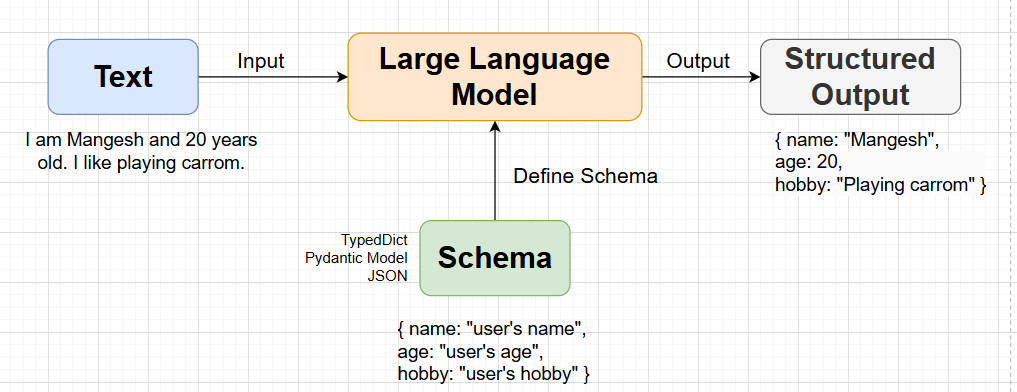
We will explore two primary methods to achieve this with the OpenAI API, building directly on the code from our last lesson.
Method 1: The Quick-and-Easy json_object Mode
The simplest way to get JSON output is by using what OpenAI calls "JSON Object mode." By adding a single parameter to your API call, you instruct the model to guarantee its output is a string that can be parsed into a JSON object.
To understand the basics of this feature and how it compares to more advanced methods, let's start with the official documentation.
Structured model outputs | OpenAI API
The OpenAI documentation provides a clear explanation of what JSON mode is and its limitations. It's a great starting point for understanding the different options available.
Please read the section titled 'Structured Outputs vs JSON mode' to understand the fundamental difference between the two main approaches. Then, briefly review the section at the very end titled 'JSON mode' to see how it's enabled.
As you read, the key takeaway is that json_object mode guarantees a syntactically valid JSON, but it does not guarantee a specific schema. The model could still invent field names or return unexpected structures.
Here’s how you would implement it, modifying the code from our last lesson:
import openai
import json

client = openai.OpenAI()

response = client.chat.completions.create(
    model="gpt-4o",
    # This is the key parameter to enable JSON mode
    response_format={ "type": "json_object" },
    messages=[
        {"role": "system", "content": "You are a helpful assistant designed to output JSON."},
        {"role": "user", "content": "Extract the name and city from this sentence: 'My name is Alex and I live in Berlin.'"}
    ]
)

# The response content is a JSON string, so we parse it
output_json = json.loads(response.choices[0].message.content)

print(output_json)
# Expected output might be: {'name': 'Alex', 'city': 'Berlin'}
This is useful, but for production systems, we need stronger guarantees.
Method 2: The Robust Approach with Structured Outputs (and Pydantic)
The most reliable way to control output is by providing the model with a precise schema. The model is then constrained to generate a JSON object that strictly adheres to this schema, including all field names, data types, and even value constraints (like enums).
For a Python developer, the most effective way to define this schema is with Pydantic. You're likely familiar with Pydantic for data validation in APIs. The openai library has native support for it, making the process seamless and Pythonic.
This video provides an excellent, practical walkthrough of how to use Pydantic for structured outputs.
OpenAI Structured Output - All You Need to Know
This tutorial by Dave Ebbelaar covers everything you need to know about OpenAI's structured output features, with a strong focus on the recommended Pydantic-based approach.
Please watch from the beginning until 21:11. The video will cover: The benefits of the new structured output features (00:00 - 04:57). How to implement structured output using Pydantic models, which is the main focus for us (14:36 - 21:11). You can skip the section on manually supplying a JSON schema (07:12 - 14:36), as the Pydantic method is superior and what we'll be using.
Implementing Structured Output with Pydantic
Let's put the concepts from the video into practice. The workflow is simple:
- Define your desired data structure as a Pydantic
BaseModel. - Use the
instructorlibrary (or theopenailibrary's patching mechanism whichinstructorsimplifies) to make the API call, passing your Pydantic model as theresponse_model. - The library handles the magic of converting the Pydantic model to a JSON schema, sending it to OpenAI, and parsing the response back into an instance of your Pydantic model.
First, let's install instructor, a popular library that makes working with Pydantic and OpenAI even cleaner.
pip install instructor
Now, let's write the code. We'll perform the same task as before, but this time with the guarantee of a specific schema.
import openai
import instructor
from pydantic import BaseModel

# Enables the .create() method to accept a response_model parameter
client = instructor.patch(openai.OpenAI())

# 1. Define your desired data structure
class UserInfo(BaseModel):
    name: str
    city: str
    age: int

# 2. Make the API call, passing the Pydantic model
user_info: UserInfo = client.chat.completions.create(
    model="gpt-4o",
    response_model=UserInfo,
    messages=[
        {"role": "user", "content": "Extract user details from this: 'My name is Alex, I'm 34 years old, and I live in Berlin.'"}
    ]
)

# 3. The result is already a Pydantic object!
print(user_info)
# Expected output: name='Alex' city='Berlin' age=34

# You can now access its fields like any Python object
print(f"User {user_info.name} is {user_info.age} years old.")
Notice the elegance of this approach. The response_model=UserInfo parameter does all the heavy lifting. You get a fully validated, type-safe Python object back, eliminating the need for manual JSON parsing and validation in your application code. This is a pattern that should feel very natural given your backend development experience.
Test your understanding!
Imagine you're building a feature to analyze product reviews. You want to extract a 1-sentence summary, the product mentioned, and a sentiment classification ('positive', 'neutral', or 'negative').
How would you define a Pydantic model named ReviewAnalysis for this task?
Show answer
You would define a Pydantic BaseModel with fields for the summary, product, and sentiment. Using Literal from the typing module is the best way to represent the fixed set of sentiment options.
from pydantic import BaseModel
from typing import Literal

class ReviewAnalysis(BaseModel):
    summary: str
    product_name: str
    sentiment: Literal['positive', 'neutral', 'negative']

# You could then use this model in your API call:
# response = client.chat.completions.create(
#     model="gpt-4o",
#     response_model=ReviewAnalysis,
#     messages=[{"role": "user", "content": "The new X-Processor is amazingly fast, I love it!"}]
# )
# print(response)
# Expected output: summary='The reviewer finds the new X-Processor to be exceptionally fast.' product_name='X-Processor' sentiment='positive'
Choosing the Right Tool for the Job
So, when should you use simple json_object mode versus the Pydantic-based structured output?
json_objectMode: Best for simple, non-critical tasks where you just need some JSON and the exact structure isn't vital. It's quick to implement but brittle.- Structured Output (with Pydantic): The recommended approach for almost all applications. It provides type safety, validation, and reliability, which are essential for production systems. It allows your code to interact with the LLM's output as if it were a strongly-typed object from any other internal service.
Other libraries like Outlines also exist to provide similar functionality, often with support for a wider range of open-source models. The core principle remains the same: use a schema to constrain the model's generation.
Conclusion
In this lesson, you've learned one of the most practical skills for an AI engineer: how to get structured, reliable data from an LLM. This moves the LLM from being a creative text generator to a predictable component in a larger software system.
Key Takeaways:
- Unstructured text output from LLMs is unreliable for programmatic use.
- JSON Object Mode is a simple API feature that forces the model to output valid JSON, but doesn't enforce a specific schema.
- Structured Outputs, especially when combined with Pydantic, provide strong guarantees about the structure and types of the output data.
- Defining a Pydantic
BaseModelis a clean, Pythonic way to specify your desired output schema. - Libraries like
instructorstreamline the process, automatically handling schema conversion and response parsing.
Next Up:
We can now control both what we ask the model (prompt engineering) and the format of its response (structured output). But is the response actually correct or useful? In the next lesson, we will focus on evaluating LLM outputs for quality, coherence, and factuality against defined criteria.