Hello! Welcome to the third lesson in our module on LLM Fundamentals.
In our last lesson, we explored how to control the output of an LLM by using different sampling strategies like top-p and temperature. We learned how to steer the model's generation process to be more deterministic or more creative. Now, we'll shift our focus to controlling the model from the other end: the input.
Today's lesson is all about the art and science of prompt engineering. Our goal is to learn how to apply prompt engineering techniques including zero-shot, few-shot, and chain-of-thought prompting. Think of this as learning how to write the perfect "spec" or instruction for an LLM to get it to perform the task you need, a crucial skill for any AI engineer.
The Power of a Well-Crafted Prompt
At its core, a prompt is simply the input text we give to an LLM. However, since the model's entire response is conditioned on this input, the way you structure your prompt has a massive impact on the quality, accuracy, and format of the output. This is where prompt engineering comes in—it's the practice of designing effective prompts to guide an LLM toward a desired response.
To begin, let's watch a short video that introduces the fundamental concepts of prompt engineering and breaks down the components of a well-structured prompt.
Master AI Prompting: Zero-Shot, Few-Shot & Chain of Thought Explained
This video from Prof. Ryan Ahmed provides a great introduction to prompt engineering and the key components that make a prompt effective.
Watch the first five minutes of the video (00:00 - 05:11). Pay attention to the four key components of a prompt he outlines: context, instruction, input data, and output indicator. As a developer, you can think of this structure as being analogous to defining a function call with clear parameters and a specified return type.
As the video explains, a good prompt often contains:
- Role/Context: Telling the model what persona to adopt (e.g., "You are an expert financial analyst").
- Instruction: A clear command of what to do (e.g., "Classify the following text").
- Input Data: The text or information the model should process.
- Output Indicator/Format: A clue about how the output should be structured (e.g., "Sentiment:").
Now, let's explore the core techniques for applying these principles.
1. Zero-Shot Prompting: Relying on Pre-trained Knowledge
The most basic form of prompting is zero-shot prompting. This is where you ask the model to perform a task without giving it any prior examples in the prompt itself. You are relying entirely on the model's vast pre-trained knowledge to understand and execute the instruction.
For example:Translate the following English text to French: 'Hello, how are you?'
Here, we haven't shown the model any examples of English-to-French translations; we just assume it knows how.
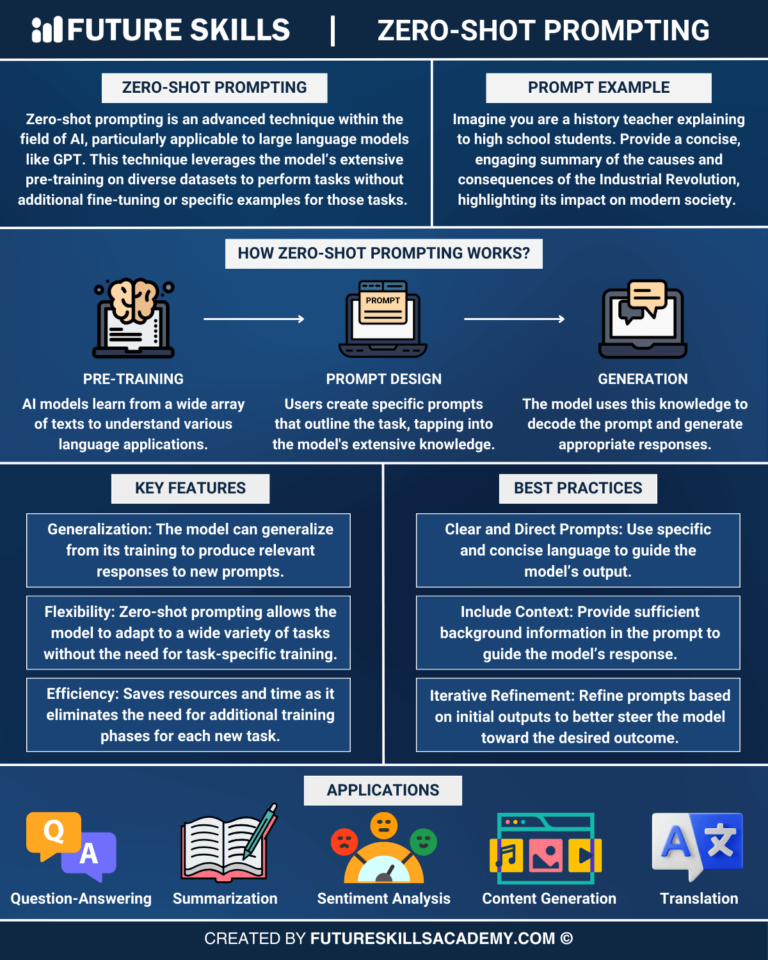
Zero-shot prompting works well for tasks that are very general or were well-represented in the model's training data, like simple summarization, translation, or sentiment analysis.
To solidify this concept, let's look at a more formal definition.
The 'Prompt Engineering Guide' on GitHub offers a concise, technical explanation of these techniques. We'll use it to formally define each method.
Read the section on 'Zero-Shot Prompting'. Notice how it's defined by the absence of examples in the prompt.
2. Few-Shot Prompting: Guiding with Examples
When a task is more complex, nuanced, or requires a specific output format, zero-shot prompting might not be enough. The model might misunderstand the instruction or produce a poorly formatted response.
In these cases, we use few-shot prompting. Here, we provide a few examples (or "shots") of the task directly in the prompt. This technique, also known as in-context learning, conditions the model to follow the pattern you've established.
Let's say we want to extract product names and categories from user reviews into a specific JSON format. A zero-shot prompt might fail, but a few-shot prompt excels:
Extract the product and category from the following user reviews and provide the output in JSON format.

Review: "I love my new AlphaWave headphones! The sound quality is incredible."
Output: {"product": "AlphaWave headphones", "category": "Electronics"}

Review: "The new TrailBlazer hiking boots are super comfortable on long treks."
Output: {"product": "TrailBlazer hiking boots", "category": "Footwear"}

Review: "Just finished 'The Crimson Cipher'. What a fantastic mystery novel!"
Output:
The model will see the pattern and is now much more likely to correctly output: {"product": "The Crimson Cipher", "category": "Books"}.

Now, let's turn back to the Prompt Engineering Guide for a formal look at few-shot prompting.
Let's read the next section of the guide to understand few-shot prompting and its benefits.
Read the section on 'Few-Shot Prompting'. Pay close attention to how the examples are used to 'steer the model to better performance' for more complex tasks.
Test your understanding!
Imagine you want an LLM to generate a one-sentence summary for a code commit message based on a user's description.
Zero-Shot Prompt:Description: "I fixed the bug where the user login was failing if the password contained a special character." Commit Message:
How would you convert this into a few-shot prompt to teach the model to follow a "Feat: [Action]" or "Fix: [Action]" convention?
Show answer
You would provide one or two complete examples before presenting the one you want the model to complete.
Few-Shot Prompt:
`Description: "I added a new button to the user profile page that allows them to export their data."
Commit Message: Feat: Add data export button to profile page
Description: "I fixed the bug where the user login was failing if the password contained a special character."
Commit Message:`
By providing the "Feat" example, you are teaching the model the desired format and style, making it much more likely to generate Fix: Resolve login failure with special characters for the second description.
3. Chain-of-Thought (CoT) Prompting: Teaching the Model to Reason
While few-shot prompting is powerful, it can still fail on tasks that require multiple steps of logical reasoning, like math word problems or logic puzzles. The model might guess the answer without actually "thinking" through the problem.
This is where Chain-of-Thought (CoT) prompting comes in. CoT is an advanced form of few-shot prompting where the examples include the intermediate reasoning steps used to arrive at the final answer. By showing the model a "chain of thought," you teach it how to break down a problem and solve it step-by-step.
The Prompt Engineering Guide has an excellent example showing where standard few-shot prompting fails and CoT succeeds.
Let's see a practical demonstration of CoT's power.
Read the section on 'Chain-of-Thought Prompting'. Notice how the prompt for the 'odd numbers' problem is modified to include the reasoning (e.g., 'Adding all the odd numbers... gives...'). This is the key difference that unlocks the model's reasoning ability.
Zero-Shot CoT: A Simple and Powerful Trick
Amazingly, you can often trigger a chain of thought without providing any examples at all. This technique, called Zero-Shot CoT, simply involves appending a magic phrase like "Let's think step by step." to your prompt. This simple instruction is often enough to coax the model into laying out its reasoning process, which significantly increases the chances of it arriving at the correct answer.
The guide you just read also covers this simple but effective technique.
Now let's look at the simplified version of CoT.
Read the short section on 'Zero-Shot CoT'. It's impressive how a simple phrase can dramatically improve the model's performance on reasoning tasks.
From Theory to Practice: CoT in Code
Understanding the concepts is the first step, but seeing how they are implemented is crucial for you as a software engineer. The LangChain library, a popular framework for building LLM applications, makes it easy to structure these prompts.
Chain of Thought Prompting Explained (with examples)
This Codecademy article explains Chain of Thought clearly and provides Python code snippets using LangChain. This will help you see how these prompt structures translate into application code.
Please read the article sections covering the definition of CoT, Zero-shot CoT, Few-shot CoT, and the implementation in LangChain. Focus on the Python code examples. Notice how PromptTemplate is used to construct both a zero-shot CoT prompt (by adding 'Solve this problem step by step') and a few-shot CoT prompt (by embedding the examples directly in the template string). This is a common pattern you'll use when building AI applications.
Conclusion
Today, you've learned the fundamental techniques for communicating effectively with large language models. This isn't just about getting better answers; it's about making the model's behavior more reliable, predictable, and aligned with your goals. These skills are the bedrock of building sophisticated AI-powered features and applications.
Key Takeaways:
- Prompt Engineering is the practice of designing inputs to guide LLMs toward desired outputs.
- Zero-Shot Prompting relies on the model's built-in capabilities without providing examples. It's best for simple, general tasks.
- Few-Shot Prompting provides examples within the prompt (in-context learning) to guide the model on more complex or specific tasks.
- Chain-of-Thought (CoT) Prompting is a powerful technique where you show the model the intermediate reasoning steps, enabling it to solve complex problems that require logic and calculation. This can be done with few-shot examples or with a simple zero-shot instruction like "Let's think step by step."
Next Up:
We now have the tools to both craft an effective prompt and control how the model generates a response. In the next lesson, we will put this all together and learn how to use a pre-trained LLM via a provider API (like OpenAI or Hugging Face). You'll write code to send your first prompts to a powerful, cloud-hosted model and get responses back, taking your first practical step toward building real-world AI applications.