Hello and welcome back to our module on "Optimizing and Scaling LLM Applications."
In our last lesson, we focused on improving throughput by running multiple independent LLM API calls in parallel using asyncio. That was all about making your application do more work in the same amount of time. Today, we're tackling optimization from a different angle: how to intelligently avoid doing work in the first place.
Many LLM applications, especially chatbots and Q&A systems, receive the same questions phrased in slightly different ways. Calling the LLM for each variation is wasteful, increasing both latency and cost. Our goal for this lesson is to implement semantic caching to reduce cost and latency by reusing responses for similar queries.
You'll learn how to build a cache that understands the meaning of a query, not just its exact text, allowing you to serve instant, free responses for questions you've already answered.
The Problem: Traditional Caching Isn't Smart Enough
As a backend engineer, you're very familiar with caching strategies like using Redis or Memcached to store results for specific requests. A traditional cache uses a key (like a URL or a database query) to store and retrieve a value. This works perfectly when the keys are identical.
However, with LLMs, users might ask:
- "How do I reset my password?"
- "I forgot my password, what do I do?"
- "What's the process for password recovery?"
A traditional cache would see three different keys and miss every time, triggering three separate, expensive LLM API calls. This is where semantic caching comes in.
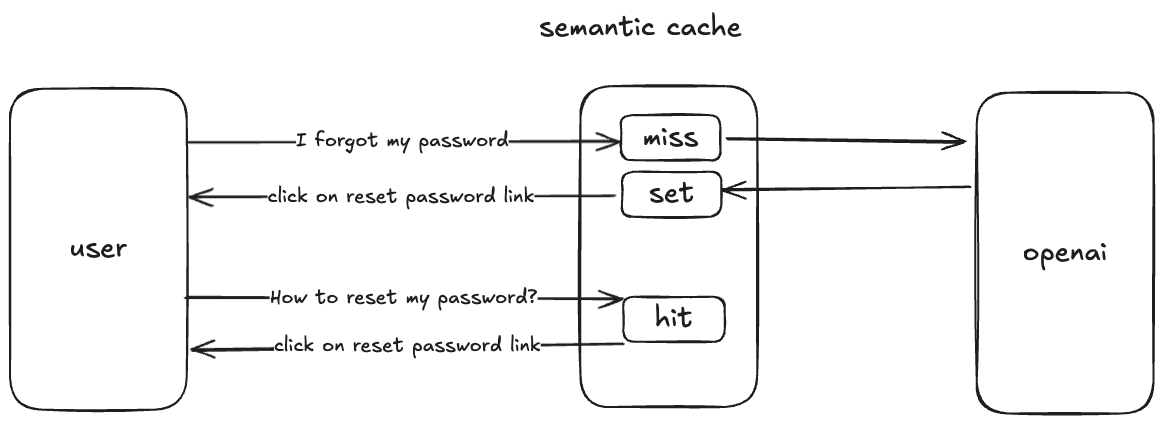
Semantic caching works by comparing the meaning of queries. It transforms the text into a numerical representation (an embedding) and searches for similar queries it has seen before.
How to Implement LLM Response Caching with Redis and Semantic Similarity
To understand the core problem and the benefits of this approach, please read the introduction of the following article from reintech.io.
Read the sections 'Why Semantic Caching Matters for LLM Applications' and 'Architecture Overview'. Focus on the distinction between traditional and semantic caching and the three main benefits listed: cost reduction, faster responses, and reduced rate limiting.
System Architecture of a Semantic Cache
From a systems design perspective, a semantic cache has a few key components that work together. We're going to build a system that follows the "cache-aside" pattern, which you're likely familiar with from backend development.
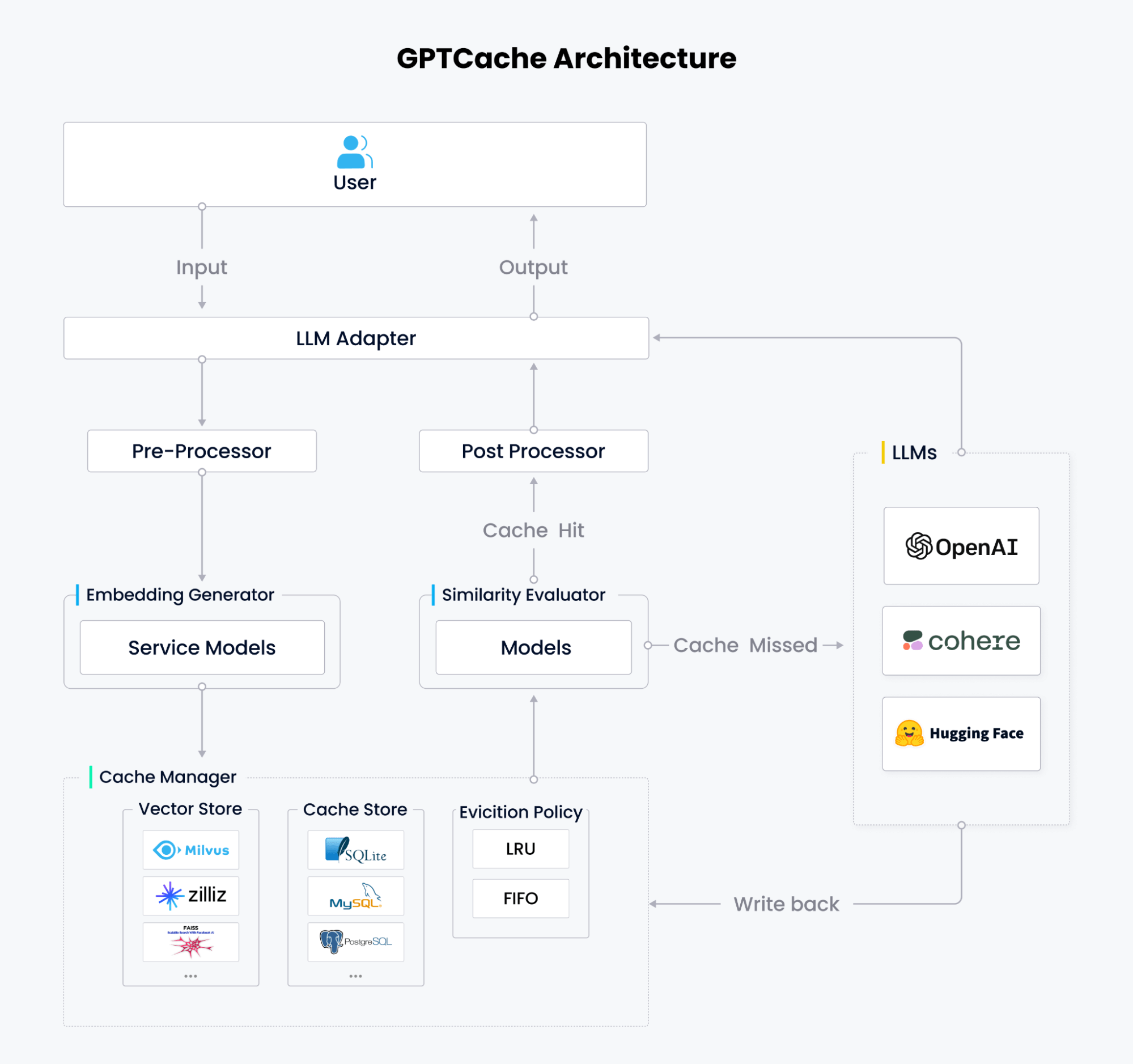
Our implementation will consist of three main parts:
- Embedding Model: A lightweight model (we'll use one from the
sentence-transformerslibrary) that converts text queries into vector embeddings. - Vector Store: A database capable of storing these vectors and performing efficient similarity searches. We'll use Redis with the RediSearch module, as its in-memory nature makes it extremely fast for this use case.
- Similarity Logic: The code that orchestrates the process: checking for a cache hit based on a similarity score (we'll use cosine similarity) and deciding whether to call the LLM or return a cached response.
Implementing the Semantic Cache
Now, let's get practical and build this system. We will follow a detailed guide that implements a reusable SemanticLLMCache class in Python.
Step 1: Setting Up the Environment
First, we need to install the necessary Python libraries and get our vector database (Redis Stack) running. Your experience with Docker will make this step straightforward.
How to Implement LLM Response Caching with Redis and Semantic Similarity
The article 'How to Implement LLM Response Caching...' provides the exact commands needed. Let's get your environment ready.
Follow the instructions in the 'Setting Up Your Environment' section. First, run the pip install command to get the Python libraries. Then, run the docker run command to start a Redis Stack container. This container includes the vector search functionality we need.
Step 2: Building the Cache Class
We will create a SemanticLLMCache class to encapsulate all the caching logic. This class will handle connecting to Redis, loading the embedding model, and creating the necessary search index.
A search index in Redis tells it how to interpret our data, specifically that one of the fields is a vector and should be indexed for similarity search using the COSINE distance metric.
How to Implement LLM Response Caching with Redis and Semantic Similarity
Let's define the skeleton of our cache class and its initialization logic.
Read the 'Building the Semantic Cache Class' section. Study the code for the __init__ and _create_index methods. Pay attention to how the Redis client is initialized, the sentence-transformer model is loaded, and the index schema is defined with VectorField and TextField.
Step 3: Implementing Cache Retrieval (get)
This is the core of the cache-aside logic. When a new query comes in, the get method will:
- Generate an embedding for the query.
- Use the embedding to perform a K-Nearest Neighbors (KNN) search in Redis to find the most similar cached query.
- If a sufficiently similar result is found (i.e., similarity > threshold), return the cached response.
How to Implement LLM Response Caching with Redis and Semantic Similarity
Now for the retrieval logic. This is where we check for a cache hit.
Read 'Implementing Cache Retrieval' and examine the get method. Note how the Redis search query is constructed: *=>[KNN 1 @embedding $vec AS score]. This finds the 1 nearest neighbor to our query vector ($vec) in the embedding field. Also, notice how the score (which is distance) is converted to similarity: 1 - float(doc.score).
Step 4: Storing New Responses (set)
If the get method returns None (a cache miss), our application will call the LLM API. After getting the response, we need to store it in the cache for future use. The set method will:
- Generate an embedding for the original query.
- Store the query, the LLM response, and the query's embedding in a Redis Hash.
- Set a Time-To-Live (TTL) on the cache entry so it expires automatically.
How to Implement LLM Response Caching with Redis and Semantic Similarity
On a cache miss, we need to populate the cache with the new data. Let's look at the set method.
Read 'Storing Responses in Cache' and review the set method's code. It's a standard Redis operation: creating a unique key and using hset to store multiple fields. The expire command is important for managing cache memory.
Step 5: Integration and Usage
With the SemanticLLMCache class fully built, the final step is to integrate it into our application logic. A clean way to do this is to create a wrapper around the LLM client that performs the cache check before making an API call.
How to Implement LLM Response Caching with Redis and Semantic Similarity
Let's put all the pieces together and see how to use our cache with an OpenAI client.
Read the sections 'Integrating with OpenAI GPT' and 'Usage Example'. The CachedLLMClient class demonstrates the complete cache-aside pattern: call cache.get(), and if it returns None, call the LLM and then call cache.set(). The final example shows a cache miss followed by a cache hit. Note: The article uses the older openai.ChatCompletion.create() syntax. In modern versions of the openai library (v1.0+), this would be client.chat.completions.create().
The difference in performance is dramatic. The first call might take several seconds, but the second, semantically similar call will be a cache hit and return in milliseconds, as demonstrated in the article "Semantic Cache: How to Speed Up LLM and RAG..." (ID: LINK), where response time dropped from 7.66 seconds to 28 milliseconds.
Test your understanding!
The similarity_threshold in our SemanticLLMCache is a critical hyperparameter. In our code, it's set to 0.85.
What would be the potential negative consequence of setting this threshold too low (e.g., 0.6)? Conversely, what is the risk of setting it too high (e.g., 0.98)?
Show answer
-
Too low (e.g.,
0.6): The cache would become too aggressive. It might incorrectly serve a cached answer for a query that is only vaguely related, but not semantically equivalent. This leads to irrelevant or incorrect responses being served to the user, reducing the quality of your application. For example, "How to install Python?" might incorrectly match a cached answer for "What is Python?". -
Too high (e.g.,
0.98): The cache would become too strict. It would only score a "hit" on queries that are almost identical in wording. This would cause many legitimate opportunities for caching to be missed, reducing the cache hit rate. You would end up making more redundant LLM calls than necessary, which negates the cost and latency benefits.
Finding the right balance, like the 0.85 suggested, is key to an effective semantic cache.
Conclusion
In this lesson, you've learned how to implement a powerful optimization technique for your LLM applications. By moving beyond traditional key-value caching to semantic caching, you can significantly reduce API costs and improve user-perceived latency.
Key Takeaways:
- Semantic caching uses vector embeddings to find and reuse answers for queries with similar meanings, not just identical text.
- This approach is highly effective for LLM applications where users frequently rephrase questions.
- A robust implementation involves an embedding model, a vector store like Redis with vector search capabilities, and application logic to manage the cache-aside pattern.
- Tuning the
similarity_thresholdis crucial to balance the cache hit rate with the relevance of the cached responses.
What's Next?
We've now covered two major optimization strategies: making requests in parallel to improve throughput and using semantic caching to reduce redundant work. However, any application that relies on external network calls must be prepared for them to fail. Our caching layer reduces the number of API calls, but the ones that do happen are still vulnerable to network errors or API rate limits.
In the next lesson, we will focus on making your application more resilient by learning how to implement robust error handling for API calls, including retries with exponential backoff.