Hello and welcome back to our module on "Optimizing and Scaling LLM Applications."
In the last lesson, we focused on reducing perceived latency for a single LLM request by streaming the response token-by-token. This makes an application feel faster to the user. Today, we're going to tackle a different kind of latency: the total time it takes to complete a workflow that involves multiple, independent LLM calls.
Many sophisticated AI applications, especially agentic systems, need to perform several tasks to fulfill a single user request. For example, an AI travel assistant might need to check flight availability, find hotel options, and look up local events simultaneously. If these calls are made one after another, the user is left waiting for the sum of all response times.
Our learning outcome for this lesson is to apply parallel API calls to optimize workflows involving multiple independent LLM requests. You'll learn how to run these calls concurrently, drastically reducing the total execution time and enabling more complex, responsive AI systems.
The Bottleneck: Sequential vs. Parallel Requests
Imagine your application needs to get three pieces of information from an LLM, and each call takes about 3 seconds.
- Sequential approach: You make the first call, wait 3 seconds. Make the second call, wait another 3 seconds. Make the third call, and wait a final 3 seconds. Total time: ~9 seconds.
- Parallel approach: You send all three requests at the same time. They all run concurrently, and you wait for the longest one to finish. Total time: ~3 seconds.
The difference is significant. As a backend engineer, you understand that waiting for I/O (like a network response) is inefficient. When the tasks are independent, there's no reason to wait.

Let's look at a simple baseline. A sequential approach is straightforward to write but slow to execute. The following code snippet, adapted from one of our resources, demonstrates this. It makes five separate, independent calls to an LLM, one after the other.
# Sequential approach (the slow way)
import google.generativeai as genai
import time

# Assume genai is configured with your API key

def generate_text(prompt):
    model = genai.GenerativeModel('gemini-1.5-flash')
    response = model.generate_content(prompt)
    return response.text

start_time = time.time()
prompts = [
    "Explain AI in 50 words",
    "Summarize quantum computing",
    "Write a haiku about robots",
    "Describe neural networks",
    "What is reinforcement learning?"
]

# This list comprehension runs generate_text() one by one
results = [generate_text(prompt) for prompt in prompts]

print(f"Sequential execution took {time.time() - start_time:.2f} seconds")
# Expected output: Sequential execution took ~15 seconds
This is the bottleneck we want to eliminate.
The Right Tool for the Job: Concurrency with asyncio
Your first instinct for parallelizing tasks in Python might be to reach for the multiprocessing library, which is excellent for CPU-bound work. However, LLM API calls are I/O-bound. The vast majority of the time is spent waiting for a response from a remote server, not performing calculations on your machine.
Using multiprocessing for I/O-bound tasks is inefficient. It spins up new processes, consuming significant resources and CPU cores, only for them to sit idle while waiting for the network. As described in the article "Run multiple parallel API requests...", this can even freeze your machine if you make hundreds of calls.
The correct and much more efficient solution is asynchronous programming, using Python's asyncio library.
Concurrent vs. Parallel Execution in LLM API Calls
To understand the distinction between concurrency and parallelism and why it's so important here, please read the following article from Neel Shah. It provides clear definitions and analogies.
Read the sections 'Understanding Concurrency, Parallelism, and Their Hybrid' and 'Key Differences and When to Use Each'. Focus on the distinction between concurrency (interleaving tasks, great for I/O) and parallelism (simultaneous execution, great for CPU).
As the article explains, concurrency allows a single thread to manage multiple tasks by switching between them whenever one is waiting for I/O. This is perfect for our use case.
Implementing Concurrent API Calls
To implement this, we'll use the async and await keywords provided by Python. Most modern LLM client libraries (like those from OpenAI, Anthropic, and Google) provide an asynchronous version of their API for exactly this purpose.
The core pattern involves three steps:
- Define an
asyncfunction (a "coroutine") that makes a single API call usingawait. - Create a list of these coroutine "tasks", one for each of your prompts.
- Use
asyncio.gather()to run all of them concurrently.
Let's see this in action.
Concurrent vs. Parallel Execution in LLM API Calls
The following two resources provide excellent, practical code examples for making concurrent LLM calls. The first uses Google's Gemini API, and the second uses OpenAI's.
First, read 'Scenario 2: Concurrent Execution (Async)'. Note how the generate_text function is now async def and uses await model.generate_content_async(). The key is the asyncio.gather(*tasks) line, which executes all the calls. Compare the execution time (~7s) to the sequential version (~15s).
Run multiple parallel API requests to LLM APIs without ...
Now, let's look at another example with the OpenAI API to solidify the pattern. This article also gives a great explanation of why asyncio is the right choice.
Read the sections 'Asyncio' and 'Asyncio LLM API calls'. The first part explains the async/await syntax and asyncio.gather. The second part shows you how to import the AsyncOpenAI client and provides a full example of running multiple translation tasks concurrently.
The pattern is consistent and powerful. By changing our synchronous calls to asynchronous ones and using asyncio.gather, we've cut our total execution time by more than half, with minimal resource overhead.
Test your understanding!
You have a list of 100 blog post titles and you need to generate a 2-sentence summary for each using an LLM API. You write a script to do this.
If you use a simple for loop to iterate through the titles and call the API for each one, what is the main performance bottleneck? How would using multiprocessing.Pool compare to asyncio.gather for this specific task, and which would you choose?
Show answer
The main performance bottleneck in the for loop approach is that the program is I/O-bound. For each of the 100 titles, the script will make an API call and then block, doing nothing but waiting for the network response before starting the next one.
-
multiprocessing.Pool: This would attempt to run the API calls in parallel across multiple CPU cores. While faster than the sequential loop, it's an inefficient use of resources. It would create many processes that spend most of their time waiting for network I/O, consuming memory and CPU context-switching overhead without providing a significant benefit over a concurrent approach. -
asyncio.gather: This is the ideal choice. It would run all 100 API calls concurrently within a single thread. When one call is waiting for its response, the event loop would switch to another, effectively managing all 100 network requests at once. This is far more memory- and CPU-efficient for I/O-bound tasks.
Therefore, you should choose asyncio.gather for its superior performance and efficiency in handling a large number of concurrent network requests.
Application: Powering Parallel Agentic Workflows
This optimization technique isn't just a theoretical speed-up; it's a foundational building block for advanced AI architectures. One of the most exciting applications is in creating "multi-agent" or "agentic" systems.
Imagine a system where an incoming user query is routed to several specialized LLM agents in parallel. One agent is an expert on product details, another on pricing, and a third on scheduling. By querying them all at once, the system can quickly gather all necessary information and synthesize a comprehensive answer.
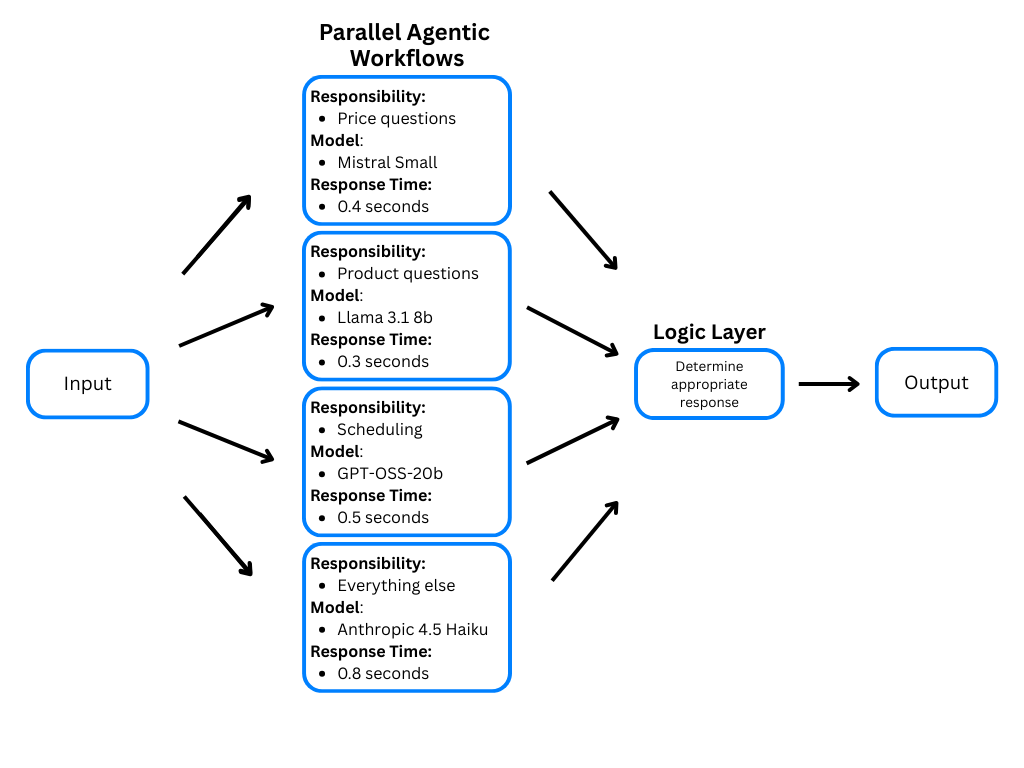
Let's sketch out what the core logic for such a system might look like in Python, using the asyncio pattern we just learned.
import asyncio
from openai import AsyncOpenAI

# Assume 'client' is an initialized AsyncOpenAI client

async def call_specialist_agent(user_query, agent_persona):
    """Calls a specialist agent with a specific persona."""
    system_prompt = f"You are a helpful assistant specializing in {agent_persona}."
    response = await client.chat.completions.create(
        model="gpt-4o",
        messages=[
            {"role": "system", "content": system_prompt},
            {"role": "user", "content": user_query}
        ]
    )
    return { "agent": agent_persona, "response": response.choices[0].message.content }

async def main():
    user_query = "I'd like to know the price of the pro plan and whether I can book a demo for next week."

    specialists = ["pricing", "scheduling", "technical features"]

    # Create a list of concurrent tasks
    tasks = [call_specialist_agent(user_query, agent) for agent in specialists]

    start_time = time.time()

    # Run all agent calls concurrently
    results = await asyncio.gather(*tasks)

    print(f"All agents responded in {time.time() - start_time:.2f} seconds.")

    # Now you can use a final LLM call or business logic to synthesize the results
    for res in results:
        print(f"\n--- Response from {res['agent']} Agent ---")
        print(res['response'])

# To run this in a script:
# if __name__ == "__main__":
#     asyncio.run(main())
This example demonstrates how you can implement a core component of an agentic system efficiently. Instead of taking 3 * call_time, the entire process takes roughly max(call_time), enabling you to build much more responsive and capable AI applications.
Conclusion
Today you've added a crucial optimization technique to your AI engineering toolkit. By understanding the difference between CPU-bound and I/O-bound tasks, you can now choose the right tool—asyncio—to dramatically speed up workflows that rely on multiple independent LLM calls.
Key Takeaways:
- Sequential API calls create a major bottleneck in workflows requiring multiple LLM interactions.
- LLM API calls are I/O-bound, making them perfect candidates for concurrency, not parallelism.
- Python's
asynciolibrary, withasync/awaitandasyncio.gather, is the highly efficient way to run multiple API calls concurrently. - This pattern is fundamental for building performant applications, from simple batch processing jobs to complex, parallel agentic systems.
What's Next?
Making a large number of requests in parallel increases throughput, but it also increases the likelihood that one or more of those requests might fail due to network issues, rate limits, or temporary server errors. A robust application must be able to handle this gracefully. In our next lesson, we will address this by learning how to implement robust error handling for API calls, including retries with exponential backoff.